msi-wrapper.md (2577B)
1 --- 2 title: "MSI Wrapper" 3 section: "Windows" 4 sectionSlug: "windows-hardening" 5 sourcePath: "src/windows-hardening/windows-local-privilege-escalation/msi-wrapper.md" 6 sourceUrl: "https://github.com/HackTricks-wiki/hacktricks/blob/188de82beb54e70956b2952367a0af91d26758b8/src/windows-hardening/windows-local-privilege-escalation/msi-wrapper.md" 7 sha: "188de82beb54e70956b2952367a0af91d26758b8" 8 isIndex: false 9 modified: true 10 license: "CC-BY-NC-4.0" 11 --- 12 13 # MSI Wrapper 14 15 MSI Wrapper can package an executable or script as a Windows Installer (`.msi`) file. Download and start the free edition, then select the executable to package.<sup>[[3]](#references)</sup> To run a sequence of commands, select a `.bat` file as the input rather than packaging `cmd.exe`.<sup>[[1]](#references)</sup> 16 17 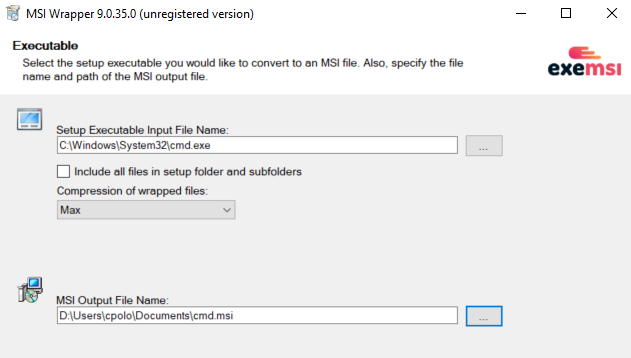 18 19 Configure the execution context and other installer properties carefully: 20 21 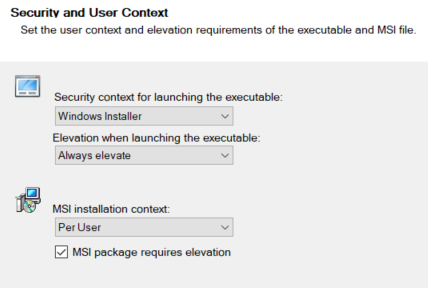 22 23 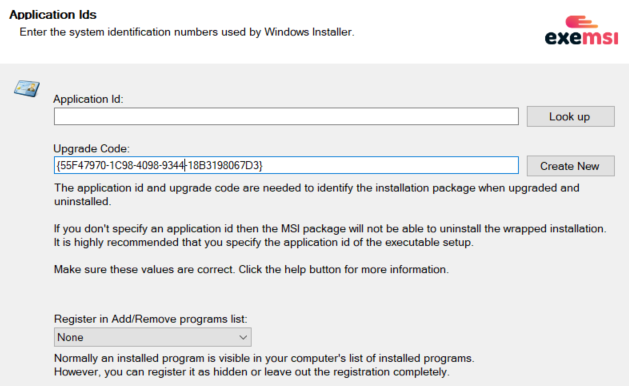 24 25 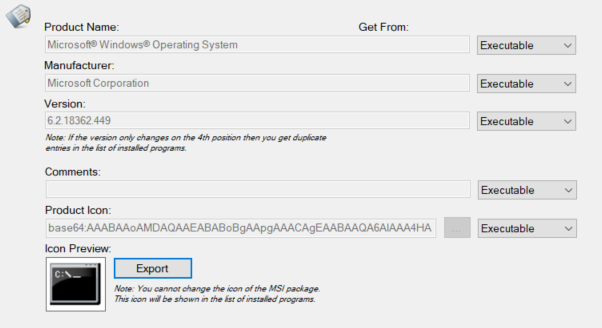 26 27 These values can be changed when packaging a custom binary. 28 29 Continue through the remaining wizard pages and select **Build** to generate the installer.<sup>[[1]](#references)</sup> 30 31 > [!WARNING] 32 > Creating an MSI does not by itself grant elevated privileges. Whether installation is elevated depends on Windows Installer policy, package context, and user authorization. Microsoft warns that enabling `AlwaysInstallElevated` for both the user and computer lets non-administrators install packages with system privileges.<sup>[[2]](#references)</sup> 33 34 ## References 35 36 - [1] [MSI Wrapper documentation - Getting started](https://www.exemsi.com/documentation/getting-started/) 37 - [2] [Microsoft Learn - Installing a package with elevated privileges for a non-admin](https://learn.microsoft.com/en-us/windows/win32/msi/installing-a-package-with-elevated-privileges-for-a-non-admin) 38 - [3] [MSI Wrapper - Download](https://www.exemsi.com/download/)